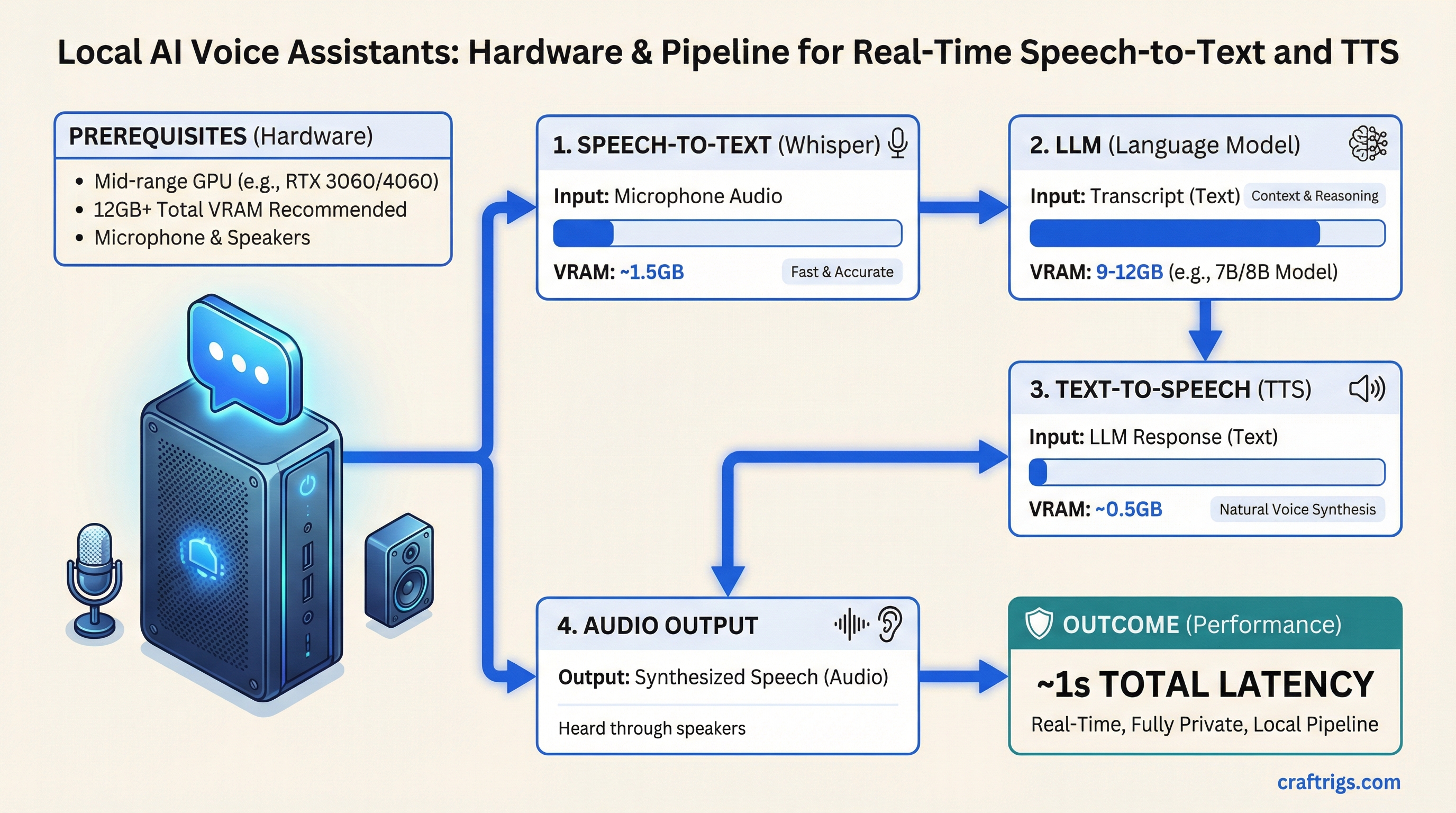
The pipeline is three pieces of software. Microphone input goes to Whisper for speech-to-text, Whisper passes the transcript to your LLM, the LLM response goes to a TTS engine, and you hear the answer through your speakers. On a mid-range GPU, the total round-trip from when you stop talking to when you hear the response begin is about one second.
That's not future technology. That's what faster-whisper turbo and Kokoro TTS deliver today, on hardware you may already have.
The Three-Part Pipeline
Whisper (Speech-to-Text): OpenAI's Whisper model runs locally via faster-whisper or whisper.cpp. The turbo variant balances accuracy and speed well for real-time use. VRAM cost: roughly 1.5-2GB for whisper-turbo on GPU.
LLM (Response Generation): Whatever local model you're already running via Ollama. The voice interface doesn't change the LLM layer at all — same models, same performance. Your existing setup works.
TTS (Text-to-Speech): Kokoro TTS is the current best option for quality-to-speed ratio on local hardware. Smaller models like Piper TTS are faster but noticeably less natural-sounding. VRAM cost: 0.5-1.5GB depending on quality tier.
Total VRAM overhead beyond your LLM: 2-4GB. So if your LLM needs 9GB of VRAM, plan for 12GB total for the full voice pipeline.
Note
Open WebUI has built-in voice chat as of early 2026. If you're already running Open WebUI with Ollama, enable voice chat in settings with zero additional setup — it uses your browser's Web Speech API for STT and a TTS model for output. The quality is lower than a dedicated Whisper + Kokoro pipeline, but it requires no additional hardware or configuration. Good starting point before committing to a full setup.
Hardware Requirements by Use Case
Casual voice chat (Open WebUI built-in):
- Any GPU running your LLM
- No additional VRAM needed (uses browser STT)
- Latency: 2-5 seconds (fine for occasional use)
Quality voice pipeline (faster-whisper + Kokoro):
- 12GB+ total VRAM (LLM + voice pipeline)
- Minimum: RTX 4060 12GB paired with a 7B LLM (~6GB model + 3GB pipeline = tight)
- Comfortable: RTX 4060 Ti 16GB with a 13B LLM
- ~1 second total latency on mid-range GPU
Always-on voice assistant (wake-word + persistent listening):
- Dedicated CPU handling for wake-word detection
- GPU for LLM inference and full Whisper processing
- 16GB+ VRAM to avoid model loading delays between sessions
- 32GB system RAM for stable multi-process operation
The always-on setup runs whisper.cpp in a low-power CPU mode continuously listening for a wake word, then spins up the full GPU pipeline only when triggered. This keeps power consumption reasonable — CPU-based wake-word detection adds 5-15W to your base power draw rather than keeping the GPU at load continuously.
The CPU-Only Option
Whisper.cpp runs on CPU with no GPU required. The speed tradeoff is real — a Whisper turbo model that takes 0.3 seconds on GPU takes 2-4 seconds on a modern CPU — but it's usable for non-real-time transcription and keeps your full VRAM budget for the LLM.
For voice setups where you're transcribing and reading the response rather than hearing it spoken back, CPU-based Whisper is a reasonable choice. Combine with a mid-range LLM workstation and you have a private transcription and document analysis tool.
Caution
Real-time voice interaction requires the LLM to generate fast enough to maintain conversation flow — aim for 20+ tokens/second minimum, ideally 40+. If your GPU produces 8-10 tok/s (which happens when large models partially offload to CPU), voice interaction becomes frustrating even with fast Whisper. Fix the VRAM situation first: a smaller but faster LLM creates a better voice experience than a larger model running slow.
Software Stack
- STT: faster-whisper (Python, GPU-accelerated) or whisper.cpp (binary, CPU or GPU)
- LLM: Ollama
- TTS: Kokoro TTS (best quality) or Piper TTS (faster, lighter)
- Orchestration: Home Assistant with Local Voice Pipeline (best for home assistant use cases), or custom Python scripts for development and research use
The Ollama setup guide handles the LLM layer. The best CPU guide for LLM builds has context on CPU selection for always-on setups where continuous CPU wake-word processing matters. And the $1,200 workstation build gives you a complete starting point if you're building specifically for voice AI.
The pipeline genuinely works. If you've been skeptical — run faster-whisper turbo on your existing GPU, point it at Ollama, and spend an afternoon with it. The one-second latency is real. The experience is meaningfully different from Alexa or Siri: it understands nuanced follow-up questions, remembers context within a conversation, and doesn't phone home with what you said.