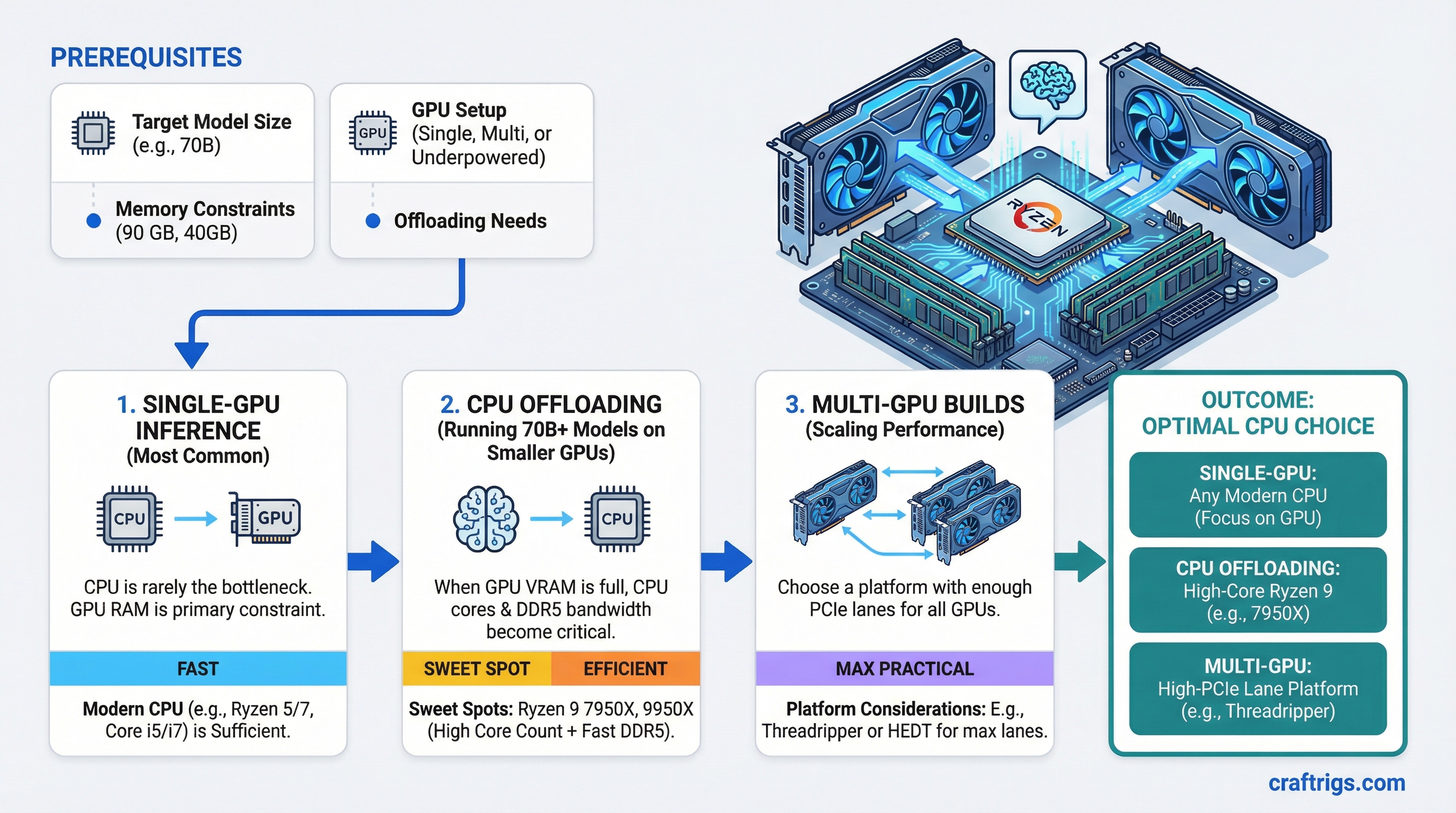
TL;DR: For single-GPU inference, almost any modern CPU works — the CPU is not the bottleneck. For CPU offloading (running 70B+ models on underpowered GPU setups), you want high core count and fast DDR5: the Ryzen 9 7950X or 9950X are the sweet spots. For multi-GPU builds, choose a platform with enough PCIe lanes: Ryzen 9000 series on X670E or Intel Core Ultra 9 for mainstream, Threadripper 9000 series for maximum lane count.
The Honest Answer Nobody Wants to Hear
The CPU is the least important component in a local LLM rig. Almost everything that determines your inference speed comes from your GPU — specifically VRAM size and memory bandwidth. The CPU sits in the background managing the OS, loading files from disk, and handling whatever tiny fraction of work doesn't fit in VRAM.
That said, "least important" isn't "irrelevant." The CPU matters in three specific scenarios: CPU offloading, multi-GPU lane distribution, and how fast models load from disk. Get those three things right and you can stop overthinking the CPU decision.
When the CPU Actually Matters
Scenario 1: CPU Offloading
If your GPU VRAM can't hold the full model, the inference engine splits layers between GPU and CPU. Every layer on the CPU runs at system RAM bandwidth instead of VRAM bandwidth — and your RAM bandwidth is determined by your CPU's memory controller.
A Ryzen 9 7950X running DDR5-6000 in dual-channel gets roughly 90 GB/s of memory bandwidth. An older i7-12700K on DDR4-3200 gets around 51 GB/s. When you're offloading 20 layers to CPU on a 70B model, that 40 GB/s difference translates directly to maybe 2-4 extra tokens per second. Not nothing.
Core count also matters here because llama.cpp and Ollama spread CPU computation across cores. A 16-core CPU running offloaded layers is genuinely faster than an 8-core at the same clock speed.
Scenario 2: PCIe Lane Count
Each GPU needs PCIe bandwidth to transfer data from system RAM. A dual-GPU build needs at least x8/x8 electrical connectivity — which requires 24+ lanes from the CPU/platform.
Consumer Intel Core Ultra (Arrow Lake) provides 24 CPU lanes. AMD Ryzen 9000 on X670E gives 24-28 CPU lanes. Both are fine for dual x8/x8.
If you want x16/x16 (both GPUs at full bandwidth) or you're running three GPUs, you need HEDT: Threadripper 9000 series with up to 160 PCIe lanes, or used Threadripper PRO 5000 series.
Scenario 3: Model Load Times
Getting a 40GB model from NVMe into VRAM involves the CPU orchestrating the transfer. A faster CPU means slightly faster load times. We're talking 3-8 seconds on a modern system vs 10-15 seconds on a slower one for a 70B model. Meaningful if you're frequently switching models, irrelevant if you load once and leave it running.
Note
In a normal single-GPU inference workflow — model fits in VRAM, running 7B or 13B models — the CPU contribution to tokens-per-second is effectively zero. The GPU is doing all the work. A $150 Ryzen 5 7600 performs identically to a $700 Ryzen 9 9950X in this scenario.
AMD Picks
Budget + Single GPU: AMD Ryzen 5 7600 or 9600
Around $180-200 as of March 2026. 6 cores, DDR5 support, PCIe 5.0 on the top slot. For a single GPU build where everything fits in VRAM, this is genuinely the right answer. Don't spend 4x more on a 16-core chip to get the same inference speed.
The Workhorse: AMD Ryzen 9 7950X or 9950X
Around $450-550 as of March 2026. 16 cores, 32 threads, supports DDR5-6000 comfortably, 24 PCIe lanes. This is the CPU for serious LLM workloads on consumer AM5 platform.
The 7950X and 9950X are effectively equivalent for LLM purposes — the 9950X (Zen 5 architecture) is ~10-15% faster in CPU-bound tasks, which shows up in CPU offloading scenarios. Both handle dual-GPU setups at x8/x8 without issue.
The 7950X frequently goes on sale and is excellent value. If you're price-sensitive and don't need the Zen 5 improvements, grab it.
When You Need Maximum PCIe: Threadripper 9960X or 9970X
The 9960X (24 cores, $1,399) and 9970X (32 cores, $2,499) on the WRX90 platform give you 160 PCIe lanes. That's enough for multiple GPUs at x16/x16, plus NVMe storage, plus networking cards, all without touching chipset lanes.
Tip
Threadripper and EPYC platforms support quad-channel DDR5, which doubles your memory bandwidth compared to dual-channel consumer platforms. For heavy CPU offloading — running 70B models primarily on CPU — this matters significantly. Quad-channel DDR5-6000 approaches 180 GB/s.
This matters for triple-GPU builds, professional inference servers, or anyone who needs maximum CPU offloading throughput. For most users, it's expensive overkill.
Intel Picks
Budget + Single GPU: Intel Core i5-14600K or Core Ultra 5 245K
Around $200-220 as of March 2026. 14 cores (P+E), DDR5 support on 700/800-series boards. Handles single-GPU builds perfectly fine.
The Core Ultra 5 245K (Arrow Lake) is slightly better for LLM workloads specifically — better memory controller, improved efficiency cores that contribute more to parallel workloads.
The Workhorse: Intel Core Ultra 9 285K
Around $500 as of March 2026. 24 cores (8 P + 16 E), DDR5-6400 support, 24 CPU PCIe lanes. Intel's answer to the Ryzen 9 7950X for dual-GPU builds.
The Core Ultra 9 285K is competitive with Ryzen 9 9950X in multi-threaded workloads. For CPU offloading, results are close — AMD's memory controller efficiency gives it a slight edge in practice, but we're talking 5-10% at most.
The Core Ultra 9 285K has one advantage: the broader ecosystem of LGA 1851 boards with specific workstation features like Thunderbolt 4/5 ports, which matters for some workflows.
Caution
Intel Core i9-14900K and i9-13900K have well-documented instability issues at stock clocks on certain boards. If you're building an always-on inference server, these CPUs are higher risk than they look. The Core Ultra 9 285K (Arrow Lake) does not have this issue.
The Platform Decision
AMD AM5 (Ryzen 7000/8000/9000) — best choice for most LLM builds. Excellent memory controller, EXPO support for easy DDR5 overclocking, competitive multi-core performance, and the X670E platform has solid multi-GPU support. Platform will be supported through at least 2027.
Intel LGA 1851 (Core Ultra 200 series) — viable alternative. Good single-core performance, broad board ecosystem, Thunderbolt integration. Slightly behind on memory bandwidth compared to AMD at the same speeds.
AMD TRX50/WRX90 (Threadripper 9000) — for serious multi-GPU or multi-model deployments. High platform cost ($500+ for CPU alone, $700+ for boards) but the lane count and quad-channel bandwidth are unmatched at this price.
What to Actually Buy
Single GPU, model fits in VRAM (the majority of people): Ryzen 5 7600 or 9600. Spend the saved money on GPU or RAM.
Single GPU + heavy CPU offloading (running 70B models on a 24GB GPU): Ryzen 9 7950X — best bang for money on this specific workload.
Dual GPU build: Ryzen 9 9950X or Core Ultra 9 285K. Either works for x8/x8 dual GPU.
Multi-GPU (3+) or production inference server: Threadripper 9960X on WRX90. Accept the platform cost.
Don't let YouTube builds with i9-14900KS and heavy overclocking convince you that more CPU = faster LLMs. That relationship is tenuous at best. The GPU decides your tokens per second. The CPU decides almost nothing — until you're offloading, and then it matters exactly as much as your RAM bandwidth allows.
See Also
- Best GPUs for Local LLMs 2026
- Best Hardware for Local LLMs: GPU, CPU, RAM Ranked — full component guide across all three budget tiers
- llama.cpp CPU+GPU Hybrid Inference — when CPU offloading is actually worth it
- Best RAM Kits for Local LLMs in 2026
- PCIe Lanes for Local LLM Builds: How Many Do You Actually Need?