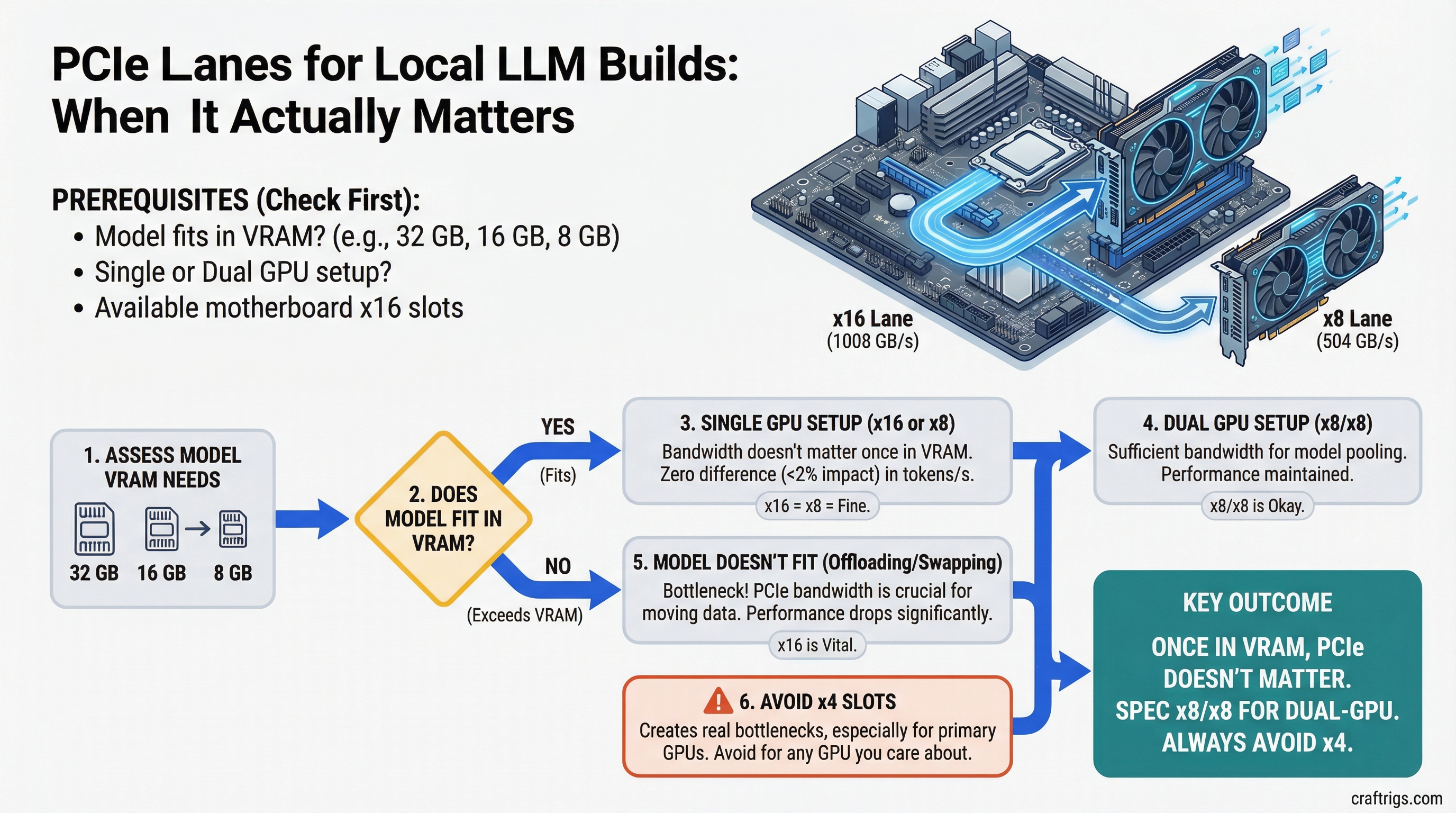
TL;DR: For single-GPU inference where your model fits in VRAM, PCIe bandwidth doesn't matter — run x16 or x8 and you'll see zero difference in tokens per second. For dual-GPU builds, x8/x8 is fine. Avoid x4 on any GPU you care about — it creates a real bottleneck during model loading and layer transfers. For three or more GPUs, you need HEDT.
Why People Get Confused About This
The confusion is understandable. PCIe x16 sounds twice as good as x8, and four times better than x4. Marketing materials for high-end motherboards emphasize lane counts. GPU spec sheets list "PCIe 4.0 x16" as a feature. So people assume more lanes = faster AI.
It's mostly wrong — but not entirely.
PCIe Bandwidth vs VRAM Bandwidth
Here's the number that puts it in context.
PCIe 4.0 x16 has a theoretical bandwidth of 32 GB/s (bidirectional). PCIe 4.0 x8 is 16 GB/s. PCIe 4.0 x4 is 8 GB/s.
An RTX 4090's VRAM bandwidth is 1,008 GB/s. An RTX 3090 is 936 GB/s. Even a mid-range RTX 4070 does 504 GB/s.
The moment a model is loaded into VRAM and you're running inference, all the math is happening inside the GPU at VRAM speeds. PCIe doesn't participate. Your tokens per second are determined entirely by VRAM bandwidth and compute — not by whether you're on x16 or x8.
This is why multiple published benchmarks show less than 2% performance difference between PCIe 4.0 x16 and x8 for GPU inference tasks. The bottleneck isn't the PCIe link.
Note
PCIe 5.0 x8 matches PCIe 4.0 x16 in bandwidth (32 GB/s). If you're using a PCIe 5.0 motherboard and your GPU runs at x8 electrically, you have equivalent throughput to a PCIe 4.0 x16 slot. The "x8" label can be misleading without knowing the PCIe generation.
When PCIe Bandwidth Actually Matters
Model Loading
Loading a 40GB model from NVMe into system RAM and then into GPU VRAM involves the PCIe bus. At PCIe 4.0 x16, that 40GB transfer completes in roughly 2-3 seconds assuming storage isn't the bottleneck. At x8, maybe 4-5 seconds. At x4, 8-10 seconds.
If you're switching between models frequently, x4 starts to feel sluggish. If you load once and leave it, it's irrelevant.
Multi-GPU Inference (NVLink or Tensor Parallelism)
This is where PCIe lane count matters most. When two GPUs are working together on a single model — splitting layers or running tensor parallelism — they communicate constantly. The PCIe bus carries that inter-GPU traffic.
Going from x16/x16 to x8/x8 shows a meaningful performance drop on collaborative multi-GPU workloads: typically 8-15% depending on the workload. Going to x16/x4 is worse — the x4 GPU becomes a communication bottleneck.
For single-GPU setups, or two GPUs where each handles separate requests (not sharing a single model), x8/x8 is fine.
CPU Offloading with Frequent Layer Swaps
When offloading, llama.cpp shuttles data between CPU RAM and GPU VRAM through the PCIe bus for each forward pass. If you're doing heavy offloading (20+ layers to CPU) with short context windows and fast inference, PCIe bandwidth becomes a small but real factor. Not the dominant bottleneck — that's RAM bandwidth — but a contributing one at x4.
The Practical Lane Math
Single GPU: Any Slot Works
If you have one GPU, it goes in the top x16 slot. It runs at x16 electrically. You never think about this again.
Dual GPU: Check the Electrical Wiring
The spec sheet saying "two x16 slots" doesn't mean both slots deliver x16 bandwidth simultaneously. When two slots are populated, most consumer boards split available CPU lanes:
- x16/x16: Both GPUs at full bandwidth. Rare on consumer boards, requires 32+ CPU lanes. Common on HEDT.
- x8/x8: Standard split on X670E/Z790 boards. Fine for dual-GPU LLM inference.
- x16/x4: Common on budget boards. Avoid for serious dual-GPU builds.
- x16/x0: Some boards cut the second slot entirely when populated. The GPU physically fits but runs at PCIe bandwidth of zero — it's dead. Check your manual.
Look for "PCIe bifurcation" in your motherboard manual. The relevant table shows what speed each slot runs at when both are populated.
Tip
ASUS ProArt X670E Creator reliably delivers x8/x8 with two GPUs. So does the MSI MEG Z790 ACE. Budget boards often don't — verify before buying. Our motherboard guide covers which specific boards handle dual GPU correctly.
Triple or More GPUs: HEDT Only
Consumer AM5 and LGA 1851 platforms have 24-28 CPU PCIe lanes. Split three ways, you get roughly x8/x8/x4 at best — and the x4 GPU is limited.
For three or more GPUs at x8/x8/x8 or better, you need AMD Threadripper 9000 series (TRX50/WRX90) with 160 PCIe lanes, or a server platform. The platform cost jumps significantly, but it's the only way to feed multiple GPUs properly.
Chipset Lanes vs CPU Lanes
One clarification that trips people up: modern motherboards have two sources of PCIe lanes.
CPU lanes: direct connection to the processor. Low latency, full bandwidth. This is what your GPU slots should use.
Chipset lanes: connected through the PCIe switch on the motherboard (the "chipset"). Higher latency, usually PCIe 3.0 speed (lower bandwidth). NVMe slots in "M.2 slots 2 and 3" on budget boards often use chipset lanes.
For GPUs, always use CPU-connected slots. Chipset slots for GPUs technically work but add latency and bandwidth reduction. Most boards label CPU-connected slots clearly.
Caution
M.2 NVMe slots that share lanes with your GPU can cause bandwidth conflicts on some boards. Populating certain M.2 slots disables PCIe bandwidth from the adjacent GPU slot. Check your motherboard manual's "PCIe sharing" section before installing NVMe drives alongside a GPU.
The Decision Framework
One GPU, model fits in VRAM: PCIe doesn't matter. Use whatever slot is available, confirm it's a CPU-connected x16 slot, move on.
One GPU + heavy CPU offloading: PCIe still doesn't matter much. RAM bandwidth is your bottleneck, not PCIe.
Two GPUs, running separate requests: x8/x8 is fine. Make sure your board actually delivers x8/x8 (not x16/x4) before buying.
Two GPUs sharing a model (tensor parallelism): x8/x8 works but you'll see some overhead. x16/x16 is meaningful here. Consider HEDT if you're serious about this workload.
Three or more GPUs: HEDT. No way around it.