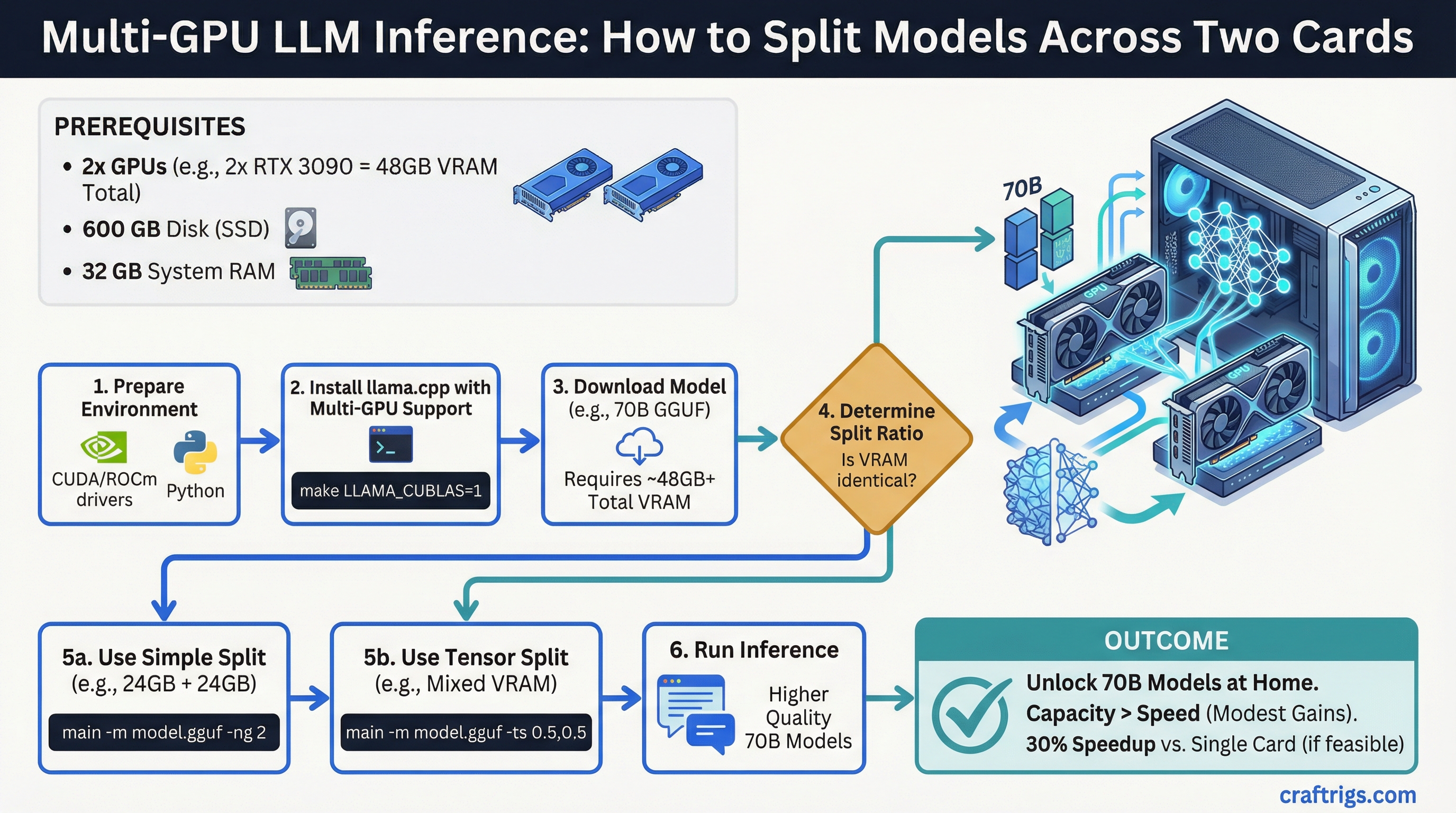
TL;DR: Multi-GPU inference makes sense when your model is too large for a single GPU's VRAM. Two RTX 3090s give you 48GB combined, which opens up 70B models at higher quality. The speed gains are real but modest — VRAM capacity is the bigger win than raw throughput.
Most local LLM builds are single-GPU. One card, all the VRAM, simple setup. But once you hit the ceiling of 24GB on a single RTX 3090 or 4090, the next question is obvious: can you just add another GPU and double the VRAM? The answer is yes, with some nuance.
When Multi-GPU Actually Makes Sense
There's one clear reason to go multi-GPU: the model you want to run doesn't fit in a single card's VRAM. That's it. If your target model fits on one GPU, adding a second GPU will not dramatically speed up inference — the overhead of inter-GPU communication often offsets any parallelism gains.
Multi-GPU is the right call when:
- You want to run 70B models at Q6 or Q8 quantization (needs ~48GB+)
- You're running 34B+ models and want more headroom for context
- You're planning ahead for larger models coming in the next year
- You're building a shared inference server and need total throughput across multiple users
Multi-GPU is probably not worth it when:
- You're running models that already fit on one 24GB card
- You want faster inference on small/medium models (a single faster GPU is better)
- You're primarily doing CPU-offloaded inference
How Model Splitting Works
When a model is too large for a single GPU, it gets split across multiple GPUs. Each GPU holds some of the model's layers. Inference passes data sequentially through the layers, jumping between GPUs as it goes.
There are two ways the GPUs can communicate: NVLink and PCIe.
NVLink:
- Dedicated high-bandwidth bridge between two GPUs on the same card pair
- RTX 3090s support NVLink via the NVLink bridge connector
- Bandwidth: ~600 GB/s (vs PCIe 4.0 x16 at ~32 GB/s)
- Latency is dramatically lower than PCIe
- Requires a compatible NVLink bridge (~$30–50 extra)
- RTX 4090 does NOT support NVLink — this is a genuine downgrade vs 3090 for dual-GPU
PCIe:
- Standard connection through the motherboard
- Much lower bandwidth than NVLink
- Still functional for inference — the inter-layer transfers are not constant
- Performance hit vs NVLink is noticeable but not always catastrophic
- Works with any dual-GPU setup on any compatible motherboard
For local inference specifically, the difference between NVLink and PCIe is less dramatic than it sounds. Inference is not like training — data transfer between GPUs only happens at layer boundaries, not continuously. In practice, a dual RTX 4090 PCIe setup often performs within 20–30% of a dual 3090 NVLink setup at the same VRAM capacity, despite the bandwidth gap.
Practical Setup: Dual RTX 3090
Two RTX 3090s is the most common dual-GPU configuration for local LLM builders. Here's the actual setup.
Hardware requirements:
- Two RTX 3090 24GB cards
- Motherboard with dual PCIe x16 slots (physical) — check that it runs x16/x16 or at minimum x16/x8 electrically. Many x16/x16 physical boards only run x8/x8 electrically when both slots are populated.
- CPU with enough PCIe lanes: Intel Core i9-13900K or i9-14900K (20 PCIe lanes from CPU), or AMD Threadripper for maximum lanes
- NVLink bridge if you want peak performance between the two 3090s
- PSU rated at minimum 1000W (two 3090s can pull 700W+ peak combined)
Software setup with llama.cpp:
llama.cpp has native tensor parallelism support for multi-GPU. The flag is --tensor-split.
./llama-cli -m model.gguf --tensor-split 1,1 -ngl 99The --tensor-split 1,1 tells llama.cpp to split evenly between two equal GPUs. If your GPUs have different VRAM amounts, you can weight accordingly (e.g., --tensor-split 3,1 for a 24GB + 8GB split).
-ngl 99 offloads all layers to GPU (you want this for pure GPU inference).
What you can run with 48GB total:
- Llama 3.1 70B at Q4_K_M: fits comfortably with room for context
- Llama 3.1 70B at Q6_K: fits with ~42GB, leaving 6GB for context
- Qwen 2.5 72B at Q4: fits
- 405B models: still need quantization, borderline at 48GB for Q2/Q3
Practical Setup: Dual RTX 4090
The RTX 4090 does not support NVLink. This is a deliberate product segmentation decision by NVIDIA. Dual 4090 setups run over PCIe only.
Despite that, dual 4090 setups are still used because the 4090 has meaningfully faster compute per VRAM byte than the 3090. The AD102 architecture is ~40% faster at inference than the GA102 in the 3090.
The tradeoff:
- Dual 4090 (PCIe only): 48GB combined, faster per-layer compute, higher inter-GPU latency
- Dual 3090 (NVLink available): 48GB combined, slower per-layer compute, lower inter-GPU latency with NVLink bridge
For most local inference use cases, the dual 4090 PCIe setup is equal or slightly faster in practice, because the faster compute of the 4090 compensates for the PCIe overhead.
Cost: Two RTX 4090s at ~$1,400–1,700 used each = $2,800–3,400 just for GPUs. This is a $5,000+ total build.
Real Performance Expectations
Running Llama 3.1 70B Q4_K_M on dual RTX 3090 (NVLink):
- Roughly 15–25 tokens/second depending on context length
- Context lengths above 8k slow things down significantly
- Prompt processing (prefill) benefits more from multi-GPU than generation
For comparison, a single RTX 4090 running a 34B Q4 model:
- Roughly 30–45 tokens/second
- Smaller model, but much faster and simpler setup
The honest takeaway: multi-GPU gets you access to bigger models, not necessarily faster inference on models that already fit. If speed is the priority and your model fits on 24GB, stick to one fast GPU.
Common Mistakes
- Buying a motherboard with x16/x16 physical slots that only run x8/x8 electrically — check the spec sheet carefully
- Forgetting the PSU is undersized after adding the second GPU
- Using
--tensor-splitincorrectly and having all layers load onto one GPU anyway - Not buying the NVLink bridge with dual 3090 setups (it's $30–50 and meaningfully improves bandwidth)