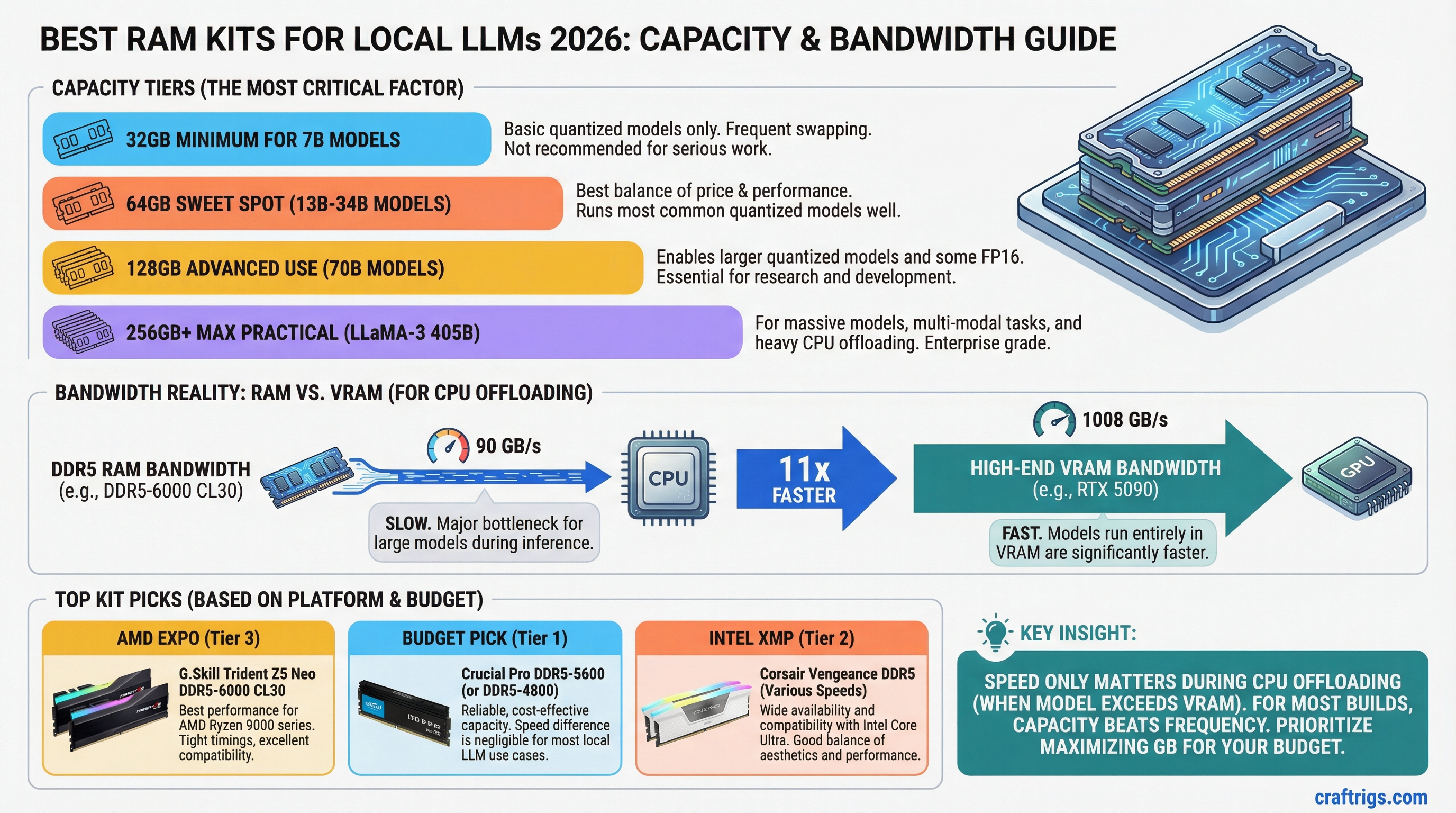
TL;DR: For most local LLM builds, 64GB DDR5-6000 CL30 is the sweet spot. Specific kits worth buying: G.Skill Trident Z5 Neo (AMD) or G.Skill Trident Z5 RGB (Intel) at DDR5-6000 CL30. If you're doing heavy CPU offloading — 70B models on a single GPU — step up to 128GB. Speed matters only when offloading; if your model fits in VRAM, buy whatever is cheapest at the right capacity.
The Problem With Most RAM Buying Guides
They tell you what speed to buy. They don't tell you why, or when it actually matters. For local LLM work, the answer is messier than "faster is better."
System RAM and VRAM serve completely different roles. Once your model is loaded into VRAM and you're generating tokens, system RAM is barely involved. The GPU is doing all the work. Paying extra for DDR5-7200 over DDR5-6000 will not make your 7B model run faster — the difference is literally 0 t/s.
But the moment you're doing CPU offloading — running a 70B model with 20+ layers on the CPU because it doesn't fit in your 24GB GPU — RAM bandwidth suddenly matters a lot. That's when a faster kit pays off.
How Much RAM You Actually Need
Before picking a kit, get the capacity right.
32GB — minimum for running any model at all. You'll be constrained. Can't run large context windows, can't offload big models comfortably. Fine if everything fits in VRAM.
64GB — the correct answer for most people. Handles large-context inference comfortably, gives you room to offload 30-40GB of model layers to RAM when needed, and doesn't create headaches.
128GB — the right call if you're running 70B models regularly on a single 24GB GPU, doing serious CPU offloading, or planning long context windows (200K+). Also smart if you're building a server that handles multiple concurrent requests.
256GB+ — workstation territory. Threadripper or EPYC platforms. Makes sense for production inference servers or if you're running multiple 70B models simultaneously.
Note
DDR5 bandwidth peaks at around 90 GB/s (dual-channel DDR5-5600). That sounds fast, but compare it to RTX 4090 VRAM at ~1,008 GB/s. This 11x gap is why CPU offloading is painful and why fitting models in VRAM matters so much.
The Best DDR5 Kits in 2026
Budget Pick: Crucial Pro DDR5-5600 CL46 (64GB — 2x32GB)
Around $89 as of March 2026. JEDEC-compliant DDR5 at a price that makes sense. If you're building a single-GPU rig where everything fits in VRAM, this is the honest answer. The latency is high (CL46) but that only matters during CPU offloading, which you're not doing.
Crucial uses Micron dies, which are among the most reliable. No frills, no RGB, no overclocking headroom to speak of — but it works, it's cheap, and it'll run at rated speed on any modern platform without touching the BIOS.
Best Value with Speed: G.Skill Ripjaws M5 Neo DDR5-6000 CL30 (64GB — 2x32GB)
Around $139 as of March 2026. This is the kit most people building a serious LLM rig should buy for AMD platforms. DDR5-6000 with CL30 timings is the sweet spot for Ryzen 7000/8000 — AMD's EXPO profile makes it one-click to enable, and the bandwidth improvement over the Crucial kit is real during CPU offloading (roughly 15-20% more bandwidth).
No RGB, clean aesthetic, and G.Skill has been reliable in this space for years. Works out of the box with EXPO on any X670/B650 board.
Best AMD Performance: G.Skill Trident Z5 Neo DDR5-6400 CL32 (64GB — 2x32GB)
Around $169 as of March 2026. The step up from the Ripjaws M5 Neo. CL32 at DDR5-6400 hits about 98 GB/s dual-channel — the practical ceiling for AM5 platform memory bandwidth without going to expensive specialist kits.
For heavy CPU offloading workflows (70B models, long contexts), the extra bandwidth is worth it. For GPU-only inference, you won't see a difference and the $30 premium is wasted.
Tip
On AMD AM5 boards, enable EXPO in your BIOS. The G.Skill and Corsair kits run at DDR5-4800 JEDEC by default — you're leaving 25-30% bandwidth on the table until you enable that profile. It takes about 30 seconds in the BIOS.
Best Intel Pick: G.Skill Trident Z5 RGB DDR5-6400 CL32 (64GB — 2x32GB)
Around $159 as of March 2026. The Intel-platform equivalent of the AMD pick above. XMP 3.0 profile enables cleanly on Z790/Z890 boards. Same bandwidth numbers, same use cases.
Intel's platform is slightly pickier about RAM compatibility at high speeds — if you're running an i9-14900K or Core Ultra 9 285K and pushing high-speed RAM, check your motherboard's QVL list before buying. The G.Skill Trident Z5 RGB appears on most.
Corsair Dominator Titanium DDR5-6000 CL30 (64GB — 2x32GB)
Around $185 as of March 2026. Corsair's flagship. The cooling spreaders are genuinely better than the G.Skill kits, which matters if your case has limited airflow near the memory slots. Performance is essentially identical to the G.Skill Trident Z5 at the same specs — you're paying for the Corsair brand, the physical build quality, and the iCUE software integration.
Honest take: the G.Skill is the better value. But if you already have Corsair fans, AIO, and you want the aesthetic consistency, the Dominator Titanium is a solid kit.
For 128GB Builds: Kingston Fury Beast DDR5-6000 CL36 (128GB — 4x32GB)
Around $289 as of March 2026. Stepping up to 128GB is where things thin out — fewer kits are validated for four-stick configurations at high speeds. Kingston Fury Beast is one of the most broadly compatible 4x32GB kits available, works on both AMD and Intel platforms, and CL36 at DDR5-6000 gives you solid bandwidth.
The 4-DIMM configuration does reduce max stable frequency slightly compared to 2-DIMM — don't expect the same stability at DDR5-6400 with all four slots populated. DDR5-6000 is where 128GB configurations are happiest.
Caution
Running 4 DIMMs on DDR5 platforms reduces the maximum stable memory frequency. Most systems that hit DDR5-6400 in dual-channel (2 sticks) will top out around DDR5-5600 or DDR5-6000 with all four slots populated. Plan accordingly if you're targeting 128GB.
DDR4 Is Still Fine — With Caveats
If you're building on an older Intel platform (Z490, Z590, Z690 DDR4 variant) or AMD's AM4, DDR4-3600 CL18 is the sweet spot. The G.Skill Trident Z DDR4-3600 CL18 runs around $89 for 32GB and $159 for 64GB as of March 2026.
DDR4 dual-channel maxes out around 51 GB/s. That's roughly half the bandwidth of DDR5-6000 — which does matter if you're doing significant CPU offloading. But if you're GPU-only, it's a non-issue.
The practical question: if you're buying new today, buy DDR5. The platform cost premium has shrunk to almost nothing for mid-range builds. DDR4 platforms are only worth it if you're reusing existing hardware.
The Actual Purchase Decision
For a new single-GPU build (model fits in VRAM): buy the Crucial Pro DDR5-5600 at whatever capacity you need. Save the money for GPU or storage.
For a CPU-offloading build (70B models on a 24GB GPU): buy the G.Skill Ripjaws M5 Neo DDR5-6000 CL30 in 64GB or 128GB. The bandwidth improvement is real and measurable.
For a dual-GPU or heavy workstation build: the Kingston Fury Beast 128GB 4x32GB kit for reliability across all four slots.
Don't let RAM marketing convince you that CL28 at DDR5-7200 will meaningfully change your inference performance. It won't — unless CPU offloading is your primary workload, in which case even then, the jump from DDR5-6000 to DDR5-7200 is maybe 8-12% faster, not the 40% the spec sheet implies.
See Also
- Best GPUs for Local LLMs 2026
- ECC vs Non-ECC RAM for Local LLM Workstations
- Best CPU for Local LLMs in 2026
RAM Configuration Decision Tree
graph TD
    A["Budget?"] --> B{"Under $150?"}
    B -->|Yes| C["32GB DDR5-5600"]
    B -->|No| D{"Under $300?"}
    D -->|Yes| E["64GB DDR5-6000"]
    D -->|No| F["128GB DDR5-6400+"]
    C --> G["GPU-primary builds"]
    E --> H["Mid-tier LLM rigs"]
    F --> I["CPU offload / large context"]
    style A fill:#1A1A2E,color:#fff
    style F fill:#F5A623,color:#000
    style E fill:#00D4FF,color:#000