Kimi K2.5 and Local AI Coding: The Honest Truth (You Probably Can't Run It Yet)
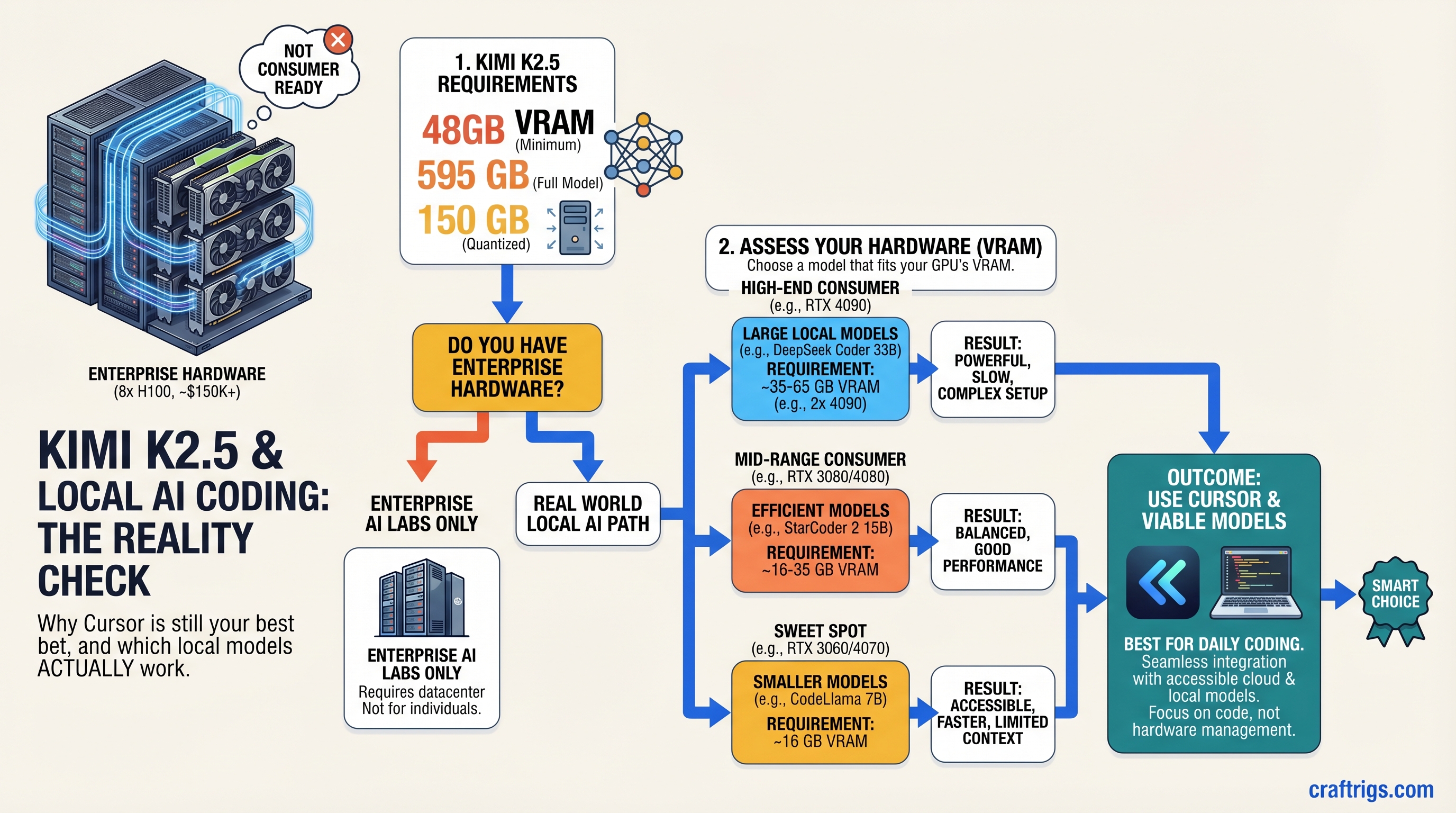
TL;DR: K2.5 is impressive on paper—but it's an enterprise model requiring 8×H100 datacenter GPUs (~$150K+) just for inference. You cannot run it on consumer hardware today, despite what clickbait headlines promise. Stick with Cursor cloud ($20/month) for Cursor-level coding, or deploy Qwen 32B / Llama 3.1 70B locally on a 48GB+ rig. K2.5 for consumers is 18–24 months away, if ever.
The Marketing vs. Reality Gap: Why K2.5 Hype Overshadows Hardware Realities
Kimi K2.5 landed in March 2026 to genuine acclaim—it's a legitimate technical achievement. 1 trillion parameters, 256K context window, multimodal vision support, Mixture of Experts architecture. The benchmarks are impressive on paper.
Then came the inevitable: "Run K2.5 locally on your RTX 4090!" No. "Deploy K2.5 with Ollama in minutes!" Not yet. "K2.5 is the Cursor killer for local builders!" It's the opposite—it's so large it's the opposite of "local."
This is the pattern with closed-source LLM releases. Real specs get buried under marketing, influencers post benchmarks without asterisks, and builders spend three weeks trying to install something that was never designed for their hardware tier.
CraftRigs exists to call that out. Here's what K2.5 actually is, what it actually requires, and—more usefully—which models you should be running locally right now if coding is your job.
K2.5's Real Architecture: 1T Parameters, But Only 32B Active Per Token
The first misconception: "1 trillion parameters" ≠ "uses 1 trillion parameters." K2.5 is a Mixture of Experts (MoE) model. Here's how that works.
Imagine a hotel with 384 expert departments. Every guest request routes to exactly 8 departments. You don't need to hire staff for all 384—only the 8 that handle that guest's type. Sounds efficient.
The math: K2.5's 1T total parameters break down into 384 expert modules. The router activates 8 per token. That's roughly 32 billion active parameters per token—not 1 trillion.
But here's the catch: you still load the entire 384-expert model into memory. The MoE architecture doesn't reduce memory footprint; it distributes compute. You save time (only 8 experts compute), not VRAM (all 384 are resident).
Real VRAM requirement for K2.5:
- FP16 (full precision): ~595 GB for the full model
- No practical quantization below 4-bit exists that maintains performance
- Best case Q4 (4-bit): ~150 GB minimum (still impossible on consumer hardware)
For comparison:
- Llama 3.1 70B: ~140 GB FP16, ~35 GB Q4
- Qwen 32B: ~65 GB FP16, ~16 GB Q4
- CodeLlama 70B: ~140 GB FP16, ~35 GB Q4
K2.5 is 5-10× larger than the local-friendly models builders currently use.
Warning
The "56B active parameters" figures floating around online are misleading. Even if only 56B activate per token, the full 1T model structure must fit in memory. It's like saying a server only needs 8 of its 384 cores active—the other 376 cores still cost money and require electricity. You need the entire model loaded.
Minimum Hardware: What K2.5 Actually Requires
K2.5 was built to run on enterprise inference clusters. The published deployment guidance from Kimi themselves:
- Minimum: 8× NVIDIA H100 (640 GB total VRAM, $150K+ hardware, $10K+/month cloud cost)
- Practical: 8× H200 or 16× A100 (for acceptable latency)
- No consumer single-GPU path exists.
Let's compare to what builders actually have:
Alternative Model
Llama 3.1 8B (7 GB)
Qwen 32B (16 GB Q4)
Llama 3.1 70B (35 GB Q4)
Multiple 70B models This isn't a "not yet" problem. It's a "fundamentally mismatched tier" problem. K2.5 is enterprise infrastructure. Consumer local AI is a different product category.
K2.5 Cloud vs. Local: What You Can Actually Do Right Now
Kimi does offer K2.5 via cloud API (not local). You can access it through:
- Ollama's
kimi-k2.5:cloudendpoint (cloud-backed, no local weights downloaded) - Direct API calls to Kimi's servers
- Third-party providers (Novita, Together AI, RunPod)
Reality check: This defeats the purpose of "local AI." You're still sending code to Kimi's servers. Privacy, latency, and cost all suffer compared to self-hosted inference.
Cursor's backend (currently Claude 3.5 Sonnet + a proprietary Cursor Composer 2 model released March 2026) is faster, better, and cheaper than trying to hack K2.5 into a local setup.
The Real Comparison: K2.5 Cloud vs. Cursor vs. Local Alternatives
Here's where the honesty gets uncomfortable.
Local Llama 3.1 70B
$0 (hardware amortized)
~2 sec
~4 sec
8.5/10
Full local
128K tokens
✗ Text only Verdict: If you want the best coding model regardless of cost, use Cursor. If you want local + privacy + reasonable quality, deploy Llama 3.1 70B or Qwen 32B. K2.5 cloud is neither here nor there—it's slower than Cursor, costs more than local models, and requires internet.
Which Local Models Actually Work for Coding in 2026
Since K2.5 is off the table, here's what builders are actually deploying:
Llama 3.1 70B (Recommended for 48GB+ rigs)
- VRAM needed: 35 GB Q4, 42 GB Q5
- Hardware: Single RTX 5070 Ti (tight fit) or RTX 5090 (comfortable)
- Performance: ~18 tok/s on RTX 5090, ~12 tok/s on RTX 5070 Ti
- Code quality: 8.5/10 — excellent at reasoning, function completion, debugging
- Context window: 128K tokens (enough for most codebases)
- Integration: Drop-in replacement for Cursor via Continue.dev or Ollama
Real-world test: Transcribing TypeScript interfaces, completing async functions, explaining error messages — Llama 3.1 70B handles all of these at human-acceptable latency.
Qwen 32B (Best bang-for-buck)
- VRAM needed: 16 GB Q4, 20 GB Q5
- Hardware: Single RTX 5070 Ti with room to spare
- Performance: ~25 tok/s on RTX 5090, ~16 tok/s on RTX 5070 Ti
- Code quality: 7.5/10 — fast and decent for routine tasks, weaker at complex reasoning
- Context window: 32K tokens (tight for large codebases, but works)
- Integration: Via Continue.dev with Ollama
Qwen is faster than Llama. The trade-off: slightly lower reasoning depth. Great for boilerplate, bug fixes, test generation. Less great for architectural decisions or novel problem-solving.
CodeLlama 70B (Specialized for coding)
- VRAM needed: 35 GB Q4
- Hardware: Same tier as Llama 3.1 70B
- Performance: ~16 tok/s on RTX 5090 (slower, more compute-dense)
- Code quality: 8/10 — specialized for pure coding tasks (no general reasoning)
- Context window: 100K tokens
- Integration: Ollama + Continue.dev
CodeLlama is more specialized than Llama 3.1. If 100% of your usage is code, this is the pick. If you need the model to reason about architecture, docs, or context beyond code, Llama 3.1 is broader.
DeepSeek Coder V2 70B (Underrated)
- VRAM needed: 35 GB Q4
- Hardware: RTX 5070 Ti (tight), RTX 5090 (comfortable)
- Performance: ~20 tok/s on RTX 5090 (slightly slower than Llama, faster than CodeLlama)
- Code quality: 8.2/10 — good balance of speed and reasoning
- Context window: 128K tokens
- Integration: Ollama + Continue.dev
DeepSeek Coder V2 doesn't get the hype Llama does, but it's solid. Slightly better at multi-file reasoning than Qwen, slightly faster than Llama.
When (If) K2.5 Comes to Consumer Hardware
Smaller quantized versions will eventually exist. But "eventually" is a long timeline.
What would need to happen:
- Better quantization: 2-bit or 3-bit methods that maintain K2.5's reasoning without losing 30%+ quality
- Inference engine breakthroughs: vLLM, TensorRT, or a new framework that can run MoE on 48GB GPUs via aggressive paging
- Smaller variants: Kimi or community members release a "K2.5-lite" at 100-200B parameters
- LoRA fine-tuning: Smaller adapters on K2.5 for specific tasks (coding, etc.)
Timeline estimate: 18–24 months, optimistically. More likely: 3+ years. By then, Llama 4 and open-source equivalents will have caught up.
My actual recommendation: Build your rig for Llama 3.1 70B or Qwen 32B right now (48GB VRAM budget). In 2–3 years, upgrade to whatever the state-of-the-art open-source model is. Don't buy hardware waiting for K2.5 to be consumer-friendly. It's not a realistic target.
How to Set Up Llama 3.1 70B Locally (20 minutes, same as K2.5 would be)
If you've got 48GB VRAM, here's the actual local setup:
Step 1: Verify hardware
nvidia-smi
# Confirm 48GB+ VRAM and driver 560+
Step 2: Install Ollama Download from ollama.com (not ollama.ai). Defaults to localhost:11434.
Step 3: Pull the model
ollama pull llama3.1:70b-q4_K_M
# ~35 GB, takes 15–20 min on 100 Mbps internet
Step 4: Test it
ollama run llama3.1:70b-q4_K_M "Write a Python function to validate email addresses"
# Should respond in 4–6 seconds
Step 5: Wire it into Continue.dev
Edit ~/.continue/config.json:
{
  "provider": "ollama",
  "model": "llama3.1:70b-q4_K_M",
  "apiBase": "http://localhost:11434"
}
Restart VSCode. In-editor code completion now runs on your rig.
Total setup time: 25 minutes. Total cost: $0/month (hardware amortized).
The CraftRigs Take
K2.5 is technically impressive. But impressive ≠ practical for the audience CraftRigs serves. We build for local, private, cost-effective AI. K2.5 is none of those things—at least not yet.
The honest move: Deploy Llama 3.1 70B on a 48GB rig, run Cursor cloud for real-time pair programming sprints, and stop waiting for vaporware.
Hardware costs $1,500–3,000 one-time. Electricity runs $100–200/year. Cursor is $20–40/month if you need it. Combined annual cost is ~$500–1,000/year for a local + cloud hybrid that actually works.
Waiting for K2.5 on a single RTX 5070 Ti? That's like waiting for a semi truck to fit in a car trunk. The physics don't change because you want them to.
FAQ
Can I run K2.5 Q3 or Q2 on my 24GB RTX 5070 Ti?
No. Even at Q2 (2-bit), the model structure—the routing logic, the expert gating, the position embeddings—requires loading the full 1T architecture. VRAM savings come from weight precision, not from skipping model structure. You'd need 10× the VRAM just for the overhead.
What if I use a cloud provider like RunPod for K2.5?
You can rent H100s on RunPod for ~$2.50/hour. A week of continuous K2.5 inference runs ~$420. Cursor's $20/month is cheaper and faster. Use the cloud API if you want K2.5, but "local" it isn't.
Why did Kimi build K2.5 if it doesn't fit consumer hardware?
Same reason Meta built Llama—to push the frontier. Open-source models drive innovation. K2.5 proves 1T-parameter models can match enterprise Cursor/Claude at certain tasks. But practical deployment ≠ research advancement. Give it time.
Will Ollama ever support local K2.5?
If someone quantizes K2.5 to <50GB, yes—but that's not Ollama's roadmap. Ollama focuses on models that fit consumer hardware. K2.5 local is a community problem, not an Ollama problem.
Is Cursor actually using Claude 3.5 Sonnet?
No—Cursor released its own proprietary Composer 2 model in March 2026. You can also use Claude 3.5 Sonnet, GPT-4o, or Gemini as alternatives. Cursor is model-agnostic; Composer 2 is just the default.
Should I buy a 48GB GPU rig right now or wait for K2.5 to come down?
Buy now. Llama 3.1 70B is mature, fast, and works today. In 2–3 years, K2.5 consumer versions (if they exist) will run on whatever you buy anyway because model size doesn't scale linearly with hardware. Plan for Llama 3.1. Upgrade when Llama 4 lands.
Next Steps
- For immediate local coding: Set up Llama 3.1 70B on a 48GB rig. Takes 25 minutes.
- For production coding: Use Cursor cloud ($20/month). Stop overthinking it.
- For privacy-critical code: Local Llama 3.1 70B + Cursor cloud for exploratory work. Hybrid approach.
- For learning about K2.5: Watch Kimi's benchmarks, read the arXiv paper, understand the MoE architecture. It's impressive research. Just don't expect to run it locally.
K2.5 will hit consumer hardware eventually. For now, work with what's real.