Quick Summary:
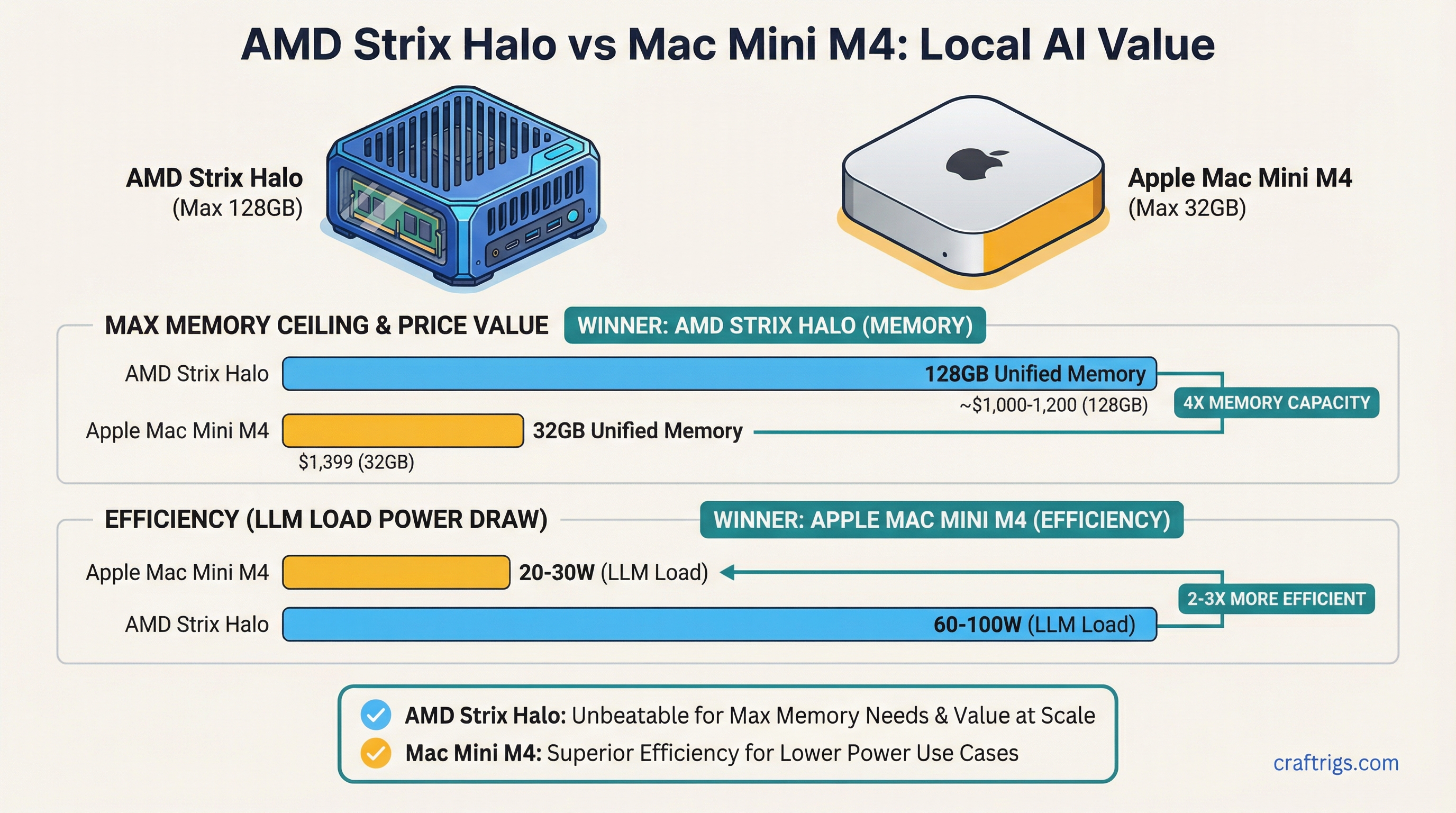
- AMD wins on memory ceiling: Strix Halo mini PCs scale to 128GB unified memory at ~$1,000-1,200. Mac Mini M4 maxes at 32GB for $1,399.
- Apple wins on efficiency: Mac Mini M4 draws 20-30W under LLM load. AMD Strix Halo mini PCs pull 60-100W. Same model, 2-3x the power draw.
- Compatibility: Both run GGUF via Ollama and llama.cpp. MLX is Apple-only. AMD mini PCs run Linux natively with better GPU memory control.
The Mac Mini M4 at $599 looked like the undisputed value king for local AI when it launched in late 2024. 16GB unified memory, 273 GB/s memory bandwidth, and Apple's software ecosystem in a box smaller than a paperback. For casual users running 7B and 13B models, it still makes a strong case.
Then AMD shipped Strix Halo.
The Ryzen AI Max series — with its up to 128GB LPDDR5x unified memory and 40-compute-unit iGPU — fundamentally changes the value equation at higher memory tiers. Mini PC makers GMKtec and Beelink have built compact systems around this silicon that undercut Apple on price-per-GB while hitting a memory ceiling Apple simply can't match in the mini PC form factor.
If you're trying to run 35B, 70B, or larger models locally without a dedicated GPU, the choice between these platforms is actually a question about memory tier. Under 32GB, Apple is competitive. Above 32GB, AMD dominates on value.
The Hardware: What You're Actually Comparing
Mac Mini M4 Configurations
The Mac Mini M4 (base) ships with the M4 chip: 10-core CPU, 10-core GPU, 273 GB/s memory bandwidth. It comes in 16GB ($599) and 24GB ($799) unified memory configurations. To reach 32GB, you step up to the Mac Mini M4 Pro at $1,399 — that gets you 14-core CPU, 20-core GPU, and 273 GB/s bandwidth (same as base M4 in the memory bandwidth department for the 24-core GPU variant it's 520 GB/s).
The Mac Mini M4 is a polished, near-silent system. It draws under 30W under LLM inference load, which matters for always-on deployments.
AMD Strix Halo Mini PCs
The Ryzen AI Max series (codenamed Strix Halo) is AMD's answer to Apple's unified memory architecture. The headline chip is the Ryzen AI Max+ 395: 16 Zen 5 CPU cores, 40-compute-unit RDNA 3.5 iGPU, 256-bit LPDDR5x memory bus. That wide memory bus is the key difference from Intel's competing mini PC chips — it allows the GPU to feed on memory at bandwidth competitive with M4.
Memory bandwidth on Ryzen AI Max: 256 GB/s at LPDDR5x-7500 — meaningfully below M4's 273 GB/s on the base chip, but in the same ballpark. The gap narrows (or reverses) when comparing against M4 Pro's 520 GB/s at 32GB.
Current retail systems:
Chip
Ryzen AI Max 385
Ryzen AI Max+ 395
Ryzen AI Max+ 395
Ryzen AI Max+ 395
Ryzen AI Max+ 395
Performance: Token/Sec Benchmarks
This is where the comparison gets practical. Inference speed for local LLMs is primarily a function of memory bandwidth and how well the inference runtime uses the GPU.
7B and 13B Models (Where Mac Mini M4 Shines)
For 7B models like Llama 3.1 8B at Q4_K_M, the Mac Mini M4 16GB delivers roughly 30-45 tokens/sec using Ollama or llama.cpp with Metal acceleration. The M4's software stack is mature — Apple's Metal backend in llama.cpp is production-quality, and MLX gives another 10-15% headroom on supported models.
AMD Strix Halo on the same 7B model scores similarly — roughly 25-40 tokens/sec on Linux with ROCm/Vulkan backend. On Windows, performance drops meaningfully because of GPU memory allocation limits (Windows doesn't allocate the full unified memory pool to the iGPU by default).
Winner at 7B-13B: roughly even, slight edge to Apple on polish and power draw.
34B-35B Models (Where AMD Pulls Ahead)
At 34-35B parameter models (Qwen 2.5 32B, DeepSeek-R1-Distill-Qwen-32B), you need 20-24GB for Q4_K_M. The Mac Mini M4 16GB cannot run these models at all in GPU mode — you'd need the $1,399 Mac Mini M4 Pro 32GB.
A $750 GMKtec EVO-X2 with 64GB handles 35B models comfortably with headroom for long context. Estimated speed: 8-15 tokens/sec on Ryzen AI Max+ 395 with proper Linux GTT allocation.
Winner at 34B-35B: AMD on value ($750 vs $1,399).
70B Models (Apple Can't Compete Without Mac Studio)
Llama 3 70B at Q4_K_M requires ~40GB. No Mac Mini configuration handles this — you'd need a Mac Studio M4 Max at $1,999+. The Ryzen AI Max+ 395 with 96 or 128GB unified memory runs 70B models at 4-8 tokens/sec. That's slow but functional, and it costs $950-1,200 vs $1,999+ for Apple.
Winner at 70B: AMD by a significant margin on price.
OS Flexibility and Setup Complexity
This is one of the most important practical differences between the two platforms.
Mac Mini M4: Plug and Play
macOS handles everything automatically. Install Ollama, run ollama pull llama3.2, start inferencing. The GPU memory allocation is automatic. LM Studio, Ollama, and llama.cpp all work out of the box with Metal. No driver configuration, no kernel parameters.
Downsides: You're locked to macOS. No Linux containers with direct GPU access. No ROCm for GPU-accelerated Python AI frameworks. Server deployments require macOS Server licensing considerations.
AMD Strix Halo on Linux: More Power, More Setup
Linux unlocks the full capability of Strix Halo hardware, but it requires deliberate configuration. The critical step: setting the GTT (Graphics Translation Table) memory limit so the iGPU can actually access the full unified memory pool.
Without this, the iGPU defaults to a small VRAM allocation and the rest sits inaccessible to the GPU. With it, you can direct 80-100GB of the 128GB pool to GPU inference.
The required kernel parameter:
# Add to /etc/default/grub GRUB_CMDLINE_LINUX_DEFAULT
amdgpu.gttsize=102400
This sets the GTT pool to 100GB, leaving ~28GB for system/CPU use on a 128GB system. Adjust based on your RAM tier.
On Windows, this level of control isn't available — Windows' memory management limits effective GPU allocation, which is why Linux is strongly recommended for Strix Halo LLM workloads.
Model Compatibility
Both platforms run GGUF models via Ollama and llama.cpp. This covers 90%+ of open-source models available on HuggingFace. For a step-by-step guide to downloading GGUF files, see our HuggingFace GGUF download guide.
Apple-only: MLX format. Apple's MLX framework is optimized specifically for Apple Silicon's unified memory architecture and can deliver 10-15% higher throughput than llama.cpp Metal on supported models. MLX models are available for most popular architectures on HuggingFace under mlx-community orgs. This is a genuine advantage — there's no equivalent for AMD.
AMD advantage: Full ROCm support on Linux for Python-based frameworks (vLLM, HuggingFace Transformers, PyTorch). If you're running fine-tuning, embedding generation, or custom inference pipelines beyond simple chat, AMD on Linux has a much broader software ecosystem.
Power Efficiency
This is where Apple has a clear, undeniable advantage.
Mac Mini M4 under LLM inference: 20-30W total system power. GMKtec EVO-X2 under LLM inference: 60-100W total system power.
For always-on home servers running inference 24/7, that 3-4x power difference adds up. At $0.15/kWh, running a 90W AMD mini PC 24/7 costs ~$118/year. A 25W Mac Mini M4 costs ~$33/year. Over 3 years, the Mac Mini M4 saves ~$250 in electricity — which partially offsets the higher price per GB at lower memory tiers.
If you're running inference intermittently, the power difference matters less.
Price Per GB: The Core Value Equation
Price/GB
$37/GB
$33/GB
$44/GB
~$19/GB
~$12/GB
~$9/GB The gap is stark at 64GB and above. If your primary goal is maximizing unified memory for large model inference, AMD Strix Halo mini PCs offer 3-5x better value per gigabyte than Apple at comparable or higher memory tiers.
Who Should Buy What
Choose Mac Mini M4 if:
- You run 7B-13B models and want zero setup friction
- Power efficiency matters (always-on, or electricity is expensive)
- You want MLX-optimized inference
- You prefer macOS for development work
Choose AMD Strix Halo mini PC if:
- You want to run 35B-70B models without paying Mac Studio prices
- You need Linux for ROCm, vLLM, or server deployments
- You want to maximize memory capacity per dollar
- You're comfortable with 30-60 minutes of Linux GPU configuration
For Linux GTT memory configuration needed to unlock the full memory pool, see our AMD Ryzen AI Max VRAM guide. For a three-way comparison including the NVIDIA DGX Spark, see DGX Spark vs Mac Studio vs AMD Strix Halo. For a broader look at how these platforms compare head-to-head with discrete GPUs, see our AMD vs NVIDIA for Local LLMs comparison.