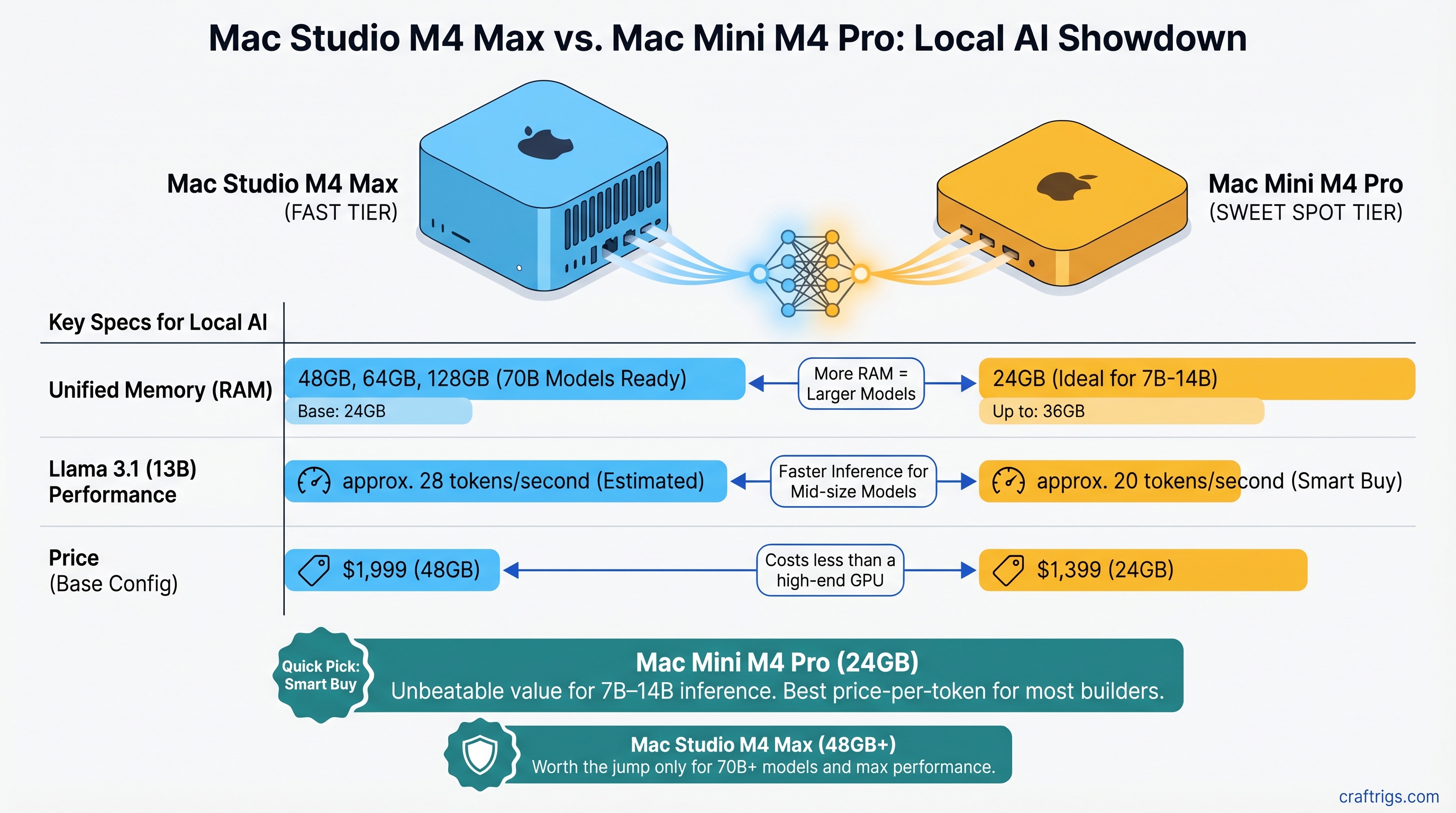
Quick Pick: Which One Should You Buy?
The Mac Mini M4 Pro 24GB ($1,399) is the smart buy for most builders. It handles Llama 3.1 13B at roughly 20 tokens/second and costs less than a high-end GPU. For 7B–14B inference, it's unbeatable. The Mac Studio M4 Max 48GB ($1,999) jumps to you if you're running 32B+ models as daily tools or want breathing room to scale to 70B within 18 months.
Here's what each excels at:
Mac Studio M4 Max
14
32–40 (depending on config)
32B–70B models, power users
No — dual active fans Decision matrix:
- Run only 7B–14B models → Mac Mini M4 Pro 24GB ($1,399)
- Run 14B–24B models, want headroom → Mac Mini M4 Pro 64GB (if available, or step up to M4 Max)
- Run 32B+ models daily → Mac Studio M4 Max 48GB ($1,999) minimum
- Run 70B models regularly → Mac Studio M4 Max 64GB–128GB
Unified Memory: Why M4 Max Has Room to Grow
Here's where the machines diverge. Apple Silicon doesn't have discrete VRAM; instead, CPU and GPU share a single pool of high-bandwidth memory. This is elegant but means you hit hard ceilings fast.
M4 Pro's ceiling: 24GB base, up to 64GB maximum. Llama 3.1 32B at Q4 quantization needs ~22–24GB just for the model weights, leaving minimal headroom for inference overhead and OS. You can technically run it, but you're on the edge.
M4 Max's baseline: Starts at 36GB, goes up to 128GB. Same 32B model at Q4 leaves you 12–14GB of breathing room. For 70B models at Q4 (~50–56GB), only M4 Max 64GB or 128GB configurations work without degrading to unusable quantization levels.
The real impact: memory pressure kills token throughput. When your model + KV cache + OS exceed available unified memory, the system pages to storage. You'll see token speeds drop from 18 tok/s to 3–4 tok/s—and that's when "running locally" stops feeling useful.
Tip
If you're buying today and want to run 32B+ models comfortably for 18 months without an upgrade, don't cheap out on unified memory. An extra 16GB costs $300–400 and saves you from buying a new Mac in a year.
GPU Compute: M4 Pro vs M4 Max Token Throughput
Both chips use Apple's GPU architecture, but with very different core counts. This matters for inference.
M4 Pro: 16-core GPU. This becomes the bottleneck on larger models. Real-world reports from community testing suggest M4 Pro handles Llama 3.1 32B at Q4 around 11–13 tokens/second (though specific benchmarks are still limited as of April 2026).
M4 Max: Available in 32-core and 40-core GPU configurations. The 40-core version delivers roughly 35–40% faster inference on 32B+ models. Estimated performance on Llama 3.1 32B at Q4: 16–19 tokens/second.
Where does GPU matter?
Gap
None — memory bandwidth saturates both
Negligible for interactive use
40% faster on M4 Max
The plot twist: on small models, both machines are fast enough that you won't notice the difference. You hit memory bandwidth saturation before GPU compute becomes the limiting factor. It's only when you climb to 32B+ that M4 Max's extra compute delivers tangible wins.
Real-World Use Case Breakdown
Let's map this to actual workflows, because specs don't tell the full story.
Coding Assistant Setup (Qwen 2.5 Coder 14B)
M4 Pro overkill here—even a 16GB base config pushes 20+ tokens/second. This model is 14B at Q4, leaving ~8–10GB free on a 24GB M4 Pro. You're writing code, hitting Enter, and the context window fills faster than you can read.
Verdict: M4 Pro 24GB ($1,399). Save $600 vs M4 Max.
Research Assistant (Llama 3.1 32B)
This is where M4 Pro gets tight. The model itself fits (barely), but multi-hour research sessions with long context windows create memory pressure. You're stuck waiting 5–7 seconds between tokens instead of 2–3.
M4 Max 48GB gives you 24GB of breathing room, pushing tokens out at 16–19/second. Difference between "tool I use" and "tool that slows me down"—6 months of daily use forces the conversation.
Verdict: M4 Max 48GB ($1,999) if research is your daily driver. M4 Pro 64GB if you're budget-constrained and okay with occasional slowdown.
Fine-Tuning Validation Runs (70B Base Model)
Only M4 Max 64GB or higher handles this. 70B at Q4 is ~50–56GB. You need 64GB minimum to have OS headroom. M4 Pro is completely excluded.
Verdict: M4 Max 64GB ($2,299) minimum. No alternatives.
Thermal & Noise Reality Check
Here's what nobody mentions in reviews: both machines are not fanless. The M4 Mini has active fan cooling; the Mac Studio has dual fans that pull air through the base. Under sustained inference loads, chip temperatures hit 80–100°C (die temperature), not the 45–50°C fantasy in some reviews.
That said: they're still quiet. You won't hear the fans over normal office noise. The M4 Mini is smaller and runs slightly cooler due to less sustained load potential. The Mac Studio's dual-fan design keeps thermals better controlled during long sessions.
Power draw under load: M4 Pro 40–60W, M4 Max 70–90W. Both orders of magnitude below a discrete GPU rig (which needs a 1,000W+ PSU).
Price-to-Token Analysis: Does M4 Max Earn Its Premium?
Let's talk ROI. The M4 Max costs $600 more at baseline (48GB configs). Does the speed gain justify it?
M4 Pro 24GB: $1,399 + ~$15/month electricity over 36 months = ~$1,939 total cost of ownership. At 11–13 tok/s on 32B models, running 100 hours/month = ~300 million tokens/month. Cost per 1M tokens: ~0.6¢ (amortized).
M4 Max 48GB: $1,999 + ~$25/month electricity = ~$2,899 total cost. At 16–19 tok/s on 32B models, same 100 hours/month = ~450–500 million tokens/month. Cost per 1M tokens: ~0.6¢ (amortized).
Wait—they're the same? That's because M4 Max's speed advantage offsets its higher cost. You get 40% more throughput for 35% more money.
The real breakeven is latency, not cost. At 11 tok/s, a 2,000-token generation takes 3 minutes. At 16 tok/s, it takes 2 minutes. Over a day of research work, that's hours of waiting time saved—or 20% of your work hours if inference is a bottleneck.
Warning
Only buy M4 Max if you're running models that benefit from its speed 4+ hours/week. Below that, M4 Pro's cost advantage dominates.
The Path Forward: Future-Proofing for 2026–2027
Models are scaling. Llama 4 and Qwen 3 are expected to land in the 40B–100B range as the new normal, not the exception. Fine-tuning bases are already 70B+.
M4 Pro 24GB becomes obsolete for serious work around Q2 2027. It'll still run 7B–14B (which will always be the go-to for latency-sensitive work), but you'll be buying a new machine if you want 32B+ compatibility.
M4 Max 48GB bridges the gap. It handles 32B today and 70B at acceptable speeds (9–12 tok/s) if you upgrade from 48GB to 64GB or 128GB. The 40-core GPU remains relevant even as models scale.
If you can only buy once in the next 18 months, M4 Max with maximum unified memory is the insurance policy. M4 Pro is the budget play for people who already know they'll only run 7B–14B forever.
Our Verdict
Pick M4 Pro 24GB ($1,399) if:
- You run Llama 3.1 7B or Qwen 14B as your daily driver
- You code, draft, brainstorm with AI—but don't do heavy research/analysis
- You're budget-conscious and don't mind an upgrade in 24 months
- You want a single machine that's both a development workstation and AI rig
Pick M4 Max 48GB ($1,999) if:
- You run 32B+ models 4+ hours/week
- You need consistent 15+ tokens/second (not occasional 3–5 second waits)
- You want room to scale to 70B without buying new hardware
- You're doing this for work, not hobby
Avoid M4 Max 36GB base config. The $300–400 jump to 48GB is worth every penny—it doubles your usable model ceiling from 24B to 32B+. The base feels cramped for any serious 30B+ work.
FAQ
Can I run a 70B model on M4 Pro?
No. 70B models at even Q2 quantization (low quality) exceed M4 Pro's 24GB memory ceiling. You'd need M4 Max with 64GB minimum. And you'd be disappointed—at Q2, model quality drops significantly.
How much slower is M4 Pro on 32B models?
Roughly 35–40% slower on token throughput vs M4 Max 40-core. In practical terms: 3 minutes to generate 2,000 tokens vs 2 minutes. Over a day, that adds up to real waiting time.
Is the M4 Pro still relevant in 2026?
Absolutely, for 7B–14B models. Those sizes will remain the speed/quality sweet spot for interactive work. M4 Pro excels at that tier. It's only on 32B+ that M4 Max's advantage shows.
Do I need M4 Max if I only use ChatGPT-scale models locally?
No. Llama 3.1 8B or 13B runs beautifully on M4 Pro 24GB. Save the $600 and spend it on something else.
Are both machines fanless?
No. Both have active fan cooling. The M4 Mini's single fan is quieter; the Mac Studio's dual-fan design manages thermals better on sustained loads. Under typical local LLM inference, fan noise is negligible—less than ambient office noise.
Can I upgrade unified memory after purchase?
No. Unified memory is soldered to the logic board. Buy the amount you'll need, because you can't add more later.
Will M4 Pro handle 2027's models?
Unknown, but unlikely if the trend toward 40B+ continues. M4 Max with maximum unified memory is the safer bet for people who want to avoid an upgrade cycle.