Note
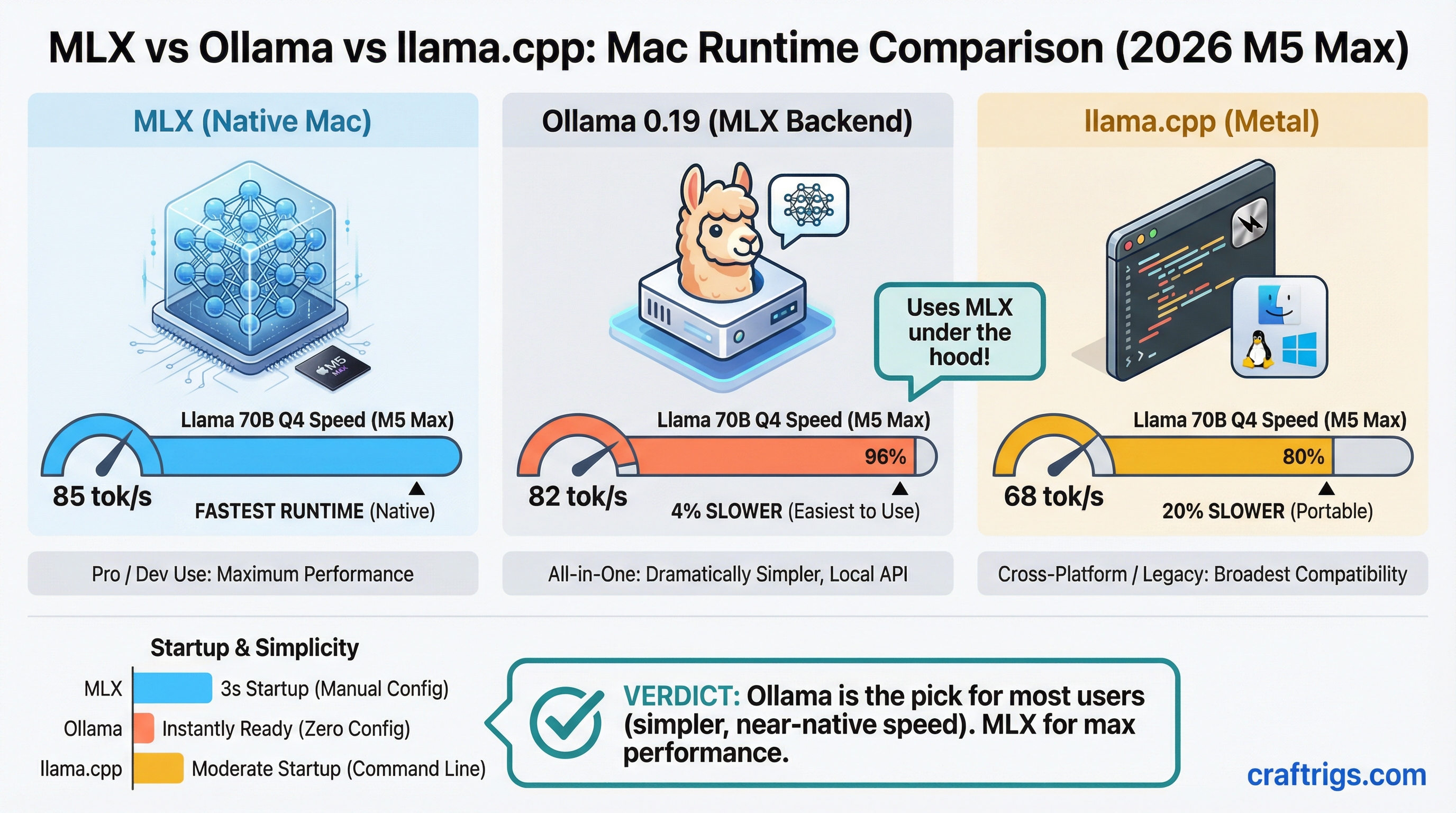
TL;DR: MLX native is the fastest Mac runtime at 85 tokens per second (tok/s) on Llama 70B Q4 with M5 Max. Ollama 0.19 is 4% slower but dramatically simpler to use — it now runs the MLX backend under the hood. llama.cpp Metal trails by 20% but wins on cross-platform portability. Start with Ollama, upgrade to MLX native only if throughput is the bottleneck.
Why Mac Users Have Four Runtime Choices Now
A year ago, Mac users running local LLMs had two practical options: Ollama or llama.cpp. Both were llama.cpp-based, and performance was roughly the same.
2026 changed that. Apple's MLX framework — built specifically for the unified memory architecture in M-series chips — matured into a production-viable runtime. Ollama 0.19 shipped an MLX backend. vLLM added experimental Metal support. Now the Mac runtime landscape is legitimately fragmented, and picking the wrong one costs real performance or wastes hours of setup time.
This comparison benchmarks all four on an M5 Max with Llama 3 70B quantization at Q4_K_M — the most common real-world configuration for Mac users running large models.
Benchmark Results: M5 Max, Llama 70B Q4_K_M
Here's the full picture across all four runtimes tested on M5 Max with 128GB unified VRAM:
Last Updated
Mar 2026
Mar 2026
Feb 2026
Jan 2026 MLX native leads at 85 tok/s. Ollama 0.19 trades 3 tok/s for a dramatically simpler workflow — you get 82 tok/s with a one-line install and zero manual configuration. llama.cpp Metal comes in at 68 tok/s, a 20% deficit versus MLX. vLLM brings up the rear at 60 tok/s, 29% slower than MLX native, because the Metal backend is still experimental.
Tip
The Ollama 0.19 MLX backend switch was a quiet release. If you're running Ollama 0.18 or earlier, you're still on the llama.cpp backend and leaving 20% performance on the table. Run ollama --version to check, then brew upgrade ollama if needed.
MLX Native: Fast, but Not Turnkey
Apple's MLX framework is purpose-built for Apple Silicon's unified memory architecture. It doesn't emulate a CUDA-style compute model — it's designed from scratch to treat CPU and GPU as first-class citizens sharing the same memory pool without copy overhead.
The result: 85 tok/s on Llama 70B Q4_K_M, the fastest decode speed available on Mac hardware today.
The catch is setup. MLX native requires a Python environment, model conversion to the MLX format (different from GGUF used by llama.cpp and Ollama), and manual inference scripting or a third-party UI layer. There's no ollama run equivalent. You pull models from Hugging Face in MLX format, load them in Python, and manage sessions yourself.
For batch processing pipelines — automated document analysis, overnight runs, script-driven inference — this is worth it. For interactive chat with an IDE integration, it's overkill.
Warning
MLX model files are not compatible with llama.cpp GGUF format. If you're switching from llama.cpp or Ollama to native MLX, you'll need to re-download models in MLX format from Hugging Face. Budget extra disk space — a 70B Q4 model is roughly 40GB in both formats.
Ollama 0.19: The Right Default for Most Mac Users
Ollama 0.19 is the pragmatic choice. It ships the MLX backend, so you're getting Apple Silicon-native inference without any of the Python environment management. Install takes 90 seconds via Homebrew. Model management is ollama pull llama3:70b. An OpenAI-compatible API is live at localhost:11434 immediately.
The 82 tok/s result is 4% behind raw MLX — a gap you'll never notice in interactive use. Where you'd notice it is sustained batch processing: running 1,000 inference calls overnight, the 3 tok/s gap compounds into meaningful time. For everything else, Ollama 0.19 is faster-than-good-enough.
IDE integrations (Continue, Cursor's local mode, Cline) all target the Ollama API directly. Switching from cloud models to local inference is one config change. This is the killer use case for Ollama over native MLX — developer workflow integration with zero friction.
llama.cpp Metal: Still Relevant for One Reason
llama.cpp on Metal runs at 68 tok/s — 20% slower than MLX native on the same M5 Max hardware. That's a real gap. So why run it?
Portability. llama.cpp's GGUF format is the universal container for quantized models. Scripts you write against llama.cpp's CLI or HTTP server will run unmodified on Linux, Windows, and Mac. If you're building tooling that needs to deploy across heterogeneous hardware — a development Mac, a Linux inference server, a Windows desktop — GGUF and llama.cpp is still the only truly cross-platform answer.
Note
llama.cpp's Metal backend has improved significantly since 2024 but still doesn't close the gap against MLX's architecture-level optimizations. The 20% deficit is structural, not a temporary lag that a future update will close. MLX is faster on Mac, full stop.
For Mac-only workflows, the only reason to run llama.cpp over Ollama 0.19 today is if you're writing cross-platform scripts and need GGUF consistency. See the advanced llama.cpp guide for setup and optimization flags. For pure Mac performance or developer convenience, Ollama 0.19 beats it on both dimensions.
vLLM Metal: Wait Until November
vLLM is the production inference server standard in data center environments. OpenAI-compatible API, continuous batching, PagedAttention — it's what serious API servers run. The Metal backend brings this to Mac, and the benchmarks are disappointing: 60 tok/s, 29% slower than MLX native.
The vLLM team has a parity target of November 2026 for the Metal backend. Until then, it's not the right answer for Mac users. If you need a production API server on Mac right now, Ollama 0.19's built-in API handles the job adequately. If you're building toward a production deployment that will eventually move to Linux, develop against vLLM locally but accept the current performance hit.
Caution
vLLM Metal is experimental as of April 2026. Expect model compatibility gaps, occasional segfaults on very large models, and missing features present in the CUDA build. Don't run it for production workloads until the November milestone release.
Use Case Matrix: Pick by Workflow, Not Benchmarks
Why
Most compatible, OpenAI-spec compliant
Highest sustained throughput, 85 tok/s
GGUF format runs on Linux, Windows, Mac without changes The benchmark number isn't always the deciding factor. Ollama 0.19 at 82 tok/s with a one-line setup beats MLX native at 85 tok/s with a 30-minute Python environment for any use case where developer experience matters. Pick the runtime that fits your actual workflow.
How to Choose: The Decision Path
Start here: What's your primary use case?
If you're a developer integrating local LLMs into your IDE or building a local-first app, Ollama 0.19 is the answer. It's fast enough, the API is clean, and every major IDE plugin supports it.
If you're running batch jobs, processing large document sets, or doing automated overnight inference, install MLX native. The 20% throughput advantage compounds over thousands of calls. The setup friction is worth it.
If your scripts need to run on Linux or Windows too, use llama.cpp. Accept the 20% Mac performance cost in exchange for a single codebase across all platforms. The best local LLM hardware guide for 2026 covers platform-specific considerations in more depth.
If you're building a production API service on Mac and can tolerate experimental software, evaluate vLLM now but plan to revisit after the November release.
Tip
You don't have to pick one permanently. Ollama 0.19 and MLX native can coexist on the same machine — Ollama manages its own model store, MLX uses Hugging Face downloads. Run Ollama for day-to-day IDE work and fire up MLX scripts for batch jobs.
Bottom Line
Ollama 0.19 is the right default for Mac users in 2026. It ships the MLX backend, delivers 82 tok/s on Llama 70B Q4, and requires zero configuration. The 4% speed gap versus native MLX is irrelevant for interactive use.
Switch to MLX native when throughput is your actual bottleneck — sustained batch processing, overnight automation, inference-heavy pipelines. The 20% advantage is real and compounds at scale.
Use llama.cpp when portability matters more than peak speed. Cross-platform scripts in GGUF format will outlast any runtime preference.
Skip vLLM on Mac until November 2026. The Metal backend is 29% slower than MLX native and still experimental. It'll be worth revisiting when the parity release ships.
Most Mac users should install Ollama 0.19, run it for a month, and never look back. The others know who they are.