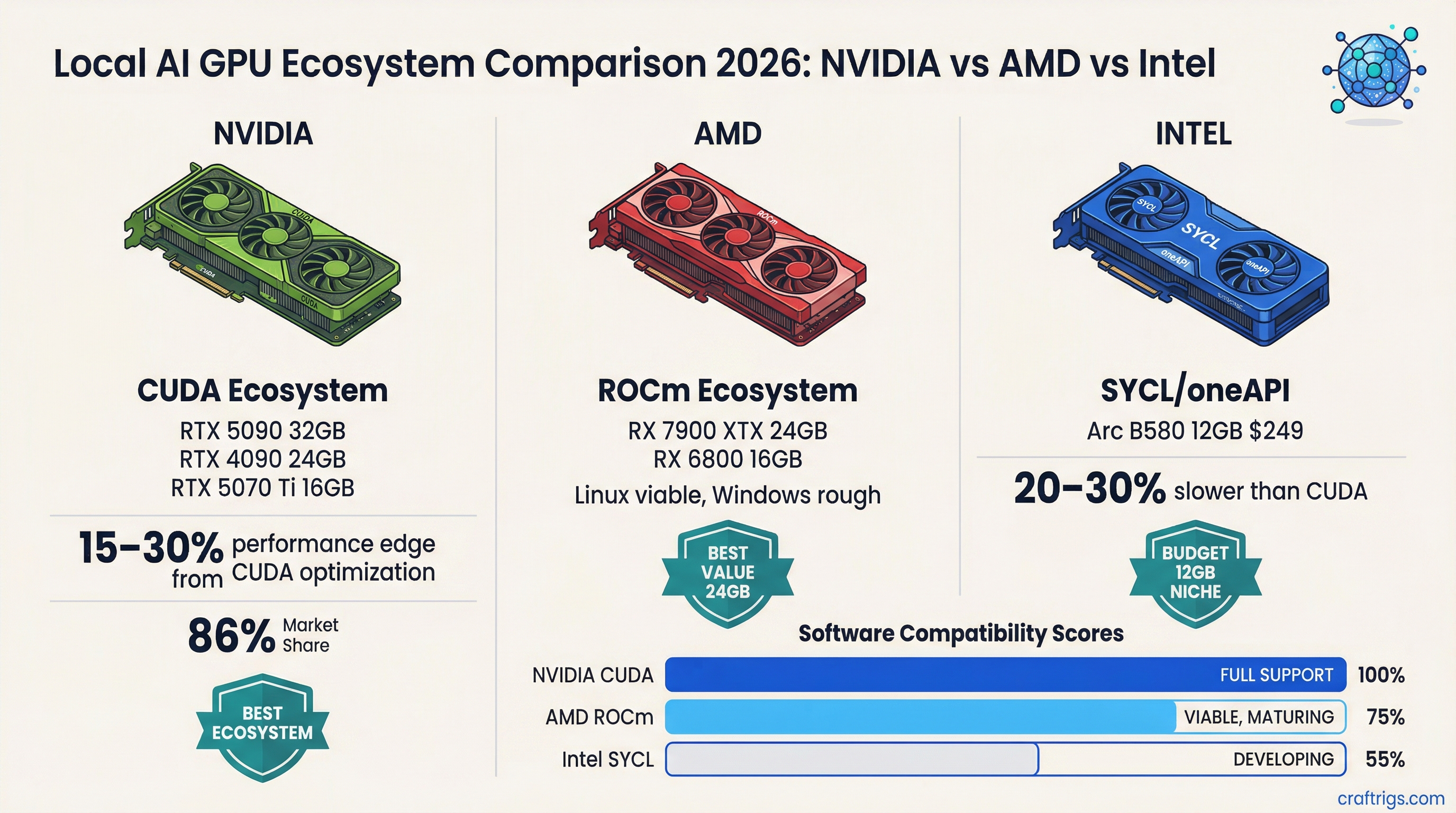
Nobody actually debates this. The GPU you run local LLMs on is almost certainly an NVIDIA card, and CUDA is almost certainly why. NVIDIA holds somewhere around 85-90% of local LLM inference workloads, and the software ecosystem gap explains most of that margin.
But something has shifted in the last 12 months. ROCm has gotten genuinely good. Intel Arc has moved from "technically works" to "actually viable for certain use cases." The NVIDIA moat is narrower than it was in 2024. Whether that matters to your buying decision depends on your specific situation, and this article is going to tell you exactly when to consider an alternative.
NVIDIA: Still the Default, Still the Best Ecosystem
CUDA has been around for two decades. That history shows up everywhere: thousands of libraries, frameworks, and inference backends that assume CUDA and have been hand-tuned against it. When llama.cpp gets a performance improvement, CUDA is what they're testing against. When vLLM ships a new quantization format, NVIDIA hardware is what it ships on first.
The practical effect: NVIDIA cards typically extract 15-30% more performance from the same raw TFLOPS as AMD or Intel alternatives, because the software has more optimization layers. An RTX 4090 at 82.6 TFLOPS outperforms an AMD card with similar theoretical compute because llama.cpp, Ollama, and most inference runtimes have spent years squeezing CUDA-specific performance.
NVIDIA holds about 86% of datacenter GPU revenue as of early 2026, down from roughly 90% a year ago. The slide is slow, but it's real.
Note
NVIDIA's Blackwell consumer cards (RTX 50 series) introduce NVFP4 quantization, a hardware-native 4-bit format that current AMD and Intel hardware can't match. As inference frameworks adopt NVFP4, the performance gap on Blackwell cards will grow vs current-gen AMD and Intel alternatives.
Who should buy NVIDIA: Anyone who wants the best local LLM experience with zero compatibility frustration. If you're not willing to troubleshoot driver issues, ROCm version mismatches, or framework support gaps, NVIDIA is the answer. It costs more, but it works.
AMD: ROCm Is Finally Worth Considering
ROCm has had a rough reputation — and honestly, that reputation was earned. Two years ago, ROCm support in llama.cpp was flaky, PyTorch required custom builds, and you'd spend more time debugging software than running models.
That's changed. As of 2026, PyTorch and JAX both offer native ROCm support without manual compilation. The ZLUDA project provides drop-in CUDA compatibility for a growing library list. AMD's MI355X shows 30% faster inference than NVIDIA's B200 on Llama 3.1 405B at scale — though that's datacenter hardware at prices nobody running local LLMs is considering.
On the consumer side, the RX 7900 XTX (24GB VRAM, 960 GB/s bandwidth) is an interesting alternative to an RTX 4090. It's significantly cheaper — $700-900 used vs $2,100-2,400 for a used 4090 — and with ROCm, it runs llama.cpp, Ollama, and LM Studio reasonably well on Linux. The key word is Linux. ROCm's Windows support has improved but still has rough edges.
For inference tokens per dollar, AMD consumer hardware running ROCm is genuinely competitive. Datacenter-focused AMD inference deployments now report roughly 40% better tokens-per-dollar vs comparable NVIDIA hardware. Consumer-level results are less dramatic but follow the same direction.
Caution
ROCm on Windows is not painless in March 2026. If you're on Windows and considering AMD for local AI, expect occasional driver headaches, limited support for the newest quantization formats, and slower community troubleshooting resources vs NVIDIA. On Linux, the experience is substantially better.
Who should buy AMD: Linux users who want to stretch a budget further and are comfortable with occasional software troubleshooting. The RX 7900 XTX at $700-850 used delivers 24GB VRAM and solid ROCm inference at a price point NVIDIA can't match. Not for Windows-first users or people who want zero friction.
Intel Arc: The Unexpected Underdog
Intel Arc launched as a disappointment for gaming. For local AI, the story is different.
Intel's IPEX-LLM framework specifically targets Arc GPUs and delivers optimized inference that's competitive with basic CUDA performance on the same price point. The Arc B580 at $249 MSRP with 12GB GDDR6 runs 7B models at Q4 through Ollama, llama.cpp (via SYCL backend), and LM Studio. It works. The Arc B580 isn't as fast as an RTX 4060 12GB at the same workload, but it's priced lower and the VRAM allocation is flexible.
Intel's push into this space is deliberate. Their Intel Developer Cloud offers Arc hardware for AI workloads, they've contributed SYCL backends to major open-source inference projects, and the vLLM integration with multi-GPU Intel support is genuinely progressing. Mixed precision support (BF16, FP16, INT4, FP8) is there.
The issues: multi-GPU SYCL memory management has known bugs that Intel is working through. Framework support gaps exist — some quantization formats don't work on Arc, and you'll occasionally hit a model config that runs on CUDA but errors on SYCL. The community for troubleshooting is a fraction of what exists for CUDA.
That said, for budget-conscious users who want to dabble in local LLMs without spending $400+ on a GPU, the Arc B580 at $249 is a real option.
Tip
Intel Arc performs best with IPEX-LLM, not generic llama.cpp SYCL builds. If you're buying an Arc card for local AI, install IPEX-LLM first. It has Arc-specific optimizations that can push 7B Q4 generation speed 20-30% higher than the generic SYCL backend.
Who should buy Intel Arc: Entry-level local AI users on tight budgets who primarily want to run 7B models. The Arc B580 at $249 is a legitimately good value for that use case. Not for people who want to run 14B+ models or need consistent software support.
The Honest Comparison
Here's where each ecosystem stands by metric that matters for local LLM inference:
Compatibility & framework support: NVIDIA >> AMD > Intel Raw VRAM per dollar (consumer used market): AMD = NVIDIA > Intel Software optimization for inference: NVIDIA >> AMD > Intel Windows support: NVIDIA >> Intel > AMD Linux support: NVIDIA > AMD > Intel Budget entry-level (sub-$300): Intel Arc B580 and NVIDIA RTX 3060 12GB tied, AMD has no competitive card here 24GB VRAM value: AMD RX 7900 XTX ($750 used) vs NVIDIA RTX 3090 ($780 used) — essentially equal on price, NVIDIA wins on software
The pattern: NVIDIA wins on software, AMD wins on compute-per-dollar at mid-to-high tiers, Intel wins at the budget entry point.
Where the Ecosystem is Heading
NVIDIA isn't standing still. NVFP4 on Blackwell creates a new software moat that will take AMD and Intel 12-18 months to close. The RTX 50 series is widening the gap on some workloads while AMD and Intel catch up on basic compatibility.
AMD's trajectory is good, though. Their enterprise inference numbers are strong enough that large-scale inference deployments are seriously considering RDNA-based solutions. That enterprise momentum tends to improve consumer ROCm support over time as AMD commits more engineering resources.
Intel's local AI bet is interesting but speculative. If IPEX-LLM matures and Arc GPU pricing stays competitive, they could own the sub-$300 AI card market by default — nobody else is competing there seriously. But that depends on Intel sustaining the investment, which has historically been uncertain.
For hardware recommendations at every price point, our complete GPU guide covers every relevant card and what it runs. If you're deciding between AMD and NVIDIA specifically for a budget build, the Intel Arc B580 deep-dive shows its real-world inference performance. And if you're weighing mid-range options, AMD's ROCm compatibility breakdown goes deeper on driver setup and what to expect.
Performance data reflects March 2026 software versions (ROCm 7.x, CUDA 12.x). CraftRigs may earn commissions on qualifying affiliate purchases.
GPU Ecosystem Comparison 2026
graph TD
    A["Choose GPU for Local AI"] --> B{"Priority?"}
    B -->|"Max VRAM"| C["NVIDIA RTX 5090 32GB"]
    B -->|"Best Value"| D["AMD RX 7900 XTX 24GB"]
    B -->|"Entry Level"| E["Intel Arc B580 12GB"]
    C --> F["Run any model up to 70B Q4"]
    D --> G["ROCm support improving"]
    E --> H["Budget 7B-13B builds"]
    F --> I["Best ecosystem / CUDA"]
    G --> J["OpenCL + ROCm"]
    style C fill:#F5A623,color:#000
    style D fill:#EF4444,color:#fff
    style E fill:#00D4FF,color:#000