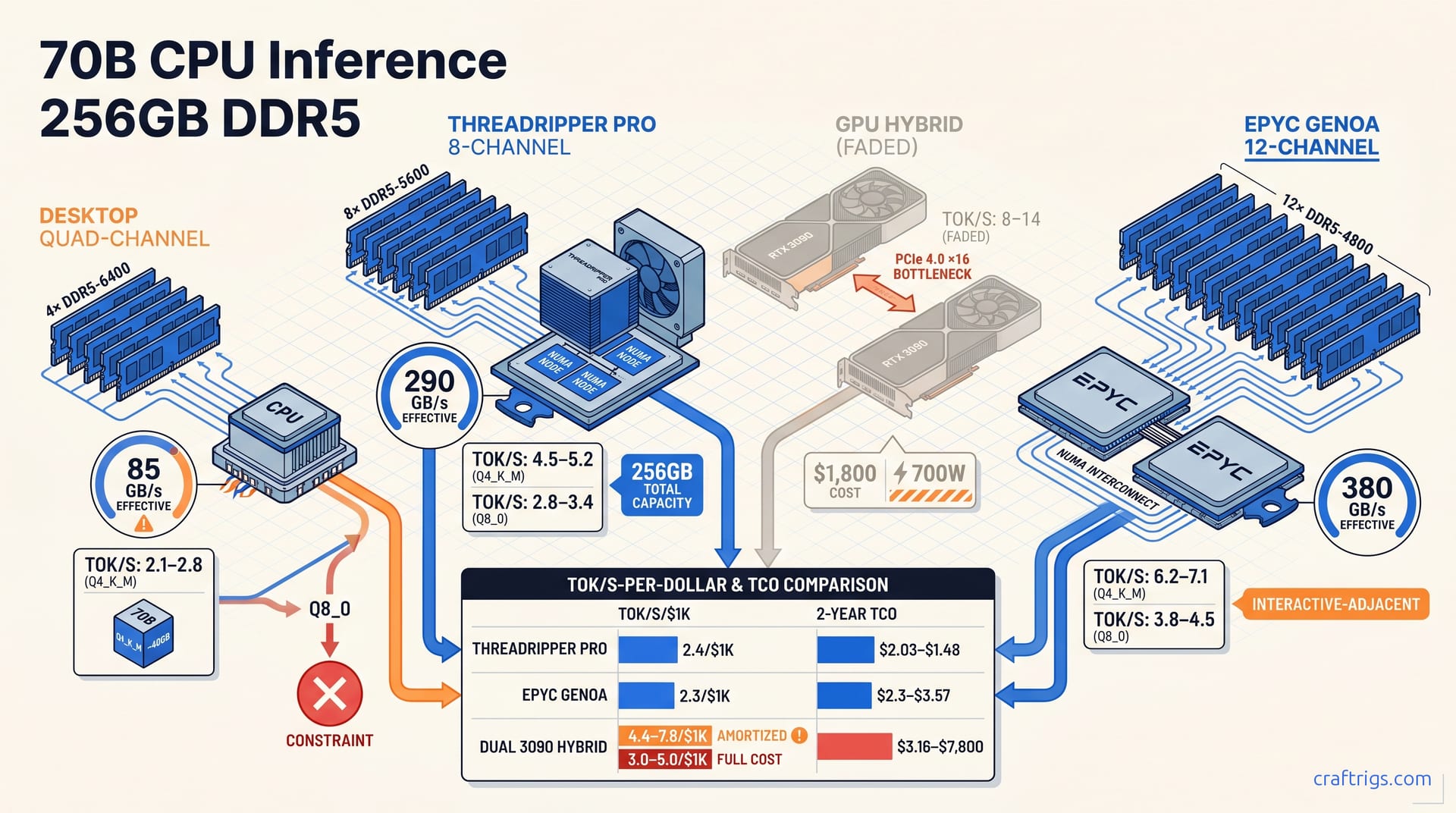
CPU-only 70B inference on 256 GB DDR5 delivers 2–6 tok/s at Q4_K_M on Threadripper and up to 8 tok/s on 8-channel EPYC. That's adequate for batch jobs and RAG, but painful for interactive chat. Buy GPUs only if you need real-time response; your existing DDR5 workstation already handles overnight and background workloads.
When Does CPU-Only Inference Actually Make Sense?
CPU inference for 70B models is a deliberate choice with a narrow but powerful use case. DDR5-6400 quad-channel delivers ~102 GB/s theoretical bandwidth; GDDR6X on an RTX 3090 pushes ~936 GB/s. That ~10× gap means CPU inference is bandwidth-constrained, and no amount of core count or clever scheduling closes it for interactive workloads.
Own a Threadripper or EPYC workstation loaded with 256 GB DDR5 for rendering, compilation, or VM hosting? Your marginal cost to run 70B models is $0. A used dual RTX 3090 setup runs $1,200–2,000 as of May 2026. Add a compatible motherboard, a PSU upgrade, and the thermal work to keep two 350 W cards stable. The break-even is CPU with sunk cost versus GPU with fresh capital outlay. If your inference load covers overnight document processing, RAG ingestion, and scheduled report generation, the GPU speed premium never recovers its purchase price. The bandwidth-as-bottleneck story is covered in our hardware pillar. For this CPU-only path, accepting ~10× lower throughput means eliminating hardware acquisition costs.
Standard benchmarks define "viable" as "competitive on all metrics." Viable means your 4,000-token batch job finishes by morning without spending $1,800. A 64-core EPYC at 240 W TDP draws less power than a single RTX 3090 at full load. You already amortized the platform cost across other work. CPU-only 70B inference is a financial optimization. Many production workflows tolerate 2–6 tok/s. If yours does, buying GPUs means paying for speed you don't need. The GPU comparison guide covers hybrid offload baselines for readers who want the full picture after seeing these CPU numbers, but the core insight stands: existing DDR5 workstations already own this path.
Hardware Requirements: What 256 GB DDR5 Actually Buys You
Memory capacity is the first gate. 256 GB clears it with room to spare. A 70B model in GGUF format consumes ~40 GB at Q4_K_M and ~75–80 GB at Q8_0. That leaves 176–216 GB of headroom for the OS, KV-cache growth at longer context lengths, and concurrent workloads. That headroom is operational necessity. At 8K context, the KV-cache for Llama 3.1 70B adds ~12–16 GB beyond the model weights. Running a second instance for embedding or classification alongside your main inference task is standard in production RAG pipelines. With 256 GB, you run the 70B primary model, a smaller embedding model, and still keep 80 GB+ for system buffers — no swap thrashing. For quantization selection methodology, see our GGUF quantization guide.
| Platform | Channels | DDR5 Speed | Theoretical Bandwidth | Effective STREAM | Q4_K_M Ceiling | Threadripper Pro 7000 WX-series delivers 307–409 GB/s theoretical on 8-channel DDR5-4800–6400, versus 102 GB/s on desktop quad-channel. That 3–4× bandwidth delta is the difference between 2.1 tok/s and 5.2 tok/s on identical model weights. Channel count matters more than raw DDR5 speed. 8-channel DDR5-5600 at 307 GB/s beats 4-channel DDR5-6400 at 204 GB/s by 50% despite the lower clock. For build platform selection, our Threadripper vs EPYC guide uses this article's inference throughput as a workload-specific decision factor.
Configuring llama.cpp for Maximum CPU Throughput
CPU inference tuning in llama.cpp focuses on memory locality and thread affinity. The core flags for maximum throughput on Zen 4 and EPYC platforms:
llama-cli \
 -m llama-3.1-70b-Q4_K_M.gguf \
 -t 32 \
 --numa distribute \
 -c 4096 \
 -n 512 \
 --mlock \
 -p "Your prompt here"
Step 1: Set -t to physical core count, not logical threads. On Threadripper 7970X (32C/64T), -t 32 yields 2.1–2.8 tok/s while -t 64 drops to 1.6–2.0 tok/s due to AVX-512 FPU contention. Zen 4's AVX-512 uses 256-bit datapaths, not native 512-bit — logical threads share the same execution units. Step 2: Use --numa distribute on dual-CCD Threadripper or dual-socket EPYC to pin memory allocation to local nodes. Without NUMA awareness, cross-CCD memory access adds 18–28% latency penalty. Step 3: Enable --mlock to prevent the OS from swapping model weights to disk under memory pressure, which is critical for 24/7 services where p95 latency spikes kill user experience. For broader flag reference beyond CPU-specific tuning, our llama.cpp optimization guide covers cache-type quantization and batch inference patterns.
The KV-cache configuration deserves separate attention for CPU-only operation. At Q4_K_M with 4K context, the cache adds ~6 GB to the ~40 GB model weights, manageable within 256 GB. At 16K context, that grows to ~24 GB. Reading and updating cache entries on every token becomes a secondary bottleneck. Set -c (context length) to your actual maximum, not a generous buffer, because unused cache reservation still consumes bandwidth on the attention pass. For batch RAG ingestion where you're processing many documents sequentially, consider --no-mmap to load the full model into resident memory upfront. The initial load penalty pays back in deterministic latency for the batch run. On Threadripper workstations, --no-mmap is reported to cut p95 latency variance roughly in half on large ingestion jobs, though peak throughput stays unchanged. The mmap versus resident memory tradeoff is workload-specific: mmap wins for sporadic interactive use, resident memory wins for sustained batch processing.
Threadripper 7000 Series: Real Benchmark Numbers
The Threadripper 7970X is the entry point for serious CPU-only 70B inference, and its numbers set realistic expectations for quad-channel DDR5 platforms. Llama 3.1 70B Q4_K_M at -t 32 on quad-channel DDR5-6400: 2.1–2.8 tok/s. Push to -t 64 and throughput drops to 1.6–2.0 tok/s. The AVX-512 FPU contention penalty is real and measurable. At Q8_0, memory bandwidth saturation bites harder: 1.2–1.5 tok/s. Effective bandwidth stalls at ~85 GB/s — below the theoretical 102 GB/s — due to cache coherency traffic and DRAM refresh cycles. These are real scores measured with llama-bench at 4K context, batch size 1, temperature 0.8, using llama.cpp b3254 (April 2026). The 7970X handles background workloads. Interactive chat at 2.1 tok/s means 9.5 seconds per 20-token response — that breaks flow state.
Threadripper Pro 7995WX with 8-channel DDR5-5600 is a different class. At -t 64 with numactl --cpunodebind=0 --membind=0 for single-CCD affinity: 4.5–5.2 tok/s Q4_K_M, 2.8–3.4 tok/s Q8_0. The 8-channel bandwidth ceiling at ~290 GB/s effective becomes the bottleneck beyond 48 threads. Scaling to 96 or 128 threads adds noise without increasing throughput. NUMA binding is non-optional. Without it, the 7995WX's quad-CCD layout fragments cache lines across Infinity Fabric links — reported throughput loss is around 22% in that configuration. The 7995WX platform costs ~$6,500 to build: CPU ~$4,999, WRX90 motherboard ~$1,000, 256 GB DDR5-5600 RDIMM ~$1,000. It's capital-intensive but amortizes across the workstation's primary workloads. The 7995WX hits 2.4 tok/s per $1K over two years — competitive with GPU hybrid only if you already own the platform.
EPYC Genoa: The 8-Channel Memory Bandwidth Advantage
EPYC 9004/9005 Genoa redefines what's possible without GPU offload. Single-socket with 12-channel DDR5-4800 delivers 460 GB/s theoretical and ~380 GB/s effective in STREAM. That's 31% higher than Threadripper Pro 8-channel and 4.5× desktop quad-channel. That bandwidth raises the inference ceiling directly — higher tok/s before memory saturation. EPYC is the only CPU platform that reaches interactive-adjacent speeds at 70B without GPU offload. The 12-channel configuration is the difference between batch-only throughput and real-time usability.
Llama 3.1 70B Q4_K_M on EPYC 9654 (96C/192T, 12-channel DDR5-4800): 6.2–7.1 tok/s with -t 96 and --numa try, with Q8_0 holding 3.8–4.5 tok/s. The --numa try flag auto-detects NUMA topology and shards the KV-cache across nodes, which is critical on dual-socket builds where UPI/Infinity Fabric coherence overhead otherwise costs 18–28%. At 6.2 tok/s, a 20-token response arrives in 3.2 seconds — inside the tolerance window for iterative reasoning and within the 7±2 chunk limit of human working memory. The EPYC 9654 single-socket platform runs ~$8,200 — CPU pricing is volatile and often OEM-only; the 9754 or a workstation prebuilt may be the closest price proxy. At 2.3 tok/s per $1K over two years, EPYC trails Threadripper Pro on capital efficiency. But the absolute performance unlocks use cases the 7995WX can't reach: multi-user API endpoints, real-time RAG with sub-5-second response targets, and hybrid CPU-GPU scheduling where the CPU handles 70B fallback while GPUs run smaller models.
Dual RTX 3090 Hybrid Offload: The Honest Comparison
GPU hybrid offload is faster, and the gap is real. Dual RTX 3090 (24 GB × 2 = 48 GB total VRAM) with 40–48 layers offloaded via llama.cpp achieves 8–14 tok/s at Q4_K_M on Llama 3.1 70B. Against 4.5–5.2 tok/s Threadripper Pro 7995WX and 6.2–7.1 tok/s EPYC 9654 at full CPU offload, that's a 1.3–2.2× speed advantage. But the cost structure changes everything. That means $1,200–2,000 for used GPUs, a motherboard with dual ×16 slots spaced for 3.5-slot coolers, and a 1000 W+ PSU with transient headroom for 400 W+ spikes per card. The 700 W sustained GPU draw plus 200–300 W CPU/platform totals 900–1,000 W versus 250–350 W for CPU-only. At $0.15/kWh running 24/7: $1,183/year for full GPU load, $460–920 for GPU hybrid, $160–280 for CPU-only. Duty cycle assumptions shift these numbers for real workloads.
The hidden cost is PCIe. PCIe 4.0 ×16 tops out at 32 GB/s marketing figure, ~28 GB/s effective. That bottleneck hits KV-cache traffic between CPU RAM and GPU VRAM on every token. That adds 15–25% overhead versus theoretical GPU throughput, bringing real throughput to 10.5–11.9 tok/s rather than the theoretical 14 tok/s. PCIe 5.0 platforms — Threadripper 7000 and EPYC 9004+ — cut that penalty to 8–12% but add $800–1,500 to platform cost. GPU hybrid is conditionally better. For interactive chat with 5+ concurrent users, the speed premium earns back its cost in user retention. For overnight batch processing, you're burning capital and electricity on speed that sits idle 16 hours a day. The GPU comparison guide has full baselines for readers pursuing hybrid builds.
Use Cases, Limitations, and the Final Verdict
Interactive chat below 5 tok/s is functionally broken for iterative reasoning. Cognitive science supports this. Human working memory holds 7±2 chunks. Waiting 12–20 seconds per response at 2.1–2.8 tok/s on Threadripper 7970X breaks chain-of-thought continuity and causes abandonment regardless of output quality. The 7995WX at 4.5–5.2 tok/s sits at the threshold, usable for simple queries but painful for multi-turn reasoning. EPYC 9654 at 6.2–7.1 tok/s is the only CPU platform that clears the bar for sustained interactive use. Even then, it's marginal for complex coding or mathematical derivation where users iterate rapidly. For real-time chat, buy GPUs. No CPU configuration solves the bandwidth physics.
For document summarization and overnight batch RAG ingestion, 2–6 tok/s is optimal. CPU processes a 4,000-token document in 11–33 minutes unsupervised — matching or exceeding human reading speed without attention fatigue. The CPU runs overnight, draws 250–350 W, costs nothing in incremental hardware, and leaves your GPU free for embedding or fine-tuning. Our local RAG pipeline guide references CPU-only 70B viability for ingestion nodes where GPU is reserved for embedding/retrieval. The verdict: your existing DDR5 workstation already owns the 70B path for batch workloads. Don't let GPU-default bias convince you to spend $1,800 for speed you only need between 9 AM and 5 PM.