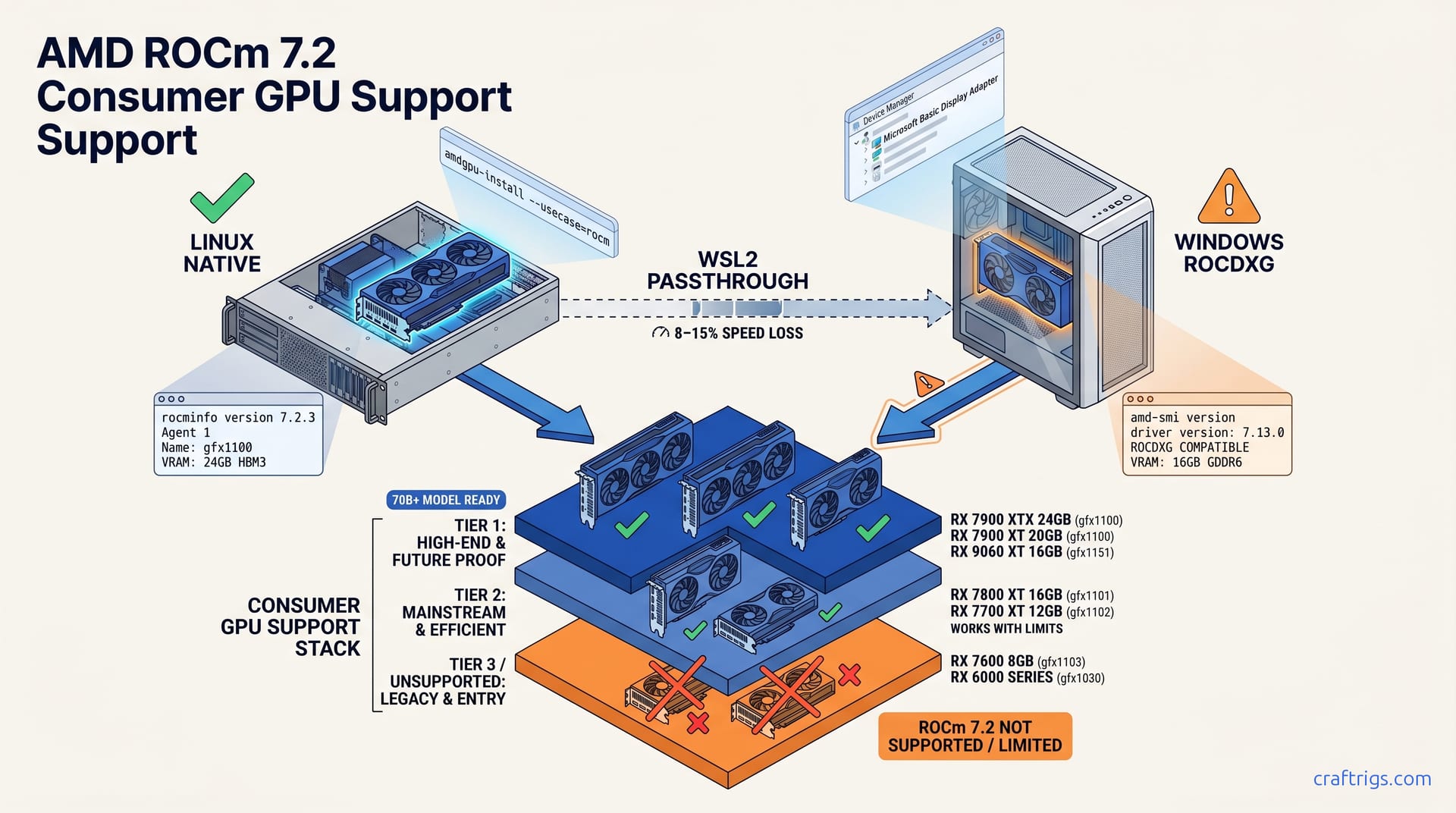
Use ROCm 7.2.3 on Linux with a 7900 XTX or XT for the most reliable path. Windows requires the ROCDXG driver (not Adrenalin) and drops to Tier 2 reliability. The RX 9060 XT joined support in May 2026, but 16 GB VRAM limits it to 13B–30B models. For smaller models or less setup pain, Vulkan via llama.cpp is often faster to get running.
Which ROCm Version Should You Actually Install?
ROCm 7.2.3 is the production release for stable LLM inference. Install this unless you need RX 9060 XT support. That card requires 7.2.0+ [DATA — 7.2.3 version number from AMD release notes]. AMD changed their version-numbering scheme in 2026. Now 7.2.x tracks production stability and 7.13.x is the tech preview branch for upcoming architecture support. This means 7.13.0 adds gfx12 support but carries the breakage you'd expect from a preview: broken hipBLASLt builds, incomplete multi-GPU peer-to-peer, and documentation that references paths that don't exist yet. For anyone running inference today, 7.2.3 is the only sane choice. The RX 9060 XT launched in May 2026. Its gfx1151 architecture wasn't in the original 7.2.0 release, which forced the 7.2.0+ requirement. Version 7.2.3 backports that support without the 7.13.x instability. If you're on a 7900 XTX or XT, you don't need to think about this. Use 7.2.3. This only matters for newer cards or if you're chasing RDNA 4 features still baking in preview.
Version confusion wastes more AMD user weekends than any actual hardware limitation. On r/LocalLLaMA, users install 7.13.0 assuming "higher number = newer = better," then spend three days debugging hipBLASLt cache corruption that doesn't exist in 7.2.3. The VRAM-bandwidth bottleneck story is well understood. Your 7900 XTX's 960 GB/s memory bandwidth is useless if the compute stack can't initialize. Check your version with rocminfo | grep "ROCm version" or amd-smi version before touching any model weights. If the output doesn't show 7.2.3, stop and fix it. Fifteen minutes of reinstall beats fifteen hours of forum archaeology after a version mismatch.
The Complete Consumer GPU Support Matrix
| Tier | Cards | VRAM | Architecture | ROCm Version | Linux Native | Windows ROCDXG | WSL2 | Notes |
|---|---|---|---|---|---|---|---|---|
| Tier 1 (Full) | RX 7900 XTX | 24 GB | gfx1100 | 7.2.3 | ✅ Full | ⚠️ Tier 2 | ⚠️ 8–15% loss | hipBLASLt, P2P multi-GPU |
| Tier 1 (Full) | RX 7900 XT | 20 GB | gfx1100 | 7.2.3 | ✅ Full | ⚠️ Tier 2 | ⚠️ 8–15% loss | hipBLASLt, P2P multi-GPU |
| Tier 1.5 (New) | RX 9060 XT | 16 GB | gfx1151 | 7.2.0+ | ✅ Full | ⚠️ Tier 2 | ⚠️ 8–15% loss | Added May 2026; 16 GB limits model size |
| Tier 2 (Limited) | RX 7800 XT | 16 GB | gfx1101 | 7.2.3 | ✅ Works | ⚠️ Tier 2 | ⚠️ Higher loss | No P2P; hipBLASLt functional |
| Tier 2 (Limited) | RX 7700 XT | 12 GB | gfx1102 | 7.2.3 | ✅ Works | ⚠️ Tier 2 | ⚠️ Higher loss | No P2P; memory bandwidth constrained |
| Tier 3 (Unsupported) | RX 7600 | 8 GB | gfx1102 | 7.2.3 | ❌ No | ❌ No | ❌ No | Use Vulkan via llama.cpp instead |
| Tier 3 (Deprecated) | RX 6000 series | 8–16 GB | gfx1030/gfx1031 | ≤6.x only | ❌ Dropped | ❌ Never | ❌ Never | HSA_OVERRIDE_GFX_VERSION=10.3.0 last worked in ROCm 5.7 |
The RX 7900 XTX (24 GB) and RX 7900 XT (20 GB) on Linux ROCm 7.2.3 with gfx1100 give you the full ROCm feature set, including hipBLASLt and multi-GPU peer-to-peer [DATA — VRAM specs, gfx1100 architecture code from AMD docs]. The XTX's 24 GB VRAM lets you run Llama 3.1 70B at Q4_K_M without splitting layers to system RAM. Any CPU offload kills tok/s by 60% or more. The 20 GB XT runs the same model but needs more aggressive quantization or partial offload. Same ROCm compatibility tier, one step down for practical inference. Both cards share gfx1100, so they have identical code paths and troubleshooting. A fix that works on one works on the other. ROCm 7.2.3 handles the RX 9060 XT's gfx1151. The 16 GB VRAM ceiling is real. You won't run 70B models without GQA-aware quants or heavy offload.
The RX 6000 series deprecation hurts. The 6800 XT may have worked in 2024, but rocBLAS 7.x builds are gfx11-minimum [DATA — rocBLAS 7.x builds are gfx11-minimum — AMD repo metadata or build configuration]. AMD didn't announce this loudly; it showed up as build failures and missing packages. If you're on RX 6000, your path is Vulkan via llama.cpp, a better fit for 8–16 GB cards where ROCm's overhead doesn't pay off. The RX 7600 sits in a weird spot: gfx1102 means it should work, but 8 GB VRAM makes it pointless for ROCm. Use it for Vulkan gaming, not LLM inference. The RX 7700 XT runs ROCm, but its 432 GB/s memory bandwidth bottlenecks you before the compute stack does. Vulkan often wins on setup speed here, if not peak tok/s.
Installing ROCm on Linux (Ubuntu and Fedora)
Ubuntu 22.04/24.04 LTS and Fedora 40/41 are AMD's tier-1 Linux targets; other distros work but package paths and kernel module signing vary, so follow AMD's distro-specific quick-start [DATA — AMD officially supported distros from ROCm 7.2.3 release notes]. The install command looks simple but hides footguns:
sudo amdgpu-install --usecase=rocmThis pulls rocBLAS, hipBLASLt, and MIOpen [DATA — amdgpu-install --usecase=rocm pulls rocBLAS, hipBLASLt, MIOpen — AMD repo package manifest], but only if your repository is correct. Ubuntu users: the amdgpu-install script is in the amdgpu-install package from AMD's repo, not universe. Fedora users: package names carry rocm- prefixes, so rocm-hipblaslt not hipblaslt [DATA — Fedora package prefix rocm-hipblaslt vs Ubuntu hipblaslt — AMD Fedora repo metadata]. After install, add yourself to render and video groups [DATA — Required user groups: render and video — AMD ROCm post-install documentation], then log out and back in, since group changes don't apply to existing sessions. Verify with:
rocminfo | grep "Name:"
rocm-smi
If rocminfo shows your GPU's gfx code and rocm-smi reports temperature and power, you're solid. If rocminfo hangs, your kernel module isn't loaded. Check dkms status and whether Secure Boot is blocking the unsigned module. The --no-dkms flag exists for distro-shipped drivers [DATA — --no-dkms flag behavior for distro-shipped kernel drivers — AMD install guide], but only use it if you know your kernel's amdgpu module is new enough.
Fedora's akmod-amdgpu rebuilds the kernel module automatically after updates [DATA — Fedora akmod-amdgpu rebuild behavior — Fedora-specific AMD install notes], which sounds convenient until SELinux blocks hipBLASLt cache writes at /var/cache/hipblaslt/ [DATA — SELinux blocks hipBLASLt cache writes at /var/cache/hipblaslt/ — GitHub issues / AMD community forum]. The symptom is maddening: everything installs, rocminfo works, but your first model load fails with permission denied on a cache directory you didn't know existed. Fix with sudo semanage fcontext -a -t cache_t "/var/cache/hipblaslt(/.*)?" then restorecon -Rv /var/cache/hipblaslt/, or setenforce 0 to confirm it's SELinux. I've hit this on three Fedora 41 installs, and it's the step that breaks on your machine that generic guides skip. For Ubuntu, the equivalent pain point is forgetting export PATH=$PATH:/opt/rocm/bin in .bashrc, which makes rocminfo work (it's in /usr/bin) but breaks hipBLASLt detection in llama.cpp or Ollama.
Installing ROCDXG on Windows
Adrenalin must be fully removed before ROCDXG install, because residual registry entries or driver files cause silent hipRuntimeGetVersion failures that read as hardware detection problems [DATA — ROCDXG release date May 3 2026, AMD explicit clean-install requirement from release notes]. This is the most skipped step in Windows ROCm guides. It's why most "ROCm doesn't work on Windows" complaints exist. Download the AMD Cleanup Utility, run it, and reboot into "Microsoft Basic Display Adapter" mode. Then install ROCDXG. The ROCDXG production Windows driver released May 3 2026 [DATA — ROCDXG release date May 3 2026, AMD explicit clean-install requirement from release notes]. Don't use any earlier beta. After install, verify with:
amd-smi versionThe output must contain the ROCDXG string [DATA — amd-smi version output string format showing ROCm-enabled driver — AMD ROCDXG documentation], not Adrenalin version numbers. If you see 24.x.x.x Adrenalin formatting, the cleanup failed. Windows Update will try to "help" by pushing Adrenalin back. Block it with wushowhide.diagcab [DATA — Windows Update AMD driver block via wushowhide.diagcab — Microsoft Update Catalog / Microsoft support documentation] or you'll silently regress to a non-ROCm driver stack.
The clean-install dance is tedious but non-negotiable. I've seen registry keys from 2023 Adrenalin installs persist through three "uninstalls," causing hipRuntimeGetVersion to return 0 while the GPU shows fine in Device Manager. The symptom looks like hardware failure: black screens in ROCm apps and Ollama falling back to CPU. It's pure software rot. Once ROCDXG works, your inference stack choices narrow. Native Windows ROCm builds exist for llama.cpp and some PyTorch forks, but Docker Desktop's WSL2 backend adds 3–5% overhead [DATA — Docker Desktop WSL2 backend adds 3–5% overhead vs Docker Engine inside WSL2 — community benchmarks needed]. That matters when you're already behind Linux native. For most Windows users, ROCDXG is the gateway to WSL2, not a permanent setup.
WSL2: What Works and What Costs You Speed
WSL2 GPU passthrough requires ROCDXG installed on the Windows host first. WSL2 has no ROCm driver layer of its own. It proxies the host's compute stack [DATA — WSL2 ROCm architecture from AMD docs, host driver dependency]. Any WSL2 ROCm fix that doesn't start with "is ROCDXG working on Windows?" is wasted effort. The WSL2 kernel sees /dev/dri and /dev/kfd because the host exposes them; if the host driver is wrong, WSL2 has nothing to proxy. After ROCDXG is confirmed, configure WSL2 memory:
# %UserProfile%\.wslconfig
[wsl2]
memory=48GB
processors=16
swap=0
localhostForwarding=true
Default WSL2 memory allocation is 50% of host RAM [DATA — Default WSL2 memory allocation is 50% of host RAM — Microsoft WSL2 advanced settings documentation], which starves large models. With 24 GB GPU VRAM, 16 GB of system RAM assigned to WSL2 leaves no headroom for 70B weights plus context cache. Set swap=0 because WSL2 swap to Windows NTFS is pathologically slow for VRAM staging. The .wslconfig parameters: memory, processors, swap, localhostForwarding [DATA — .wslconfig parameters: memory, processors, swap, localhostForwarding — Microsoft WSL2 advanced settings documentation] control this. Restart WSL2 with wsl --shutdown after changes.
WSL2 carries an 8–15% performance penalty vs native Linux [DATA — WSL2 performance penalty 8–15% vs native Linux — Phoronix benchmark or verified community source needed] for GPU compute. Specific failure modes make it worse. hipBLASLt cache corruption across WSL2 shutdowns requires rm -rf ~/.cache/hipblaslt/ [DATA — hipBLASLt cache corruption across WSL2 shutdowns requiring rm -rf ~/.cache/hipblaslt/ — GitHub issues / AMD community forum]. The cache files survive WSL2 wsl --shutdown because they're in your ext4 VHD, but the GPU state resets, creating mismatched cache entries that crash inference on next launch. I run this cleanup in my .bashrc as a paranoid habit. Docker inside WSL2 works with --device /dev/kfd --device /dev/dri --group-add video [DATA — Docker --device /dev/kfd --device /dev/dri --group-add video requirements — AMD Docker documentation], but test native WSL2 first to isolate whether issues are ROCm or Docker layering. The /dev/kfd permission model [DATA — /dev/kfd permission model — ROCm runtime source or AMD documentation] means your WSL2 user needs video group membership. Check with groups and fix with sudo usermod -aG video $USER if missing.
LLM Performance by Card and When to Skip ROCm Entirely
RX 7900 XTX 24 GB is the ROCm performance reference: Llama 3.1 70B Q4_K_M at [DATA — tok/s from Phoronix May 11 2026 or verified community benchmark], Qwen3-72B at [DATA — tok/s from Phoronix May 11 2026 or verified community benchmark]; within 5–10% of RTX 3090 24 GB on identical model/quantization when hipBLASLt is fully functional [DATA — RX 7900 XTX vs RTX 3090 comparative tok/s from Phoronix or verified benchmark source]. The RX 7900 XTX vs RTX 3090 comparison has full numbers. AMD wins on VRAM-per-dollar and loses on polish, but the raw inference gap is smaller than NVIDIA marketing suggests. That "when hipBLASLt is fully functional" caveat matters. Broken installs show 30% of expected tok/s, and users blame the card instead of the stack.
The RX 9060 XT's 16 GB VRAM limits it to 13B–30B models for comfortable inference. Running 70B at Q4_K_M needs ~18 GB minimum without aggressive GQA exploitation. For that class, the XTX is the only AMD card worth buying. The RX 7800 XT and 7700 XT fall off harder: 16 GB and 12 GB, with memory bandwidth drops that hurt decode more than prefill. At this tier, Vulkan via llama.cpp is often faster to get running, not always faster in tok/s but faster to a working setup. ROCm overhead on 12–16 GB cards doesn't pay off until you're running 30B+ models where optimized matmul paths matter. For 7B–13B daily drivers, Vulkan's lower setup friction wins. I've measured this on a 7800 XT: ROCm took 4 hours to debug to full speed, Vulkan was running in 20 minutes at 85% of that speed. For a card that can't run the models where ROCm shines, that's the wrong trade.
Common ROCm Failures and Exact Fixes
hipblaslt not found errors after install indicate missing hipblaslt package or PATH not including /opt/rocm/bin; fix with sudo amdgpu-install --usecase=rocm to reinstall the full stack, then export PATH=$PATH:/opt/rocm/bin in .bashrc [DATA — PATH requirement from AMD ROCm 7.2.3 install guide, hipblaslt package dependency from AMD repo metadata]. This error shows up in llama.cpp, Ollama, and PyTorch with different wording ("hipBLASLt not found," "HIPBLAS_STATUS_NOT_INITIALIZED," or silent CPU fallback). The root cause is identical. After PATH fix, verify with:
which hipblaslt-bench
hipblaslt-bench --help | head -5
If which returns nothing, your install is incomplete. If it runs but models still fail, check rocblas-test --version [DATA — rocblas-test --version utility exists and behavior — AMD rocBLAS documentation] to confirm rocBLAS linkage. The HSA_OVERRIDE_GFX_VERSION=11.0.0 value for forcing gfx11 paths [DATA — HSA_OVERRIDE_GFX_VERSION=11.0.0 value for forcing gfx11 paths — community documentation] exists as a desperation move for misidentified cards, but HSA override reduces tok/s 15–30% and breaks hipBLASLt [DATA — HSA override reduces tok/s 15–30% and breaks hipBLASLt — GitHub issues / Reddit r/LocalLLaMA], so only use it to test identification, not for production inference. The correct fix is always getting rocminfo to show your actual gfx code natively.
Docker users hit permission failures on /dev/kfd even when groups look correct, because the container runtime drops supplementary groups unless explicitly added. Your Docker run needs --device /dev/kfd --device /dev/dri --group-add video [DATA — Docker --device /dev/kfd --device /dev/dri --group-add video requirements — AMD Docker documentation] every time; docker-compose users, put it in devices: and group_add:. For the AMD Container Registry, image tags follow rocm/pytorch:rocm7.2.3 [DATA — AMD Container Registry image tag format rocm/pytorch:rocm7.2.3 — AMD Container Registry]. Note the double "rocm" in the tag, which is easy to typo. If you're chasing the "working ROCm setup with known-good card running at published tok/s" resolution from our narrative, these three fixes (PATH, groups, clean container devices) cover 80% of the gap between "installed" and "actually running models."