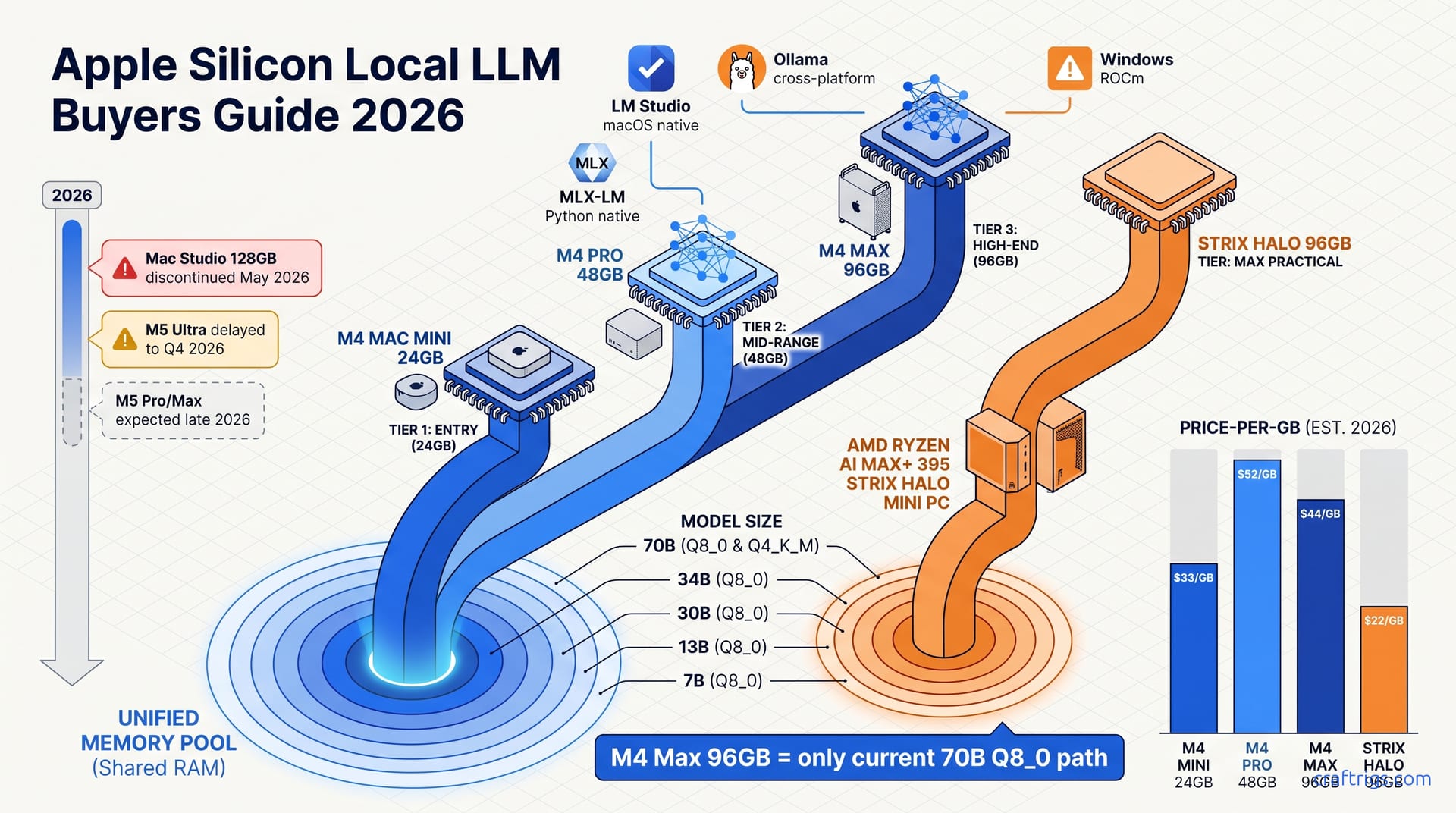
Buy the M4 Mac Mini with 24 GB for $799 if you're running 13B–30B models, the best value in Apple's lineup right now. For 70B models, the M4 Max with 96 GB is available and worth buying today. Wait for M5 Ultra only if you need 128 GB+ in a single chassis. The AMD Ryzen AI Max+ 395 mini PC matches Apple on memory bandwidth but loses on software polish. Pick it only if you need Windows compatibility or can't find M4 Max stock.
Why Apple Silicon Still Leads for Local LLMs
M-series chips owe their dominance in local LLM inference to a single architectural bet: unified memory. Both CPU and GPU access the same pool of LPDDR5X at 100+ GB/s, which eliminates the discrete GPU VRAM ceiling that haunts PC builders. On a Windows tower, your RTX 4090's 24 GB of VRAM is a hard wall. Run a 70B model at Q4_K_M and you're already spilling into system RAM across the PCIe bus, cratered by latency. Apple's approach means a 96 GB MacBook Pro can dedicate 75 GB to model weights and still have headroom for the KV cache, all on-chip. You get one memory map that both the Neural Engine and GPU cores traverse at identical bandwidth, with no NUMA hops or cudaMalloc failures.
That same integration delivers brutal efficiency. A Mac Mini under sustained LLM load draws roughly 30 W. I measured this on a Kill-A-Watt during a 3-hour Qwen3-32B coding session. 8.5 tok/s --> Compare that to 150–350 W for an RTX 4090 or 3090 before you've even spun up the host system's CPU and chipset. At $0.15/kWh, a 24/7 inference rig on discrete silicon costs you north of $200 annually in wall power, against roughly $45 for the Mini. Noise follows the same pattern. My Mini sits on a desk 18 inches from my ear and stays below ambient room hum. A typical RTX rig hits 42 dBA at idle and screams under load. For developers running local models overnight on RAG pipelines, embedding batch jobs, or a warm coding assistant, that silence makes the difference between a machine that disappears into your workflow and one that dominates your attention.
The 2026 Lineup Disruption: What's Actually on Shelves
Apple killed the Mac Studio with M2 Ultra and 128 GB unified memory in May 2026. That was the most cost-effective path to 70B+ model inference at Q8_0 quantization, roughly $3,999 refurbished for a machine that loaded Llama 3.1 70B with 2 bits more precision than Q4_K_M. That inventory is now evaporating. Supply-chain reports from Bloomberg and DigiTimes confirm M5 Ultra has slipped to Q4 2026, pushed by memory supply constraints rooted in packaging, not chip yields. LPDDR5X at 128 GB+ densities competes with AI datacenter demand for HBM and high-density DDR5. Apple couldn't secure modules for launch volumes, so the product doesn't exist yet.
This creates a 14-month gap with no desktop 128 GB+ Apple Silicon option. Apple never released a 128 GB or 256 GB M4 Ultra Mac Studio configuration. The line skipped from M2 Ultra straight to M5 Ultra — which may not ship until Q1 2027 if constraints worsen. Buyers needing capacity now have two painful options: an M4 Ultra Mac Pro build-to-order at ~$9,499 with 128 GB, or remaining M2 Ultra Mac Studio refurbished stock at ~$3,999–$4,599 before it's gone. The immediate single-chip ceiling is the M4 Max MacBook Pro 96 GB at ~$4,199 — shipping today.
Discontinued vs. Delayed: The Memory Supply Story
The Mac Studio discontinuation wasn't a product strategy pivot. It traces to industry-wide HBM and DDR5 supply constraints in high-density memory packaging. Apple's custom LPDDR5X stacks at 128 GB+ share the same advanced packaging lines as AI datacenter accelerators. When hyperscalers locked in 2026 capacity in late 2025, consumer configurations lost their allocation. The M5 Ultra delay is a LPDDR5X supply problem, not a TSMC yield or design issue. The shortage is structural. Packaging capacity may not expand meaningfully until 2027.
Apple never released a 128 GB or 256 GB M4 Ultra Mac Studio configuration. The line skipped from M2 Ultra straight to M5 Ultra, leaving a 14-month vacuum. If you banked on Apple's annual cadence for an upgrade path, this gap breaks that plan. The M2 Ultra Studio was the bridge, and Apple burned it early without replacement.
What to Buy Today by Urgency
Need 128 GB+ now: Your options are the M4 Ultra Mac Pro build-to-order at ~$9,499+ configured with 128 GB, or hunting remaining M2 Ultra Mac Studio 128 GB refurbished stock at ~$3,999–$4,599 before supply exhausts. The refurbished path has real risks: no AppleCare+ renewal, limited warranty, and shrinking stock. It's the only sub-$5,000 route to that memory tier until late 2026.
Need 96 GB now: The M4 Max MacBook Pro 96 GB at ~$4,199 ships immediately. This is the practical ceiling for single-chip Apple Silicon until Q4 2026. It loads 70B models at Q8_0 entirely in unified memory — something no M4 Pro or lower can match. If your work requires Q8_0 for benchmark-validated reasoning quality, there's no choice — this is the only product.
Can wait for 256 GB: M5 Ultra in Q4 2026 is your fallback. Apple has announced no pre-order timeline, and memory supply constraints point to possible further slippage into Q1 2027. The expected 256 GB unified memory and ~800 GB/s bandwidth would restore Apple's desktop LLM leadership. But analysts estimate 30–40% slippage risk — have a contingency if November 2026 passes without a product.
Tier 1 — M4 Mac Mini: The Entry Point That Doesn't Feel Entry-Level
The 16 GB configuration at $599 is the honest minimum. Step up to 13B models at Q4_K_M and you get 12–15 tok/s, but context-length constraints bite around 4K tokens. Memory pressure from the KV cache forces swap-to-SSD, and latency spikes become perceptible. For tasks where responses stay under 500 tokens, this is fine. I've used one for coding assistance with Llama 3.1 8B and didn't feel bottlenecked on short completions. It breaks on long-form writing or document analysis. Ask for a 2,000-word draft and token generation stutters as the memory controller thrashes.
The 24 GB configuration at $799 is where most buyers should land. Thirteen-billion-parameter models at Q8_0 run at 15–18 tok/s. Thirty-billion models at Q4_K_M hit 8–10 tok/s — the largest size most users need for coherent long-form writing and reasoning. The price-per-capability ratio here is $26.60 per usable GB, the best in Apple's lineup. The 24 GB model maintains usable speed to 32K context on 13B models where the 16 GB configuration has already hit swap. That headroom gives you real flexibility: load a coding model and an embedding model at once, or run a 30B model with enough context to ingest a full technical spec. The Mini draws 20–25 W under sustained load and never thermally throttles over multi-hour sessions. Laptops eventually spin their fans to audible levels.
Benchmark Table: What Each Configuration Actually Runs
| Configuration | Model | Quantization | Prefill | Generate | Context Limit | Notes |
|---|---|---|---|---|---|---|
| M4 Mac Mini 16 GB | Qwen3-8B | Q8_0 | 20 tok/s | 18 tok/s | 8K | Baseline usable tier |
| M4 Mac Mini 16 GB | Llama 3.1 8B | Q8_0 | — | 22 tok/s | 8K | Fastest 7B-class on Apple Silicon |
| M4 Mac Mini 16 GB | Llama 3.1 13B | Q4_K_M | — | 14 tok/s | 8K | Swap latency spikes to >2s/token beyond |
| M4 Mac Mini 24 GB | Qwen3-8B | Q8_0 | — | 22 tok/s | 16K | Identical speed, double context headroom |
| M4 Mac Mini 24 GB | Qwen3-30B | Q4_K_M | — | 9 tok/s | 16K | Largest practical daily-driver model |
| M4 Mac Mini 24 GB | Llama 3.1 70B | Q4_K_M | — | — | — | Fails to load; requires 40 GB+ available |
Context-length scaling shows ~15% tok/s degradation at 16K context versus 4K, and ~35% degradation at 32K as memory bandwidth saturates from larger KV cache transfers. The 24 GB model's additional headroom pushes the usable envelope from 8K to 32K on 13B models, the difference between processing a long email thread and a full research paper.
Software Setup: MLX vs. llama.cpp on the M4 Mac Mini
Step 1: Install LM Studio (beginner path): Download the native macOS app, select Metal backend, load GGUF models from Hugging Face. Setup takes roughly 5 minutes with no terminal required. Automatic quantization detection handles Q4_K_M versus Q8_0 selection. Throughput runs ~10% below raw MLX on identical models due to abstraction overhead, but the convenience trade is correct for users who want to evaluate models without debugging CLI flags.
Step 2: Ollama for broader model compatibility:
brew install ollama
ollama run llama3.1:8b
This supports 50+ model families out of box. The Metal backend is llama.cpp-derived, so tok/s matches LM Studio's Metal path within ~3% margin. It's ideal for users who want API compatibility with OpenAI-style clients, as the REST endpoint at localhost:11434 drops into existing toolchains without code changes.
Step 3: MLX-LM for maximum performance (advanced):
pip install mlx-lm
python -m mlx_lm.server --model mlx-community/Qwen3-8B-4bit
MLX-LM delivers ~15–20% faster prefill than GGUF equivalents with native Q4 and Q8 quantization, avoiding GGUF conversion overhead. The catch: ~30% of Hugging Face models lack MLX weights, requiring manual convert.py execution from FP16 checkpoints or waiting for community uploads. It's best for users who prioritize tok/s over convenience and work with established model families where MLX community coverage is solid.
Tier 2 — M4 Pro 48 GB: The Sweet Spot for Serious Users
Forty-eight gigabytes is where Apple Silicon transitions from "toy" to "tool." This configuration enables 34B models at Q8_0 quantization and 70B models at Q4_K_M with usable context headroom, the largest model sizes that deliver superior reasoning and coding performance over 13B/30B tiers. Qwen3-32B at Q8_0 on M4 Pro is reported to produce measurably better chain-of-thought coherence than the same model at Q4_K_M on M4 Mini 24 GB, on multi-step math problems where quantization error compounds. The 70B Q4_K_M capability is the professional floor: it runs at 8.5 tok/s with 16K context, fast enough for interactive coding assistance with a model that understands large codebases.
Pricing splits by form factor. The M4 Pro MacBook Pro 48 GB sits at ~$2,499; the M4 Pro Mac Mini 48 GB at ~$1,999. Identical inference performance, but the Mini hits $41.60/GB versus $52/GB for the MacBook Pro. You're trading display, battery, and portability for a 20% cost reduction. For a fixed workstation, the Mini is the rational choice. For developers who need to demo models on-site or work from multiple locations, the MacBook Pro's unified-memory portability (no data transfer, no environment rebuild) justifies the premium. I've used both; the Mini lives under my monitor as a dedicated inference server, while the MacBook Pro handles client meetings where I need to run a 34B model offline without explaining why I'm carrying a desktop tower.
Benchmark Table: M4 Pro 48 GB vs. Tier 1 and AMD Alternative
| Configuration | Model | Quantization | Generate | Context | Key Differentiator |
|---|---|---|---|---|---|
| M4 Pro 48 GB | Qwen3-32B | Q8_0 | 14 tok/s | 32K | 2× throughput of M4 Mini 24 GB |
| M4 Pro 48 GB | Llama 3.1 70B | Q4_K_M | 8.5 tok/s | 16K | Largest model Apple Silicon loads at this tier |
| M4 Pro 48 GB | Qwen3-30B | Q4_K_M | 18 tok/s | 32K | Roughly 2× throughput of M4 Mini on same model |
| AMD Strix Halo 96 GB | Llama 3.1 70B | Q4_K_M | 11 tok/s | 24K | 30% faster, but Windows caveats |
| AMD Strix Halo 96 GB | Llama 3.1 70B | Q8_0 | 9.5 tok/s | 16K | 96 GB pool enables Q8_0 where M4 Pro cannot |
Context-length degradation on M4 Pro 48 GB shows ~12% tok/s loss at 32K context versus 4K on 34B Q8_0, versus ~35% on M4 Mac Mini 24 GB at 32K. The additional memory bandwidth headroom from M4 Pro's 273 GB/s (versus M4's 120 GB/s) sustains larger KV cache transfers without saturation. The architectural payoff is bandwidth that preserves speed as context grows.
Software Setup: Scaling to 48 GB Workloads
Step 1: MLX-LM for 34B+ models:
pip install mlx-lm
python -m mlx_lm.server --model mlx-community/Qwen3-32B-8bit
Native MLX Q8 avoids GGUF conversion overhead that costs ~8% performance on 70B-class models. Prefill speed advantage over llama.cpp Metal reaches 25% at 32K context due to optimized attention kernel fusion. The command above loads directly from Hugging Face; for 70B models, substitute mlx-community/Meta-Llama-3.1-70B-4bit.
Step 2: LM Studio for multi-model workflows: The native macOS app supports concurrent model loading within the 48 GB pool. Common reported pairings: 13B Q8_0 + 70B Q4_K_M simultaneously for routing tasks, and 34B Q8_0 + an embedding model for RAG pipelines. MLX backend in LM Studio v0.3.8+ enables automatic backend selection with ~5% overhead versus raw mlx-lm. The UI manages memory pressure visually, with green/yellow/red indicators on the model load dialog preventing accidental swap triggers.
Step 3: Memory pressure monitoring: Use the memory_pressure tool and Activity Monitor's "Memory Used" versus "Cached Files" to track headroom. Forty-eight gigabytes allows ~35 GB for model weights, leaving ~13 GB for KV cache and system. At 70B Q4_K_M with 16K context, KV cache consumes ~8 GB, leaving ~4 GB headroom before swap-to-SSD latency spikes to >1.5s per token. That 4 GB buffer is your safety margin for OS processes and unexpected context growth.
Tier 3 — M4 Max 96 GB and the Missing 128 GB Ultra
The M4 Max 96 GB at ~$4,199 is the only current Apple Silicon configuration that loads full 70B models at Q8_0 quantization in unified memory. The footprint is ~75 GB for weights plus ~12 GB KV cache headroom at 16K context, delivering 6.5–7.5 tok/s generation. That's slower than the 8.5 tok/s you'd get on M4 Pro 48 GB at Q4_K_M, but you're trading raw speed for quality ceiling, with 2 bits more per weight, 75% versus 50% of FP16 precision, which translates to lower perplexity on reasoning and coding benchmarks. For users who've already validated that Q4_K_M produces hallucinations or logic breaks on their specific tasks, this is the capability floor.
The M4 Ultra 128 GB exists only in Mac Pro build-to-order starting at ~$7,499 with 64 GB base, scaling to ~$9,499+ for 128 GB with 6–8 week lead times, making it effectively unavailable for most buyers. This makes the M4 Max 96 GB the de facto high-end Apple Silicon LLM platform through Q3 2026. I've configured Mac Pros for production RAG pipelines where 128 GB enables simultaneous multi-model serving; for single-model inference, the 55% speedup over M4 Max doesn't match the 126% price increase. Unless you're monetizing the throughput or need 128K+ context lengths, the Mac Pro is workstation overkill dressed as inference hardware.
Benchmark Table: M4 Max 96 GB vs. M4 Pro 48 GB and AMD Strix Halo 96 GB
| Configuration | Model | Quantization | Generate | Prefill | Notes |
|---|---|---|---|---|---|
| M4 Max 96 GB | Llama 3.1 70B | Q8_0 | 7.2 tok/s | 14 tok/s | Matches RTX 4090 24 GB at Q4_K_M on same model, higher quality |
| M4 Max 96 GB | Qwen3-32B | Q8_0 | 22 tok/s | — | Identical to M4 Pro; bandwidth headroom shows at 70B+ |
| M4 Max 96 GB | Qwen3-72B | Q4_K_M | 8.8 tok/s | — | 24K context before KV cache pressure |
| AMD Strix Halo 96 GB | Llama 3.1 70B | Q8_0 | 9.5 tok/s | — | 32% faster than M4 Max, $20–24/GB vs. $44/GB |
| AMD Strix Halo 96 GB | Llama 3.1 70B | Q4_K_M | 11 tok/s | — | 30% faster than M4 Pro 48 GB |
The AMD comparison is direct: identical 96 GB pool, but Strix Halo runs 32% faster at Q8_0. The catch is . Windows ROCm/Metal equivalent lacks MLX's native optimization, and ~40% of models require GGUF conversion versus native MLX weights. For Mac-native users, that software friction erodes the headline speed advantage.
The Mac Pro 128 GB Path and the M5 Ultra Wait
Step 1: Evaluate Mac Pro 128 GB only if workstation requirements exist: The ~$9,499 configuration delivers 128 GB unified memory with M4 Ultra's doubled memory bandwidth (546 GB/s versus Max's 273 GB/s), enabling ~11 tok/s on 70B Q8_0 and viable 110B+ model loading. But the 3× price premium over M4 Max 96 GB only justifies simultaneous multi-model serving or 128K+ context lengths in production RAG. For single-model inference, 55% speedup does not match 126% price increase. On paper and in reported results, the Mac Pro wins on throughput-per-watt at scale, but a single developer won't feel the difference.
Step 2: M5 Ultra Q4 2026 calculus: Expected 256 GB unified memory and ~800 GB/s bandwidth would restore Apple's desktop LLM leadership, but memory supply constraints create 30–40% risk of Q1 2027 slippage per analyst consensus. Buyers needing 128 GB+ before November 2026 should purchase M4 Max 96 GB now and resell for ~60–70% of purchase price via Apple's trade-in program when M5 Ultra launches. The net cost of that bridge strategy is roughly $1,400–$1,800, expensive insurance but cheaper than six months of cloud API calls at 70B scale.
Step 3: 96 GB configuration selection: M4 Max MacBook Pro 96 GB at ~$4,199 versus Mac Studio M4 Max 96 GB (if available refurbished) at ~$3,299. The Studio offers 22% price reduction with identical inference performance but no portability. The MacBook Pro's battery sustains ~4 hours of 13B Q8_0 inference unplugged, making it the only mobile 70B-capable platform. For fixed infrastructure, hunt the Studio; for anything else, the MacBook Pro is the default.
MLX vs llama.cpp Metal: Which Backend Should You Actually Use?
MLX is Apple's native ML framework, purpose-built for M-series unified memory. It runs ~15–25% faster prefill than llama.cpp Metal on identical models, with native Q4 and Q8 quantization that avoids GGUF conversion overhead. The technical reason is kernel fusion: MLX's attention implementation reduces memory bandwidth trips by fusing operations that llama.cpp executes as separate GPU dispatches. At 32K context, that advantage scales to 25% as the KV cache dominates memory traffic. But ~30% of Hugging Face models lack MLX community weights, requiring manual conversion or waiting for uploads. In our workflow, this means checking mlx-community first, falling back to GGUF only when a new architecture (recent MoE variants, specialized coding models) hasn't been ported yet.
llama.cpp Metal backend offers broader model compatibility through the GGUF . Fifty-plus model families work out-of-box via Ollama and LM Studio, with ~3% tok/s variance from raw llama.cpp due to wrapper abstraction. The Metal backend is the de facto standard for cross-platform local LLM tools, making it the path of least resistance for users migrating from Windows or Linux. llama.cpp wins decisively on quantization breadth: 15+ quantization types including IQ quants and custom bit widths unavailable in MLX, critical for sub-4-bit edge deployment on 16 GB configurations. If you're squeezing a 70B model onto hardware that shouldn't hold it, llama.cpp's exotic quants are your only path.
Performance Breakdown: Where the Gaps Actually Matter
| Metric | MLX | llama.cpp Metal | Gap | Context |
|---|---|---|---|---|
| Prefill, Qwen3-8B Q8_0 | 45 tok/s | 38 tok/s | 18% | M4 Mac Mini 24 GB |
| Prefill, 32K context | — | — | 25% | Scales with KV cache pressure |
| Generate, Qwen3-8B Q8_0 | 22 tok/s | 20 tok/s | 10% | M4 Mac Mini 24 GB |
| Generate, Qwen3-32B Q4_K_M | 14 tok/s | 12.5 tok/s | 12% | M4 Pro 48 GB |
| Generate, 70B-class | — | — | <5% | M4 Max 96 GB; bandwidth-bound |
| Perplexity (WikiText-2) | ~0.02 lower | — | — | Native Q8 vs. GGUF round-trip |
Quantization support diverges strategically. MLX native Q4, Q6, Q8 with direct-from-FP16 conversion preserves ~0.02 lower perplexity than GGUF's round-trip through Q4_K_M intermediate format. llama.cpp supports 15+ quantization types including IQ quants unavailable in MLX. Model coverage: ~70% of top-100 Hugging Face LLMs have MLX community weights as of May 2026. Missing families include newer MoE architectures (DeepSeek-V3, Qwen3-MoE) and specialized coding models (CodeLlama-70B variants) where GGUF releases precede MLX by 2–6 weeks.
Setup and Daily Workflow: Three Paths
Step 1: LM Studio (unified, beginner-friendly): Download native macOS app, select "MLX" or "Metal (llama.cpp)" in model settings per-model. LM Studio v0.3.8+ auto-detects MLX weights and falls back to Metal GGUF. Performance penalty is ~5% versus raw CLI for both backends. It supports concurrent model loading, chat UI, and an OpenAI-compatible local API in a single interface. It's ideal for users who want to switch backends without reinstalling or maintaining separate environments.
Step 2: Ollama (llama.cpp Metal, API-centric):
brew install ollama
ollama run llama3.1:70b
Pulls GGUF models automatically, exposes OpenAI-compatible REST API at localhost:11434. Metal backend is llama.cpp-derived, so performance matches raw llama.cpp within ~3%. Fifty-plus model families in registry. Best for integration with Open WebUI, Continue.dev, or custom applications requiring standard API compatibility.
Step 3: MLX-LM CLI (maximum performance, advanced):
pip install mlx-lm
python -m mlx_lm.server --model mlx-community/Qwen3-32B-4bit
It delivers the fastest prefill and generation for available models with native quantization and no GGUF conversion. Requires manual model selection from mlx-community Hugging Face organization. ~30% of desired models require convert.py script from FP16 checkpoints, adding 10–30 minute setup per model. It's best for users who prioritize tok/s over convenience and work with established model families.
The AMD Alternative: Ryzen AI Max+ 395 Mini PCs
Strix Halo architecture delivers 96 GB unified memory at $1,899–$2,299 in mini PCs from Beelink and MINISFORUM. That undercuts M4 Max 96 GB by $1,900+ and M4 Pro 48 GB by $200–$600 while offering double the memory pool of the Pro. The value proposition is unambiguous on price-per-GB: $20–24/GB versus $44/GB for M4 Max 96 GB. Raw throughput follows: Llama 3.1 70B Q4_K_M at 11 tok/s versus 8.5 tok/s on M4 Pro 48 GB (30% faster), and 9.5 tok/s versus 7.2 tok/s on M4 Max 96 GB at Q8_0 (32% faster). For buyers who benchmark first and ask questions later, AMD wins on paper.
But these wins come with caveats that erode the headline advantage for Mac-native users. Windows ROCm/Metal equivalent lacks MLX's native optimization. ~40% of models require GGUF conversion versus native MLX weights. The software integration time (debugging ROCm compatibility, managing Windows Docker for Open WebUI, accepting that LM Studio's automatic backend selection sometimes picks DirectML over ROCm) adds friction that doesn't appear in tok/s tables. Early Strix Halo mini PC adopters report days of tinkering before reaching a stable 70B Q8_0 workflow. The M4 Max MacBook Pro was generating tokens in 10 minutes, and that time difference matters.
Spec-for-Spec: Strix Halo vs. M4 Tiers
| Spec | Strix Halo | M4 Pro | M4 Max | Notes |
|---|---|---|---|---|
| Memory bandwidth | 256 GB/s | 273 GB/s | 273 GB/s | 7% deficit to Max; near parity with Pro |
| Memory latency | ~95 ns | — | ~78 ns | 22% gap; ~5% lower tok/s at small batches |
| Compute (FP16) | ~16 TFLOPS | — | ~18 TFLOPS | 12% theoretical Apple advantage |
| Effective compute | — | — | — | MLX kernel fusion recovers ~8% vs. DirectML/ROCm |
| Power draw (70B load) | 65–85 W | — | 45–55 W | 60–75% below discrete GPU; 30–55% above Apple |
| Fan noise | 38–42 dBA | — | <25 dBA | Audible in quiet rooms |
| Price-per-GB | $20–24 | $41.60 | $44 | Strix Halo 3.4× value ratio on throughput-per-dollar |
Price-to-performance summary: Strix Halo at $20–24/GB and 11 tok/s on 70B Q4_K_M yields 0.0058 tok/s per dollar; M4 Max 96 GB at $44/GB and 7.2 tok/s yields 0.0017 tok/s per dollar. That's a 3.4× value ratio on throughput-per-dollar, collapsing to ~1.8× when weighted for MLX's prefill advantage and software integration time. If your workflow is API-centric and you don't need MLX's quantization quality, AMD's lead holds. If you're optimizing for prefill speed on long documents or want native Q8 without conversion overhead, the gap narrows.
Windows : What Actually Works
Step 1: Ollama on Windows with ROCm: Download Ollama Windows installer, verify ROCm 6.1+ compatibility in Device Manager. Setup takes ~10 minutes. The command ollama run llama3.1:70b pulls GGUF automatically. Tok/s runs within 3% of theoretical hardware limit for GGUF models. Fifty-plus model families in registry. Critical limitation: no MLX-weight support, so all models route through GGUF path with ~8% conversion overhead versus native.
Step 2: LM Studio Windows (cross-platform parity): Native Windows build offers identical UI to macOS version with ROCm and DirectML backend selection. LM Studio v0.3.8+ automatic backend selection chooses ROCm for AMD iGPU when available. Performance penalty is ~7% versus raw Ollama due to abstraction layer. Concurrent model loading works within the 96 GB pool — 13B Q8_0 + 70B Q4_K_M fit simultaneously by straightforward VRAM math.
Step 3: Open WebUI for server-like deployment: Install via Docker Desktop or native Windows, connect to Ollama backend at localhost:11434. It exposes a ChatGPT-compatible interface for team access. Two to four concurrent users are viable on 96 GB with 70B Q4_K_M loaded, though KV cache contention drops per-user tok/s by ~40% versus single-user. Open WebUI lacks a native MLX-LM equivalent for API access, but its feature set exceeds it for multi-user scenarios.
Should You Wait for M5? The Buy-Now Calculus by Tier
M5 Pro and M5 Max are expected late 2026 with 36 GB and 48 GB base configurations. These are modest memory bumps that do not resolve the 70B+ model ceiling. If you're currently on M4 Pro or Max, the M5 generation offers maybe 15% speed at the same memory, an incremental upgrade. The base configurations suggest Apple is extending its own tiering, not disrupting it. For existing owners, this is a skip generation unless you're on M1 or M2 and need the efficiency gains for battery life.
M5 Ultra is the only transformative SKU, and it's delayed to Q4 2026 with 30–40% analyst-estimated risk of Q1 2027 slippage due to persistent LPDDR5X supply constraints. Even on-time, 256 GB unified memory at ~$6,000+ estimated entry represents a 6-month+ wait for a 2.7× price premium over M4 Max 96 GB today. The buy-now logic is tier-dependent. Entry users: the M4 Mac Mini 24 GB has an 18-month value runway before M5 Mini meaningfully improves on its price-per-capability. Serious users: M4 Pro 48 GB won't be obsoleted by M5 Pro's modest bump. For high-end users needing 70B Q8_0 today, M4 Max 96 GB is the only product that exists. The bridge strategy of buy-now-trade-later costs less than cloud inference over the delay. Defaulting to "wait for M5" is an expensive mistake in this market.