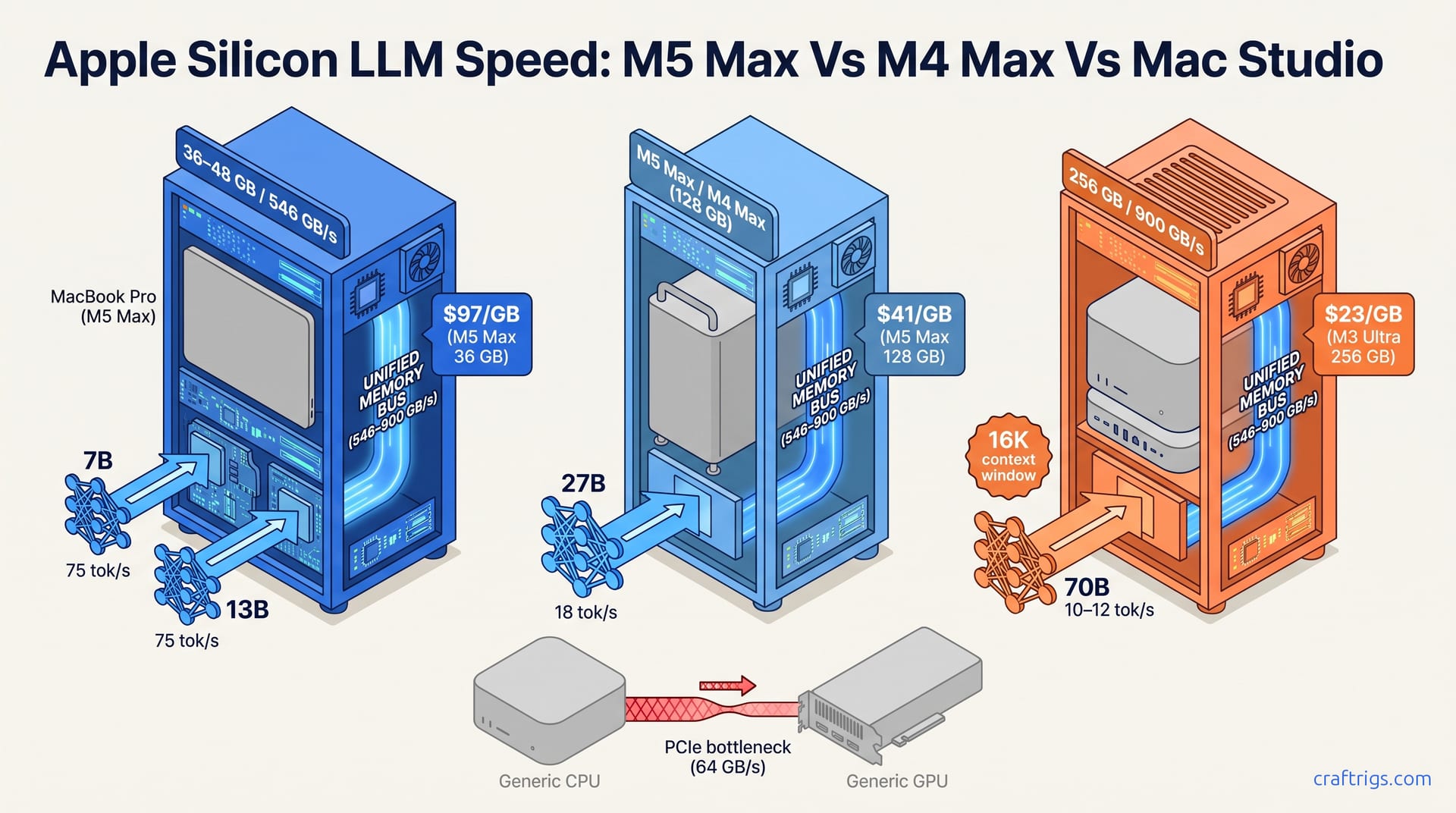
Buy the M5 Max with 128 GB unified memory for portable 70B-class inference. Buy the M3 Ultra Mac Studio with 256 GB for 70B at Q8 or larger stationary models. Apple briefly sold a 512 GB tier, but per 9to5Mac's reporting on the 2026 memory-supply cuts, that option is gone, so 256 GB is the practical ceiling. The M4 Max at 128 GB remains viable for budget-conscious buyers who don't need the M5's bandwidth gains. Skip 64 GB configs for 70B work — you'll quantize too aggressively and lose capability.
The Memory Ceiling: Why Unified Memory Beats GPU Compute for Inference
Apple Silicon's unified memory architecture changes the math for local LLM inference in ways that raw GPU compute specs obscure. The M5 Max reaches 546 GB/s of unified memory bandwidth — identical to the M4 Max. That single number matters more than the 40-core GPU or 16-core Neural Engine for most workloads. On Apple Silicon, those weights sit in the same memory pool the CPU and GPU share. No copies across PCIe. No stalling while a discrete GPU waits for the next chunk of weights from system RAM.
Discrete desktop GPUs tell a different story. An RTX 4090 boasts 1,008 GB/s of VRAM bandwidth — nearly double the M5 Max — but its 24 GB of VRAM is a hard wall. Exceed that and the model falls back to system RAM across a 64 GB/s PCIe 4.0 x16 link, a 17× bottleneck that turns context-switching workloads into stuttery messes. Unified memory trades peak bandwidth for consistency: you never hit that cliff because the "VRAM" is your RAM, up to 128 GB on laptops or 256 GB on Mac Studio. Throughput stays predictable even when the model swells past what any consumer discrete card could hold.
That consistency has a ceiling, though. A 70B model at Q4_K_M needs ~42 GB at load. Only the M4/M5 Max 128 GB configuration and Mac Studio tiers (M2 Ultra at 192 GB, M3 Ultra at 256 GB) can run it without offloading weights to CPU. The 36 GB and 48 GB M4/M5 Max variants top out at 27B-class models before hitting memory pressure. Their impressive theoretical throughput doesn't matter. This isn't a software limit. It's physics. You cannot add unified memory later. The chip you buy today locks in your model-size ceiling for the life of the machine, which is why the hardware selection pillar treats memory capacity as the primary filter before any benchmark comparison.
M5 Max vs M4 Max vs Mac Studio: Bandwidth and Capacity by the Numbers
The spec sheet reveals a surprising stagnation between laptop generations. M5 Max and M4 Max share identical 546 GB/s memory bandwidth and the exact same 36 GB / 48 GB / 128 GB unified memory tiers. Apple did not widen the bus or add capacity options. Improved efficiency cores and modest GPU gains don't alter the local LLM ceiling. For inference, an M4 Max 128 GB and M5 Max 128 GB perform identically on identical model loads. The upgrade case rests on CPU-bound preprocessing or battery life, not bigger models.
Mac Studio breaks that laptop plateau. M2 Ultra doubles bandwidth to 800 GB/s with 192 GB memory. M3 Ultra reaches 900 GB/s and 256 GB. It's the only Apple Silicon configuration that runs 70B Q4_K_M with headroom for context cache. That bandwidth jump matters because inference at these scales is memory-bound, not compute-bound. More GB/s means faster weight streaming. That directly translates to higher tok/s when the model exceeds on-chip cache. The Studio's desktop form factor eliminates thermal throttling under sustained loads. MacBook Pro chassis pay a hidden tax running 70B-class workloads for hours.
Memory Configurations and Price Tiers
Apple's pricing creates sharp tiers that map directly to model accessibility. Entry tier: M4/M5 Max 36 GB at $3,499 runs 7B–13B models at full speed. Mid tier: 48 GB at $3,899 extends to 27B before memory pressure. The 128 GB laptop at $5,299 and Mac Studio M2 Ultra 192 GB at $3,999 base both claim 70B viability. Only the M3 Ultra 256 GB Mac Studio at $5,799 avoids memory-pressure throttling on 70B with 8K+ context windows. That price-per-GB-VRAM spread is brutal: $97/GB for the M5 Max 36 GB, dropping to $23/GB for the M3 Ultra 256 GB. The laptop premium buys portability, not efficiency. For users who never unplug, the Studio's economics are undeniable. For those who do, the 128 GB laptop is the only configuration that doesn't artificially cap model size.
| Configuration | Unified Memory | Memory Bandwidth | Price | Price/GB | Max Practical Model |
|---|---|---|---|---|---|
| M4/M5 Max 36 GB | 36 GB | 546 GB/s | $3,499 | $97/GB | 13B Q4_K_M |
| M4/M5 Max 48 GB | 48 GB | 546 GB/s | $3,899 | $81/GB | 27B Q4_K_M |
| M4/M5 Max 128 GB | 128 GB | 546 GB/s | $5,299 | $41/GB | 27B Q4_K_M (70B crippled) |
| Mac Studio M2 Ultra | 192 GB | 800 GB/s | $3,999 | $21/GB | 70B Q4_K_M analysis-grade |
| Mac Studio M3 Ultra | 256 GB | 900 GB/s | $5,799 | $23/GB | 70B Q4_K_M chat-interactive |
What You Actually Run: tok/s by Model Size and Quantization
Benchmarks without model size and quantization labels are noise. On 7B Q4_K_M, M5 Max and M4 Max both hit ~75 tok/s via MLX, while Mac Studio M2 Ultra reaches ~110 tok/s and M3 Ultra ~140 tok/s. That spread — nearly 2× from laptop to top Studio — collapses as models grow. At 27B Q4_K_M, M5/M4 Max 128 GB sustain ~18 tok/s, M2 Ultra ~28 tok/s, M3 Ultra ~35 tok/s. Still usable for interactive work, but the laptop is already showing strain. The critical threshold sits below 128 GB. All laptop configs drop to CPU-fallback below 4 tok/s when memory-bound. That makes 128 GB the practical floor for 27B+ interactive use. Below that, you're not slower — you're waiting seconds per token.
70B Q4_K_M is where the floor becomes a wall. Viable only on Mac Studio: M2 Ultra 192 GB manages 6–8 tok/s, usable for analysis, not chat. M3 Ultra 256 GB reaches 10–12 tok/s. It's the first Apple Silicon config that feels interactive at this scale. No laptop configuration runs 70B without aggressive quantization below Q4_K_M — Q3_K_M or Q2_K. That degrades reasoning quality below production thresholds. The M5 Max 128 GB will load a 70B model with OS tricks, but context cache eviction turns it into a stuttering mess. You bought the chip for inference quality. Running degraded quantization to fit defeats the purpose.
MLX vs llama.cpp: When the Framework Choice Matters
Framework selection creates smaller deltas than memory capacity, but they're real. MLX wins 20–30% on M5/M4 Max at 7B–13B where GPU utilization stays under 70%. The Apple-optimized memory path avoids copies that llama.cpp's cross-platform abstraction incurs. At 70B on M3 Ultra, that gap closes to <10%. Unified memory bandwidth saturates before either framework can differentiate. Framework choice is secondary to memory capacity above 27B parameters. For laptop users running smaller models, MLX is the clear pick. For Studio users at the ceiling, either works. llama.cpp's broader model support may matter more than the marginal speed. The MLX setup guide covers installation specifics for readers choosing that path.
MLX vs llama.cpp: Which Engine Wins on Apple Silicon
The engine comparison repeats the bandwidth-saturation pattern at every tier. MLX outperforms llama.cpp by 20–30% on M5/M4 Max at 7B–13B scales where GPU utilization stays below 70%. The gap narrows to <10% on Mac Studio M3 Ultra at 70B where unified memory bandwidth saturates before compute. This isn't a driver bug or missing optimization. It's the physical limit of how fast weights can stream through memory. Once you hit that wall, both frameworks wait on the same hardware. Laptop users should default to MLX for the free speed. Studio users should pick by model support — not benchmark — since the numbers converge.
llama.cpp brings broader quantization support (Q5_K_M, Q6_K, IQ4_XS) and cross-platform compatibility. That makes it the default for model availability and reproducibility. If a new model drops on Hugging Face with only GGUF weights, llama.cpp runs it today. MLX often lags for niche quantizations. MLX's tighter Apple Silicon integration yields cleaner memory management and ~15% better power efficiency under sustained load. Neither engine changes which chip tier can run which model size. A 36 GB M5 Max cannot run 70B in either framework. The engine choice is optimization within constraints, not constraint removal. For readers wanting deeper framework analysis, the detailed comparison breaks down quantization support and debugging workflows.
The 70B Reality Check: Which Chip Is Practical at What Quality
The 70B threshold exposes every Apple Silicon tier. 70B Q4_K_M requires ~42 GB memory at load plus ~8–16 GB for context cache at 4K–8K context. Only Mac Studio configurations qualify. M2 Ultra 192 GB runs 6–8 tok/s, analysis-grade, not chat-interactive. M3 Ultra 256 GB reaches 10–12 tok/s with headroom for 16K context. No M4/M5 Max laptop configuration sustains 70B. The 128 GB ceiling with OS overhead forces aggressive Q3_K_M or Q2_K quantization. That degrades reasoning quality below production thresholds. The 128 GB laptop can load the weights. It cannot run them with acceptable context and quality simultaneously.
For laptop-bound Apple Silicon users, 27B Q4_K_M is the practical ceiling. M4/M5 Max 128 GB sustain ~18 tok/s interactive, while 36 GB and 48 GB variants drop to CPU-fallback below 4 tok/s on 27B. The $1,800 premium for 128 GB over 48 GB buys exclusively larger-model access, not faster small-model speed. 7B–13B tok/s is identical across all M4/M5 Max tiers at 75 tok/s via MLX. This is the upgrade decision in stark terms: pay for memory capacity or don't. There is no hidden performance boost in the bigger config for workloads that already fit. If your use case tops out at 13B, the 36 GB tier is fully sufficient. The extra $1,800 wastes money that could fund a Studio later.
Buying Verdict by Budget and Mobility Need
At $3,499–$3,899, M4/M5 Max 36–48 GB laptops win for mobile developers running 7B–13B models at 75 tok/s. The $5,299 128 GB variant justifies its $1,800 premium only if 27B models are essential. Small-model speed is identical across all tiers. Below $3,500, no Apple Silicon configuration matches a $2,000 used RTX 3090 desktop for 70B access. Mac Studio is the mandatory leap for that workload. The Apple tax is real, but it's a different tax than NVIDIA's — you're paying for unified memory consistency and silence, not peak throughput. Know which you need.
Mac Studio M2 Ultra 192 GB at $3,999 (used/entry pricing) is the minimum viable desktop for 70B Q4_K_M at 6–8 tok/s analysis-grade speed. M3 Ultra 256 GB at $5,799 is the only Apple Silicon configuration that runs 70B at 10–12 tok/s chat-interactive with 16K context headroom. Price-per-GB-VRAM favors M3 Ultra at $23/GB versus $97/GB for M5 Max 36 GB. The $1,800 laptop-to-desktop gap only closes for users who never need portability. If you travel, the Studio is a brick. If you don't, it's the obvious choice. The M5 Max 128 GB occupies an awkward middle — portable, expensive, and still 70B-limited. It only makes sense for users who must run 27B models on planes and cannot tolerate two machines. For everyone else, pick a lane: cheap laptop for small models, or Studio for the ceiling. The in-between configs bleed money without delivering capability.