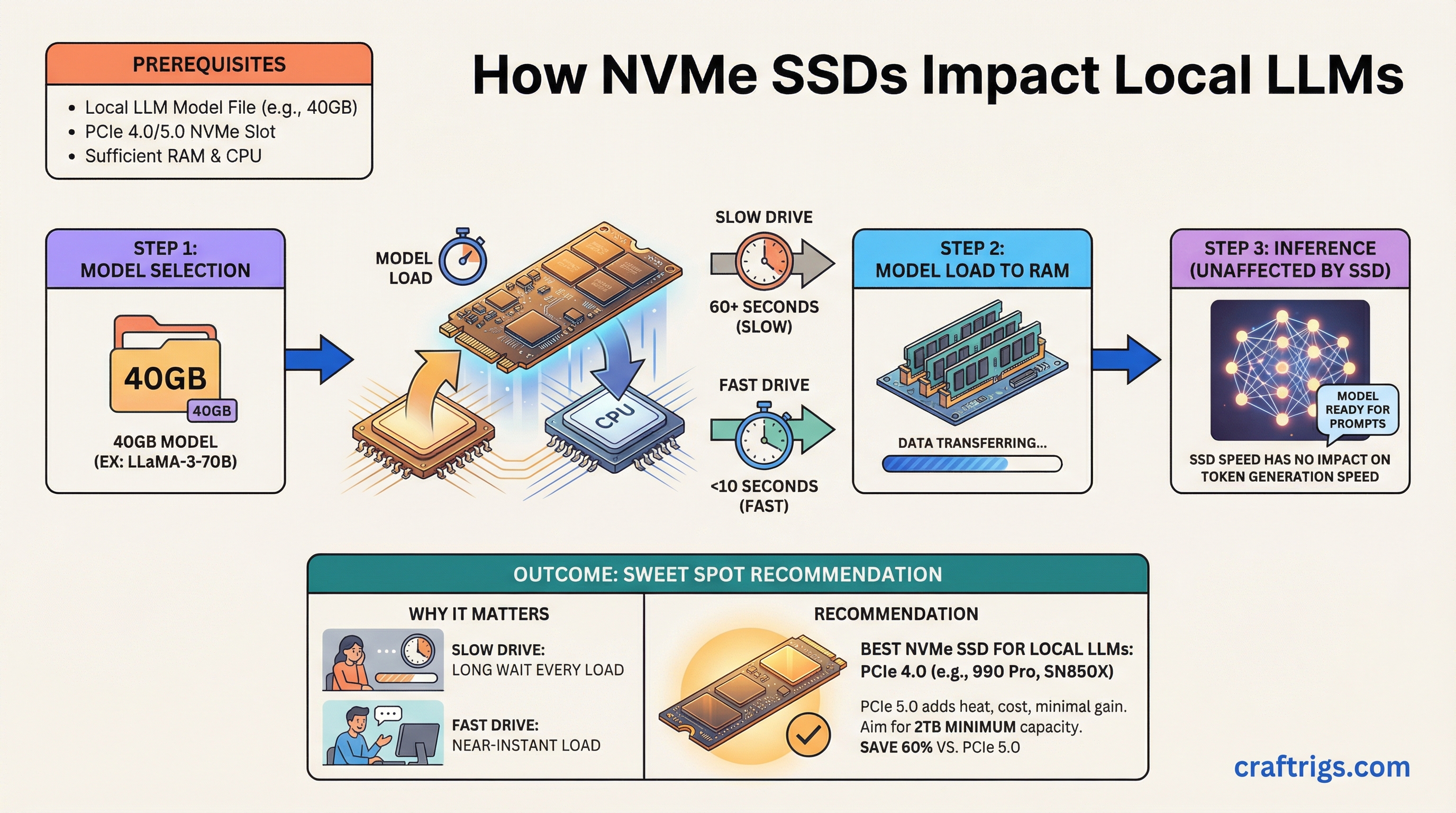
TL;DR: Your NVMe drive won't make inference faster, but it determines how long you wait every time you load a model. A good PCIe 4.0 drive like the Samsung 990 Pro or WD Black SN850X is the sweet spot. PCIe 5.0 drives cost more and run hotter for minimal real-world gain in LLM workflows. Buy 2TB minimum if you're running multiple models.
Why Does Your SSD Matter for Local LLMs?
Here's what trips people up: your SSD has zero impact on inference speed. Once a model is loaded into VRAM (or RAM for CPU offloading), your storage drive sits idle. Tokens per second — the speed at which your model generates text — is entirely a GPU/CPU/memory bottleneck.
But model loading is a different story. A 70B parameter model in GGUF format (the standard file format for quantized models that run on consumer hardware) at Q4 quantization weighs roughly 40GB. On a mediocre SATA SSD, that's a 70+ second load. On a fast NVMe, it's under 15 seconds. If you swap between models frequently — testing different sizes, comparing finetunes, running different models for different tasks — those load times add up fast.
The other factor: if you're doing any kind of model downloading, converting, or quantizing, sequential write speed matters. Downloading a 40GB model from Hugging Face while your drive is already half full on a cheap QLC drive is painfully slow.
PCIe 4.0 vs 5.0: Is Gen 5 Worth It?
Short answer: no, not for LLM work.
PCIe 4.0 NVMe drives top out around 7,000 MB/s sequential read. PCIe 5.0 drives push past 12,000 MB/s. On paper, that's a huge gap. In practice, for loading LLM files, the difference shrinks dramatically because:
- llama.cpp and other inference engines don't do pure sequential reads when loading models. There's metadata parsing, memory mapping, and allocation overhead that bottleneck before raw throughput does.
- PCIe 5.0 drives run significantly hotter, often requiring heatsinks with active airflow. In a multi-GPU build where thermals are already tight, that's a real cost.
- The price premium is 40-60% more per TB as of March 2026.
Our recommendation: PCIe 4.0 is the sweet spot. Save the money for more VRAM or a bigger drive.
Best NVMe Drives for LLM Workflows
Best Overall: Samsung 990 Pro (2TB)
Around $150 as of March 2026 for the 2TB model. 7,450 MB/s sequential read, excellent sustained write performance, and Samsung's proven controller reliability. The 990 Pro handles the mixed workload of downloading, loading, and occasionally quantizing models without breaking a sweat. 1,200 TBW endurance rating on the 2TB model is more than enough.
Best Value: WD Black SN850X (2TB)
Typically $5-10 cheaper than the 990 Pro with nearly identical real-world performance. 7,300 MB/s sequential read. If you find it on sale, grab it. The only slight edge Samsung has is sustained write performance during very long transfers, which rarely matters for LLM workflows.
Budget Pick: Kingston KC3000 (2TB)
Around $120 as of March 2026. Still a PCIe 4.0 drive with 7,000 MB/s sequential read. Uses a Phison E18 controller that's well-proven. The tradeoff is slightly lower sustained write speeds and a less sophisticated thermal design, but for model loading it's nearly as fast as the premium options.
If You Must Have PCIe 5.0: Crucial T705 (2TB)
Around $220 as of March 2026. 14,500 MB/s sequential read, which is genuinely impressive. But you'll need a motherboard heatsink or an aftermarket one — this drive throttles without active cooling. Only makes sense if you're constantly loading 70B+ models and the 3-5 second difference in load time matters to your workflow. For most people, it doesn't.
High Capacity: Sabrent Rocket 4 Plus (4TB)
Around $280 as of March 2026. If you need to store a large collection of models locally — multiple quantization levels of several model families — 4TB gives you room to breathe. Performance is solid at 7,100 MB/s sequential read, though not quite class-leading. The real selling point is price per TB at the 4TB tier.
How Much Capacity Do You Actually Need?
This depends on how many models you keep locally. Here's a rough sizing guide:
- 1TB: Enough for 2-3 models in the 7B-13B range, plus one 70B model. Tight if you experiment a lot. Fine for a focused workflow where you run one or two models regularly.
- 2TB: The sweet spot. Room for a full collection across sizes — a few 7B models, a couple 13B, a 30B, and a 70B or two. Plus space for downloads and quantization work without juggling files.
- 4TB: For model hoarders and people who keep every quantization variant. Also makes sense if this drive doubles as your OS and project storage.
One tip: don't fill your NVMe past 80% capacity. SSD performance degrades as the drive fills up because the controller has fewer empty blocks to work with. A 2TB drive effectively gives you ~1.6TB of good-performance storage.
SSD Endurance: Should You Worry About TBW?
TBW (Terabytes Written) is the manufacturer's rated endurance — how much data you can write before the drive is expected to wear out. For LLM workflows, your write patterns are:
- Downloading models (write once, read many)
- Occasional quantization work (moderate writes)
- Model loading (reads only — no wear)
This is a very read-heavy workload. Even a budget drive rated at 600 TBW will last years. The 990 Pro's 1,200 TBW at 2TB is overkill for this use case, which is fine — it means drive endurance is one thing you don't need to worry about.
The exception: if you're running training workloads or doing heavy fine-tuning with lots of checkpoint saves, write endurance matters more. In that case, stick with TLC drives (Samsung, WD, Crucial) and avoid QLC drives (which have lower endurance and slower sustained writes).
Setup Tips
Enable Direct Storage / NVMe optimizations in your OS. On Linux, make sure you're using the NVMe driver (not AHCI) and consider mounting with noatime to reduce unnecessary writes. On Windows, ensure the Samsung/WD NVMe driver is installed rather than the generic Microsoft one.
Put your models on a dedicated partition or drive if possible. Keeps your model storage separate from OS and application I/O, which prevents contention during model loads.
Consider a RAID 0 setup with two cheaper drives if you have two M.2 slots and want maximum sequential read speed on a budget. Two Kingston KC3000 1TB drives in RAID 0 will outperform a single 990 Pro in sequential reads. The downside: if either drive fails, you lose everything. For model storage (easily re-downloaded), that's an acceptable tradeoff.
The Bottom Line
For most local LLM builders: Samsung 990 Pro 2TB. It's fast, reliable, reasonably priced, and perfectly sized. PCIe 5.0 is a waste of money for this workload. Spend the savings on a better GPU or more VRAM instead.
If you're building a full multi-GPU rig, check our dual-GPU build guide for how storage fits into the complete picture, or start with our ultimate hardware guide for the full component breakdown.