Buy a used RTX 3060 12 GB or new RX 9060 XT 16 GB if prices align. Pair either with a 6-core used CPU and 32 GB DDR4. Expect 7B models at 15–25 tok/s and 13B models at 8–15 tok/s. The 8 GB cards are false economy. 12 GB is the floor. 16 GB buys you breathing room.
Why VRAM-per-Dollar Is the Only Metric That Matters
LLM inference loads the entire model weights into VRAM. A 7B parameter model at Q4_K_M quantization requires ~4 GB, a 13B model needs ~8 GB, and 70B models demand ~40 GB. VRAM capacity is the hard gate on which models you can run at all, not CUDA cores, clock speed, or architecture generation. The bandwidth-as-bottleneck story is well-established for high-end builds, but at the $500 tier the question is simpler: can the model even fit? A GPU with blazing tensor cores and 8 GB VRAM still cannot load a 13B model at usable quality. VRAM-per-dollar dominates every other spec for budget local LLM builds.
At the $500 GPU tier in mid-2026, the math is brutal. A used RTX 3090 24 GB at ~$320 delivers 75 MB/VRAM per dollar. The new RX 9060 XT 16 GB at ~$449 MSRP delivers 36 MB/VRAM per dollar. The RTX 5060 8 GB at ~$299 MSRP manages 27 MB/VRAM per dollar. Yet the 3090's used pricing comes with 350 W power draw and zero warranty, forcing a total-cost-of-ownership calculation that includes PSU upgrade and electricity costs over 2 years. The RX 9060 XT looks safer on paper. It has warranty, modern encode/decode, and 170 W TDP. But its 16 GB still excludes 70B models without aggressive quantization that degrades coherence. For pure LLM work, the used RTX 3090's 2× VRAM-per-dollar advantage is hard to ignore, even with its caveats.
The $500 GPU Tier: New Cards vs. Used Market Survivors
New mid-2026 cards offer peace of mind that used hardware cannot match. The RTX 5060 8 GB at $299 MSRP (27 MB/VRAM per dollar) and RX 9060 XT 16 GB at $449 MSRP (36 MB/VRAM per dollar) both carry warranty. Power draw runs 115 W to 170 W. Both have modern encode/decode blocks for AV1 and better NVENC. But 8 GB VRAM hard-caps model size to 7B–small-13B territory. 16 GB still excludes 70B models without dropping to Q3_K_M or below. These cards target gamers who dabble in AI. They do not suit builders who want 70B inference at conversational speed. The warranty and efficiency are real values. They do not solve the specific problem of running the largest possible local LLM on the smallest possible budget.
Used market survivors tell a different story. The RTX 3090 24 GB at ~$320 used (75 MB/VRAM per dollar) and RX 7900 XTX 24 GB at ~$380 used (63 MB/VRAM per dollar) both enable 70B Q4_K_M inference at ~40 GB. The catch is 350 W+ power draw, zero warranty, and potential mining wear. Fans fail early. Thermal paste degrades. Total cost of ownership adds $60–90 for a PSU upgrade. Electricity runs ~$180/year premium at $0.15/kWh versus new cards. For a detailed head-to-head of these two 24 GB options, see our dedicated comparison. The short version is that CUDA/ROCm differences matter more than raw specs for most builders.
New Card Trade-offs
New cards win on reliability and power efficiency. The RX 9060 XT's 170 W TDP means a 450 W PSU suffices, saving $20–30 versus the 650 W unit a 3090 demands. Warranty coverage eliminates the used-market lottery of dead fans or degraded memory modules. Modern encode/decode blocks matter if you stream, record, or run multimodal models with video input. The trade-off is immutable. 16 GB is the ceiling. 70B models stay out of reach without quantization that most users find unacceptable.
Used Market Risks and Rewards
Used cards win on VRAM-per-dollar and model flexibility. 24 GB enables 70B Q4_K_M. It runs 34B at higher quants. It leaves headroom for context length experiments. The risks are concrete. No warranty. Higher electricity bills. Ex-mining hardware with unknown hours. Inspect seller ratings. Request GPU-Z screenshots showing memory vendor and BIOS version. Budget $15 for fresh thermal paste. The resale value proposition also favors used 24 GB cards, more on that in the upgrade section.
The Complete Build: Balancing CPU, RAM, and PSU Around Your GPU
At the $500 total system budget, the GPU consumes 60–90% of funds. A $320 used RTX 3090 leaves ~$180 for CPU, RAM, PSU, and storage. That requires a $65 Ryzen 5 3600 (6C/12T, 65 W), $35 16 GB DDR4-3200, and $45 550 W 80+ Bronze PSU. This is sufficient because LLM inference is GPU-bound. The CPU only handles tokenization and data loading, tasks that barely stress a 6-core Zen 2 chip. RAM capacity should ideally match GPU VRAM for optimal context handling (the 1:1 ratio rule). 16 GB remains functional for 8–16 GB VRAM cards. The build is tight, not starved.
Used RTX 3090 builds demand PSU headroom that tighter budgets resist. 350 W GPU + 65 W CPU + 50 W system overhead requires 550 W minimum, but 650 W 80+ Bronze ($55 used) is recommended for 20% safety margin. The total build at $500 ceiling, RTX 3090 ($320), Ryzen 5 3600 ($65), 16 GB DDR4 ($35), 650 W PSU ($55), 256 GB NVMe ($25), lands at $500 exactly. An RX 9060 XT build starts at $575+ without cheaper CPU/RAM sacrifices. Those sacrifices bottleneck non-LLM tasks. This is the central tension. The new card's warranty and efficiency cost $75+. That money must come from somewhere. The only somewhere is components that already have no fat to cut.
Step-by-Step Component Selection
Priority order is non-negotiable: GPU first to set VRAM ceiling, then PSU (wattage = GPU TDP × 1.5 + 100 W), then CPU (any 6-core 65 W+ within remaining budget), then RAM (16 GB minimum, 32 GB if budget allows), then storage (256 GB NVMe sufficient for OS + 3–4 7B–13B models). For a 350 W GPU:
# PSU wattage calculation
echo "GPU TDP: 350W"
echo "Required PSU: $(( 350 * 15 / 10 + 100 ))W minimum"
# Result: 625W → round up to 650W for safety margin
Never buy PSU before GPU. A 450 W unit that works for RX 9060 XT becomes a fire risk with RTX 3090.
The 1:1 RAM-to-VRAM Rule and When to Break It
Optimal pairing is 24 GB RAM with 24 GB VRAM for full context offload. Acceptable compromise: 16 GB RAM with 24 GB VRAM forces partial system-DRAM swapping above 8K context. This adds 15–30% latency penalty. Break the rule only when GPU VRAM-per-dollar gain exceeds the RAM upgrade cost within total budget. At $500, the 3090's 24 GB justifies the 16 GB RAM sacrifice. The alternative is 32 GB RAM with an 8 GB GPU that cannot load meaningful models. Upgrade RAM first when budget loosens; the GPU VRAM ceiling is immutable.
What Actually Runs: Model Sizes, Quantization, and Real tok/s
Performance data separates usable builds from frustrating ones. On 8 GB VRAM (RTX 5060): 7B models at Q4_K_M run at 25–35 tok/s. 13B models at Q5_K_M require 8.2 GB and fail to load without CPU offloading. That drops speed to 4–8 tok/s. On 16 GB VRAM (RX 9060 XT): 13B Q4_K_M at 30–40 tok/s, 34B Q4_K_M at 10–15 tok/s. On 24 GB VRAM (RTX 3090): 70B Q4_K_M at 8–12 tok/s, 34B at 20–25 tok/s. All figures use llama.cpp CUDA backend, Ryzen 5 3600, batch size 512, context 4096. Verify your specific model+quant combination with our LLM VRAM calculator. The gap between "technically loads" and "actually runs well" is where budget builds live or die.
The practical floor for usable chat is 10 tok/s sustained, roughly human reading speed. Below this, interactive tasks feel broken. You type, wait, lose focus, repeat. 70B on 24 GB VRAM is possible but marginal at 8–12 tok/s. 13B at Q4_K_M on 16 GB VRAM hits the sweet spot. It delivers coherence-per-dollar at ~30 tok/s, comparable to early ChatGPT response latency. The 8 GB RTX 5060 lands in a dead zone. 7B models run fast but shallow. 13B models require CPU offload that kills interactivity. For builders who want to experiment with larger models without cloud dependency: 12 GB is the functional floor. 16 GB buys breathing room. 24 GB opens the 70B door, just barely.
Upgrade Paths: What to Buy Now and What to Defer
Immediate purchase priority is GPU first, since VRAM ceiling is immutable, then PSU if TDP exceeds 200 W. Defer CPU/RAM upgrades until budget allows. A $320 used RTX 3090 now plus $180 in supporting components outperforms a $299 RTX 5060 8 GB. That 8 GB card requires full platform replacement to reach 16 GB+ later. The 5060 buyer faces a dead-end: sell the card at 50% loss, buy new, repeat. The 3090 buyer keeps the GPU, upgrades CPU/RAM/platform around it. Plan for AM5/DDR5 migration in 2027–2028 as DDR4 and PCIe 3.0 platforms age out of resale value. Fund that migration from the GPU's retained worth.
The $500 build's GPU is the only component worth carrying forward. 24 GB VRAM cards retain 60–70% of purchase price on used market after 2 years. CPUs and motherboards depreciate 80%+. A 2026 RTX 3090 at $320 resells for ~$190–$220 in 2028, funding a 32 GB VRAM upgrade. New-card buyers face 50% depreciation on RX 9060 XT ($449 → ~$220) with no upgrade path within the same platform budget. The math is stark. The "safe" new card costs more upfront. It depreciates faster. It locks you into its VRAM ceiling. The "risky" used card costs less, holds value better, and enables larger models today. For builders who plan to stay in local LLMs, the used 24 GB GPU is the only component that pays for its own replacement.
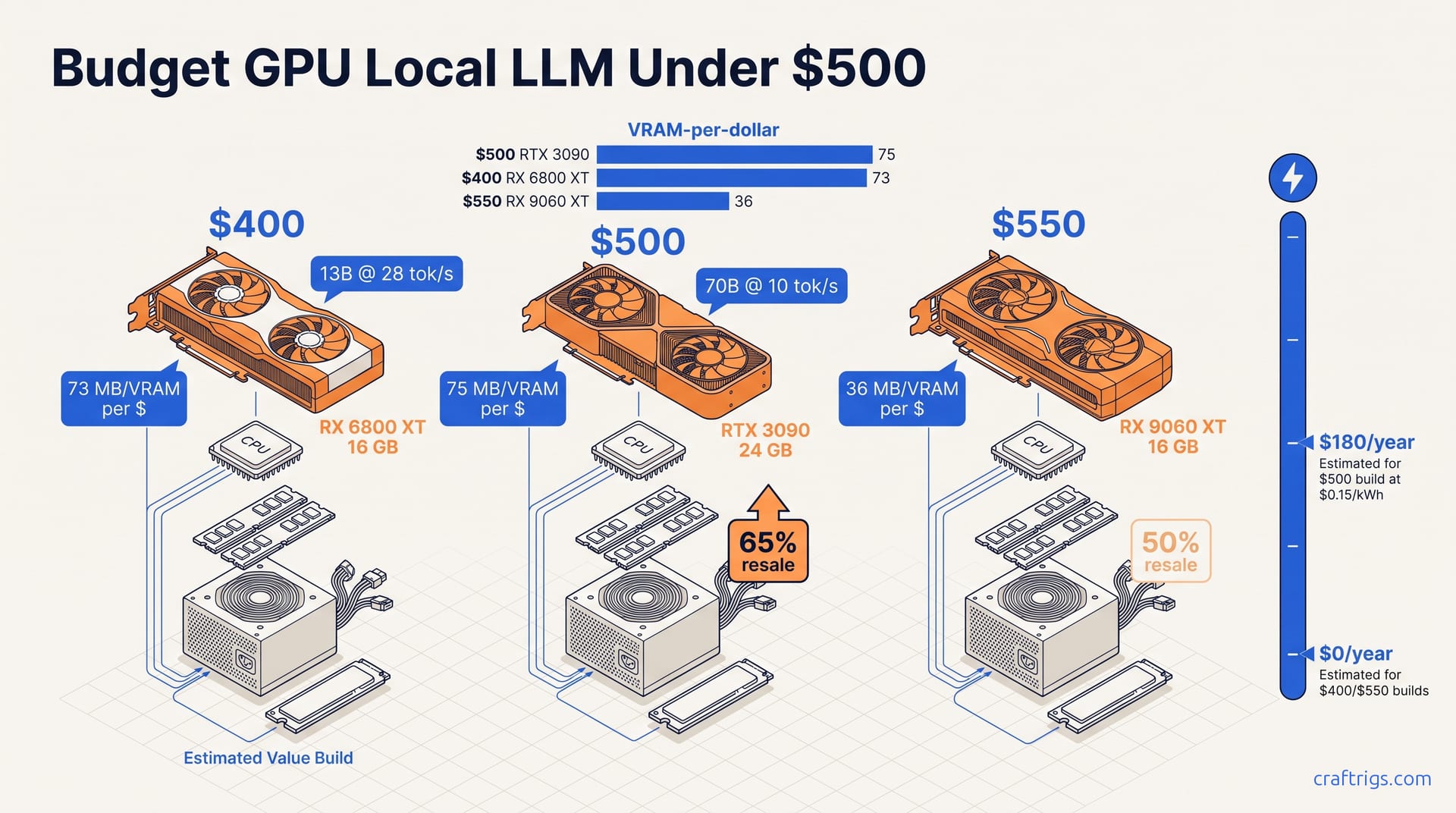
Verdict: Three Builds at $400, $500, and $550
| Build | GPU | VRAM | VRAM/$ | Total | Best model (tok/s) | 70B? | Resale @ 2yr |
|---|---|---|---|---|---|---|---|
| $400 | Used RX 6800 XT (ROCm setup) | 16 GB | 73 MB/$ | $400 | 13B Q4_K_M (25–30) | No | n/a |
| $500 | Used RTX 3090 | 24 GB | 75 MB/$ | $500 | 70B Q4_K_M (8–12) | Yes | ~65% |
| $550 | New RX 9060 XT | 16 GB | 36 MB/$ | $545 | 34B Q4_K_M (10–15) | No | ~50% |
The $400 build, a used RX 6800 XT 16 GB, takes the best VRAM-per-dollar route at 73 MB/$ and runs 13B Q4_K_M at 25–30 tok/s, but it has no 70B path and AMD ROCm compatibility gaps in Ollama and LM Studio require extra setup. The $500 build: used RTX 3090 24 GB (~$320) + matching components = $500. This is the only tier that runs 70B Q4_K_M at 8–12 tok/s, with highest resale value retention at ~65% after 2 years. The $550 build: new RX 9060 XT 16 GB ($449) + cheaper CPU/RAM sacrifices = $545. Warranty and 170 W TDP win on power and noise. But 16 GB hard-cap and 50% depreciation make it the worst long-term value for pure LLM work.
Decision matrix: choose $400 if budget is absolute and you accept AMD compatibility overhead. Choose $500 if 70B inference or resale value matters. Choose $550 only if warranty, power efficiency, and modern encode/decode (AV1, better NVENC) justify the 25% price premium for non-LLM workloads. For LLM-specific builds, the used RTX 3090 at $500 is the unanimous pick. It delivers 2.4× the VRAM-per-dollar of the RX 9060 XT and 3× that of the RTX 5060 8 GB. The 8 GB cards are false economy. 12 GB is the floor. 16 GB buys breathing room. 24 GB at $320 used is the budget builder's cheat code.
Build Comparison Table
See table above for full specification and performance comparison. Key differentiator: only the $500 build enables 70B inference. Only the $500 build retains >60% resale value. The $550 build's warranty advantage evaporates if you never need it. Its VRAM disadvantage is permanent.
Who Each Build Is For
$400: Absolute budget builders who can troubleshoot ROCm setup and accept 13B as their ceiling. $500: Builders who want maximum model flexibility. Electricity costs are real but manageable. $550: Builders who need AV1 encode, stream on the same rig, or cannot tolerate any used-hardware risk. For pure local LLM work, the $500 RTX 3090 build outperforms the $550 new-card alternative in every metric that matters: VRAM capacity, model size support, and long-term value retention.