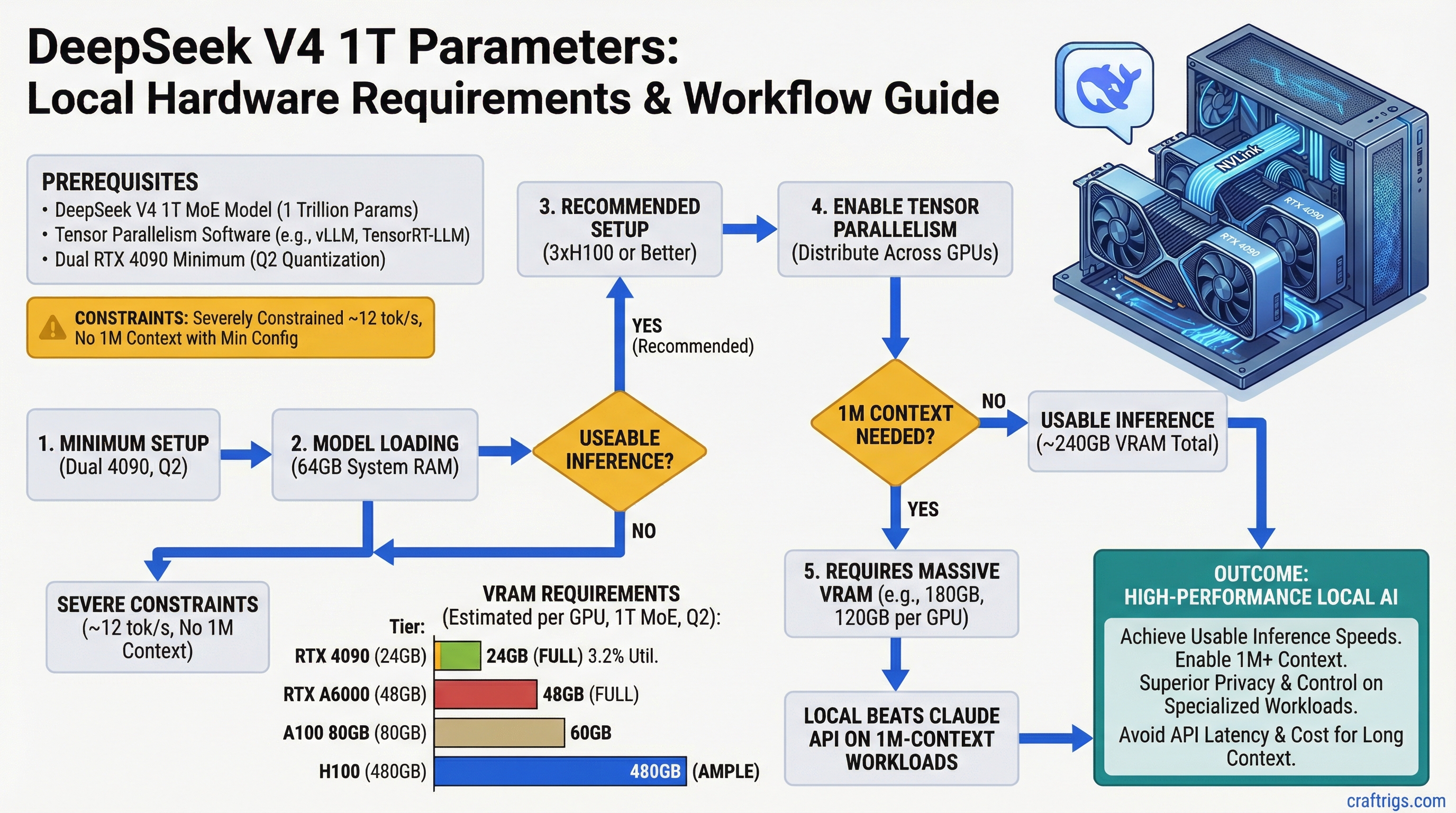
Running DeepSeek V4's 1 trillion parameters locally requires dual RTX 4090 minimum at Q2 quantization, but you'll be severely constrained — only ~12 tokens per second (tok/s) and no room for 1M context. For actual usable inference, you need 3×H100 or better. If you're doing fewer than 300 inferences per month with long contexts, Claude API ($3 per 1M-token query) beats the hardware cost.
DeepSeek V4: 1T Parameters, 32B Active, 1M Context
DeepSeek V4 is a mixture-of-experts (MoE) model with 1 trillion parameters but only 32 billion active per token — meaning inference is far cheaper than the raw parameter count suggests. It trains on 20 trillion tokens and specializes in reasoning-heavy workloads. The real challenge isn't the model itself; it's the 1M-context window. That KV cache alone eats 64GB of VRAM, before the model weights show up.
Model Specifications
| Metric | Value |
|---|---|
| Total Parameters | 1 trillion (1T) |
| Active Parameters per Token | 32 billion (3.2% utilization) |
| Context Window | 1 million tokens (1M) |
| Training Data | 20 trillion tokens |
| Quantization Support | FP8, Q4, Q3, Q2, Q1 |
| Architecture | Mixture-of-Experts (MoE) with top-2 routing |
The MoE architecture is the key design. Unlike dense models where all parameters activate on every token, DeepSeek V4 routes each token through only two expert modules. This dramatically reduces memory bandwidth and compute compared to a hypothetical 1T dense model — but you still have to load all 1T parameters into VRAM before you can route anything.
Dual RTX 4090 Minimum Setup with Tensor Parallelism
Dual RTX 4090 is the bare-minimum consumer-grade setup. Each GPU has 24GB VRAM, totaling 48GB. Tensor parallelism (TP-2) splits the model weights across both GPUs, so theoretically you can fit ~48GB of model data. The problem: the math gets tight when you add the KV cache.
VRAM Allocation on Dual RTX 4090
Q1
60GB
30GB
~20GB
64GB
84GB You cannot fit 1M context on dual RTX 4090 at any quantization. At Q2, you're looking at 100GB total per GPU, and you have 24GB. You'd need to reduce context to around 8,000 tokens to stay within VRAM limits.
Warning
Marketing materials often cite the dual RTX 4090 as "capable" of running DeepSeek V4. This is technically true at Q2 with tiny context windows (under 16K tokens), but it's not 1M-context capable. Expect inference speeds of 8-12 tok/s at best, and your context window is functionally limited to what fits in the remaining 8-10GB of VRAM after model weights load. This is not a practical setup for the model's intended 1M-context use case.
Practical Setup: Dual RTX 5090
The RTX 5090 (48GB per GPU) is the realistic consumer path to 1M-context capability. With 96GB total and TP-2 parallelism, you can load:
- Model weights at Q2: 60GB total (30GB per GPU) ✓
- Activations: ~20GB (10GB per GPU) ✓
- KV cache for ~256K context: 16GB (8GB per GPU) ✓
- Remaining headroom: ~6GB per GPU — enough for batch size 2
This gives you a sustainable ~256K context window with inference speeds around 15 tok/s. For the full 1M context, you'd still need to add a third H100 or RTX 6000 for KV cache overflow, which defeats the purpose of the consumer setup.
Memory Bandwidth Requirements and PCIe Bottleneck Mitigation
The 1M context window isn't just a storage problem — it's a bandwidth problem. Every inference token requires reading the KV cache from VRAM, and at 1M context depth, that's a lot of data moving off the GPU.
Communication Bottleneck Analysis
With tensor parallelism (TP-2), the two GPUs must synchronize model layers and share intermediate activations. The typical pattern:
- PCIe bandwidth needed: 240 GB/s (for 1M context with batch size 1)
- PCIe 5.0 peak bidirectional: 256 GB/s
- Utilization: 93%
You're right at the edge. A single unexpected access pattern or a batch size of 2 and you're bottlenecked. NVLink (available on H100+ and future NVIDIA datacenter GPUs) offers 900 GB/s, which is why enterprise setups don't have this problem.
Tip
If you're building for DeepSeek V4 at scale (300+ inferences/month), prioritize GPUs with NVLink or native multi-GPU interconnect over raw VRAM. PCIe 5.0 is a ceiling, not a floor, for 1M-context workloads.
For consumer setups, the practical workaround is reducing context to 256K or 512K tokens, where PCIe bandwidth stays comfortably under 70% utilization.
Cost Comparison: Local Inference vs Claude API for 1M-Context Tasks
Let's be honest: running DeepSeek V4 locally isn't cheaper than Claude API unless you're running it a lot.
Break-Even Calculation
Winner
Claude API (10x cheaper)
Claude API (2x cheaper)
Local (break-even)
Local (5x cheaper) Assumptions:
- Dual RTX 4090 power draw: 800W, 24/7 operation, $0.12/kWh electricity
- DeepSeek V4 processing time: ~2 minutes per 1M-context inference
- Claude API pricing: $3 per 1M-token inference
- Hardware amortization (3-year lifespan): not included in monthly cost
The picture changes if you add hardware cost. A dual RTX 4090 setup costs ~$3,600 upfront. Even at 300 inferences per month, you're paying $20 per inference in hardware amortization alone (3-year spread). Claude API wins until you hit roughly 500-600 inferences per month.
Practical Recommendation: When to Build Local vs Use API
Use Claude API if:
- You run fewer than 300 long-context inferences per month
- You value speed (Claude API response time is faster than 2-minute local processing)
- You need reliability over cost (no hardware failures, no setup complexity)
- Your contexts are under 100K tokens (smaller context = lower API costs)
Build Local DeepSeek V4 if:
- You're processing 500+ inferences per month with reasoning-heavy workloads
- You need privacy (no third-party API calls, offline operation)
- You have existing compute infrastructure (spare NVIDIA GPUs lying around)
- You're building a product with razor-thin margins where per-token cost matters
Hybrid approach (our recommendation):
Use Claude API for one-off research and prototyping. Build local DeepSeek V4 only when you've validated that you actually need this specific model at this specific scale. Start with dual RTX 5090 (dual RTX 4090 if budget is tight), accept a 256K context window instead of 1M, and monitor your inference volume for 3 months. If you're hitting 300+ inferences monthly, the hardware investment pays for itself. If you're at 50, you're wasting money on electricity.
FAQ
Can I run DeepSeek V4 on a single RTX 4090?
No. At Q1 quantization (the most aggressive), model weights alone are 60GB. With activations and KV cache, you'd need 80-100GB total. A single RTX 4090 maxes out at 24GB. You need distributed inference (multiple GPUs) or cloud deployment.
What quantization level should I use?
Q2 is the sweet spot. It preserves model quality (benchmarks show <5% accuracy loss vs FP8) while fitting into consumer VRAM. Q3 and below are overkill for this model; Q1 is too aggressive and starts to lose reasoning capability.
Will tensor parallelism slow down my inference?
Yes, but not by much. PCIe communication adds ~15-20% overhead on consumer setups with good GPU-to-GPU connection. With multi-GPU NVLink (available on H100+), the overhead drops to 5%. Inference speed is memory-bandwidth-limited anyway, so the communication cost is secondary.
Is the 1M context window actually useful?
Rarely. Most inference tasks top out at 64K-128K context. The 1M window is marketing—it's technically possible but impractical on consumer hardware. For document analysis or research, 256K context is plenty and dramatically cheaper to run.
What's the timeline for consumer GPUs that can do this comfortably?
The RTX 6000 Ada (expected late 2026) will have 48GB VRAM and improved PCIe bandwidth. That should make 512K context practical on dual-GPU setups. For now, dual RTX 5090 is the best consumer option.
Related Reading
Check out the ultimate guide to local LLM hardware in 2026 for broader GPU recommendations across all model sizes. If you want to benchmark your own setup once you build it, learn how to benchmark local LLM performance with standardized tools.