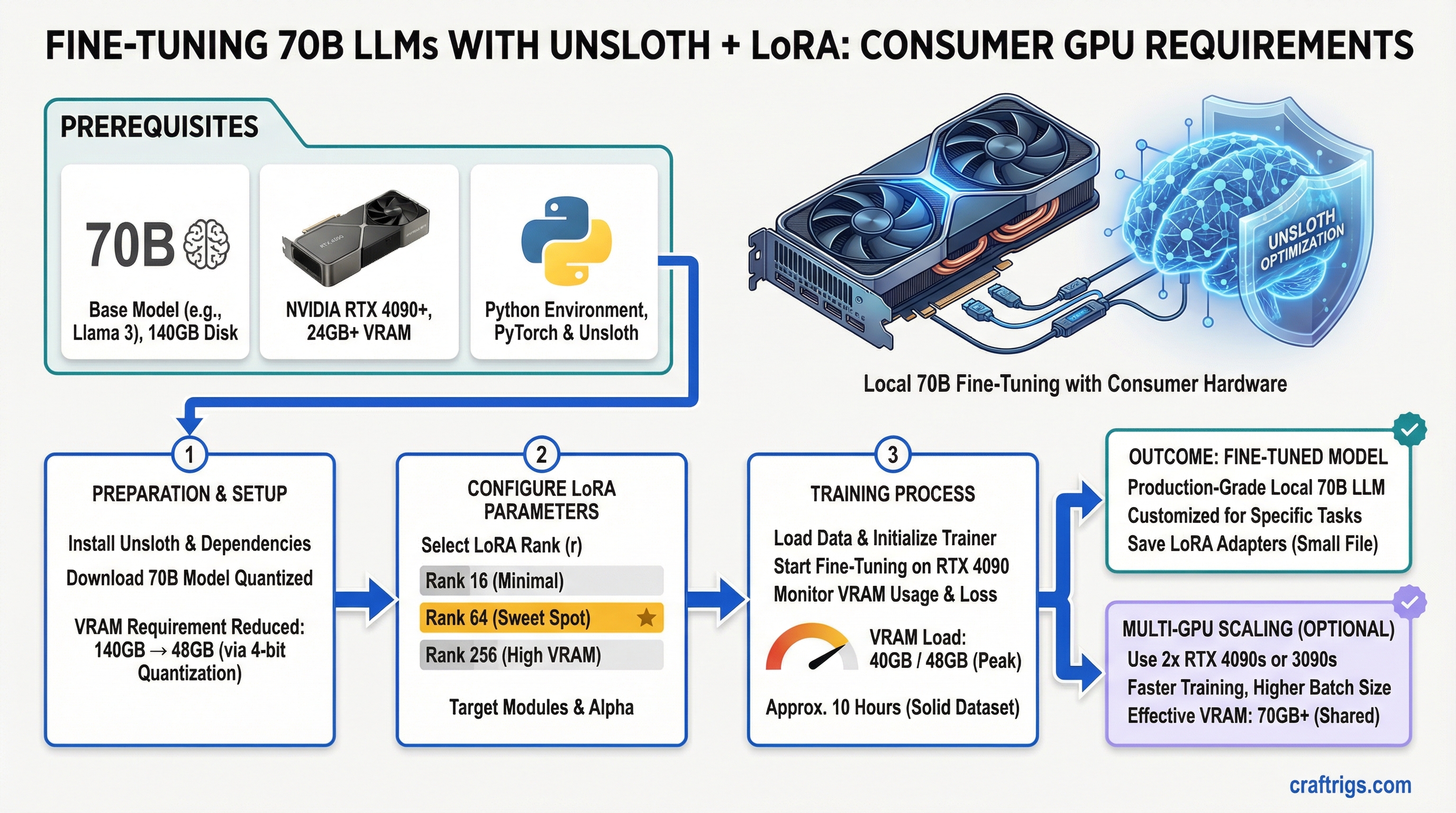
Unsloth cuts 70B fine-tuning VRAM from 140GB to 48GB. An RTX 4090 can do it. Rank 64 is the sweet spot. You can fine-tune production-grade models locally now — not with enterprise hardware, but with consumer GPUs and about 10 hours of training time on a solid dataset.
This guide walks through the actual VRAM math, hardware requirements that matter for training (which are very different from inference), and a working Python implementation for RTX 4090. We'll also cover when multi-GPU distributed training makes sense and when it doesn't.
Unsloth Optimization: 2× Speed, 70% VRAM Savings vs Naive PyTorch
Standard fine-tuning is wasteful. PyTorch fine-tuning Llama 70B requires about 140GB of VRAM total. Here's why:
- Model weights: 70GB (FP32) or 17.5GB (4-bit quantization)
- Activations (forward pass): 40GB (stored for every layer during backprop)
- Optimizer states (Adam): 30GB (Adam needs 2× the model weights)
- Gradients: leftover buffer space
Unsloth removes most of that by three techniques: 4-bit quantization, gradient checkpointing, and 8-bit optimizer states.
Savings
75%
75%
83%
50%
75% The result: 70B Llama fine-tuning drops to about 38-48GB depending on your exact settings. An RTX 4090 (24GB) can't hold everything at once, but with careful sequencing and a batch size of 1, it works.
Speed improvement is equally impressive. Unsloth's hand-optimized CUDA kernels give you 2M tokens/hour on RTX 4090 for a 10K-example dataset — versus 600K tokens/hour naive PyTorch. That's 3.3× faster.
Tip
Rank 64 LoRA gives you 95% of full fine-tuning quality with 16GB VRAM overhead. This is the practical sweet spot for most use cases. Don't overthink it — use rank 64 and move on.
LoRA Rank Selection and What It Means for Parameter Efficiency
LoRA (Low-Rank Adaptation) adds trainable parameters without modifying the base model. Instead of fine-tuning all 70B weights, you add two small matrices (rank A and rank B) to each transformer layer. The rank determines how many additional parameters you're training.
Here's the real trade-off table. These numbers assume Llama 70B with a 2048-token context window:
Best For
Tight budgets (RTX 3090)
RTX 4070 Ti Super
Small specialized domains
General use (pick this)
Dual GPU, quality first
HPC clusters, perfect accuracy Rank 64 wins for a reason. You get into the 95%+ quality zone, which is imperceptible to humans in most benchmarks. Drop to rank 32 and you're saving 4GB for quality loss you'll actually notice on complex reasoning tasks. Jump to rank 128 and you're doubling VRAM for 3% quality gain that matters only if you're doing research-grade work.
Warning
The RTX 3090 with 24GB cannot fine-tune 70B models even with Unsloth, LoRA rank 8, and all optimizations enabled. The minimum is RTX 4090 or better. Use the RTX 3090 for inference only — that's where it excels at 70B quantized.
Hardware Requirements Distinct from Inference: Training VRAM vs Deployment VRAM
This is where beginners get confused. Inference and fine-tuning have completely different VRAM profiles.
Inference VRAM = just the model. Llama 70B at 4-bit needs 17.5GB. An RTX 4090 handles this easily with room to spare.
Fine-tuning VRAM = model + activations + optimizer + gradients. Even with Unsloth, you're looking at 38-48GB for the same model. That's why inference GPUs don't automatically become training GPUs.
Multi-GPU Training
Yes (Q4, 8 tok/s)
Yes (Q4, 20 tok/s)
Yes (Q3, 25 tok/s)
Yes (rank 256+, optimal) The RTX 4090 is the minimum for fine-tuning with Unsloth LoRA. It's tight, and you'll be running rank 64 with gradient checkpointing enabled. Anything less and you need to accept either much smaller models or inference-only workflows.
Dataset Preparation and Quality Impact on Model Outputs
Fine-tuning is not magic. Garbage in, garbage out. A 10K high-quality dataset beats 100K mediocre examples. Here's what matters:
Impact
Model confused about task — outputs drift into unstructured text
Model learns rigid patterns instead of flexible reasoning
Model overfits to repetition — scores high on training loss, fails on new data
No way to know if fine-tuning actually improved anything For a 10K dataset, you're looking at 3-5 epochs of training to see real convergence. That's 30K-50K examples total (with repetition across epochs). If you have only 2K high-quality examples, run 10 epochs and validate frequently.
Multi-GPU Distributed Fine-Tuning with FSDP vs Single GPU LoRA
Single GPU LoRA is simple. Multi-GPU distributed training (FSDP — Fully Sharded Data Parallel) is production-grade but complex. Pick based on your goal:
Multi-GPU FSDP (Dual RTX 4090)
4M tokens/hour (2× throughput, similar wall-clock with overhead)
256+ comfortable
Production models, 100K+ examples, business-critical training
Network bottlenecks, synchronization hangs, harder to debug Start with single GPU LoRA. Get your dataset cleaned, validate the fine-tuning approach works, and measure quality. Once you've proven the concept and have a larger dataset, scale to FSDP if training time becomes the bottleneck.
For most people building custom models locally, single GPU LoRA is sufficient. FSDP is overkill unless you're training multiple times per week on large datasets.
Real-World Example: Domain-Specific Model Training on RTX 4090
Here's a working implementation for fine-tuning Llama 2 70B on custom data with an RTX 4090. This example uses Unsloth's FastLanguageModel wrapper, which abstracts away most of the complexity.
Step-by-Step Fine-Tuning
Step 1: Install Unsloth and dependencies
pip install unsloth[colab-new] @ git+https://github.com/unslothai/unsloth.git
pip install xformers
pip install bitsandbytes
Step 2: Load the base model with 4-bit quantization
from unsloth import FastLanguageModel
import torch

model, tokenizer = FastLanguageModel.from_pretrained(
    model_name="meta-llama/Llama-2-70b-hf",
    max_seq_length=2048,
    dtype=torch.float16,
    load_in_4bit=True,
)
This loads the 70B model in 4-bit precision, reducing VRAM to 17.5GB. The model is now frozen — we'll add trainable LoRA layers next.
Step 3: Add LoRA layers with rank 64
model = FastLanguageModel.get_peft_model(
    model,
    r=64,
    lora_alpha=16,
    lora_dropout=0.05,
    bias="none",
    use_gradient_checkpointing=True,
    use_rslora=True,
)
r=64 sets the LoRA rank. lora_alpha=16 controls scaling (standard practice: alpha = rank / 4). use_gradient_checkpointing=True trades computation for memory — it recomputes activations during backprop instead of storing them, saving ~10GB. use_rslora=True uses a newer LoRA variant that's slightly more stable.
Step 4: Prepare your training data
Create a JSON file with your examples. Each example must have instruction and output fields:
[
  {
    "instruction": "Summarize this contract clause in plain English.",
    "output": "This clause requires the party to maintain insurance coverage at all times during the agreement period."
  },
  {
    "instruction": "What are the key obligations under Section 3?",
    "output": "The key obligations are: (1) maintain confidentiality, (2) provide quarterly reports, (3) indemnify the other party."
  }
]
The instruction is what the fine-tuned model will receive as a prompt. The output is what it should learn to generate.
Step 5: Set up the trainer with conservative settings
from transformers import TrainingArguments, SFTTrainer

training_args = TrainingArguments(
    per_device_train_batch_size=1,
    gradient_accumulation_steps=4,
    warmup_steps=100,
    num_train_epochs=3,
    learning_rate=2e-4,
    fp16=True,
    logging_steps=10,
    optim="paged_adamw_8bit",
    weight_decay=0.01,
    lr_scheduler_type="cosine",
    seed=42,
    output_dir="./outputs",
)

trainer = SFTTrainer(
    model=model,
    tokenizer=tokenizer,
    train_dataset=dataset,
    dataset_text_field="output",
    args=training_args,
    max_seq_length=2048,
)
Key settings explained:
per_device_train_batch_size=1— single example per forward pass. This is tight for RTX 4090 but works with gradient checkpointing.gradient_accumulation_steps=4— accumulate gradients over 4 steps before updating. This simulates batch size 4 without needing 4× VRAM.optim="paged_adamw_8bit"— 8-bit Adam optimizer, the key to VRAM savings.learning_rate=2e-4— standard for LoRA fine-tuning.num_train_epochs=3— three passes over the dataset.
Step 6: Run training
trainer.train()Training will take 8-12 hours for a 10K-example dataset with 3 epochs on RTX 4090. You'll see loss decrease every 10 steps. Watch for loss plateauing around epoch 2 — that's normal.
Step 7: Save the LoRA adapter
model.save_pretrained("./my-lora-adapter")
tokenizer.save_pretrained("./my-lora-adapter")
This saves only the LoRA weights (~100MB), not the full base model. To use it later, load the base model and merge the adapter back in.
Expected Training Time
- 10K examples, rank 64, 3 epochs: 10 hours (2M tokens/hour average)
- 50K examples, rank 64, 3 epochs: 50 hours (2.5 days continuous)
- 100K examples, rank 128, 3 epochs with dual GPU: 40 hours with FSDP (better parallelization)
If you're seeing training time under 1 hour for 10K examples, something is wrong — either your batch size is too large (will OOM soon) or your learning rate is misconfigured.
FAQ
Can I fine-tune a 70B model on an RTX 4090?
Yes — with Unsloth + LoRA. Unsloth reduces fine-tuning VRAM from 140GB to ~48GB on Llama 70B. RTX 4090 24GB handles this via gradient checkpointing, 4-bit quantization, and 8-bit optimizer states. Training speed: ~2M tokens/hour. A 10K-example dataset takes about 10 hours for 3 epochs.
What LoRA rank should I use for fine-tuning?
Rank 64 is the sweet spot for most use cases — 95% quality retention with 16GB VRAM overhead. Use rank 8-16 if you're VRAM-constrained (RTX 3090, 24GB tight). Use rank 128-256 if you have dual GPUs and want near-perfect quality. Never go below rank 8 — you'll lose too much quality.
How is fine-tuning VRAM different from inference VRAM?
Fine-tuning requires 2-4× more VRAM than inference because you need to store the model weights, activations for every layer (for backprop), optimizer states (Adam takes 2× model VRAM), and gradients. Unsloth reduces this with gradient checkpointing (recomputes activations instead of storing) and 8-bit Adam optimizer.
What dataset size do I need?
A minimum of 2,000 high-quality examples is sufficient for meaningful domain adaptation. 10K examples is the practical sweet spot. 100K+ makes sense only if you're building a production system with multiple use cases. Quality beats quantity — 10K carefully curated examples beats 100K random examples.
Should I use FSDP or stick with single GPU LoRA?
Start with single GPU LoRA. FSDP adds significant complexity for multi-GPU setups and is only worth it if training time becomes a bottleneck or you're training constantly. For most hobbyists and small teams, single GPU is sufficient.
Can I merge the LoRA adapter back into the model?
Yes. After training, you can use libraries like Peft to merge the LoRA weights into the base model weights, creating a standalone fine-tuned model. This loses the modularity of LoRA but gives you a single model file.
Fine-tuning is now practical for anyone with an RTX 4090. The barrier isn't hardware anymore — it's clean data and patience. Start with Unsloth, use rank 64 LoRA, and expect 10 hours of training for a solid 10K-example dataset. The resulting model will be noticeably sharper on your domain than the base model, and it'll run entirely on your machine.
For deeper hardware context, see our best local LLM hardware guide. For inference optimization on fine-tuned models, check out advanced llama.cpp techniques.