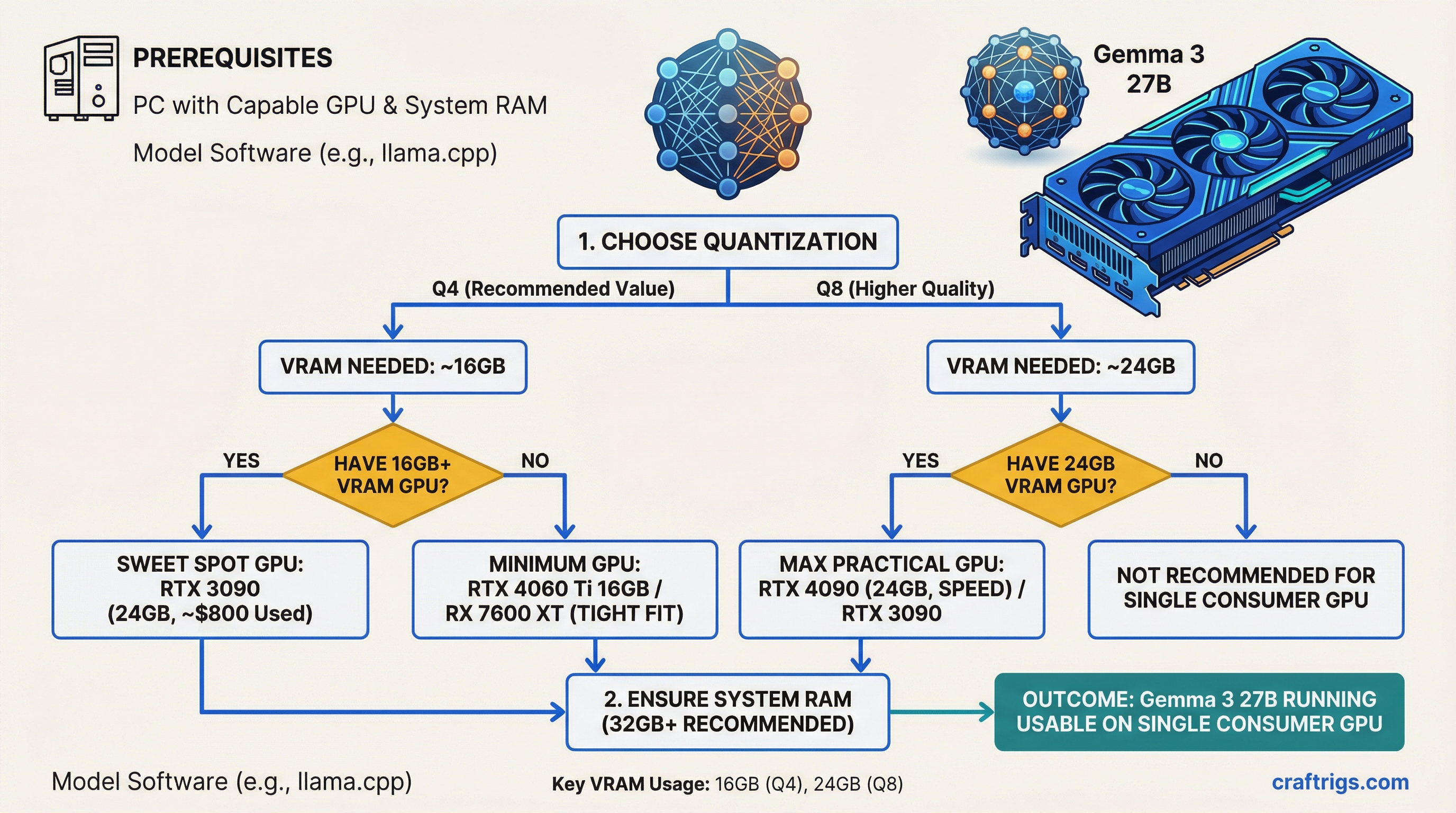
TL;DR: Gemma 3 27B is arguably the best open model you can run on a single consumer GPU. At Q4 quantization, it needs about 16GB of VRAM — tight on a 16GB card, comfortable on a 24GB one. Buy an RTX 3090 (24GB, ~$800 used) for the best value, or an RTX 4090 if you want speed. It beats most 70B-class models on the LMArena leaderboard despite being a fraction of the size.
Why Gemma 3 27B Matters
Google released Gemma 3 on March 12, 2025, and positioned it as "the most capable model you can run on a single GPU." That's marketing, but it's also basically true.
At 27 billion parameters (dense, not a Mixture of Experts), Gemma 3 27B sits in a sweet spot: large enough to deliver genuinely strong reasoning, small enough to fit on consumer hardware with quantization — the process of compressing model weights to use less memory. It supports text and image inputs (multimodal), handles a 128K token context window, and speaks 140+ languages.
The headline number: on the LMArena chatbot leaderboard, Gemma 3 27B posts an Elo of 1338, beating Llama 3.1 405B in human preference despite being 15x smaller. That's not a typo. For the kinds of tasks most people actually use local LLMs for — chat, analysis, coding, summarization — this model punches absurdly above its weight.
VRAM Requirements at Every Quantization Level
Here's exactly how much VRAM Gemma 3 27B needs at each precision level. These numbers include the model weights only — add 1-3GB for KV cache (conversation memory) depending on context length.
Full Precision (BF16 / FP16):
- VRAM needed: ~54GB
- Hardware: Requires an A100 80GB or two 24GB consumer GPUs
- Who needs this: Researchers doing fine-tuning or evaluation. Nobody runs inference at full precision.
Q8_0 (8-bit quantization):
- VRAM needed: ~28-30GB
- Hardware: RTX 5090 (32GB) fits it. RTX 4090 (24GB) does not — you'd need partial CPU offloading.
- Quality: Near-lossless. Virtually indistinguishable from full precision for inference.
Q5_K_M (5-bit quantization):
- VRAM needed: ~20-22GB
- Hardware: RTX 4090 or RTX 3090 (24GB) with headroom for context
- Quality: Excellent. Most users can't tell the difference from Q8 in blind tests.
Q4_K_M (4-bit quantization):
- VRAM needed: ~16-17GB
- Hardware: Fits on a 24GB card with plenty of room. Technically fits on 16GB, but context window will be very limited.
- Quality: The standard for daily use. Minor quality degradation on complex reasoning tasks, but still very good.
Q3_K_M (3-bit quantization):
- VRAM needed: ~13-14GB
- Hardware: Fits on 16GB cards comfortably
- Quality: Noticeable degradation. Fine for casual chat, not ideal for tasks requiring precision.
IQ2 (2-bit quantization):
- VRAM needed: ~10-11GB
- Hardware: Fits on 12GB cards (RTX 3060 12GB)
- Quality: Significant quality loss. Only use this if your hardware can't handle Q4.
The 16GB Question: Tight But Possible
A 16GB GPU (RTX 4070 Ti Super, RTX 5060 Ti, RTX 4060 Ti 16GB) can technically run Gemma 3 27B at Q4_K_M. The model itself takes about 16-17GB, which leaves almost nothing for KV cache.
In practice, this means:
- Short conversations (under 2K context): Works fine, responsive speeds
- Medium conversations (4K-8K context): Starts getting tight, may need to reduce context or use KV cache quantization
- Long context (16K+): Won't fit. The model plus KV cache will exceed 16GB.
If you have a 16GB card and want to run Gemma 3 27B, use Q3_K_M instead. At ~14GB for the model, you'll have 2GB left for context — enough for useful conversations up to 4-8K tokens.
The comfortable tier is 24GB. At Q4_K_M on a 24GB card, you have 7-8GB of headroom for context, system overhead, and longer conversations. This is where the experience goes from "it runs" to "it's actually pleasant to use."
Performance: How Fast Does It Run?
Tokens per second (t/s) — how many words per second the model generates — depends on your GPU's memory bandwidth. Here's what to expect with Gemma 3 27B at Q4_K_M:
- RTX 5090 (32GB, 1,790 GB/s): ~55-65 t/s — fast and fluid
- RTX 4090 (24GB, 1,008 GB/s): ~35-42 t/s — excellent, faster than reading speed
- RTX 3090 (24GB, 936 GB/s): ~30-38 t/s — smooth, no complaints
- RTX 4070 Ti Super (16GB, 672 GB/s): ~22-28 t/s at Q3_K_M — usable but noticeably slower
- RTX 3060 12GB (192 GB/s): Only runs IQ2/Q2 quants, ~8-12 t/s — functional but slow
For reference, comfortable reading speed is about 4-5 t/s. Anything above 15 t/s feels responsive for interactive chat. Above 30 t/s feels fast.
How Gemma 3 27B Compares to the Competition
The 27B-34B parameter class is competitive right now. Here's how Gemma 3 stacks up against the models people actually compare it to:
Gemma 3 27B vs Llama 3.1 70B:
- Gemma 3 27B beats Llama 3.1 70B on the LMArena Elo leaderboard (1338 vs ~1290)
- Uses roughly one-third the VRAM at equivalent quantization
- Llama 3.1 70B is stronger on pure coding benchmarks
- For general use, Gemma 3 27B is the better choice — same quality, way less hardware
Gemma 3 27B vs Qwen 2.5 32B:
- Very close in overall quality across benchmarks
- Qwen 2.5 32B is slightly larger (~32GB at Q4 vs ~16GB), needs a 24GB card minimum
- Gemma 3 27B has native vision (image understanding) — Qwen 2.5 32B does not in the base model
- Qwen edges ahead on coding tasks; Gemma wins on multilingual and multimodal
Gemma 3 27B vs Mistral Small 22B:
- Gemma 3 27B is significantly stronger on most benchmarks
- Mistral Small 22B uses slightly less VRAM (~13GB at Q4)
- If your hardware can handle Gemma 3, there's no reason to run Mistral Small instead
Gemma 3 27B vs DeepSeek R1 32B:
- DeepSeek R1 32B is specifically tuned for chain-of-thought reasoning
- Gemma 3 27B is better for general tasks, multimodal, and multilingual
- DeepSeek R1 32B wins on math and complex multi-step reasoning
- Similar VRAM requirements
Which GPU Should You Buy?
Budget pick: RTX 3090 24GB (~$800 used, as of March 2026)
The clear winner for Gemma 3 27B on a budget. 24GB fits the model at Q4 or Q5 with headroom. Runs at 30-38 t/s — fast enough for daily use. Available on the used market for about half the price of a 4090. Check our best GPUs guide for buying tips.
Performance pick: RTX 4090 24GB (~$1,600)
Same VRAM, 50% faster inference. Worth it if you use your LLM heavily and want the snappiest possible responses. Also handles the higher quants (Q5, Q8) better thanks to the extra bandwidth.
Future-proof pick: RTX 5090 32GB (~$2,000)
The 32GB lets you run Q8 quantization — near-lossless quality — without worrying about context length. The 78% bandwidth improvement over the 4090 translates directly to faster token generation. Overkill for Gemma 3 27B specifically, but if you plan to run 70B-class models later, the extra VRAM matters.
Budget-constrained: RTX 4070 Ti Super 16GB (~$750)
Runs Gemma 3 27B at Q3_K_M with limited context. Functional but not the ideal experience. Consider this only if you also plan to run smaller models (7B-14B) where 16GB gives you comfortable headroom.
Mac Alternative
A MacBook Pro M4 Max with 48GB unified memory runs Gemma 3 27B at Q4_K_M without breaking a sweat — the 48GB of unified memory leaves plenty of room for context, and the Metal-optimized llama.cpp backend keeps speeds at 15-22 t/s. Slower than an RTX 4090, but you get a laptop that does everything else too. See our Apple Silicon LLM benchmarks for detailed numbers.
Getting Started
- Install Ollama — the easiest way to run local models
- Pull the model:
ollama pull gemma3:27b(automatically downloads Q4_K_M) - Run it:
ollama run gemma3:27b - For more control over quantization, use llama.cpp with a specific GGUF file from HuggingFace
For a complete beginner's walkthrough, see our guide to running LLMs locally.