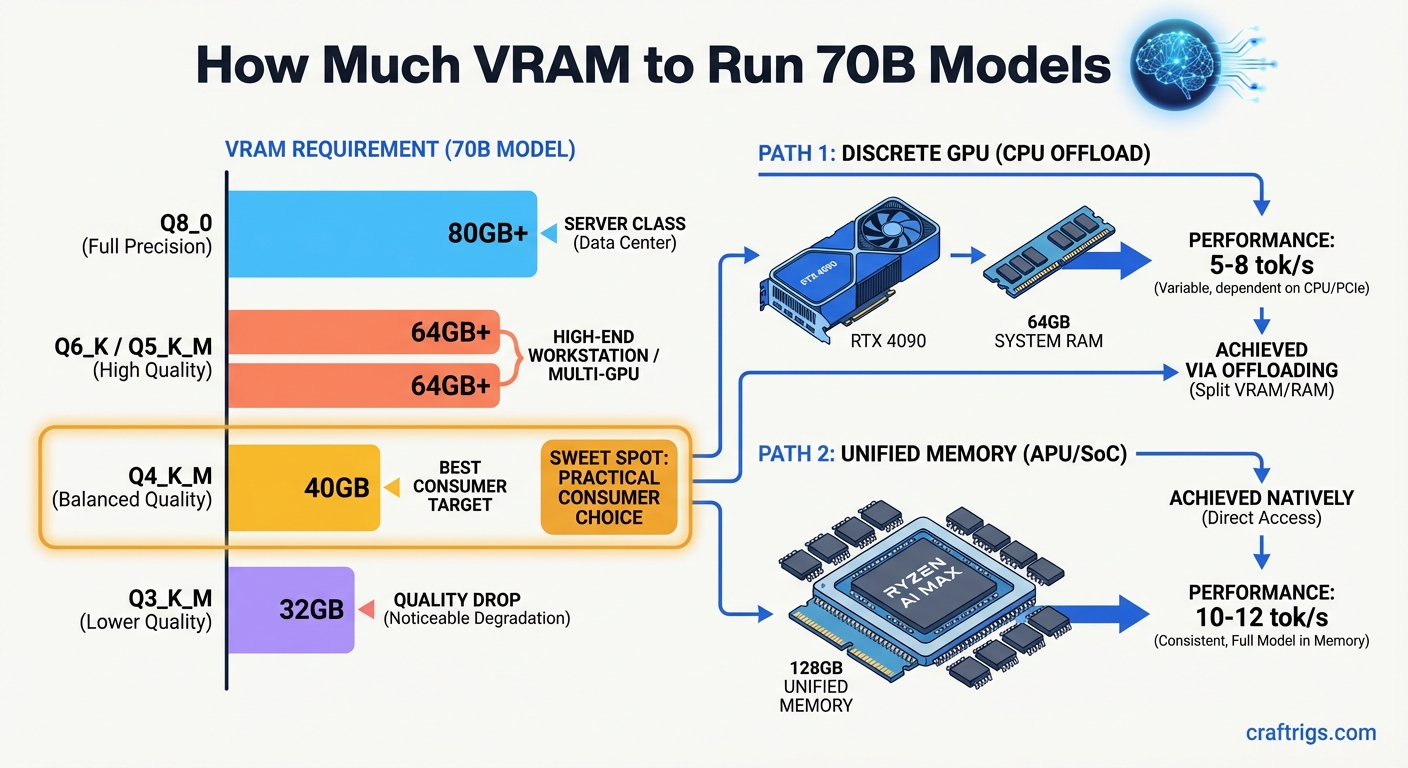
Quick answer: A 70B model at Q4_K_M quantization requires approximately 40GB of VRAM. You have two practical paths: pair a 24GB GPU with CPU offloading to handle layers that won't fit, or use a unified memory system with 128GB (like the Ryzen AI Max+ 395) that loads the full model in fast shared memory. Both work — they have different speed and cost trade-offs.
VRAM Requirements by Quantization Level
The table below covers a standard dense 70B model (Llama 3.3 70B, DeepSeek R1 70B, Qwen 2.5 72B, etc.) at common quantization levels. Sizes are approximate — real-world usage adds a small overhead for the KV cache and runtime buffers.
Notes
Full precision weights — needs A100 80GB or multi-GPU
Near-lossless quality — still server-class hardware
Good quality, still out of range for consumer single-GPU
Best consumer trade-off — fits 128GB unified memory systems
Noticeable quality drop vs Q4 — useful for testing, not daily driving The practical floor for running a 70B model fully in memory is Q4_K_M at ~40GB. Anything lower introduces meaningful quality loss that most users notice, especially for reasoning tasks.
Path 1 — Discrete GPU with CPU Offloading
A single RTX 4090 (24GB) or RTX 3090 (24GB) won't fit a Q4_K_M 70B model entirely in GPU memory. But it doesn't have to. Tools like llama.cpp and Ollama support layer-by-layer offloading: the GPU handles as many transformer layers as fit in its VRAM, and the CPU handles the rest using system RAM.
How it works in practice:
With 24GB of VRAM and a Q4_K_M 70B model (~40GB total), you can offload roughly 60% of layers to the GPU. The remaining 40% run on the CPU. If you have 64GB of system RAM, the full model fits in memory — you just have two execution speeds running simultaneously.
What you actually get:
- Speed: 3–8 tokens/second depending on CPU, RAM bandwidth, and how many layers GPU handles
- Quality: Full Q4_K_M quality — no degradation from the offloading itself
- Usable for: Chat, long-form writing, summarization, Q&A — anything non-latency-sensitive
- Not good for: Real-time applications, rapid back-and-forth chat where 5+ second wait times are frustrating
Hardware that works for this path:
Expected Speed
5–8 t/s
4–7 t/s
12–18 t/s — fits fully in GPU VRAM
4–6 t/s The RTX 3090 is currently the best-value path for 24GB VRAM: used cards are at $650–$750, and the 24GB capacity is the same as the 4090.
Dual RTX 3090 with NVLink: Two 3090s connected via NVLink give you 48GB of combined VRAM that the model sees as a single pool. A Q4_K_M 70B model fits comfortably with room for context. Speed jumps to 12–18 t/s — usable for real conversations. The downside is cost (~$1,400–$1,600 for two used 3090s), power (two cards at 350W each), and NVLink bridge compatibility requirements. See our multi-GPU inference guide for full setup details.
Path 2 — Unified Memory (Ryzen AI Max+ 395 / 128GB Systems)
AMD's Ryzen AI Max+ 395 processor uses unified memory architecture: the CPU and integrated GPU share the same physical memory pool. With 128GB of LPCAMM2 memory installed, you have 128GB of fast unified memory available to the model — the entire Q4_K_M 70B model fits with 88GB to spare for context and system overhead.
The ASRock AI BOX-A395 is a mini-PC built around this chip with 128GB unified memory. It's a purpose-built local AI workstation in a compact form factor — see our full comparison of ASRock AI BOX-A395 vs. a discrete GPU tower build for throughput benchmarks and cost breakdown.
Why unified memory is different:
On a discrete GPU setup, VRAM is the bottleneck. Any layers that don't fit in GPU VRAM drop to system RAM, which runs over PCIe and is 5–20x slower per layer. On the Ryzen AI Max+ 395, there's no VRAM vs system RAM distinction — it's all the same physical memory pool, running at LPDDR5X speeds (~100 GB/s).
This means the full 70B model runs at the same bandwidth throughout. No layer-by-layer speed difference, no bottleneck at the GPU/CPU handoff.
Speed comparison:
No — split across VRAM + RAM
Yes — 48GB GPU VRAM
Yes — Apple Silicon unified memory The Ryzen AI Max+ 395 system sits between the 4090-with-offload (slower) and dual-3090 NVLink (faster but more expensive and power-hungry). For a compact, quiet, single-device setup that handles 70B natively, it's a strong option.
Trade-off summary:
- Peak token speed: discrete GPU wins (NVLink dual-GPU is fastest in this tier)
- Simplicity: unified memory wins — no offloading config, no NVLink compatibility concerns
- Power: unified memory wins — the Ryzen AI Max+ system draws ~65W vs 700W+ for dual 3090s
- Price: comparable — a 128GB AI MAX+ 395 mini-PC runs $1,800–$2,200; dual 3090s with a full build is similar
Which Path Is Right for You?
Use this to decide:
Go with a single RTX 3090/4090 + CPU offloading if:
- You already own a gaming PC and want to add 70B capability without a full rebuild
- You can tolerate 4–8 t/s for non-real-time tasks (research, summarization, drafting)
- Budget is the priority — the RTX 3090 is the cheapest path into 70B territory
Go with dual RTX 3090 (NVLink) if:
- You want the fastest consumer-class 70B inference
- You're running an API server or multi-user setup where speed matters
- You're comfortable with the complexity of dual-GPU setup and NVLink configuration
Go with Ryzen AI Max+ 395 / unified memory if:
- You want a compact, low-power system that handles 70B without configuration complexity
- Power and noise are a real concern (home office, bedroom workstation)
- You want one device that handles AI inference, daily computing, and runs cool
Go with Apple Silicon (M4 Max/Ultra 128GB) if:
- You're already in the Mac ecosystem
- You want the fastest unified memory inference per watt
- You can spend $3,000–$6,000+ for top-tier Apple hardware
For more detail on the VRAM math behind any model size, use the VRAM Calculator.
Conclusion
Running 70B models locally is genuinely possible in 2026 on consumer hardware — but you have to pick your path deliberately. The 40GB VRAM floor for Q4_K_M is not negotiable: below that, you're either offloading to CPU (slow) or dropping quantization (lower quality).
The RTX 3090 at $650–$750 is the cheapest entry point, paired with 64GB+ system RAM for offloading. Two 3090s with NVLink gives you full in-memory speed at a reasonable cost. And unified memory systems like the Ryzen AI Max+ 395 give you a clean, compact, low-power alternative that fits the full model without any GPU-to-CPU offloading.
Choose based on what you're optimizing for: raw speed, lowest cost, lowest power, or simplest setup.
VRAM Requirements for 70B Models
graph LR
    A["Llama 3.3 70B"] --> B{"Quantization?"}
    B -->|"Q2"| C["~22GB VRAM"]
    B -->|"Q4_K_M"| D["~40GB VRAM"]
    B -->|"Q8"| E["~70GB VRAM"]
    B -->|"FP16"| F["~140GB VRAM"]
    C --> G["RTX 3090 24GB + CPU offload"]
    D --> H["2x RTX 3090 / A100 40GB"]
    E --> I["A100 80GB / H100"]
    style A fill:#1A1A2E,color:#fff
    style D fill:#F5A623,color:#000
    style H fill:#00D4FF,color:#000