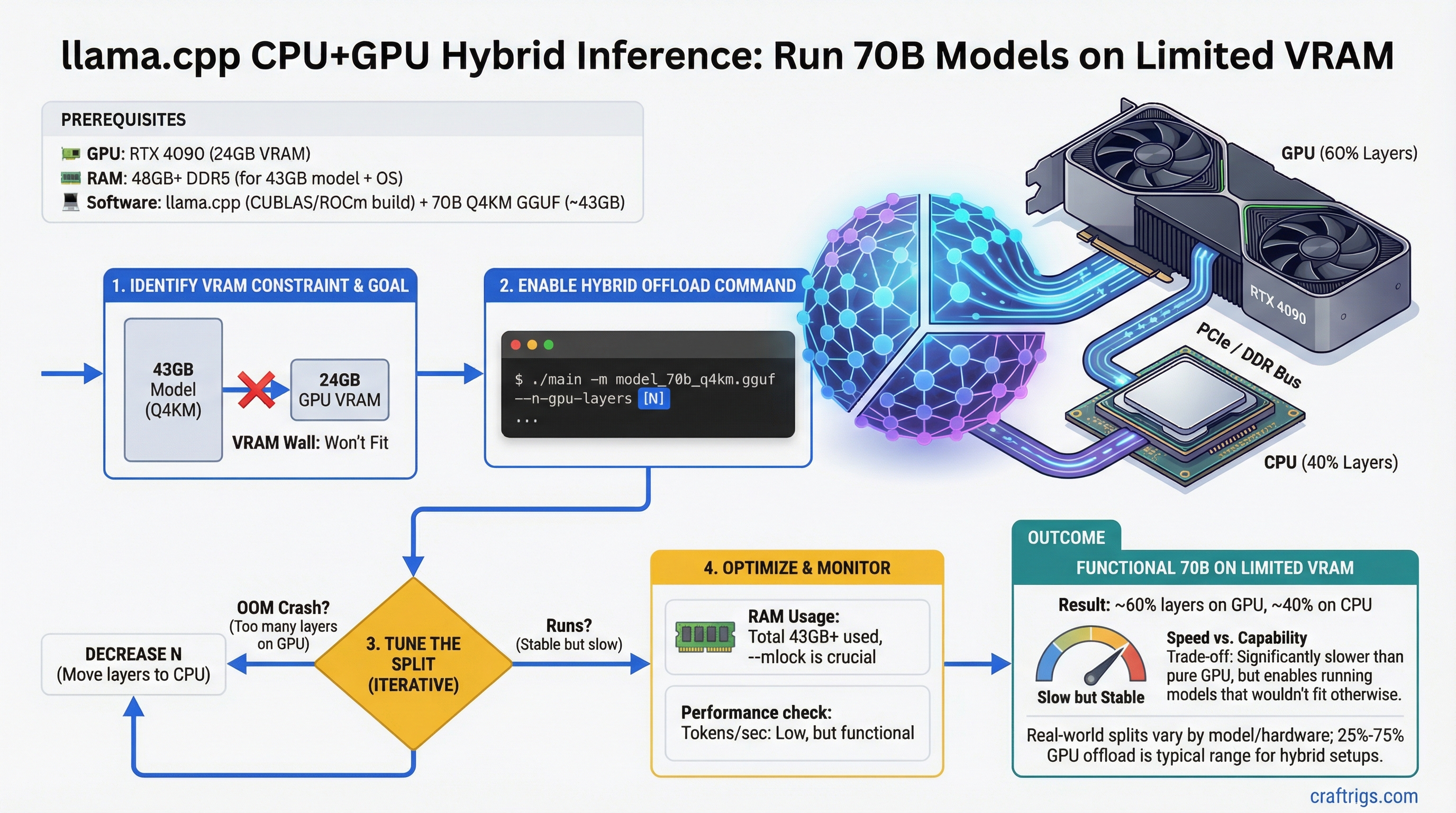
A 70B model needs roughly 43GB of VRAM at Q4_K_M. A single RTX 4090 has 24GB. The math does not work — unless you split the model across GPU and CPU.
llama.cpp has supported layer offloading since 2023, and it is more useful than most people realize. You cannot get fast inference this way — CPU compute is an order of magnitude slower than GPU for matrix operations. But you can run models that would otherwise require hardware you do not own, at speeds that are tolerable for specific use cases.
This guide explains exactly how layer offloading works, what speeds to expect, how to configure it, and how to get the best performance from the hardware you have.
Quick Summary
--n-gpu-layers N: N=0 is full CPU, N=99 forces all layers to GPU, any value between splits proportionally- Speed penalty: Hybrid inference runs at 1–5 t/s for large models — 5–15x slower than full GPU inference
- RAM requirement: CPU layers live in system RAM — 70B Q4_K_M needs up to 43GB total; subtract your GPU VRAM to get RAM requirement
How Layer Offloading Actually Works
A transformer model consists of a stack of layers — typically 32 layers for 7B models, 80 layers for 70B models. Each layer is a self-contained set of weight matrices (attention, MLP, normalization).
llama.cpp's layer offloading assigns each layer to either GPU VRAM or CPU RAM. During inference:
- For each layer assigned to GPU: the computation happens in CUDA/ROCm at full GPU speed
- For each layer assigned to CPU: the weights are read from RAM and computed using CPU SIMD instructions (AVX2/AVX-512)
- Between GPU and CPU layers, data transfers over the PCIe bus
The critical point: inference is sequential through layers. Token generation requires passing through all layers in order, which means the overall speed is dominated by the slowest hardware in the chain — the CPU.
Why This Creates a Throughput Cliff
GPU tokens/second on a 70B model: ~15–25 t/s (fully in 48GB VRAM) CPU tokens/second on a 70B model: ~0.5–1.5 t/s (fully in RAM on a modern Ryzen/Intel)
With 25% of layers on GPU and 75% on CPU, the bottleneck is still the CPU sections. You do not get 25% of GPU speed — you get something much closer to CPU speed with GPU sections reducing total time modestly.
Useful rule of thumb: if less than 50% of layers fit in VRAM, full CPU inference is often comparable in speed to hybrid inference for smaller 70B quantizations. Hybrid inference becomes worth it when you can get 60%+ of layers on GPU.
The --n-gpu-layers Parameter
llama-cli \
  --model ./Llama-3.1-70B.Q4_K_M.gguf \
  --n-gpu-layers 20 \
  --ctx-size 4096 \
  --prompt "Explain transformer attention mechanisms"
--n-gpu-layers value | Effect |
|---|---|
| 0 | All layers on CPU (pure CPU inference) |
| 1–N | Specific number of layers on GPU, rest on CPU |
| 99 (or any large number) |
llama.cpp counts from the bottom layers up. With --n-gpu-layers 20 on a 80-layer model, the first 20 layers go to GPU and layers 21–80 run on CPU.
Checking Layer Count for Your Model
llama-cli --model your-model.gguf --verbose 2>&1 | grep "n_layer"Common layer counts:
- 7B/8B models: 32 layers
- 13B/14B models: 40 layers
- 34B models: 48 layers
- 70B/72B models: 80 layers
RAM Requirements for Hybrid Inference
When layers run on CPU, their weights live in system RAM (not VRAM). For a 70B Q4_K_M model (~43GB total):
RAM_needed = total_model_size - (VRAM × 0.9)The 0.9 factor accounts for VRAM overhead from CUDA context, KV cache, and scratch buffers.
RAM Required (70B Q4_K_M)
38–40 GB system RAM
34–36 GB system RAM
28–30 GB system RAM
16–20 GB system RAM
For the 16GB and 24GB GPU scenarios, 32–64GB of system RAM is the practical requirement. Running hybrid inference with only 16GB system RAM on a 16GB GPU card (total 32GB addressable) leaves almost nothing for the OS.
Speed Benchmarks by Offload Configuration
70B Llama 3.1 Q4_K_M on RTX 4060 Ti 16GB (80 total layers)
Notes
Ryzen 9 7950X, AVX2
Marginal improvement
Noticeable but still slow
Best this card can do 70B Llama 3.1 Q4_K_M on RTX 3090/4090 24GB (80 total layers)
Approx Tokens/sec
1.5–3.0 t/s
4.0–6.0 t/s
8.0–12.0 t/s
The diminishing-returns pattern here is clear: going from 20 to 40 GPU layers roughly doubles speed; going from 40 to 60 roughly doubles again. The majority of speed comes from pushing the majority of layers to GPU.
Optimal Configurations for Common GPU Cards
RTX 4060 Ti 16GB — Running 70B
Maximum safe layer count: approximately 35–38 layers at Q4_K_M before VRAM overflow.
llama-cli \
  --model Llama-3.1-70B-Instruct.Q4_K_M.gguf \
  --n-gpu-layers 35 \
  --ctx-size 2048 \
  --threads 8 \
  --prompt-cache ./cache.bin
RAM requirement: 64GB system RAM recommended. 32GB works but leaves the OS tight.
Practical use: 2–3 t/s. Better suited to batch processing (summarizing documents, generating reports) than real-time chat.
RTX 3090 / RTX 4090 24GB — Running 70B
Maximum safe layer count: approximately 55–60 layers at Q4_K_M.
llama-cli \
  --model Llama-3.1-70B-Instruct.Q4_K_M.gguf \
  --n-gpu-layers 58 \
  --ctx-size 4096 \
  --threads 8 \
  --flash-attn
RAM requirement: 32GB system RAM sufficient; 64GB comfortable.
Expected speed: 8–12 t/s. Usable for interactive chat, though a 7B fully on GPU will feel faster.
Dual RTX 4090 48GB — Running 70B Fully on GPU
With two RTX 4090s in tensor parallel mode via llama.cpp:
llama-cli \
  --model Llama-3.1-70B-Instruct.Q4_K_M.gguf \
  --n-gpu-layers 99 \
  --tensor-split 1,1 \
  --ctx-size 8192
Expected speed: 15–25 t/s at 4K context. This is the consumer ceiling for 70B models.
See our guide on multi-GPU LLM inference setup for tensor split configuration details.
Reducing Context to Fit More Layers
Context length directly affects VRAM usage through the KV cache. Cutting context length in half roughly halves KV cache VRAM, freeing room for more GPU layers.
# Instead of default 2048, use 1024 to free ~0.5-1GB VRAM for an extra few layers
llama-cli \
  --model model.gguf \
  --n-gpu-layers 40 \
  --ctx-size 1024
For applications that do not need long context (summarizing paragraphs, answering questions about short documents), --ctx-size 1024 or 1536 frees meaningful VRAM.
Using mmap for Faster CPU Layer Loading
When CPU layers live in RAM, llama.cpp can use memory-mapped files (mmap) to load model weights without copying them into a separate allocation:
llama-cli \
  --model model.gguf \
  --n-gpu-layers 30 \
  --mmap \
  --ctx-size 4096
--mmap is the default in most builds. If your build has it disabled, enabling it reduces RAM usage and speeds up model loading. It does not improve generation speed.
When Hybrid Inference Is and Is Not Worth It
Use hybrid inference when:
- You need to run a 70B model for non-real-time tasks (processing documents, batch generation)
- You have 16–24GB VRAM and 64GB+ RAM and cannot afford a second GPU
- You are fine with 2–8 t/s throughput
- You specifically need 70B-level reasoning quality and lower quantizations of smaller models are not sufficient
Skip hybrid inference and use a smaller model when:
- You need interactive conversational speed (>10 t/s)
- A 13B or 34B model fully in VRAM meets your quality requirements
- You have 24GB VRAM — run 27B at Q8_0 fully on GPU instead of 70B hybrid
For pure performance per dollar, running a 34B model fully on a single RTX 3090 (24GB, ~$750 used) outperforms 70B hybrid inference on the same card in most real-world tasks. See our VRAM calculator to compare options before committing to a hybrid setup. For budget build options that avoid hybrid inference entirely, see our cheap $500 local LLM build and $1,200 build guide.