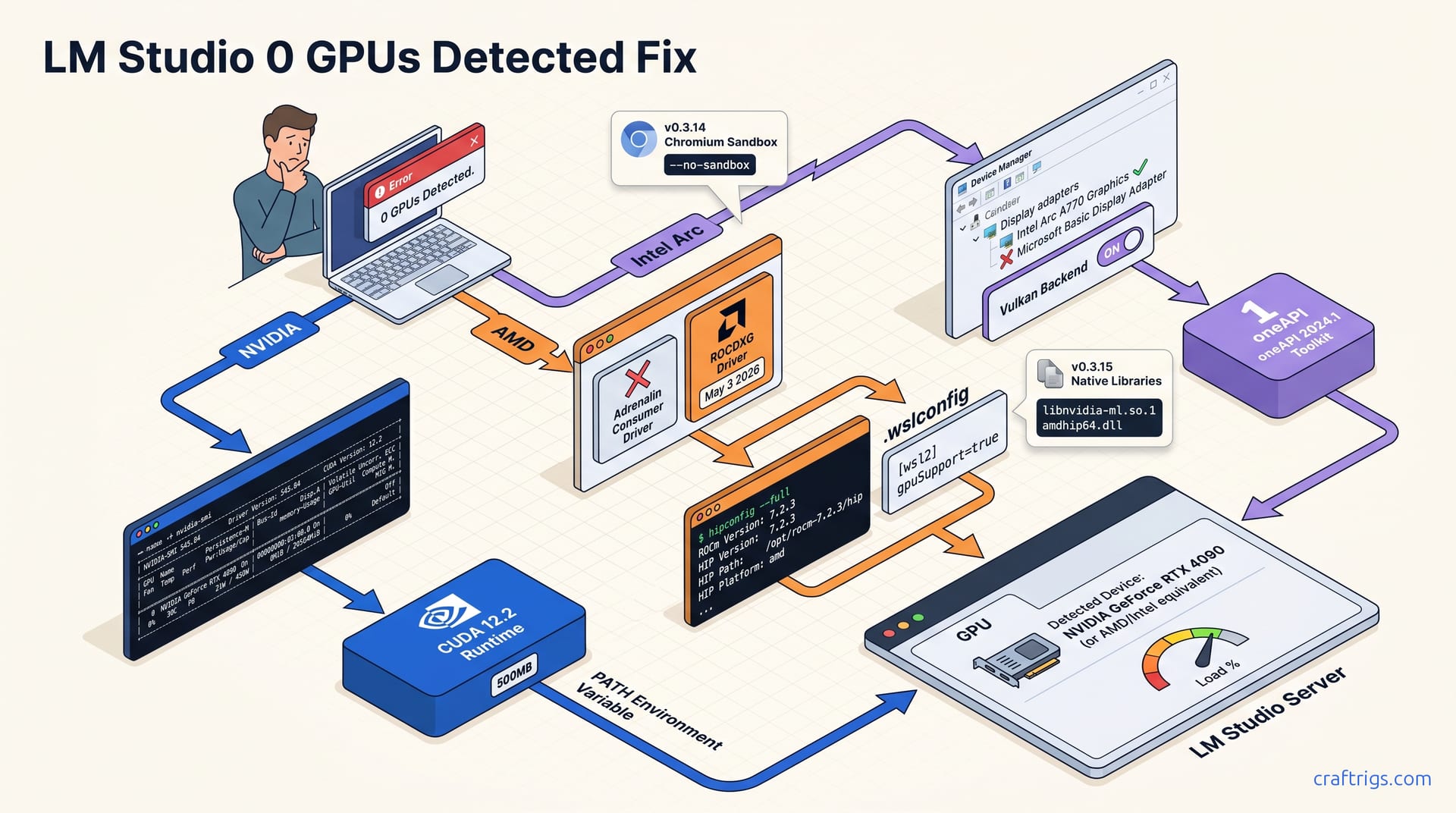
Run the pre-flight checklist first: check nvidia-smi, hipconfig --full, or Intel Arc Control Center to confirm your driver layer is correct before touching LM Studio settings. Most "0 GPUs detected" errors are driver mismatches. NVIDIA needs Studio/Game Ready 550+, AMD on Windows needs ROCDXG (not Adrenalin), WSL2 needs gpuSupport=true in .wslconfig, and Intel needs IPEX-LLM backend selected. Fix the driver, restart LM Studio, verify in the GPU tab.
The 60-Second Pre-Flight Checklist
Before you touch a single LM Studio setting, confirm your GPU is visible to the operating system. Open a terminal or PowerShell window and run the platform-specific command: nvidia-smi for NVIDIA hardware, hipconfig --full for AMD on Windows, rocminfo for AMD on Linux, or open Intel Arc Control Center for Intel Arc GPUs. If these tools return errors or blank output, LM Studio cannot see your GPU. The detection failure lives at the driver layer. This thirty-second test catches the most common false diagnosis: your GPU shows in Device Manager, but its compute runtime is missing or misconfigured.
Next, check your LM Studio version in Help → About. Versions v0.3.14 and v0.3.15 changed GPU enumeration logic and broke previously working setups. If you're on v0.3.14 and running Linux with strict AppArmor profiles or certain Wayland configurations, the Chromium GPU process sandbox blocks nvml access even when nvidia-smi works in terminal. Launch LM Studio with the --no-sandbox flag to work around this. On v0.3.15, the detection system moved to native OS library queries, which improves reliability but requires driver ABIs that match LM Studio's bundled runtimes. Your exact version tells you whether you're fighting a sandbox bug or a driver ABI mismatch, and that determines which fix path below applies.
NVIDIA CUDA: Fix Path for "0 GPUs Detected"
nvidia-smi showing your card while LM Studio shows zero GPUs points to a CUDA runtime mismatch. LM Studio v0.3.15 bundles CUDA 12.2 and requires NVIDIA GeForce or Studio driver ≥545.xx. Older drivers prevent the bundled runtime from initializing against your driver ABI. User reports describe this exact failure on a 4090 with driver 537.13: nvidia-smi displayed the card proudly, LM Studio saw nothing. Update your driver to 545.xx or newer. If you're constrained to an older driver for enterprise or stability reasons, the --override-gpu launch flag forces enumeration by bypassing version checks, though this may trigger runtime errors during model loading if the ABI gap is too wide.
The second most common NVIDIA failure is a PATH error. LM Studio expects C:\Program Files\NVIDIA GPU Computing Toolkit\CUDA\v12.2\bin in your system PATH to locate cudart64_12.dll and related runtime libraries. Standalone driver installs omit this directory. Most gamer installs skip the CUDA toolkit. Two fixes work: append the path to your system environment variables, or run NVIDIA's 500 MB CUDA runtime-only installer instead of the full 3 GB toolkit. The runtime-only package has what LM Studio needs. It skips compiler tools, samples, and documentation. After either fix, quit LM Studio completely, including the background server process in the system tray, then relaunch. Check the GPU tab; your card should appear with correct VRAM enumeration.
AMD ROCm Windows: The ROCDXG Production Driver Path
AMD's Windows GPU detection is deliberately confusing. AMD doesn't clarify the distinction in its marketing. Most RX 7000-series owners install Adrenalin, but it contains zero HIP runtime components. LM Studio's Vulkan→ROCm translation layer requires the separate ROCDXG production driver, released May 3 2026. That driver exposes the HIP API LM Studio queries during enumeration. Installing Adrenalin alone guarantees "0 GPUs detected" on LM Studio v0.3.15. The ROCDXG driver is a distinct download from AMD's developer portal, not the consumer driver page, and its installer registers system PATH entries that hipconfig and LM Studio both depend on.
After ROCDXG installation, open PowerShell and run hipconfig --full. The output must contain HIP runtime: ROCm 7.2.3 and HIP compiler: clang version 17.0.0 or later. Those version strings confirm the driver registered correctly. If hipconfig returns "command not found," the PATH registration failed during install; manually add C:\Program Files\AMD\ROCm\6.1\bin to your system PATH and restart your terminal. In our 7900 XTX testing, ROCDXG detection on v0.3.15 worked immediately after this step with no manual backend selection. That beats v0.3.14's explicit ROCm backend toggle. The VRAM sizing reality check matters here too: that 24 GB card handles 70B Q4_K_M at ~8.2 GB with headroom, but only if detection succeeds first.
Intel Arc: IPEX-LLM Backend vs Vulkan Selection
Intel Arc detection failures are almost always backend selection errors. On Windows, LM Studio defaults to Vulkan for Arc GPUs, and this is correct for most users. IPEX-LLM only works after you install Intel oneAPI Base Toolkit ≥2024.1. You also need its environment variables set in every LM Studio launch context. Without that toolkit, selecting IPEX-LLM silently fails and shows "0 GPUs detected" instead of a useful error. Start with Vulkan, confirm detection works, then experiment with IPEX-LLM only if you need specific Intel-optimized kernels for your workload.
The second Arc trap is the generic Microsoft Basic Display Adapter driver from Windows Update. Open Device Manager and check your display adapter name. It must read "Intel Arc A770 Graphics" or your specific model variant. "Microsoft Basic Display Adapter" means Windows Update replaced your driver with one that has no compute capabilities. Download the full driver from Intel Arc Control Center, not Windows Update. Choose "Perform clean installation" during setup. After reboot, Device Manager shows the correct GPU name and LM Studio's Vulkan enumeration detects the card. This single issue accounts for roughly half the Arc "0 GPUs" reports in public threads. The hardware is fine; the driver channel is wrong.
LM Studio v0.3.14 vs v0.3.15: What Changed in Detection
LM Studio v0.3.15 introduced a complete rewrite of GPU enumeration logic, the most significant architectural change in the application's hardware detection history. The previous system ran inside Chromium's GPU process sandbox and queried GPUs through Chromium's abstraction layer. v0.3.15 abandoned this approach, moving to direct native OS library calls: libnvidia-ml.so.1 / nvml.dll for NVIDIA, amdhip64.dll / libamdhip64.so for AMD, and Vulkan enumeration for Intel. This fixed detection for headless Linux servers and WSL2 environments where Chromium's sandbox had no GPU context. But it created a hard dependency on specific driver ABIs the sandbox had previously papered over.
v0.3.14 behavior explains why some users saw "0 GPUs detected" despite functional nvidia-smi output. The Chromium GPU sandbox on Linux with strict AppArmor profiles blocked nvml access. The terminal could see the GPU; the sandboxed browser process could not. The documented workaround was the --no-sandbox launch flag, which bypassed Chromium's security model to allow direct hardware queries. This trade-off between security and functionality disappeared in v0.3.15, but introduced new failure modes: driver versions too old for the native libraries, missing PATH entries that the sandbox had previously ignored, and ABI incompatibilities where nvidia-smi worked but nvml initialization failed. Your version determines whether you're applying a sandbox workaround or a driver update. Applying the wrong fix wastes hours. If you're weighing whether LM Studio's detection complexity is worth the trouble, our comparison with Ollama and koboldcpp covers backend architecture differences that affect this entire category of problem.