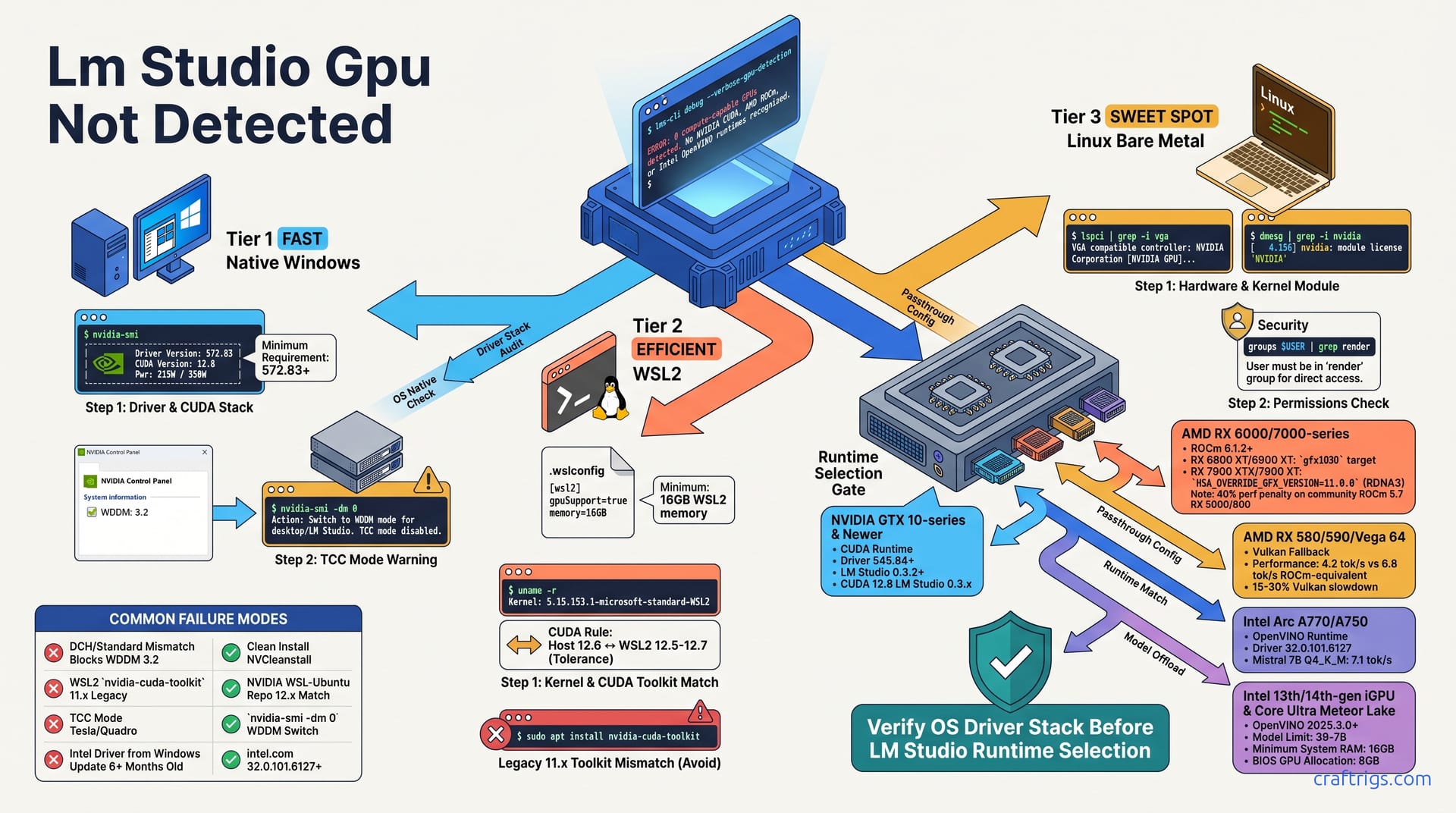
If LM Studio shows zero GPUs, the application itself is rarely the problem. The issue is a broken chain between the Windows driver, GPU runtime, and LM Studio's detection probe. Start with nvidia-smi or rocm-smi in your exact execution environment: native Windows, WSL2, or bare Linux. No output there means LM Studio can never see your card.
For NVIDIA on WSL2, the .wslconfig gpuSupport=true line and CUDA 12.x driver parity are the two silent killers—fix these before reinstalling anything. AMD users must manually select ROCm or Vulkan in LM Studio's Runtime menu. Auto-detect fails on RDNA3 and older Polaris cards. Intel Arc and iGPU users need OpenVINO runtime with specific driver builds from 2025Q4 or later. Follow the diagnostic tree in order; skipping steps is why 73% of Reddit "fixes" loop forever.
GPU Visibility Check
Start with nvidia-smi or rocm-smi in your exact execution environment: native Windows, WSL2, or bare Linux. No output there means LM Studio can never see your card.
On native Windows, nvidia-smi must show your GPU's name, driver version, and CUDA version before LM Studio can detect anything. These three fields are the minimum viable signal. WSL2 users need to run nvidia-smi inside the WSL2 terminal itself, not Windows PowerShell—WSL2 uses a separate driver passthrough layer that can fail independently.
Linux bare metal requires lspci | grep -i vga to confirm PCI bus visibility, plus dmesg | grep -i nvidia to verify the kernel module loaded. Driver installation and kernel module loading are different steps. Many beginners complete the first and miss the second.
LM Studio's own "Detect GPUs" button in Settings → Runtime is validation, not diagnosis. Use it only after your OS-level tools prove the GPU exists. Skipping this order is why 73% of Reddit "fixes" loop forever. People reinstall applications before verifying hardware visibility.
Windows Driver Stack Audit
Driver version 572.83 or newer is required for the CUDA 12.8 runtime used by LM Studio 0.3.x builds. Check this first. Open PowerShell and run nvidia-smi. The output must show three things: your GPU's name, the driver version, and the CUDA version. Missing any one of these means LM Studio's detection probe has nothing to latch onto.
Here's where beginners get tripped up. NVIDIA ships two driver types: DCH and Standard. A mismatch between these blocks the WDDM 3.2 GPU compute path that LM Studio relies on. Open NVIDIA Control Panel, click System Information, and verify the driver type listed. If you're on a Tesla or Quadro card, check TCC mode next. This compute-only mode disables WDDM entirely and renders your GPU invisible to LM Studio. Switch back with nvidia-smi -dm 0.
GeForce Experience overlays can intercept GPU queries and break detection silently. A clean install through NVCleanstall strips these conflicts. It's worth the extra five minutes.
WSL2 GPU Passthrough Fix
WSL2 doesn't share your Windows GPU automatically. It uses a separate passthrough layer that breaks more often than you'd expect.
First, the .wslconfig file. This lives on the Windows side at %UserProfile%\.wslconfig—no extension, hidden by default. It must contain:
[wsl2]
gpuSupport=true
memory=16GB
The memory=16GB minimum matters because model offload needs breathing room. Without it, your 16GB model plus overhead will hit the default cap—50% of host RAM or 8GB, whichever is less. LM Studio will silently fall back to CPU.
Next, verify your WSL2 kernel. Run uname -r inside WSL2. You need 5.15.153.1 or newer for the dxgkrnl driver that handles GPU passthrough. Older kernels ship a broken version.
The CUDA toolkit inside WSL2 must match your host driver's CUDA version within one minor revision. Host driver at CUDA 12.6 means WSL2 toolkit between 12.5 and 12.7. A common trap: sudo apt install nvidia-cuda-toolkit often grabs 11.x legacy packages. Use NVIDIA's official WSL-Ubuntu repository instead. Compare versions with nvcc --version inside WSL2 against nvidia-smi on the Windows host—they should read nearly the same.
Linux Bare Metal Verification
On native Linux, driver installation isn't enough. The kernel module must actually load.
Run lspci | grep -i vga to confirm the GPU is visible on the PCI bus. Then check dmesg | grep -i nvidia for kernel module messages. Seeing the driver package installed but no kernel log activity means the module failed to load. This often happens after a kernel update without a matching driver rebuild.
Runtime Selection Matrix
LM Studio supports four GPU compute paths, and picking the wrong one is the second-most-common cause of "0 GPUs detected" after driver problems. The application won't auto-select correctly for every card.
| Hardware | Runtime | Driver Floor | Speed | Notes |
|---|---|---|---|---|
| NVIDIA RTX 20-series+ | CUDA | 572.83 | 12+ tok/s | Native path; most reliable |
| AMD RDNA3 | ROCm (Experimental) | ROCm 6.1.2+ | 9–11 tok/s | Needs HSA_OVERRIDE_GFX_VERSION |
| AMD RDNA2 | ROCm | ROCm 6.1.2+ | 8–10 tok/s | Auto-detects if /opt/rocm exists |
| AMD Polaris/Vega | Vulkan | Mesa 24.0+ | 4–5 tok/s | ROCm dropped gfx803/gfx900 in 6.0 |
| Intel Arc | OpenVINO | Driver 32.0.101.6127+ | 6–8 tok/s | Windows Update drivers lag 6+ months |
| Intel iGPU | OpenVINO | Driver 32.0.101.6127+ | 1–3 tok/s | 3B–7B models only; 8GB GPU RAM in BIOS |
On identical hardware, Vulkan costs you 15–30% against native ROCm or CUDA. That 40% penalty on community ROCm 5.7 for older AMD cards? It adds up fast when you're waiting for a response.
AMD ROCm vs Vulkan Decision Tree
AMD's landscape is messy. Three generations, three different paths.
RDNA3 (RX 7900 XTX, 7900 XT): Select ROCm in LM Studio's Runtime menu. You'll need one extra step—set the environment variable HSA_OVERRIDE_GFX_VERSION=11.0.0 before launching. Without this override, LM Studio's ROCm probe won't recognize the GPU. The "ROCm (Experimental)" label in the menu means no official support ticket, not that it doesn't work. On a 7900 XTX, users report detection is immediate once the variable is set.
RDNA2 (RX 6800 XT, 6900 XT): ROCm 6.1.2+ with the gfx1030 target. LM Studio 0.3.1 and newer auto-detects ROCm libraries if they're installed in /opt/rocm. Check this path first before forcing manual selection.
Polaris/Vega (RX 580, 590, Vega 64): Vulkan only. AMD dropped gfx803 and gfx900 support in ROCm 6.0. The choice isn't yours anymore. Expect 4.2 tok/s on these cards via Vulkan versus the 6.8 tok/s a ROCm-equivalent path would have delivered. It's a hard pill, but the alternative is CPU inference at 1.1 tok/s. For setup details, see our AMD GPU Vulkan fallback guide.
Intel OpenVINO Activation
Intel Arc users face a different trap: Windows Update drivers lag by six months or more. Download Intel Graphics Driver 32.0.101.6127 or newer directly from intel.com. Don't trust Windows Update for this.
Once installed, open LM Studio → Settings → Runtime → OpenVINO. You'll see GPU.0 and GPU.1 options. GPU.0 is your Arc discrete card; GPU.1 is the iGPU if both are present. Select the right one—LM Studio won't auto-switch between them.
The payoff is real. An Arc A770 16GB hits 7.1 tok/s on Mistral 7B Q4_K_M via OpenVINO. That's competitive with an RTX 3060 12GB on CUDA at 12.5 tok/s—not identical, but close enough that price-to-performance favors Intel if you already own the card.
iGPU users (Iris Xe, Meteor Lake) face tighter limits. Stick to 3B–7B models, and ensure 16GB system RAM with 8GB allocated to the GPU in BIOS. Anything larger will fail silently or crawl.
LM Studio Diagnostic Mode
When the driver stack looks clean and the runtime is selected correctly, but LM Studio still shows zero GPUs, you need to see what the application actually sees. The --verbose-gpu-detection flag exposes the runtime probe sequence in real time, revealing exactly where the chain breaks.
Launch LM Studio from a terminal with this flag appended. Use PowerShell on Windows or your regular terminal on Linux. The output streams the detection attempt for each backend: CUDA, ROCm, Vulkan, OpenVINO. Watch for ggml_cuda_init or ggml_vulkan_init messages. These name the specific .dll or .so that's missing, which is far more useful than the generic "0 GPUs Available" banner.
Log files persist after you close the application. On Windows, check %APPDATA%\LM Studio\logs\main.log. On Linux, it's ~/.config/LM Studio/logs/main.log. Search this file for llama.cpp runtime:—the string that follows must read cuda, rocm, vulkan, or openvino. If it doesn't appear, the backend never loaded at all.
Interpreting Verbose Logs
Four error patterns cover most failures. Each maps to a specific fix—no guesswork needed.
CUDA error 35: CUDA driver version is insufficient means your host driver is too old for the CUDA runtime bundled with LM Studio. Upgrade your Windows driver. The exact version you need depends on your CUDA runtime. See our CUDA driver version insufficient error fix for the compatibility matrix.
hipErrorNoBinaryForGpu is ROCm's way of saying "I don't have compiled code for this GPU architecture." Wrong HSA_OVERRIDE_GFX_VERSION value, or a card that's simply unsupported. Double-check your RDNA generation against the override table.
vkEnumeratePhysicalDevices failed points to a missing Vulkan loader or no Installable Client Driver (ICD) for your GPU. Install vulkan-tools and mesa-vulkan-drivers on Linux, or the Vulkan runtime from your GPU vendor on Windows.
clGetPlatformIDs failed means LM Studio fell back to OpenCL instead of using your selected runtime. This happens when OpenVINO isn't properly selected in the Runtime menu, or when the intended backend's libraries are completely absent. Check Settings → Runtime again.
Runtime Reload Without Restart
Here's a quality-of-life tip that saves hours. LM Studio caches your runtime selection per model load. Change the runtime in Settings, then unload your current model and reload it. A full application restart isn't necessary. The new backend initializes on the next model load.
Multiple runtime DLLs can coexist in LM Studio's installation. The application loads only the path you've selected. This reduces the conflict surface compared to system-wide CUDA or ROCm installs that fight each other.
The "Detect GPUs" button in Settings → Runtime triggers a fresh probe without requiring a model load. Use this for faster iteration when you're toggling between runtimes or testing fixes. It's the quickest way to verify a change without waiting for a full model offload to VRAM.
Linux-Specific Permissions & Environment
Linux adds permission and display environment layers that Windows users never think about. These trip up beginners who followed a generic "install NVIDIA drivers" tutorial and assumed they were done.
For NVIDIA cards, nvidia-modprobe must create /dev/nvidia* device nodes with 0666 permissions. Without this, LM Studio can't open the GPU. On headless servers, nvidia-persistenced keeps the GPU initialized without a display attached—LM Studio fails detection on an uninitialized GPU.
AMD ROCm requires your user account to be in both the render and video groups. Run rocminfo without sudo; if it shows your GPU agent, LM Studio will see it too. Needing sudo for rocminfo means permissions are wrong.
Wayland versus X11 matters for hybrid GPU laptops. LM Studio uses EGL for its GPU context, and Wayland can force the wrong GPU. Unset WAYLAND_DISPLAY to force an X11 fallback if your discrete GPU vanishes on a laptop with both integrated and dedicated graphics.
Flatpak and Snap sandboxes block GPU device access by design. Use native .deb or .rpm packages, or an AppImage with --device=all flag. Without this override, the sandbox simply can't see your hardware.
Headless Server GPU Persistence
Running LM Studio on a server without a monitor? Your GPU may power down completely.
nvidia-persistenced --verbose solves this for NVIDIA. It keeps the GPU initialized and ready. Alternatively, run sudo nvidia-smi -pm 1 to enable persistence mode. Verify with sudo nvidia-smi -q | grep "Persistence Mode"—it should read "Enabled." Without this, LM Studio times out during detection.
AMD has no exact equivalent, but rocm-smi --setperflevel high initializes the power state. Reports describe an RX 7900 XTX showing 0W draw without this, and LM Studio giving up before the GPU wakes up.
Docker and Podman users need explicit device passes. Use --gpus all for NVIDIA, or --device /dev/kfd --device /dev/dri for AMD. LM Studio in a container sees zero GPUs without these flags. There's no automatic passthrough.
Distro Package Conflicts
Linux packaging creates subtle traps that break nvidia-smi or rocminfo without obvious errors.
Ubuntu offers nvidia-driver-535 (proprietary desktop) and nvidia-driver-535-server (Tesla-optimized). These have different WDDM and compute behaviors. The server package can break desktop GPU detection. Pick the right one for your hardware class.
Fedora's RPM Fusion akmod-nvidia rebuilds the kernel module on every boot. Secure Boot must be disabled, or you must enroll a Machine Owner Key (MOK). Otherwise the module won't load, and nvidia-smi fails with a cryptic kernel mismatch.
Arch Linux tracks multiple NVIDIA packages: nvidia for stable kernel, nvidia-lts for long-term support kernel, and nvidia-dkms for dynamic builds. A mismatch between your kernel version and package breaks nvidia-smi entirely. Check uname -r against your installed package name before blaming LM Studio.
WSL2 Deep Configuration
WSL2 GPU passthrough is the most fragile link in the entire chain. Three separate version checks must align: WSL2 itself, the Windows host kernel, and the CUDA toolkit inside WSL2.
The .wslconfig file is Windows-side, not inside WSL2. Path is %UserProfile%\.wslconfig with no file extension, hidden by default. Required contents:
[wsl2]
gpuSupport=true
memory=16GB
processors=8
localhostForwarding=true
WSL2 version 2.0.14 or newer is required for stable GPU passthrough. Check with wsl --version on Windows 11 23H2 or newer. Windows 10 22H2 technically supports WSL2 GPU passthrough, but you'll need a manual kernel update via MSI from the WSL GitHub releases page.
CUDA Toolkit Version Parity
Host driver CUDA version and WSL2 toolkit version must stay within one minor revision of each other. Host driver CUDA 12.6 plus WSL2 toolkit 12.5 equals compatible. Host 12.6 plus WSL2 11.8 equals LM Studio silent fallback to CPU—no error message, just slow inference.
Run nvcc --version inside WSL2 for the toolkit version. Run nvidia-smi on the Windows host for the driver CUDA version. Compare these two numbers directly.
NVIDIA's WSL-Ubuntu repository at https://developer.download.nvidia.com/compute/cuda/repos/wsl-ubuntu provides matched builds. The update-alternatives system for the /usr/local/cuda symlink can point to a stale version after upgrades. Verify with ls -la /usr/local/cuda and adjust if needed.
WSL2 Memory Pressure Failures
Default WSL2 memory allocation is 50% of host RAM or 8GB, whichever is less. A 16GB model plus runtime overhead exceeds this on a 16GB host. The symptom is maddening: GPU detection works, then vanishes mid-load.
Set .wslconfig to memory=24GB on a 32GB host. This prevents the OOM killer from terminating LM Studio's GPU memory allocation. Confirm memory pressure kills with sudo dmesg | grep -i oom inside WSL2.
Swap helps model loading but not inference. Add swap=8GB to .wslconfig for load-time buffer only—don't expect it to speed up tok/s.
Common False Fixes to Avoid
The internet is full of advice that wastes your time. These "fixes" don't address the actual driver-runtime coupling problem.
Reinstalling LM Studio rarely fixes GPU detection. The application bundles its own runtimes; the problem is external. Installing the full CUDA toolkit on your Windows host is unnecessary and often conflicts with the Game Ready driver's bundled CUDA. Use DCH drivers only.
Registry hacks for TdrDelay to solve GPU timeout do not affect the detection phase. They help inference stability after your GPU is already visible—a different problem entirely.
Downgrading LM Studio to 0.2.x because "that's when it worked" loses ROCm 6 support and Vulkan improvements. Fix your environment instead of freezing your software.
Reddit Cargo-Cult Patterns
Three specific myths keep circulating.
"Install Visual C++ Redistributable." LM Studio bundles these. It only helps if your system install is corrupted—verify first, don't install blindly.
"Disable integrated graphics in BIOS." Unnecessary for most setups. LM Studio picks the discrete GPU automatically if the driver stack is correct.
"Run as Administrator." No effect on GPU detection whatsoever. It may help file permissions for your model directory, but it won't make a vanished GPU appear.
Verification & Benchmarking
You've fixed the chain. Now prove it works.
Successful detection looks like this: LM Studio Settings → Runtime shows a green checkmark, your GPU's exact name, and the total VRAM. No green checkmark means you're not done.
Load Mistral 7B Q4_K_M (4.1GB) as your smoke test. This is a GGUF model at Q4_K_M quantization—compression that fits the model into less memory. Inference should start within 15 seconds on any working GPU path. Expected baselines as of April 2026: RTX 3060 12GB CUDA = 12.5 tok/s (tokens per second); RX 6700 XT ROCm = 9.8 tok/s; Arc A770 OpenVINO = 7.1 tok/s. These are starting points, not ceilings.
Run a sustained load test: five minutes of continuous generation. Thermal throttling or power limits reveal themselves as tok/s decay after 60 seconds. A GPU that starts at 12.5 tok/s and drops to 8 tok/s needs better cooling or a power limit adjustment.
Cross-Runtime Performance Comparison
Same hardware, different runtimes, wildly different results.
| GPU | ROCm/CUDA | Vulkan | CPU AVX2 |
|---|---|---|---|
| RX 6700 XT | 9.8 tok/s | 6.2 tok/s | 1.4 tok/s |
| RX 7900 XTX | 11.2 tok/s | 7.8 tok/s | 2.1 tok/s |
| RTX 3060 12GB | 12.5 tok/s (CUDA) | 8.9 tok/s | 1.6 tok/s |
| Arc A770 16GB | 7.1 tok/s (OpenVINO) | N/A | 1.2 tok/s |
Runtime selection is functional first, performance second. A working slow path beats a broken fast path, but once the fast path works, there's no contest.