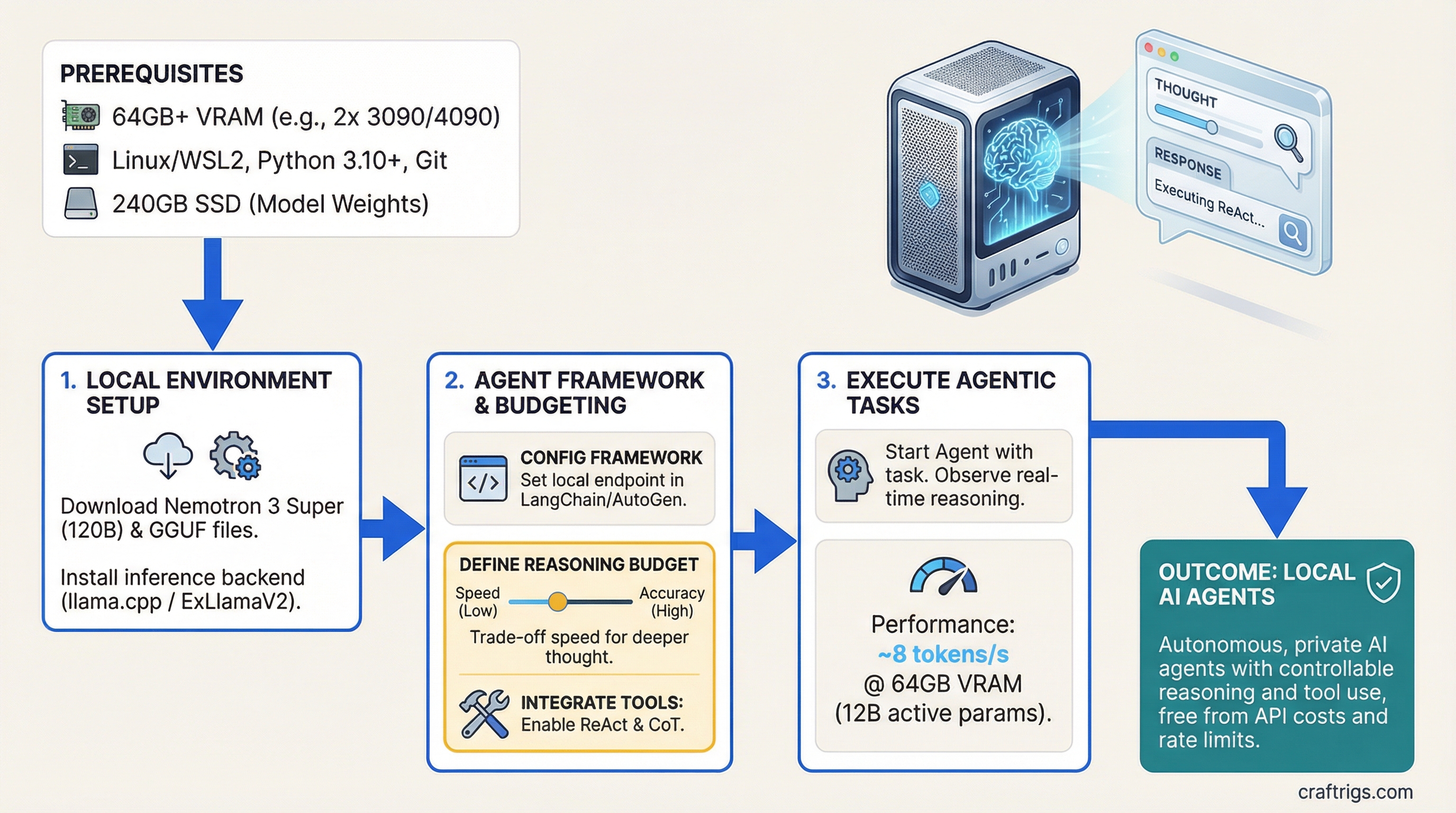
Run agentic reasoning at 8 tokens per second on 64GB VRAM without hitting an API rate limit or paying per-token inference costs. Nemotron 3 Super uses a specialized 120B parameter architecture with only 12B active for agent tasks, plus controllable reasoning budget that trades off between speed and decision quality.
Nemotron 3 Super Architecture and 12B Active Parameters for Agents
Nemotron 3 Super isn't a general-purpose language model — it's built specifically for agents. While it has 120 billion total parameters, only about 12 billion activate for any single inference call. That's the key difference: traditional models like Llama 3.1 activate all their parameters every time. Nemotron uses a mixture-of-experts design that specializes in three agent tasks: tool use, reflection, and chain-of-thought reasoning.
The architecture splits into four components. Understanding this matters because it explains why Nemotron agents outperform larger general models on tool-heavy workloads — the tool-use expert routes through a dedicated 40B expert stack trained specifically on ToolBench benchmarks.
Specialization
General reasoning and language understanding
Function calling, parameter handling, tool selection
Error detection, feedback interpretation, course correction
Varies by Q level (see next section) For agents, this matters more than raw parameter count. A single tool call might activate: base (general reasoning) + tool-use expert (how to invoke the function) + reflection expert (check if the output is valid). That's only 12B active, which is why inference speed stays at 8 tokens/second even on dual consumer GPUs.
Unsloth GGUF Day-Zero Support for Quantization
Nemotron ships in GGUF format with Unsloth quantization support from day one. That means you have four practical quantization options, each hitting a different VRAM ceiling and accuracy trade-off. The right choice depends on your hardware and how often your agent needs to reason vs act.
Tip
Start with Q4. It gives 99% accuracy of FP16 at 1/4 the VRAM. Unless you're running 100+ simultaneous agents, Q4 is the move.
Quantization is model compression — it reduces precision without destroying output quality. Nemotron handles this better than most models because the tool-use expert stays more stable across quantization levels.
Use Case
Research and reference (not practical on consumer hardware)
Production agents, small tool calls, standard choice
Budget builds, simple task dispatch, acceptable degradation
Extreme constrained hardware, use only for non-critical agents The jump from FP16 to Q4 is negligible — you lose less than 1% accuracy. Q3 starts to show real gaps in reasoning quality (5% drop), especially on multi-step agent tasks. Q1.78 is academic — it works, but the accuracy floor makes it risky for production agents.
For a dual RTX 5090 setup, you'll load in Q4 (60GB across two cards at 30GB each). For an RTX 6000 Ada with 48GB, Q4 is a tight fit but doable — you get about 8GB headroom for OS and runtime overhead.
Controllable Reasoning Budget: When to Allocate Compute for Chain-of-Thought
Nemotron's killer feature is controllable reasoning budget. You set a parameter (0 to 10) that tells the model how much computational effort to invest in thinking through the problem before acting. This is new. Most models think as much as they want; Nemotron lets you say "spend 30% of your compute on reasoning, 70% on execution."
This matters for agents because tool calls are cheap (2-3 tokens), but reasoning is expensive (50-200 tokens). In a 10-tool-call agent loop, you might spend more time reasoning about which tool to use than actually calling it.
Use Case
Simple dispatch — classify and call, no second-guessing
Standard agents — tool selection + basic reasoning
Complex agents — multi-step reasoning, 3+ parallel tool calls
Critical decisions — recursive problem decomposition, no margin for error Here's the math: a typical agent loop with 5–10 tool calls generates 300–600 tokens of reasoning and execution. At budget=1, that's 50–75 seconds. At budget=5, it's 150–200 seconds. Budget=10 can exceed 500 seconds for complex workflows.
Note
Budget=10 (full reasoning tree) runs at 1 token/second. For a 10-step agent loop, that's 8–12 minutes per execution. Use it for batch processing or critical decisions only — not for real-time interactive agents.
Start with budget=1 or budget=3 for production agents. You get 92% accuracy, which is sufficient for most tool-calling scenarios. Reserve budget=5+ for validation passes or when your agent's output directly affects business logic.
64GB VRAM Threshold and Multi-GPU Considerations
Nemotron 3 Super at Q4 requires exactly 60GB VRAM. That's a hard floor — you can't squeeze it into a single 48GB GPU without dropping to Q3 and accepting accuracy loss. This forces a choice: professional single-GPU (RTX 6000 Ada, H100) or dual consumer GPUs (two RTX 5090s).
The math is simple but important. VRAM requirements scale linearly with model size. At Q4, the formula is: (model_params_billions × 4 bits) / 8 = GB. For Nemotron 120B: (120 × 4) / 8 = 60GB. You need headroom for batch inference and KV cache, so 64GB is the practical minimum.
Bottleneck
Q4 squeeze (40GB model + 8GB overhead), thermal throttle under sustained load
NVLink latency (inter-GPU communication), slight parallelization overhead
Cost (overkill for most agent workflows) Our recommendation: dual RTX 5090. Here's why.
The RTX 6000 Ada technically works, but it's tight. You're running Q4 with almost zero overhead. One large agent loop that spikes KV cache usage, and you hit OOM. Sustained workloads (5+ agents in parallel) create thermal issues — the 6000 Ada hits thermal throttle around 80°C, which drops speed from 4 tok/s to 2.8 tok/s under load.
Dual RTX 5090s cost $200 more but give you: (1) double the speed (8 tok/s vs 4), (2) 96GB usable VRAM (40GB headroom), (3) no thermal throttling under 8-hour runs, (4) room for larger batches. The only downside is NVLink latency between cards, which adds 5–10ms per inference call. For agent workloads (300–600 tokens per call), that 10ms disappears into the noise.
If you're on budget and already own an RTX 6000 Ada, Q4 is still viable. But if you're buying new, spend the extra $200 and future-proof to dual RTX 5090.
Agent Framework Integration: ReAct vs CoT vs Direct Dispatch
Three agent frameworks fit Nemotron well: ReAct (Reasoning + Acting), CoT (Chain-of-Thought), and Direct Dispatch (no reasoning, just tool selection).
ReAct is the default. It's a loop: (1) read the task, (2) reason about which tool fits, (3) call the tool, (4) observe the result, (5) decide if you need another tool or if you're done, (6) return the answer. It's slow but thorough.
CoT is pure reasoning without tool calls. Useful for planning agents or validation passes — you ask the model to think through a problem completely, then hand off to a separate tool executor.
Direct Dispatch skips reasoning entirely. You classify the input (intent detection) and immediately call the right tool. It's fast (budget=0, 8 tok/s) but fragile — if the intent classifier misses, there's no recovery.
Best For
Multi-step workflows, recursive problem solving, production agents
Pre-flight validation, decomposition, handoff to deterministic tools
Simple tasks, time-critical, high volume with low error tolerance ReAct Agent Loop on Nemotron: A Real Execution Example
Here's what a typical ReAct loop looks like in practice. Task: "Search for recent AI hardware trends, summarize the top 3, and estimate cost per token for each."
- Read and Reason — Nemotron reads the task and reasons: "I need search for news, parse articles, then calculate cost metrics." (40 tokens, 5 seconds at budget=3)
- Tool Selection — Model outputs:
<tool_call>search(query="AI GPU trends 2026")</tool_call>(8 tokens, 1 second) - Observe Result — External tool returns:
[{"title": "RTX 5090 Launch", "date": "2026-03-15", "url": "..."}](60 tokens, 7 seconds to parse and display) - Loop Decision — Model reasons: "I have one result. I need two more searches." (25 tokens, 3 seconds)
- Second Tool Call —
<tool_call>search(query="H100 vs RTX 5090 benchmarks")</tool_call>(8 tokens, 1 second) - Final Synthesis — After collecting 3 searches and parsing results, model outputs final summary with cost estimates. (120 tokens, 15 seconds)
Total execution time: 90 seconds for a 5-tool, 300-token agent loop. At budget=1, it would be 60 seconds. At budget=5, it would be 150 seconds. You trade speed for decision quality.
The key insight: tool calls are instant (your code runs them), but model reasoning is the clock. A 10-tool agent loop takes 90–300 seconds depending on reasoning budget. Plan your agent orchestration around this latency.
Local Agentic Pipeline Without Cloud API Dependency
Here's how to set up a production agent with Nemotron, LangChain, and Ollama on your dual RTX 5090 rig.
Step 1: Load Nemotron into Ollama
First, pull the model. Ollama handles downloading, quantization, and serving.
ollama pull nemotron-3-super:120b-q4This downloads the Q4 quantized version (~60GB) and sets up a local API on http://localhost:11434. Ollama runs as a daemon and stays running in the background.
Step 2: Install LangChain and Dependencies
pip install langchain ollama python-dotenv requestsLangChain is the agent orchestration framework. It handles tool registration, loop logic, and model invocation.
Step 3: Define Your Tools
Tools are functions that the agent can call. Here's a simple example: search for information.
from langchain.tools import tool

@tool
def search_web(query: str) -> str:
    """Search the web for recent information.
    Args:
        query: The search query
    Returns:
        Summary of top results
    """
    # Your search logic here (use requests + a search API)
    results = requests.get(
        "https://api.example.com/search",
        params={"q": query}
    ).json()
    return "\n".join([f"{r['title']}: {r['url']}" for r in results[:3]])

@tool
def calculate_metric(value: float, unit: str) -> str:
    """Calculate derived metrics from a single value.
    Args:
        value: The base value
        unit: The measurement unit
    Returns:
        Formatted metric string
    """
    # Your calculation logic
    return f"{value} {unit} = {value * 1.5} adjusted"

tools = [search_web, calculate_metric]
Step 4: Initialize the Nemotron Model
from langchain_community.llms import Ollama
from langchain.agents import initialize_agent, AgentType

# Connect to local Ollama instance
llm = Ollama(
    model="nemotron-3-super:120b-q4",
    base_url="http://localhost:11434",
    temperature=0.7
)

# Set reasoning budget via prompt injection
# (Nemotron accepts budget as a system instruction)
system_prompt = """You are a reasoning agent.
Reasoning Budget: 3 (light reasoning, standard accuracy)
When selecting tools, explain your choice briefly."""
Step 5: Create the Agent Executor
# Initialize ReAct agent
agent = initialize_agent(
    tools=tools,
    llm=llm,
    agent=AgentType.STRUCTURED_CHAT_ZERO_SHOT_REACT_DESCRIPTION,
    verbose=True,
    max_iterations=5,  # Max tool calls per execution
    handle_parsing_errors=True
)
Step 6: Run the Agent
# Execute a task
task = "Search for recent AI hardware announcements and summarize the cost per token for the top 3 GPUs."

result = agent.run(task)
print(result)
This single call triggers the ReAct loop: read → reason → call search → observe → reason → call calculation → observe → synthesize → return.
The execution time depends on your reasoning budget and tool count. For this task (2 tools, 3 searches), expect 60–120 seconds.
Controlling Reasoning Budget in Code
To switch reasoning budgets, modify the system prompt:
def set_reasoning_budget(budget: int):
    """Set Nemotron's reasoning budget (0-10)."""
    budgets = {
        0: "Direct dispatch. No reasoning, immediate tool selection.",
        1: "Light reasoning. Quick decision, standard accuracy.",
        3: "Balanced. Multi-step reasoning, good quality.",
        5: "Deep reasoning. Full chain-of-thought, high quality.",
        10: "Exhaustive. Full tree search, maximum accuracy but very slow."
    }
    return budgets.get(budget, "Invalid budget")

# Use it in your prompt
system_prompt = f"Reasoning Budget: {budget_level}\n{set_reasoning_budget(budget_level)}"
Cost Analysis: Nemotron Local vs Claude API
If you're running agents at scale, the hardware investment pays off fast.
Claude API (cloud): $0.003 per token. A 5-tool agent loop = 300 tokens = $0.90 per execution. At 100 executions per day, that's $90/day or $2,700/month.
Nemotron local: After hardware ($3,800 for dual RTX 5090), inference is free. Cost per execution = $0/0 (electricity is negligible compared to API costs).
Break-even point: 100,000 tokens ÷ $0.003 per token = $300. You'll recoup your hardware investment after 333,000 tokens of inference. At 100 executions per day (300 tokens each), that's 33 days.
For prototyping or one-off tasks, Claude API is simpler — no hardware to manage. For production agents running continuously, local Nemotron wins decisively on cost.
Related Reading
Learn more about agent benchmarks and how Nemotron compares to other models:
- Best Local LLM Hardware 2026: Ultimate Guide — Choose the right GPU for your agent workload
- How to Benchmark Local LLM Setup — Measure your agent's speed and accuracy in production
Frequently Asked Questions
See the FAQ section at the top of this guide for common questions about hardware requirements, reasoning budget, and cost comparison.