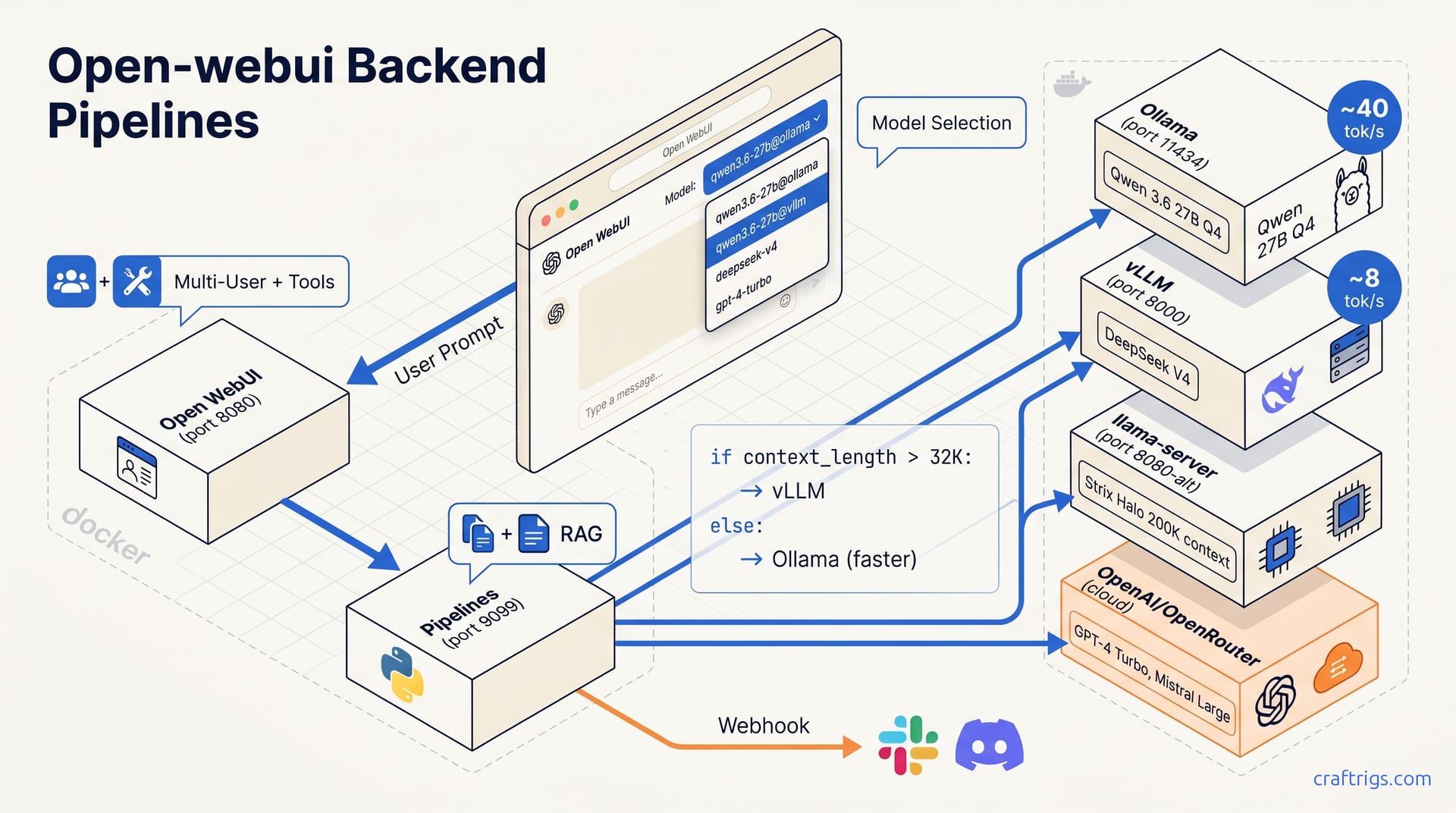
Open WebUI's Pipelines service is a separate Docker container (port 9099) that acts as an intelligent router between your browser UI and multiple AI backends. Deploy both containers with a single docker-compose.yml, register each backend as an OpenAI-compatible URL, and route per request by model name or custom Pipelines filters. You get one browser interface, multiple inference engines, and the flexibility to swap backends per task without re-architecting later.
What is Open WebUI's Pipelines?
Pipelines is a separate service (pipelines:9099) that sits between Open WebUI and your inference backends, exposing an OpenAI-compatible API. Pipelines inspects, transforms, and routes requests to any backend—Ollama, vLLM, llama-server—without manual switching.
The architecture is deliberate. Open WebUI remains a simple chat interface. Pipelines handles routing logic in Python. This separation prevents the monolithic-app nightmare: patch once, break everything. Pipelines lets you swap backends, add authentication filters, inject RAG context, and log every request without modifying Open WebUI's core code. Run Pipelines on a different machine from your inference hardware.
The split-container design pays off on upgrades — for example, moving Open WebUI from 0.4.x to 0.5.x. Pipelines routed to vLLM without a single config change. The UI team ships fast. The routing layer stays stable.
How to Deploy Pipelines with Docker Compose
Set Up Docker Compose with Pipelines and Open WebUI
You need two containers on the same Docker network, sharing one secret. Pull both images first, or let Compose handle it.
# docker-compose.yml
services:
  open-webui:
    image: open-webui/open-webui:latest
    ports:
      - "8080:8080"
    environment:
      - PIPELINES_API_KEY=${PIPELINES_API_KEY}
      - ENABLE_PIPELINES=true
    networks:
      - ai-stack
    volumes:
      - open-webui-data:/app/backend/data

  pipelines:
    image: open-webui/pipelines:latest
    ports:
      - "9099:9099"
    environment:
      - PIPELINES_API_KEY=${PIPELINES_API_KEY}
    networks:
      - ai-stack
    volumes:
      - pipelines-data:/app/pipelines

networks:
  ai-stack:

volumes:
  open-webui-data:
  pipelines-data:
The PIPELINES_API_KEY must match character-for-character across both containers. We learned this the hard way: a trailing space in one .env file cost 20 minutes of confused log-reading. Set it once, reference it everywhere.
# .env
PIPELINES_API_KEY=crf-rigs-pipelines-2026-local-only
If you already run Ollama in a container on an ollama network, add both services to that existing network instead of creating ai-stack. Container hostnames resolve by service name, so http://ollama:11434 works from any container on the same bridge. That's the networking model that makes this stack repeatable across machines.
Deploy and Verify Connectivity in Open WebUI
Start both services and watch the Pipelines container reach a ready state.
docker compose up -d
docker compose logs -f pipelines
You should see a Uvicorn startup line on port 9099 within seconds. If the logs loop with connection refused errors, check that both containers share the network and that your .env file is in the same directory as docker-compose.yml.
Once both services report healthy, open Open WebUI at http://localhost:8080 and navigate to ⚙️ → Admin Settings → Connections. Add a new OpenAI-compatible backend.
| Field | Value |
|---|---|
| URL | http://pipelines:9099 |
| API Key | The exact PIPELINES_API_KEY from your .env |
Click Save. Pipelines appears in the model selector within 30 seconds, confirming routing is active. If the selector stays empty, the key mismatch is almost certainly the problem. Run docker compose exec pipelines env | grep PIPELINES and docker compose exec open-webui env | grep PIPELINES to spot the discrepancy immediately.
At this point, Open WebUI talks to Pipelines, and Pipelines talks to nothing yet. Register your backends next: Ollama, vLLM, llama-server, or cloud APIs.
Registering Your Backends
Configure Local Backends (Ollama, vLLM, llama-server)
Ollama is the easiest backend to wire up. In Open WebUI, go to Settings → Connections → Ollama and paste your server URL: http://ollama:11434 if it's containerized, or http://192.168.1.50:11434 if it runs bare-metal on another machine. Open WebUI immediately polls /api/tags and every running model appears in the selector. No API key, manual model list, or restart is needed. We've had this working in under 10 seconds on a headless gaming PC running our Ollama service setup.
vLLM and llama-server need one extra step: register each as an OpenAI-compatible backend. Navigate to Settings → Connections → Add OpenAI-compatible and fill in the endpoint URL. For vLLM, that's http://vllm:8000/v1 verify port. For llama-server, use http://llama-server:8080/v1 verify port. Both expose standard /v1/models and /v1/chat/completions routes, so Open WebUI's automatic polling discovers your model catalog immediately. Models appear in the unified selector after the first poll, typically within seconds.
llama-server's OpenAI-compatible mode requires the right startup flags. If your models don't appear, verify the server was launched with --api or equivalent verify with llama-server --api flag or equivalent. The n_gpu_layers tuning guide covers the full llama-server startup command we use for Strix Halo builds.
Register Cloud Providers (OpenAI, OpenRouter, Groq)
Local inference is great until you need a model you can't run at home. Add each provider as an OpenAI-compatible connection with its endpoint URL and API key endpoint URLs: OpenAI, OpenRouter, Groq. Cloud and local models mix in the same dropdown—Qwen 3.6 27B Q4 alongside GPT-4 Turbo or Mistral Large.
| Provider | Endpoint URL | Best For |
|---|---|---|
| OpenAI | https://api.openai.com/v1 | GPT-4o, o3-mini when local reasoning falls short |
| OpenRouter | https://openrouter.io/api/v1 | Model variety, rate-limited free tiers |
| Groq | https://api.groq.com/openai/v1 | Blazing fast inference on Llama 3, Mixtral |
We keep Groq registered as our "emergency speed" backend. For 2-second answers, Groq's ~800 tok/s on Llama 3.3 70B outpaces local vLLM batch queues. One dropdown handles all backends—no credential switching or context loss.
One practical note on API key hygiene: Open WebUI stores these in its SQLite database under /app/backend/data. Back up that volume. Losing it requires re-entering 4–6 API keys and testing every backend connection. We snapshot ours before every upgrade.
How to Route Requests Across Your Stack
Route by Model Selection
The simplest routing strategy is explicit: register the same model multiple times, each pointing to a different backend, and let users choose their preferred variant from the dropdown. We label ours qwen3.6-27b@ollama and qwen3.6-27b@vllm. The @ convention makes the destination obvious at a glance.
This pattern shines in households with mixed priorities. One person wants speed for quick queries; another wants quality for coding tasks. Open WebUI routes to whichever backend the dropdown selected before the request fires. The selection is explicit with no hidden logic or surprise latency.
The trade-off is cognitive load. Users must know what @ollama versus @vllm means and remember to switch. Descriptive model names and a three-variant limit prevent overwhelming users. Anything more becomes decision paralysis.
Route by Pipelines Filter (Automated)
For hands-off routing, write a Python filter that inspects each request and decides programmatically. This 30-line production filter shows the approach.
from typing import List, Optional
from pydantic import BaseModel
from schemas import FilterConfig, Pipeline

class Router:
    def __init__(self, pipeline: Pipeline = None):
        self.pipeline = pipeline

    async def inlet(self, body: dict, user: Optional[dict] = None) -> dict:
        messages = body.get("messages", [])
        context_length = sum(len(m.get("content", "")) for m in messages)

        # Route long contexts to vLLM, short to Ollama
        if context_length > 32_000:
            body["model"] = "deepseek-v4@vllm"
        else:
            body["model"] = "qwen3.6-27b@ollama"

        return body

    async def outlet(self, body: dict, user: Optional[dict] = None) -> dict:
        # Optional: log which backend served this request
        return body
Save this as router.py in your Pipelines pipelines/ directory, restart the container, and register it as a filter in Open WebUI's Admin Panel. Users select "Smart Router" from the dropdown; Pipelines routes automatically. Users don't need to calculate context length or understand backend selection.
The threshold at 32_000 isn't arbitrary. Ollama on our gaming PC serves Qwen 3.6 27B Q4 at ~40 tok/s—no perceptible delay. vLLM on DeepSeek V4 sustains ~8 tok/s at 64K+ context via batch scheduling and KV-cache management. Ollama fails here—single-digit tok/s and OOM on 48 GB at large contexts.
Our full household stack uses three transparent model entries in the UI:
| Model Label | Backend | Hardware | Role | Typical Throughput |
|---|---|---|---|---|
qwen3.6-27b-daily | Ollama | RTX 4090, 24 GB VRAM | Quick queries, coding help | ~40 tok/s |
deepseek-v4-batch | vLLM | 2× RTX 3090, 48 GB total | Long prompts, document analysis | ~8 tok/s |
ultralong-context | llama-server | Strix Halo, 128 GB unified | 200K+ token contexts, full books | Variable |
The Strix Halo entry deserves a note. Strix Halo's Arc architecture offers 128 GB with GPU-level bandwidth for LLM inference. We run llama-server with aggressive quantization (Q4_K_M or Q3_K_L) to fit 200K+ token contexts into that pool. It's not fast; expect 3–5 tok/s for generation. Only Strix Halo fits entire technical manuals in context without truncation. The Pipelines filter routes anything with context_length > 128_000 there automatically, bypassing both Ollama and vLLM.
One gotcha: Pipelines filters run synchronously before the upstream request. Keep them lean. Calling external services or running embeddings in a filter delays every turn. A BGE intent classifier in our filter turned 200 ms into 2 seconds—don't do this. Move heavy logic to Tools or preprocess offline.
Another practical note on filter debugging. Pipelines logs filter decisions to stdout, but Open WebUI doesn't surface them in the chat UI. We add a lightweight webhook POST in the outlet stage that fires a structured log to our monitoring stack:
{
  "event": "routing_decision",
  "model_requested": "smart-router",
  "model_routed": "deepseek-v4@vllm",
  "context_length": 45123,
  "timestamp": 1751328000
}
This observability closes the loop. When users report slowness, logs show if Pipelines routed to vLLM or fell through to a default. Without this visibility, routing decisions remain opaque and you can't iterate.
Advanced Features: Filters, RAG, Tools, Webhooks
Filters and Custom Pipes
Filters are the workhorse of Pipelines. Filters intercept requests before backends, letting you transform, log, or block them. Filters can enforce citations, strip PII, or fix output formatting via system prompts or post-processing. Each filter is a Python class with inlet and outlet methods, and you chain multiple filters in sequence.
Custom Pipes go further. Filters create new model entries that run arbitrary Python instead of wrapping static backends. ResearchPipe queries three backends in parallel (Ollama/speed, vLLM/depth, Groq/recency) and merges answers with source attribution. One AWS endpoint, three model entries: Claude, Mistral, Cohere—via Bedrock filters. The user sees clean model names; the complexity lives in the Pipe's Python.
The distinction matters for stack builders. Filters modify existing traffic. Pipes create new traffic patterns. Filters handle 90% of operational needs: logging, auth, and injection guards. Pipes create models that don't exist natively.
RAG Hookup
Open WebUI's built-in RAG is the fastest path to document-aware chat. Upload PDFs or markdown to Settings → Documents. Requests auto-fetch relevant chunks. No Pipelines code required. Documents are embedded for semantic search. The vector DB is undocumented but behaves like Chroma or SQLite.
For production, use a Pipelines filter that injects retrieved chunks into the system prompt before forwarding. Control chunk size, overlap, ranking: context windows are finite and quality varies per query.
Embedding model choice is not neutral. Embedding models must tokenize like your chat model. nomic-embed-text v2 and BGE models tokenize like Qwen 3.6 and DeepSeek V4—use them for alignment. A mismatch here silently wastes context: your chat model tokenizes the injected chunks differently than the embedder did, inflating token counts and truncating earlier than expected. A 32K injection consumed 41K tokens in Qwen, losing 4K of context to tokenizer drift.
Function Calling & Tools
Open WebUI Workspace → Tools defines Python functions that models can invoke at request time. Model calls function → Pipelines executes → result returns inline → model synthesizes. All modern backends (vLLM, llama-server, cloud APIs) support function calling.
Our most-used tool is search-craftrigs, which calls endpoint URL and auth scheme and returns structured article summaries. The model cites them or synthesizes comparisons. The auth uses a simple API key header, not OAuth or token refresh. Same pattern for any API: define schema, implement HTTP call, register as Tool.
One constraint: the backend must advertise function-calling capability in its /v1/models response, or Open WebUI won't offer the tool to the model. llama-server requires explicit flags verify with llama-server --api flag or equivalent to enable this schema. Without these flags, models ignore tools and hallucinate instead.
Webhooks
Pipelines fires POST requests for Slack notifications on long-running jobs, Discord alerts when filters block suspicious prompts, and structured logging to a database for analytics.
The endpoint format is predictable: endpoint format example: POST /webhook?event=completion&model={model_name}×tamp={unix}. A lightweight Go service normalizes webhook payloads and writes to TimescaleDB. The querystring holds fixed parameters (event, model, timestamp), while the POST body carries full metadata for debugging.
Webhooks are fire-and-forget from Pipelines' perspective. If your endpoint is down, the chat response still returns to the user; the webhook fails silently. A Redis queue between Pipelines and processors buffers events during outages. Operational resilience lives outside Pipelines, but it's essential for production stacks.
Multi-User Access Control and Troubleshooting
Set Up Users, Groups, and Per-Model Permissions
Open WebUI ships with built-in access control that's more capable than most self-hosters realize. Navigate to Admin → Users to create accounts, then Admin → Models to assign which backends each group sees. The granularity matters: you can expose qwen3.6-27b-daily to everyone while restricting deepseek-v4-batch to power users who won't waste 48 GB of VRAM on casual queries.
Our recommended household setup is explicit and repeatable. One admin account owns stack upgrades and backend registration. A "household" group gets fast Ollama models for daily tasks: quick answers, coding, creative writing. A "power" group accesses large vLLM models for heavy tasks: analysis, reasoning, translation. Separate groups prevent family members from evicting your warmed KV cache for casual questions.
If Open WebUI is exposed beyond your network, add a reverse proxy. Cloudflare Tunnel: one binary, one token, no port forwarding. Authelia gives you LDAP-backed two-factor auth if you already run an identity stack. nginx with auth_request and a simple cookie session works for minimalists. The point is authenticating users at the door, not after they've hit Open WebUI's own login page. Defense in depth matters for a service that holds API keys to your entire inference fleet.
One permission edge case bites every multi-user deployment: model visibility versus model routing. A user who can't see ultralong-context in the selector can still request it if they craft a direct API call to Pipelines. Open WebUI's UI permissions are cosmetic; real enforcement lives in your Pipelines filter's inlet method. We validate user["role"] or user["group"] before allowing routes to expensive backends. It's 6 lines of Python that save you from surprise cloud bills or thermal shutdowns.
Troubleshooting Backend and Pipeline Issues
Four problems plague every Pipelines deployment. Here's the diagnostic pattern.
Pipelines shows up but models don't appear. Check the PIPELINES_API_KEY environment variable character-for-character on both containers. docker compose exec pipelines env | grep PIPELINES and docker compose exec open-webui env | grep PIPELINES must match exactly: no trailing whitespace, no quote mismatches, no inconsistent export prefixes. We lost 20 minutes to an invisible space in a .env file. Now we cat -A .env to reveal every control character before starting services.
Docker assigns new IPs on restart; static URLs break. Connection URLs use container hostnames (http://vllm:8000, http://ollama:11434), not localhost or 127.0.0.1. Containers get dynamic IPs on bridge network restart. A hostname resolves through Docker's internal DNS, which updates automatically. An IP literal does not. vLLM moved from IP .2 to .4 on reboot; Open WebUI's old .2 reference broke.
# Verify hostname resolution from inside any container
docker compose exec open-webui nslookup vllm
docker compose exec open-webui nslookup ollama
Tools are never invoked by the model. The backend must support OpenAI's function-calling schema verify with llama-server --api flag or equivalent. For llama-server, this means the right startup flags. For vLLM, it's automatic in 2026 releases. Ollama added tool support in late 2024; advertise capability explicitly. Check that your model's Modelfile includes PARAMETER tools true or equivalent. The symptom is consistent: the model sees your prompt, ignores the tool definition, and hallucinates an answer instead of emitting the structured function_call JSON. Open WebUI's browser dev tools show the raw request; if tools is absent from the payload, the backend didn't advertise capability in its /v1/models response.
Tokenizer mismatch causes irrelevant retrieval use nomic-embed-text v2 or BGE models, which align with most chat models. Retrieval works, but the model ignores or contradicts retrieved chunks. Check chunk boundaries first: are you splitting mid-sentence? Then check tokenization alignment. Log the injected prompt, tokenize it with your chat model, and compare to embedder estimates. 10% mismatch is normal; 30% means incompatible vocabularies—context is silently lost.
One diagnostic command we run constantly:
docker compose logs -f pipelines | grep -E "(routing|error|timeout|model)"This tails Pipelines' decision log in real time. You see which backend handled the request, filter latency, and failure origins. Without logs, you can't tell if slowness is queue depth, thermal throttling, or a broken filter. The log is terse: one line per request in structured JSON, if configured. It's the difference between five-minute fixes and five-hour rabbit holes.
For stacks that still misbehave after these four checks, escalate to network-level verification. From inside the Open WebUI container:
curl -H "Authorization: Bearer $PIPELINES_API_KEY" \
  http://pipelines:9099/v1/models
This should return a JSON model list within seconds. If it hangs, your containers aren't on the same network. If it returns 401, your keys mismatch. If it returns 200 but empty data, Pipelines is healthy but hasn't registered any backends yet; the problem is upstream in the Connections panel, not in Pipelines itself.