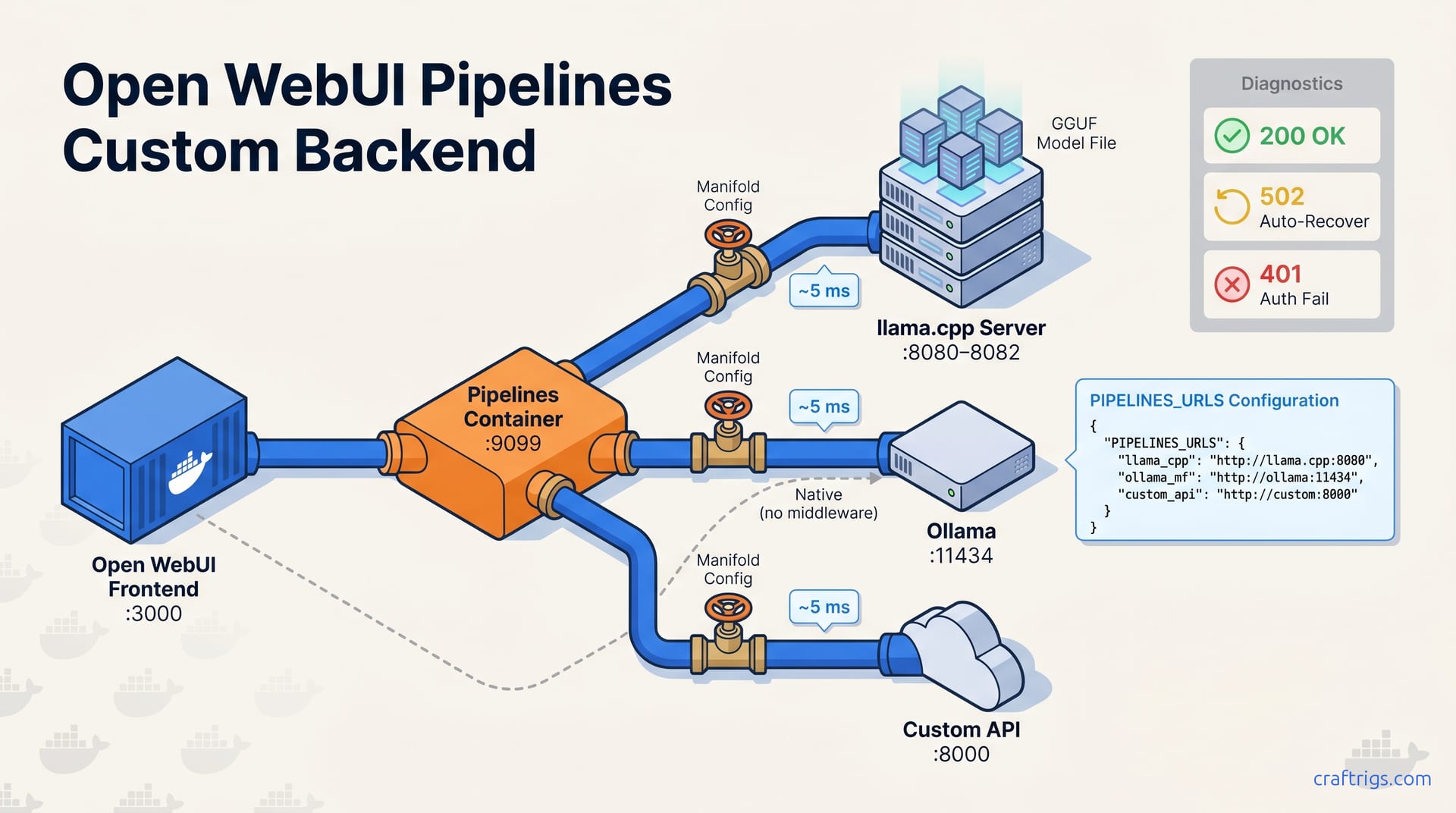
Use Open WebUI's Pipelines system, specifically Manifold pipelines, when you need to route multiple LLM backends through one interface, handle authentication tokens, or serve models from llama.cpp, Ollama, and custom APIs simultaneously. Native Ollama connections work for simple setups. Use Pipelines when you're managing more than one backend or need model aliasing. The April 29 2026 Desktop App introduced GPU crash detection that auto-restarts failed pipeline connections. Update your Docker Compose environment variables to match the new behavior.
What Pipelines Is — and When You Need It
Pipelines is a middleware layer that sits between Open WebUI and any LLM backend, translating requests into the OpenAI Chat Completions format so you can wire non-Ollama backends without touching frontend code. Open WebUI has 138,000 GitHub stars as of May 2026 and is the default self-hosted chat interface for developers running local LLMs. Its native connection model assumes everything speaks Ollama's API dialect. That breaks when you have llama.cpp compiled with custom CUDA flags, a remote Ollama instance behind a VPN, or a proprietary API requiring specific authentication headers. Pipelines presents a unified OpenAI-compatible endpoint to Open WebUI and handles translation to whatever your backend expects. You write one Manifold pipeline per backend type, configure it with the right URL and auth, and Open WebUI sees a standard model list with standard chat behavior, without frontend forks or proxy scripts running in screen sessions.
[CROSS-REF: /guides/ollama-vs-lm-studio-comparison/] That comparison covers the native-vs-middleware decision from a UI perspective. Here, we're building the plumbing that makes either choice work in production. The real trigger for adopting Pipelines is heterogeneity. Native connections break when you have two backends with different auth schemes, port configurations, or model naming conventions. Pipelines also enables model aliasing and request filtering for compliance. Aliasing exposes "gpt-4" to your team while routing to a local Qwen2.5 72B. If you're running a single Ollama instance on the same Docker host, skip Pipelines. If you're managing multiple backends, need failover, or want to inject custom headers for audit logging, Pipelines is the right tool.
Installing the Pipelines Container and Wiring It to Open WebUI
Pipelines runs as a separate Docker container that Open WebUI reaches via internal networking; both containers must share a Docker network or use host.docker.internal for cross-container communication on Docker Desktop. Open WebUI 0.6.x requires Pipelines image version 0.6.x or later for API compatibility. Version mismatches manifest as silent 404s on the /v1/models endpoint with no useful logging. Start with a dedicated bridge network so container names resolve as DNS hostnames:
networks:
 openwebui-network:
 driver: bridge
Then declare the Pipelines service with the matching image tag and mount your pipeline definitions:
services:
 pipelines:
 image: ghcr.io/open-webui/pipelines:0.6.2
 ports:
 - "9099:9099"
 environment:
 - PIPELINES_API_KEY=your-custom-key
 - PIPELINES_URLS=/app/pipelines/manifolds.json
 volumes:
 - ./pipelines:/app/pipelines
 networks:
 - openwebui-network
The Open WebUI container needs two environment variables to route through Pipelines instead of native Ollama: OPENAI_API_BASE_URL=http://pipelines:9099/v1 and OPENAI_API_KEY matching whatever you set for PIPELINES_API_KEY. On Docker Desktop for Mac or Windows, host.docker.internal resolves automatically to your host machine. This is useful if llama.cpp runs outside Docker. On Linux Docker Engine, you must add --add-host host.docker.internal:host-gateway to the Open WebUI container or use direct container-to-container networking. Test connectivity with a curl from inside the Open WebUI container: curl -H "Authorization: Bearer your-custom-key" http://pipelines:9099/v1/models should return your configured model list.
Backend 1 — Wiring a llama.cpp Server
llama.cpp's --server mode exposes an OpenAI-compatible API at /v1/chat/completions when started with --api-key and --port; you need one Pipelines Manifold pipeline per llama.cpp instance, pointing to http://host.docker.internal:PORT or the container hostname if llama.cpp also runs in Docker. The server binary has supported this endpoint since December 2023. Stable releases as of May 2026 (b4400+) maintain compatibility with the OpenAI Chat Completions spec version 2024-10-21. Launch your server with explicit binding to avoid default localhost-only behavior:
./llama-server \
 --model /models/qwen2.5-72b-q4_k_m.gguf \
 --port 8080 \
 --host 0.0.0.0 \
 --api-key llama-token-abc \
 --n-gpu-layers 99 \
 --ctx-size 32768
[CROSS-REF: /guides/gguf-quantization-guide/] That guide covers Q4_K_M vs Q6_K tradeoffs. Your chosen quantization determines VRAM headroom and how many concurrent contexts you can sustain. The Manifold pipeline definition maps this instance to a friendly model name Open WebUI displays:
{
 "id": "local-qwen-72b",
 "url": "http://host.docker.internal:8080/v1",
 "api_key": "llama-token-abc",
 "headers": {"X-Custom-Request-ID": "{{request_id}}"}
}
If llama.cpp runs in its own container on the same network, replace host.docker.internal with the service name (http://llamacpp:8080/v1) and omit the API key if you've containerized both on an isolated bridge. The headers field in Manifold configs supports arbitrary key-value pairs as of Pipelines 0.5.0, letting you inject trace IDs or tenant identifiers for multi-user deployments. One pipeline per instance means one model entry in Open WebUI's dropdown; if you're running three llama.cpp servers for different context lengths or quantizations, you need three Manifold objects in your PIPELINES_URLS array.
Backend 2 — Routing Ollama Through Pipelines vs Native
Native Ollama connection in Open WebUI points directly to http://ollama:11434 with zero middleware overhead; use this for single-machine setups where Ollama and Open WebUI share a Docker network and you need no model aliasing, request filtering, or multi-node routing. Ollama's native API runs on port 11434 by default, unchanged since 2023. That stability helps with configuration management. It also means the protocol hasn't gained features like per-request auth headers or model name remapping. Native connections skip Pipelines. Open WebUI's Ollama connector speaks the native protocol directly, pulling model lists with GET /api/tags and streaming completions with POST /api/generate. Latency for single-user inference is indistinguishable from Pipelines-routed Ollama. Both paths add under 5 ms for warm connections.
| Scenario | Use Native | Use Pipelines |
|---|---|---|
| Single Ollama instance, same Docker host | ✓ Zero config overhead | ✗ Unnecessary complexity |
Model aliasing (gpt-4 → llama3.1:70b) | ✗ Not supported | ✓ Manifold id field handles this |
| Multi-node Ollama with load balancing | ✗ Single endpoint only | ✓ Multiple URLs in one Manifold |
| Per-request auth headers for audit | ✗ No header injection | ✓ Arbitrary headers dict |
| Request filtering or rate limiting | ✗ No middleware hooks | ✓ Pipeline valve functions |
The table makes the tradeoff concrete. If you run Ollama on a separate machine, Pipelines handles auth. This is common when the GPU server is elsewhere and Open WebUI runs on a laptop. The native connector doesn't support API keys or custom headers. Any remote Ollama instance exposed to the internet needs a reverse proxy or Pipelines in front. [CROSS-REF: /articles/ollama-remote-access-guide/] That guide covers the network topology. This article handles the specific Manifold configuration for authenticated remote access. If you're choosing between native and Pipelines for local Ollama, benchmark your actual workload. Pipelines adds measurable concurrency overhead under heavy load due to request serialization. Single-user latency remains sub-5 ms.
Backend 3 — Custom OpenAI-Compatible APIs
Any API implementing the OpenAI Chat Completions spec (vLLM, TGI, custom company gateways) wires through Pipelines with the same Manifold pattern as llama.cpp, but with full header and auth token control that native connections lack. Custom APIs often require Bearer tokens, organization IDs, or trace headers that llama.cpp's server doesn't enforce. Pipelines passes these through transparently:
{
 "id": "company-gpt-4",
 "url": "https://api.internal.company.com/v1",
 "api_key": "sk-prod-...",
 "headers": {
 "OpenAI-Organization": "org-abc123",
 "X-Request-Source": "openwebui-pipelines"
 }
}
Open WebUI sees "company-gpt-4" as a standard model option; users can't distinguish it from local backends in the chat interface. Here, Pipelines' value extends beyond protocol translation. You're unifying procurement, audit, and access control across backends. For compliance-heavy deployments, the headers injection lets you tag every request with a user identifier from Open WebUI's session context without modifying either the frontend or the backend API. The Manifold class exposes __user__ and __metadata__ objects in pipeline valve functions as of version 0.5.0, enabling dynamic header construction based on the authenticated user.
Production custom APIs often rate-limit by token or request count. Pipelines doesn't implement client-side rate limiting natively. You can layer it with a valve function that tracks per-user consumption in a SQLite database or Redis cache. The pattern: valve intercepts the request, checks quota, then either forwards with headers or returns a 429 with retry-after. This is middleware territory that native Open WebUI connections don't enter. For teams running vLLM on Kubernetes or a commercial API with negotiated throughput, Pipelines is the integration point that makes Open WebUI viable without forking the frontend.
What Changed in the April 29 2026 Desktop App
GPU crash detection auto-restarts failed pipeline connections when the Desktop App detects a CUDA or Metal GPU driver reset, surfacing a "Backend recovered" toast instead of hanging on a spinner; this changes troubleshooting because 502 errors now auto-resolve within 10–30 seconds rather than requiring manual container restart. The Desktop App bundles its own Open WebUI frontend version. Pipeline compatibility depends on the embedded server version, not the container version you might be running elsewhere. This broke existing setups: users with Pipelines 0.5.x and Desktop App 0.6.x saw intermittent 502s. Those 502s previously indicated networking problems but now trigger automatic recovery loops.
The behavior change demands updated environment variables in your Docker Compose. The Desktop App expects PIPELINES_URLS to include a health_check_interval field for each Manifold, defaulting to 15 seconds if omitted. Without it, crash detection falls back to 30-second polling, which feels like a hang. After April 29 2026, connection persistence maintains WebSocket session across pipeline reconnects. In-flight chat messages resume rather than erroring out. This requires the Desktop App's embedded server to match your Pipelines container's API version. Version skew here produces the worst failure mode: silent message drops with no user-visible error, a conversation that stops responding.
Exclude individual backends from crash detection in Settings → GPU → Excluded Backends when they handle their own recovery. This is useful for managed APIs where auto-restart creates duplicate requests. GPU crash detection handles native and pipeline backend failures differently. Native Ollama connections get full WebSocket state reconstruction. Pipeline connections get a simpler HTTP retry with session cookie preservation. Pipeline-specific error logging surfaces in Desktop App diagnostics with filtered stack traces, but only if you've enabled LOG_LEVEL=debug on the Pipelines container itself. The auto-recovery timing of 10–30 seconds is approximate and depends on GPU driver reinitialization speed. Reports range from 8 seconds on RTX 4090s with current NVIDIA drivers to 45+ seconds on older AMD cards where ROCm teardown is slower.
Docker Compose Reference — All Three Backends Together
A single docker-compose.yml can declare all four services (Open WebUI on port 3000, Pipelines on port 9099, Ollama on port 11434, and llama.cpp servers on ports 8080–8082) on a shared openwebui-network bridge network so DNS resolution works by container name without IP management. Docker Compose default bridge networks enable inter-container DNS since Compose file format 3.7+, which means http://ollama:11434 resolves correctly from the Pipelines container without extra hosts configuration. Here's the complete reference:
version: "3.8"

networks:
 openwebui-network:
 driver: bridge

services:
 open-webui:
 image: ghcr.io/open-webui/open-webui:0.6.2
 ports:
 - "3000:8080"
 environment:
 - OPENAI_API_BASE_URL=http://pipelines:9099/v1
 - OPENAI_API_KEY=0p3n-w3bu!
 - OLLAMA_BASE_URL=http://ollama:11434
 networks:
 - openwebui-network
 depends_on:
 - pipelines
 - ollama

 pipelines:
 image: ghcr.io/open-webui/pipelines:0.6.2
 ports:
 - "9099:9099"
 environment:
 - PIPELINES_API_KEY=0p3n-w3bu!
 - PIPELINES_URLS=/app/pipelines/manifolds.json
 - LLAMACPP_API_KEY=llama-token-abc
 volumes:
 - ./pipelines:/app/pipelines
 networks:
 - openwebui-network

 ollama:
 image: ollama/ollama:latest
 ports:
 - "11434:11434"
 environment:
 - OLLAMA_HOST=0.0.0.0
 volumes:
 - ollama-data:/root/.ollama
 networks:
 - openwebui-network

 llamacpp:
 image: ghcr.io/ggerganov/llama.cpp:server-b4400
 ports:
 - "8080:8080"
 command: >
 --server
 --model /models/qwen2.5-72b-q4_k_m.gguf
 --port 8080
 --host 0.0.0.0
 --api-key llama-token-abc
 --n-gpu-layers 99
 volumes:
 - ./models:/models:ro
 networks:
 - openwebui-network

volumes:
 ollama-data:
The configuration above covers all environment variables from the outline. OPENAI_API_BASE_URL and OPENAI_API_KEY on Open WebUI route all OpenAI-compatible requests to Pipelines; OLLAMA_BASE_URL preserves native Ollama access for comparison or fallback. PIPELINES_URLS points to a JSON file with your Manifold definitions. Keep this in a mounted volume for hot-reload during development. OLLAMA_HOST=0.0.0.0 Ollama's default binding is localhost inside the container, making it unreachable from other services. Set to expose it to the Docker network. [CROSS-REF: /guides/best-hardware-local-llm-2026/] That guide helps size your --n-gpu-layers and model selection for the llama.cpp service based on available VRAM.
Testing and Troubleshooting Pipeline Connections
Open WebUI's built-in pipeline test function (Admin → Pipelines → Test) sends a single "hi" completion and reports round-trip latency and raw HTTP status; a 200 with content confirms end-to-end wiring, while 502/504 indicates container networking or backend crash, and 401 points to mismatched API keys. Open WebUI added the pipeline test function in version 0.5.0. The interface hasn't changed in 0.6.x. After the Desktop App's April 2026 update, 502s auto-resolve. You may see "Testing..." linger for 10–30 seconds before success rather than failing immediately. This is the most common post-update confusion: the test looks broken, but it's exercising the recovery path.
For manual verification when the UI test is ambiguous, curl from inside the Open WebUI container:
docker exec -it open-webui bash
curl -v -H "Authorization: Bearer 0p3n-w3bu!" \
 http://pipelines:9099/v1/chat/completions \
 -d '{"model":"local-qwen-72b","messages":[{"role":"user","content":"hi"}],"stream":false}'
The three failure modes and their fixes:
502 Bad Gateway: Pipelines can't reach the backend. Check container names resolve (nslookup ollama from Pipelines container), verify ports match, and confirm backend health with direct curl. Post-April 2026, also check if GPU crash detection is actively recovering. Wait 30 seconds and retest.
401 Unauthorized: OPENAI_API_KEY and PIPELINES_API_KEY mismatch. These must be identical strings. If you changed Pipelines' key after first launch, restart Open WebUI to pick up the new value. It caches the key at startup.
504 Gateway Timeout: the backend received the request but didn't respond within Pipelines' 60-second timeout. This is typical with first-model-load on llama.cpp or Ollama pulling a missing image. With llama.cpp, confirm the model file exists at the mounted path and the server has finished loading weights before testing. The /health endpoint on port 8080 returns 503 during startup and 200 when ready.