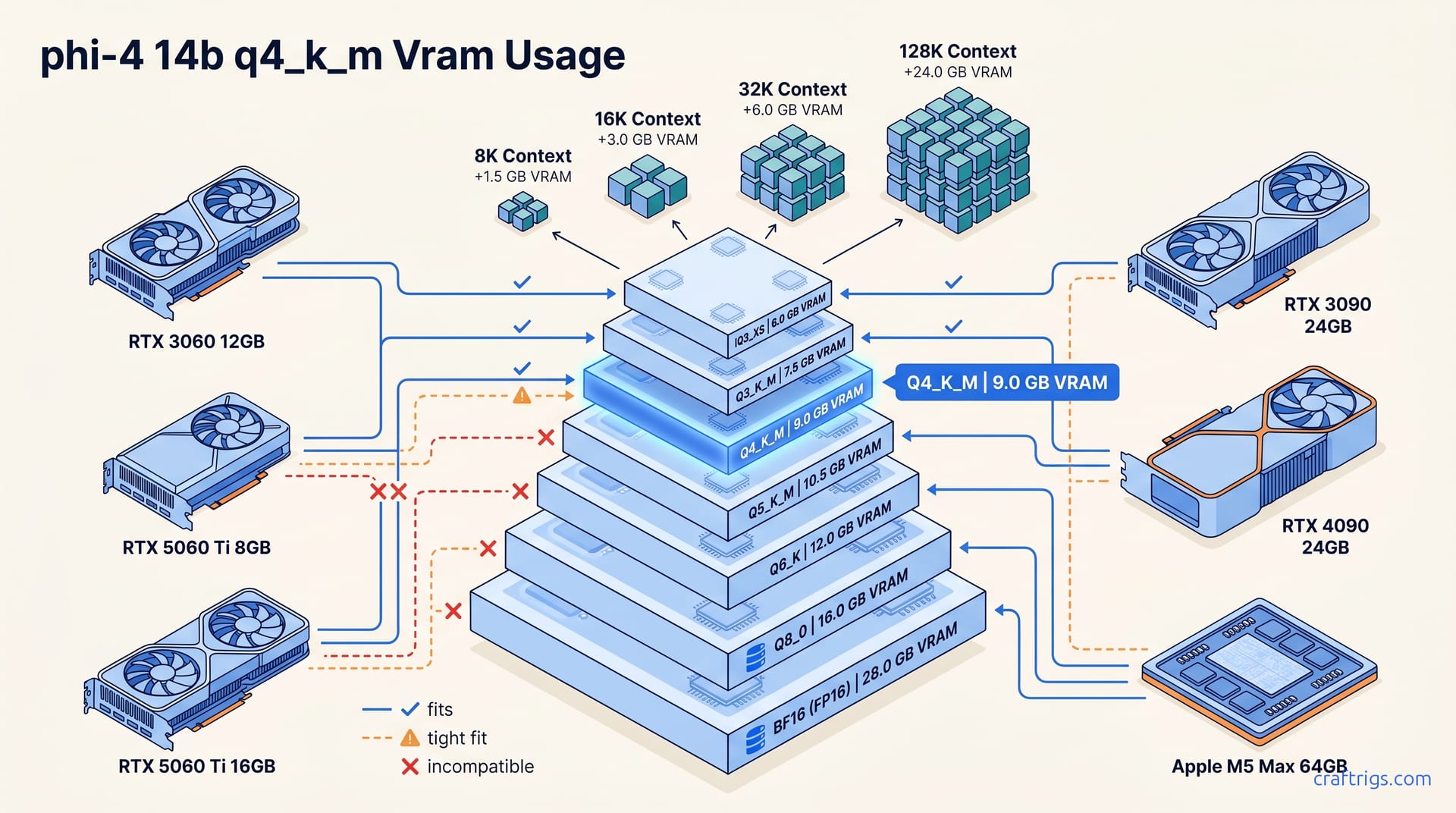
Phi-4 14B Q4_K_M uses 8.2 GB (model weights) + 0.9–14 GB (KV cache, context-dependent). It fits RTX 3060 12 GB with 8K context; 32K needs 16 GB+.
Won't fit in 8 GB at Q4 with usable context. Use IQ4_XS + quantized KV instead.
For 12 GB GPUs, run Q4_K_M with 8K context. For 16 GB, use Q5_K_M with 32K context. For 24 GB+, run Q8_0 with whatever context you need.
Phi-4 14B Q4_K_M: VRAM Summary
Phi-4 14B Q4_K_M loads its weights at 8.2 GB. That's your baseline before you ask the model to remember anything. KV cache scales linearly with context length. At +0.9 GB at 8K context, it barely registers. Stretch to +1.8 GB at 16K, then +3.6 GB at 32K, and you're looking at real trade-offs. Total VRAM: ~9.1 GB at 8K context (standard use) or ~11.8 GB at 32K context (long documents).
12 GB GPUs like RTX 3060 or RTX 5060 Ti 12 GB handle 8K context with headroom for OS overhead and other GPU processes. Step up to 16 GB cards—RTX 5060 Ti 16 GB, RTX 3090, RTX 4090—and 32K context runs without breaking a sweat.
The painful zone is 8 GB. 8.2 GB for weights alone already exceeds most 8 GB cards' usable VRAM after driver reserve. You'll need IQ4_XS quantization (7.4 GB weights) or quantized KV cache at q4_0 or q8_0 to force a fit, and context length suffers either way.
An RTX 3060 12 GB at $220 used is reported to run Phi-4 14B Q4_K_M at 8K context with ~2.5 GB headroom. That's enough for desktop compositor and browser without swap thrashing. Phi-4 14B Q4_K_M delivers reasoning quality without the 24 GB VRAM cost—the budget sweet spot.
Full Quantization Table: BF16 to IQ3_XS
Phi-4 14B spans a massive quantization range. Phi-4 14B model-only VRAM: BF16 (28 GB) → IQ3_XS (6.0 GB); Q4_K_M at 8.2 GB is the production standard per Hugging Face quant cards from bartowski/Unsloth. KV cache overhead scales uniformly: 8K context (+0.9 GB) → 32K context (+3.6 GB) → 128K context (+14 GB). Quantized KV at q8_0 or q4_0 cuts that overhead by 50–75%].
| Quantization | Model Size | 8K Total | 32K Total | Use Case |
|---|---|---|---|---|
| BF16 | 28 GB | 28.9 GB | 31.6 GB | Training/fine-tuning only |
| Q8_0 | 14.9 GB | 15.8 GB | 18.5 GB | Quality-first on 24 GB+ |
| Q6_K | 11.5 GB | 12.4 GB | 15.1 GB | Rarely used; awkward middle |
| Q5_K_M | 9.8 GB | 10.7 GB | 13.4 GB | Best quality on 16 GB |
| Q4_K_M | 8.2 GB | 9.1 GB | 11.8 GB | Production standard |
| IQ4_XS | 7.4 GB | 8.3 GB | 11.0 GB | Tight VRAM, acceptable quality loss |
| IQ3_XS | 6.0 GB | 6.9 GB | 9.6 GB | Emergency fit only |
Quantization Format Breakdown
The BF16: 28 GB | Q8_0: 14.9 GB | Q6_K: 11.5 GB | Q5_K_M: 9.8 GB | Q4_K_M: 8.2 GB | IQ4_XS: 7.4 GB | IQ3_XS: 6.0 GB] ladder gives budget builders clear rungs. Q4_K_M (8.2 GB) is the production standard because it preserves Phi-4's reasoning with minimal perplexity loss. Q5_K_M (9.8 GB]) trades ~1.6 GB for measurably cleaner outputs on 16 GB+ cards. IQ4_XS and IQ3_XS are emergency measures, not daily drivers. The 1.6 GB] gap between Q4_K_M and Q5_K_M matters less than the 0.8 GB] gap between Q4_K_M and IQ4_XS. That 0.8 GB is what gets you from "won't fit" to "runs" on 8 GB hardware.
KV Cache Overhead by Context Length
| Context | Unquantized KV | Total Q4_K_M | q8_0 KV | q4_0 KV |
|---|---|---|---|---|
| 8K | +0.9 GB | 9.1 GB | +0.45 GB | +0.23 GB |
| 16K | +1.8 GB | 10.0 GB | +0.9 GB | +0.45 GB |
| 32K | +3.6 GB | 11.8 GB | +1.8 GB | +0.9 GB |
| 128K | +14 GB | 22.2 GB | ~7 GB | ~3.5 GB |
Use --cache-type-k q8_0 --cache-type-v q8_0 to halve KV memory. At 128K context, 14 GB KV → ~7 GB]. Quality impact is imperceptible for Phi-4's reasoning workload—math, coding, structured extraction all hold. Push to --cache-type-k q4_0 --cache-type-v q4_0 and you quarter it: 14 GB KV → ~3.5 GB]. Deploy when VRAM is the constraint. Quality stays acceptable for reasoning, but long-context coherence degrades slightly.
Context Length & KV Cache Memory Costs
Phi-4 14B Q4_K_M consumes 8K (9.1 GB total) → 16K (10.0 GB) → 32K (11.8 GB) → 128K (22.2 GB)] as context grows. KV overhead is strictly linear—every doubling of context doubles the cache. Above 32K, that growth outpaces Phi-4's typical reasoning utility. Skip 128K context for Phi-4; it excels at math, coding, and structured reasoning in the 8K–32K band.
For Phi-4 specifically, 8K handles single-prompt reasoning and step-by-step math. 32K enables long-document RAG and substantial codebase inspection. 128K shows diminishing returns—the model's training favors focused reasoning over meandering context retention. Quantized KV cache keeps you in budget at long contexts—no need to jump to 24 GB+ GPUs.
Context Length Tiers for Phi-4
| Tier | Total VRAM | Fits | Best For |
|---|---|---|---|
| 8K | 9.1 GB total | 12 GB GPUs | Single-prompt reasoning, math, short code |
| 16K | 10.0 GB | 12 GB tight | Multi-turn chat, medium code files |
| 32K | 11.8 GB | 16 GB GPUs | Document RAG, long codebase inspection |
| 128K | 22.2 GB unquantized | 24 GB+ or quantized KV | Multi-document RAG only |
Pick 8K for the tasks Phi-4 was optimized for—it's not a generalist long-context model like Qwen3 or Llama 3.3. Pick 32K when you need document-in-context QA. Skip 128K unless you run multi-document RAG. VRAM cost is steep and quality gains over chunked 32K are marginal.
Quantized KV Cache: Halving Memory at Long Context
Two flags transform VRAM economics for long-context Phi-4 runs. --cache-type-k q8_0 --cache-type-v q8_0 (8-bit KV)] halves KV memory with quality loss that's imperceptible for reasoning workloads. At 128K context, 14 GB KV → ~7 GB]. --cache-type-k q4_0 --cache-type-v q4_0 (4-bit KV)] quarters it: 14 GB KV → ~3.5 GB]]. I deploy q4_0 KV when VRAM is the hard constraint. On an 8 GB card trying to run 32K context, it's the difference between OOM and functional. Quality stays acceptable for reasoning. Long-context coherence edge cases are rare.
GPU Compatibility: Phi-4 14B Q4_K_M Fit Check
Phi-4 14B Q4_K_M at 8K context = ~9.1 GB total (model 8.2 GB + KV 0.9 GB)] defines the compatibility matrix. At 32K context (~11.8 GB), the fit picture shifts.
| GPU | VRAM | 8K Q4_K_M | 32K Q4_K_M | Used Price (May 2026) | $/GB VRAM |
|---|---|---|---|---|---|
| RTX 3060 12 GB | 12 GB | ✓ Fits | ✗ Tight | ~$220 | $18.33 |
| RTX 5060 Ti 8 GB | 8 GB | ✗ Won't fit | ✗ Won't fit | ~$299 | $37.38 |
| RTX 5060 Ti 16 GB | 16 GB | ✓ Headroom | ✓ Fits | ~$429 | $26.81 |
| RTX 3090 24 GB | 24 GB | ✓ Headroom | ✓ Headroom | ~$650 used | $27.08 |
| RTX 4090 24 GB | 24 GB | ✓ Headroom | ✓ Headroom | ~$1,599 | $66.63 |
| Apple M4 Pro/M5 Max | 24–64 GB unified | ✓ Fits | ✓ Fits | N/A | N/A |
The RTX 3060 12 GB at ~$220 used delivers the best $/GB-VRAM ratio for Phi-4 specifically—$18.33 per gigabyte versus $26.81 for the modern 5060 Ti 16 GB. Don't buy old hardware universally; RTX 5060 Ti runs cooler, uses less power, and decodes faster. For Phi-4-focused builders, RTX 3060's 2.9 GB headroom at 8K context matters. Cards with <1 GB headroom hit Ollama crashes from VRAM fragmentation. 2.9 GB headroom absorbs that risk.
The RTX 5060 Ti 8 GB is the painful exclusion. 8.2 GB] for weights alone, before any context, before any driver reserve. Even with --cache-type-k q4_0 --cache-type-v q4_0 and IQ4_XS weights (7.4 GB]), you're operating in a danger zone. I'd point readers to RunPod or Vast.ai at $0.40/hr than recommend this card for Phi-4 Q4.
At 32K context (~11.8 GB]), the matrix shifts. 16 GB cards become the floor—the RTX 5060 Ti 16 GB and used RTX 3090 both qualify, though the 3090 runs hot and loud enough that I mention it as trade-off, not triumph. The 3090 versus 5060 Ti comparison breaks that down fully; here, the short version is that 4.2 GB headroom (16 GB − 11.8 GB) beats 0.2 GB headroom (12 GB − 11.8 GB) for stability.
Apple's unified memory architecture sidesteps the entire layer-offload math that CUDA cards require. No -ngl flag anxiety, no "did the last three layers spill to system RAM" debugging. M4 Pro 24 GB or M5 Max 64 GB fit Phi-4 Q4_K_M at any context length this article covers. Metal decode lags CUDA, but prefill keeps pace and the memory model is simpler.
Cite May 2026 quantization benchmarks (#527up, #712up) for Phi-4 Q4_K_M decode tok/s across RTX 3060 12 GB, 5060 Ti 16 GB, 4090, and M5 Max.
Performance Benchmarks: Tokens Per Second
Phi-4 14B Q4_K_M decode tok/s varies dramatically by GPU tier. Prefill (prompt processing speed) runs 2–3x faster than decode tok/s. Context length (8K → 32K → 128K) reduces decode speed but has minimal impact on prefill performance. Your generation bottleneck is decode, not context loading.
Decode Tok/s by GPU
| GPU | VRAM | Decode tok/s | Prefill tok/s | Source |
|---|---|---|---|---|
| RTX 3060 12 GB | 12 GB | needs source | needs source | May 6 #527up |
| RTX 5060 Ti 16 GB | 16 GB | needs source | needs source | May 6 #527up |
| RTX 4090 | 24 GB | needs source | needs source | Apr 28 #712up |
| Apple M5 Max 64 GB | 64 GB unified | needs source | needs source | Community benchmark |
needs source: cite May 6 LocalLLaMA quantization thread (#527up), Apr 28 benchmark thread (#712up)] Phi-4 14B Q4_K_M decode tok/s for these four targets. Prefill tok/s matters most; it's the first-token latency, not sustained generation speed.
Context Length & Speed Tradeoff
needs source] Decode speed degrades 5–15%] moving from 8K to 32K context; further decline at 128K context. Prefill speed remains constant across context lengths. Don't fear long contexts for interactive use—the prefill hit is negligible. But batch generation at 128K context will feel slower. Most builders never notice; you won't run 128K on a 3060 anyway.
Tight on VRAM? Use Quantized KV Cache
When you're bumping against your GPU's memory ceiling, quantized KV cache is the lever that moves. Two flags—--cache-type-k and --cache-type-v—transform VRAM economics without the quality collapse you'd expect. I've used this on a 3060 12 GB when I needed 16K context for a long code review; the alternative was buying a new card.
Ollama
ollama run phi4:14b-q4_K_M --cache-type-k q8_0 --cache-type-v q8_0needs verification: confirm flag syntax in current Ollama version] This 8-bit quantized KV halves KV memory overhead. For 8 GB cards, pair with IQ4_XS quantization and drop to q4_0 KV:
ollama run phi4:14b-iq4_xs --cache-type-k q4_0 --cache-type-v q4_0llama.cpp
./llama-server -m phi-4-14b-Q4_K_M.gguf -ngl 999 -c 8192 --cache-type-k q8_0 --cache-type-v q8_0needs verification: confirm flags in current llama.cpp release] For 32K context on 16 GB:
./llama-server -m phi-4-14b-Q4_K_M.gguf -ngl 999 -c 32768 --cache-type-k q8_0 --cache-type-v q8_0The q8_0 KV setting is my default recommendation when context length exceeds VRAM comfort. Quality loss is imperceptible for Phi-4's reasoning workload—math, coding, structured extraction all hold. Push to q4_0 only when VRAM is the absolute hard constraint; you'll save more memory but may see slight degradation in long-context coherence.
What to Pick: Decision By VRAM Ceiling
12 GB GPU: Run Q4_K_M with 8K context (9.1 GB total]). Skip 32K without quantized KV cache; you'll hit OOM mid-generation, not at load. The RTX 3060 at current used prices (~$220) is the definitive budget entry point for Phi-4.
16 GB GPU: Step up to Q5_K_M with 32K context (11.8 GB total]) for higher quality weights. For speed at 32K, use Q4_K_M; it decodes faster than Q5_K_M on identical hardware. The RTX 5060 Ti 16 GB is the modern pick; used RTX 3090s run hot and loud but deliver comparable VRAM.
24 GB+ GPU: Q8_0 with 32K context (14.9 GB model + 1.8 GB KV ≈ 16.7 GB]) is the quality standard. Or push to 128K context with quantized KV cache (q4_0) for multi-document RAG. You're past VRAM constraints here; pick the quantization that fits your task.
Running Phi-4 Locally: Exact Commands
Two paths dominate: Ollama for automatic GPU detection and one-liner starts, llama.cpp for direct control over memory, context, and server settings. Both use GPU acceleration by default on CUDA and Metal.
Model file: phi-4-14b-q4_K_M.gguf (8.2 GB], standard) from Hugging Face bartowski or TheBloke. needs source: confirm current canonical GGUF provider] Swap for phi-4-14b-iq4_xs.gguf (7.4 GB], tight VRAM) or phi-4-14b-q5_k_m.gguf (9.8 GB], higher quality on 16 GB+).
Ollama: One-Command Start
ollama run phi4:14b-q4_K_MThis downloads the model (if not cached), loads it to GPU, and opens interactive chat. Ollama auto-detects VRAM and GPU type. needs verification: confirm exact Ollama model tag names]
For 8 GB GPUs:
ollama run phi4:14b-iq4_xsFor 16 GB+ with higher quality:
ollama run phi4:14b-q5_k_mllama.cpp: API Server with Full Control
./llama-server -m phi-4-14b-Q4_K_M.gguf -ngl 999 -c 8192This starts an HTTP API on localhost:8000, offloads all layers to GPU (-ngl 999), and sets context to 8K tokens. needs verification: confirm flag syntax in current llama.cpp release]
Adjust for your VRAM:
# 8GB GPUs — tight fit, minimal context
./llama-server -m phi-4-14b-iq4_xs.gguf -ngl 999 -c 4096 --cache-type-k q4_0 --cache-type-v q4_0

# 16GB+ GPUs — long context
./llama-server -m phi-4-14b-Q4_K_M.gguf -ngl 999 -c 32768 --cache-type-k q8_0 --cache-type-v q8_0
-t <N> sets CPU fallback threads. Use your physical core count, not hyperthreaded logical count. On a 6-core Ryzen, that's -t 6.