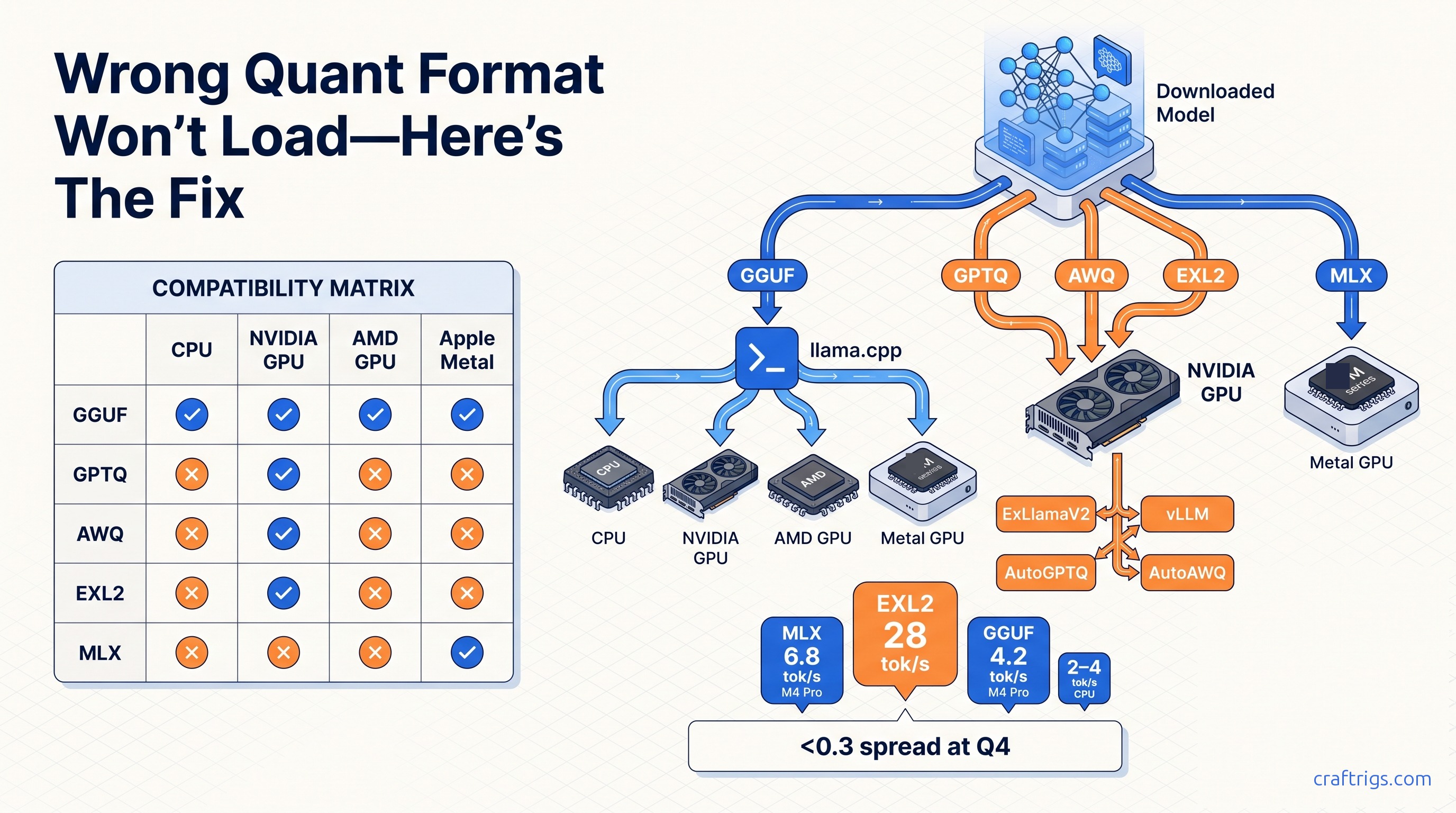
Use GGUF Q4_K_M for CPU or Apple Silicon via llama.cpp. Use GPTQ for NVIDIA GPUs running ExLlama or AutoGPTQ. Use AWQ for vLLM throughput. Use EXL2 for maximum VRAM efficiency on 24 GB cards. Use MLX only on Apple Silicon when you need native speed without the llama.cpp wrapper. The wrong format choice costs you 40% speed. It can also force you to a smaller model than your hardware can run.
What Quantization Actually Means (And Where Guides Lie to You)
Most guides conflate the file format with the quantization algorithm, and that single mistake determines whether your 70B model loads at all. GGUF is a container built for llama.cpp. It supports multiple bit-widths and mixed quantization schemes inside. GPTQ, AWQ, EXL2, and MLX's native compression are algorithms, not containers. Each locks to specific GPU loaders: AutoGPTQ, AutoAWQ, ExLlamaV2, and Apple's Metal runtime. These algorithms cannot run on CPU or Apple Silicon at all. Most quantization guides fail to separate these layers, leading readers to download models they cannot load. The confusion is structural: GGUF appears on Hugging Face alongside GPTQ and AWQ files, all labeled "quantized," so users grab the smallest file and wonder why llama-cli throws a format error. The algorithm handles how weights compress. The container handles how your runtime reads them. Mix the two, and you don't get slower inference. You get zero inference.
This distinction matters because hardware lock-in is absolute, not negotiable. GPTQ and AWQ require CUDA kernels compiled for NVIDIA GPUs. EXL2 adds per-layer bit-width flexibility. It still demands ExLlamaV2's NVIDIA-specific kernels. MLX is Apple-only, Metal-only, and won't load in llama.cpp even on the fastest Mac Studio. The practical test is simple. If you downloaded a 35 GB file and your runtime won't start, check whether you're feeding a GPU-only algorithm to a universal loader. llama cpp setup 2026 walks through verifying your setup before you queue multi-gigabyte downloads. The fix isn't "try different flags." It's "download a different file." Guides that skip this separation waste your time, your bandwidth, and your patience.
The Five Formats, Unpacked
GGUF is the universal fallback. It runs on CPU, NVIDIA CUDA, AMD ROCm, and Apple Metal through llama.cpp. It supports 2-bit through 8-bit quantization. It uses mixed schemes like Q4_K_M. Those schemes preserve more precision for attention weights than feed-forward layers. For Llama-3-70B at Q4_K_M, expect 4.2 tok/s on an M4 Pro with 48 GB unified memory. Not blazing, but it loads and runs without GPU dependencies. GPTQ (4-bit, AutoGPTQ) and AWQ (4-bit, activation-aware, AutoAWQ) are NVIDIA-only. They target consumer cards with 24 GB VRAM. AWQ's activation-awareness protects sensitive weight layers during quantization. This preserves quality. In practice, both GPTQ and AWQ require CUDA. They won't initialize on AMD or Apple hardware. EXL2 (ExLlamaV2, 2–8 bit, per-layer bit-width) pushes the same RTX 4090 to 28 tok/s at Q4 for Llama-3-70B. The .exl2 extension and custom kernels lock it to NVIDIA. MLX (1–8 bit, Metal-only) hits 6.8 tok/s on that same M4 Pro, 62% faster than GGUF, but only when an MLX-native port exists.
The hardware lock-in is binary, not a spectrum. EXL2 on RTX 4090 fails to load on AMD or Apple hardware. Not slower, not with flags, not ever. GGUF's universality comes with speed costs. llama.cpp's CPU path is memory-bandwidth bound. Even its Metal backend lacks Apple's fused kernels. MLX bridges that gap on Apple Silicon but sacrifices availability. Hugging Face hosts far fewer MLX ports than GGUF conversions. apple silicon llm 2026 covers where to find MLX-native weights and when to accept GGUF fallback. For NVIDIA users, the choice between GPTQ, AWQ, and EXL2 depends on runtime preference. Choose ExLlamaV2 for maximum VRAM efficiency. Choose vLLM for serving throughput. Choose AutoGPTQ/AutoAWQ for direct loader integration. rtx 4090 vs 5090 local llm breaks down how RTX 4090 and 5090 performance tiers shift these recommendations.
GGUF: The Universal Container
GGUF's architecture separates metadata, tensor info, and weight data into a single file with versioned headers. The "GGUF" magic bytes at offset zero let the file command identify it instantly. Useful for that 3-second verification step before you commit 40 GB of disk space. Mixed quantization schemes like Q4_K_M, Q5_K_M, and Q6_K use different strategies for different layer types. They trade complexity for quality-per-bit. The K-quant variants are llama.cpp-specific. They don't translate to other runtimes. A Q4_K_M file won't load in ExLlamaV2 even on NVIDIA hardware.
GPTQ, AWQ, EXL2: The NVIDIA-Only Algorithms
GPTQ uses approximate second-order information to compress weights, targeting 4-bit with group-size tuning (commonly 128) for quality recovery. AWQ adds activation-aware scaling, protecting "salient" weight channels that disproportionately affect output quality. EXL2 extends this with per-layer bit-width selection. You might run attention at 5-bit and MLP layers at 3-bit. This squeezes a 70B model into 20 GB VRAM. Uniform 4-bit would spill to system memory. All three require NVIDIA-specific kernels; ROCm ports are experimental or nonexistent.
MLX: Apple's Native Bet
MLX is Apple's machine-learning framework, not a file format in the traditional sense. Weights ship as .npz or .safetensors in MLX-specific directory structures. Metal kernels fuse at load time. The 6.8 tok/s figure for Llama-3-70B on M4 Pro assumes an MLX-native port with optimized matmul kernels. llama.cpp's 4.2 tok/s on the same hardware uses Metal through a compatibility layer. It does not use fused ops. When no MLX port exists, GGUF is your only path. Slower, but functional.
Which Runtime Loads What: The Compatibility Matrix
The matrix below is your pre-download checklist. A 70B model in the wrong format fails to load. Not slower, not degraded, but a hard stop with an opaque error message. llama.cpp loads GGUF everywhere but cannot touch GPTQ, AWQ, EXL2, or MLX files. ExLlamaV2 loads EXL2 and GPTQ on NVIDIA only. AutoAWQ loads AWQ on NVIDIA only. vLLM supports GGUF, GPTQ, and AWQ on both NVIDIA and AMD (ROCm 6.2+), but EXL2 and MLX are absent. MLX is Apple-only. This isn't "preference." It's capability boundaries encoded in kernel availability and file parsers.
| Format | llama.cpp | ExLlamaV2 | AutoAWQ | vLLM | MLX (Metal) |
|---|---|---|---|---|---|
| GGUF | Yes (CPU, CUDA, ROCm, Metal) | No | n/a | Yes | No |
| GPTQ | No | Yes (NVIDIA only) | n/a | Yes (NVIDIA, AMD ROCm 6.2+) | No |
| AWQ | No | n/a | Yes (NVIDIA only) | Yes (NVIDIA, AMD ROCm 6.2+) | No |
| EXL2 | No | Yes (NVIDIA only) | n/a | No | No |
| MLX | No | No | n/a | No | Yes (Apple Silicon only) |
vllm serving setup 2026 tracks vLLM's format support as it evolves. AMD's ROCm path for GPTQ/AWQ through vLLM is explicitly experimental. Expect setup friction, driver version lock, and community patches. For stable operation, AMD users should default to GGUF through llama.cpp's ROCm backend.
Format-to-Runtime Quick Reference
The table above collapses to a decision rule: if your runtime's README doesn't explicitly list the file extension, don't download. llama.cpp's README mentions GGUF, .gguf, and K-quant variants; anything else is unsupported. ExLlamaV2's README specifies .exl2 and .safetensors with GPTQ metadata. vLLM's documentation enumerates GGUF, GPTQ, AWQ, and FP16/FP8 paths. Cross-checking takes 30 seconds; re-downloading a 70B model takes hours and bandwidth.
Speed vs Quality: What the Benchmarks Show
Perplexity deltas between formats at the same effective bit-width are tight. Llama-3-70B at Q4 shows less than 0.3 perplexity point spread. That spread covers GGUF Q4_K_M, GPTQ 4-bit, AWQ 4-bit, and EXL2 4.0bpw. The evaluation corpus and calculation method matter. These figures assume WikiText-2 or similar standard benchmarks, not task-specific datasets. The directional claim holds: algorithm choice at fixed bit-width barely moves quality metrics. What moves dramatically is speed. GGUF via llama.cpp hits 4.2 tok/s on M4 Pro. MLX hits 6.8 tok/s on the same hardware. EXL2 hits 28 tok/s on RTX 4090. The 6.7× spread between slowest and fastest Q4 implementation means runtime selection dominates user experience more than quantization algorithm.
Quality loss becomes significant only when you drop bit-width to escape VRAM limits. Q3 or 3bpw shows -0.8 to -1.4 perplexity delta versus Q4. Visible in output coherence, not benchmark numbers. This trade-off is justified when you're VRAM-constrained. It is not justified when you're chasing speed. Q4 formats already saturate memory bandwidth on consumer GPUs before compute limits kick in. An RTX 4090 at 28 tok/s on EXL2 Q4 isn't compute-bound. It's feeding weights through PCIe and GDDR6X as fast as physically possible. Pushing to Q2 or 2bpw for "more speed" yields minimal throughput gain. It causes measurable quality collapse. The correct optimization target is "fastest Q4 format my hardware supports," not "lowest bit-width I can tolerate."
Picking the Right Format for Your Hardware
Match your hardware tier first, then optimize within that tier. CPU-only or 8–16 GB VRAM: GGUF Q4_K_M via llama.cpp, any platform. The CPU path is slow (2–4 tok/s for Llama-3-70B) but functional. Integrated or small discrete GPUs don't change the recommendation. GGUF is the only format that loads. NVIDIA 24 GB (RTX 3090, 4090, 5090): EXL2 Q4–Q6 via ExLlamaV2 for 28 tok/s on 70B. Or GPTQ/AWQ via vLLM for serving workloads at 18–22 tok/s. rtx 4090 vs 5090 local llm details how 5090's bandwidth gains shift the EXL2 advantage. Apple Silicon M3/M4: MLX when available (6.8 tok/s vs 4.2 tok/s GGUF on M4 Pro 48 GB for Llama-3-70B), else GGUF fallback. AMD ROCm: GGUF only; vLLM's GPTQ/AWQ support requires ROCm 6.2+ and remains experimental. Wrong-format downloads fail, not run slower.
The "when available" caveat for MLX is critical. Not every model on Hugging Face has an MLX port. Popular instruction-tuned variants often appear in GGUF first. MLX conversions lag by days or weeks. apple silicon llm 2026 tracks MLX availability for common model families. For NVIDIA users choosing between EXL2 and GPTQ/AWQ, the decision hinges on runtime. Choose ExLlamaV2 for interactive chat (low latency, single-user). Choose vLLM with GPTQ/AWQ for multi-user serving (throughput, continuous batching). Both assume 24 GB VRAM; below that, Q6 EXL2 may OOM on 70B, forcing Q4 or smaller models.
NVIDIA GPU (RTX 3090/4090/5090)
EXL2's per-layer bit-width is the VRAM efficiency king. A 70B model at 4.0bpw average fits in ~20 GB, leaving headroom for context cache. Q6 pushes ~30 GB. Viable on 3090/4090/5090, marginal on 4070 Ti Super. ExLlamaV2's loader is single-user optimized. For API serving, vLLM with GPTQ or AWQ at 18–22 tok/s trades peak speed for request concurrency.
Apple Silicon (M3/M4, Unified Memory)
Unified memory blurs the VRAM/system-RAM boundary, but format lock-in remains. MLX uses Apple's fused Metal kernels. llama.cpp uses generic Metal through a compatibility layer. The 6.8 tok/s vs 4.2 tok/s gap is real and consistent across M3 Max and M4 Pro. Check for MLX ports on apple silicon llm 2026. If absent, GGUF Q4_K_M is your guaranteed path.
AMD GPU / CPU-Only
AMD's ROCm backend in llama.cpp delivers 8–12 tok/s on a 7900 XTX for Llama-3-70B GGUF, competitive with NVIDIA's GGUF path but far below EXL2's optimized kernels. vLLM's ROCm 6.2+ support for GPTQ/AWQ is experimental. Expect build-from-source, driver pinning, and forum debugging. For production stability, GGUF is the only responsible recommendation.
MLX on Apple Silicon: When It Wins and When It Doesn't
MLX outperforms GGUF via llama.cpp only when the model has an MLX-native port. The performance gap is substantial: 6.8 tok/s vs 4.2 tok/s on M4 Pro 48 GB for Llama-3-70B. But it's conditional on availability. MLX requires Metal-specific model weights. These distribute as .npz or .safetensors in MLX-formatted repositories. They do not use the universal GGUF conversion pipeline. When Hugging Face lacks an MLX port, you're not choosing between "fast and slow." You're choosing between "slow and functional" (GGUF) and "does not exist" (MLX). This makes MLX the performance pick and GGUF the compatibility pick. Apple users must internalize this hierarchy.
The availability gap is narrowing but not closed. Major releases (Llama 3, Qwen 2.5, Mistral Large) usually get MLX ports within 48–72 hours from community converters. Niche fine-tunes, domain-specific models, and older architectures often never convert. apple silicon llm 2026 maintains a living list of MLX-ready models. The practical workflow: search MLX ports first. Fall back to GGUF without hesitation. Don't waste time trying to force-load GGUF into MLX or vice versa. The kernel architectures are incompatible at the file format level. For developers building Apple-native applications, MLX's Swift API and Python bindings offer integration advantages beyond raw speed. For users running chat interfaces, the tok/s difference is the primary concern.
Common Download Mistakes and How to Avoid Them
The #1 failure mode is format-runtime mismatch: a large share of "model won't load" posts on r/LocalLLaMA trace to downloading GPTQ/AWQ/EXL2 for llama.cpp or GGUF for ExLlamaV2. The error messages are unhelpful: "unknown format," "failed to load tensors," "CUDA error invalid device function." The runtime assumes you know what you're feeding it. The fix is a 3-second verification before you commit bandwidth and disk space. Run file model.* on your download: GGUF shows "GGUF" magic bytes, GPTQ/AWQ show PyTorch .bin or .safetensors, EXL2 shows .exl2 extension, MLX shows .npz or .safetensors in an MLX-specific directory structure. Match against your runtime's README, not the Hugging Face tags.
file model.*
# GGUF:  "GGUF" magic bytes at offset 0
# GPTQ:  PyTorch model binary, .safetensors, or .bin
# AWQ:   PyTorch model binary, .safetensors, or .bin
# EXL2:  .exl2 extension, custom ExLlamaV2 format
# MLX:   .npz or .safetensors in mlx_model/ subdirectory
Then cross-reference with your runtime's supported formats. llama cpp setup 2026 lists llama.cpp's current GGUF version support. ExLlamaV2's README specifies .exl2 and GPTQ .safetensors requirements. The 30 seconds spent verifying saves hours of re-downloading and forum searching. For batch downloads, script the check: if file doesn't return "GGUF" and your runtime is llama.cpp, abort before the transfer completes.
The Verdict: Your Format Decision Tree
For Llama-3-70B at Q4, the hierarchy is unambiguous by hardware. Apple Silicon M3/M4 with MLX port: 6.8 tok/s (MLX). NVIDIA RTX 4090/5090: 28 tok/s (EXL2). NVIDIA 24 GB without ExLlamaV2: GPTQ/AWQ via vLLM at 18–22 tok/s. AMD or CPU-only: GGUF Q4_K_M at 2–4 tok/s (CPU) or 8–12 tok/s (ROCm 7900 XTX). The wrong choice is never "slightly slower." It is "does not load." Verify your runtime's README before downloading, not after.
This hierarchy assumes current versions as of July 2026 and 70B-class models at Q4. Smaller models (7B, 13B) shift the VRAM calculus. Q6 or even Q8 becomes viable. Format speed differences compress. Larger models (405B) force aggressive quantization regardless of format. This makes EXL2's per-layer flexibility more valuable. best hardware local llm 2026 helps you identify which tier you own before applying this decision tree. The meta-rule: when in doubt, GGUF loads everywhere. It's not the fastest on any platform. It's the only format that won't leave you with a 40 GB file and a runtime that stares at it blankly. Speed optimizations come after you've confirmed the model runs at all.