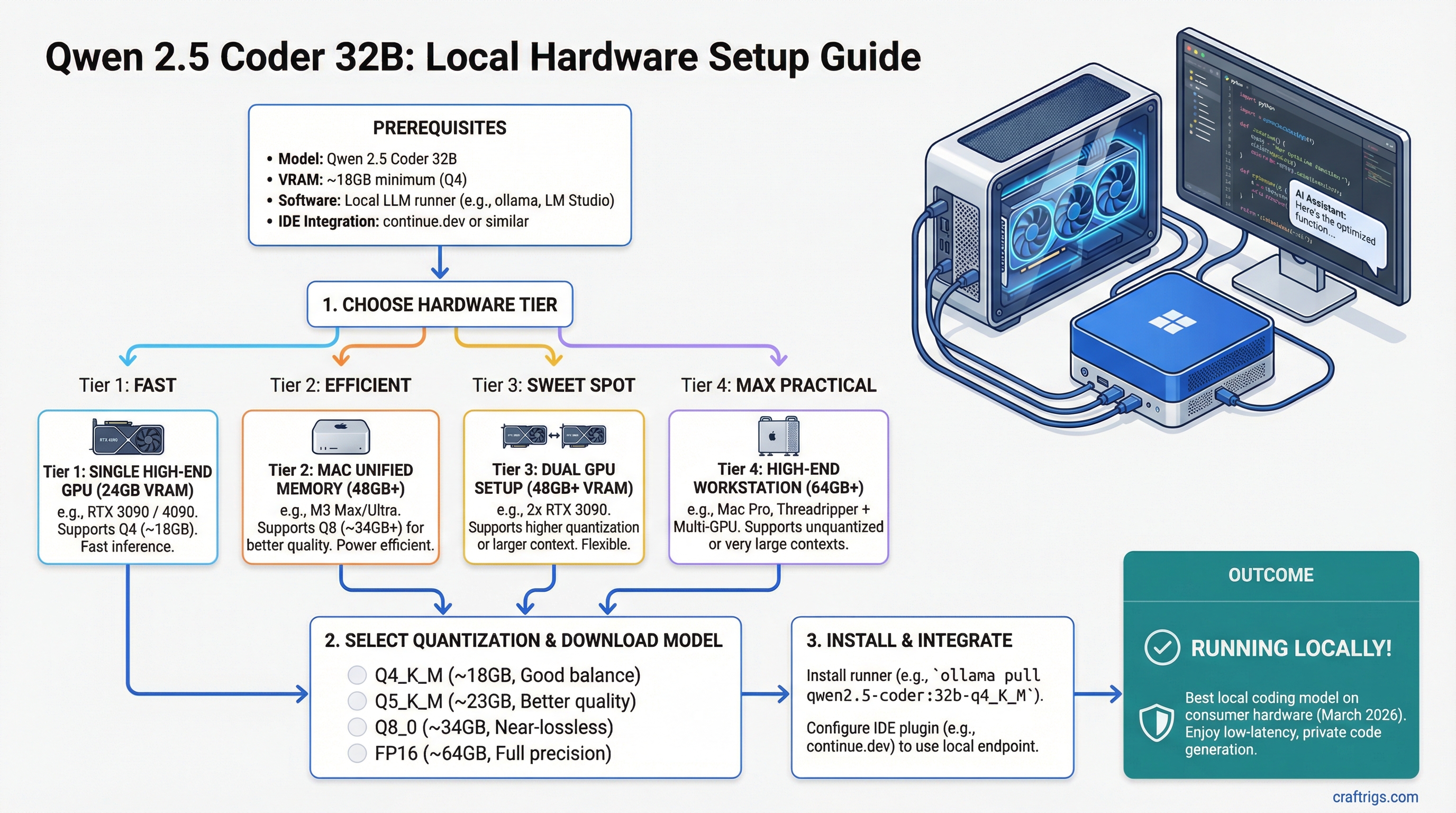
TL;DR: Qwen 2.5 Coder 32B is the best local coding model you can run on consumer hardware as of March 2026. At Q4 quantization, it fits on a single RTX 3090 or RTX 4090 (24GB). On Mac, 48GB+ unified memory lets you run Q8 for even better quality. Pair it with continue.dev or Aider and you have a private Copilot that never sends your code to the cloud.
Why Qwen 2.5 Coder 32B Stands Out
The local coding model space has gotten crowded. CodeLlama, DeepSeek Coder, StarCoder, Codestral — there's no shortage of options. But Qwen 2.5 Coder 32B carved out a clear position by doing something unusual: it benchmarks competitively with models 2-4x its size on real coding tasks.
On HumanEval, MBPP, and LiveCodeBench (as of March 2026 benchmarks), Qwen 2.5 Coder 32B at Q4 scores within striking distance of GPT-4-class models on code generation, code completion, and bug fixing. It handles multi-file context well, understands project structure, and generates code that actually compiles on the first try more often than you'd expect from a 32B model.
The practical upside: you get near-frontier coding ability that runs on a $700-1,800 GPU without sending a single line of your proprietary code to an external API.
VRAM Requirements
All figures for GGUF format through llama.cpp, benchmarked March 2026:
- FP16 (full precision): ~64GB — dual-GPU or Mac 64GB+ territory
- Q8_0: ~34GB — Mac 48GB, tight on dual 24GB GPUs
- Q6_K: ~26GB — tight on single 24GB card (short context)
- Q5_K_M: ~23GB — fits 24GB with moderate context
- Q4_K_M: ~20GB — comfortable on 24GB, our recommendation for GPU
- Q3_K_M: ~15GB — fits 16GB GPUs, quality drop noticeable on complex code
For a coding model specifically, quantization quality matters more than for chat models. Code is precise — a wrong variable name or misplaced bracket breaks everything. Below Q4, you'll notice more frequent syntax errors and less reliable function signatures. Don't go below Q4_K_M for serious coding work.
Recommended Hardware Setups
RTX 3090 — Best Value ($700-800 used)
The workhorse pick. Running Qwen 2.5 Coder 32B at Q4_K_M:
- VRAM usage: ~20GB of 24GB
- Speed: 15-22 t/s
- Context: 8K tokens comfortable, 16K possible
- Experience: Fast enough for code completion (the model finishes a function before you've read the prompt). Slightly slow for generating long boilerplate, but you can live with it.
At current used prices (March 2026), the RTX 3090 is the easiest recommendation on this entire site. 24GB of VRAM for under $800 is the foundation of most local AI builds.
RTX 4090 — Best Performance ($1,800-2,000)
Same 24GB VRAM, dramatically faster:
- VRAM usage: ~20GB of 24GB
- Speed: 30-45 t/s at Q4_K_M
- Context: 16K comfortable, 32K tight
- Experience: Genuinely fast. Code generation feels real-time — the model streams completions as fast as you read them. Multi-file refactoring suggestions come back in seconds.
The 4090 is worth the premium if you're using Qwen Coder as a daily driver for professional development work. The speed difference between 18 t/s and 40 t/s matters when you're making 50+ queries per day.
Full GPU comparison in our best GPUs for local LLMs roundup.
Mac with 48GB+ Unified Memory
Apple Silicon gives you a unique advantage for coding models: you can run Q8 quantization instead of Q4, because unified memory provides more total capacity than any single discrete GPU.
Mac Mini M4 Pro (48GB) — $1,800:
- Runs Q8_0 (~34GB model) with 14GB headroom for context
- Speed: 15-22 t/s
- Quality: measurably better code output than Q4 — fewer hallucinated imports, more accurate type signatures
MacBook Pro M4 Max (48GB) — $3,200+:
- Same Q8 capability but ~25-35 t/s thanks to higher bandwidth
- Portable coding assistant that works offline on a plane
Mac Studio M4 Max (64-128GB) — $2,500+:
- Runs Q8 with massive context windows (32K+)
- Speed: 25-35 t/s
- The best Mac setup for a dedicated coding workstation
The Mac trade-off: lower raw t/s than a 4090 at the same quantization, but higher quantization quality since you're not VRAM-constrained. For coding specifically, higher quant often matters more than raw speed — a correct answer at 20 t/s beats a subtly wrong answer at 45 t/s.
See our M4 Max vs RTX 4090 comparison and Apple Silicon benchmarks for detailed numbers.
16GB GPU Option
A 16GB card (RTX 4060 Ti 16GB, RTX A4000) can run Q3_K_M at ~15GB:
- Speed: 20-30 t/s (these cards have decent bandwidth for their tier)
- Quality: noticeable degradation on complex code — more syntax errors, occasional hallucinated APIs
- Context: limited to 4-8K tokens
Usable for autocomplete and simple function generation. Not recommended for multi-file refactoring or architecture-level suggestions. If you're buying hardware for this model, spend the extra $200-300 for a 24GB card.
IDE Integration Setup
Running the model is half the story. Integrating it into your development workflow is what makes it useful. Here are the three best options as of March 2026:
continue.dev (VS Code / JetBrains)
The most popular open-source AI coding extension. Connect it to your local Ollama or llama.cpp server:
- Install Ollama and pull the model:
ollama pull qwen2.5-coder:32b-instruct-q4_K_M - Install the Continue extension in VS Code
- Configure Continue to point at
http://localhost:11434 - Set Qwen 2.5 Coder 32B as your default model
Continue supports tab-completion, inline chat, and multi-file context. It sends your code to localhost only — nothing leaves your machine.
Aider (Terminal-based)
Aider is a terminal coding assistant that works with your entire git repo. It understands file relationships, makes multi-file edits, and auto-commits changes.
- Run your model through Ollama or a llama.cpp server with an OpenAI-compatible API
- Point Aider at your local endpoint:
aider --model ollama/qwen2.5-coder:32b - Aider maps your repo and lets you chat about code changes naturally
Aider works best with 16K+ context, so make sure your hardware supports it. On a 24GB GPU at Q4, you'll have enough headroom for most repos.
Cursor (with local backend)
Cursor supports custom OpenAI-compatible endpoints. Run llama.cpp or Ollama as an API server, then configure Cursor to use it instead of the cloud. You lose some Cursor-specific features (their cloud RAG, multi-model routing), but gain full privacy and zero API costs.
The setup is slightly more involved than continue.dev, and Cursor's local model support is less polished. But if you're already a Cursor user, it's worth configuring.
Context Length for Coding
Coding tasks need more context than chat. Your prompt includes the current file, related files, function signatures, error messages — it adds up fast.
VRAM budget for context on a 24GB GPU at Q4_K_M (~20GB model):
- 4K context: ~21GB total — tight but works
- 8K context: ~22GB total — the practical sweet spot
- 16K context: ~24GB total — maxes the card, use carefully
- 32K+: won't fit on 24GB at Q4
On Mac with 48GB at Q8 (~34GB model):
- 8K context: ~36GB total
- 16K context: ~38GB total
- 32K context: ~42GB total — plenty of room
- 64K context: ~48GB — possible on 48GB Mac
For most coding workflows, 8K context handles the current file plus 2-3 related files. If you're doing large refactors across many files, you'll want 16K+ — which means either trimming quantization or using a Mac with more memory.
Qwen 2.5 Coder 32B vs. Alternatives
Quick comparison for anyone choosing between coding models:
vs. DeepSeek Coder V2 (236B MoE): DeepSeek is slightly better on complex reasoning but needs 5x the VRAM. Qwen 32B wins on accessibility by a mile.
vs. CodeLlama 34B: Qwen 2.5 Coder beats CodeLlama 34B on nearly every benchmark. CodeLlama is older and less capable. Run Qwen.
vs. Codestral 22B: Codestral fits on smaller hardware (16GB at Q4) and is faster, but Qwen 32B produces noticeably better code on complex tasks. If you have 24GB, Qwen wins. If you're on 16GB, Codestral is the better choice.
vs. Cloud Copilot/GPT-4: Cloud models are still better for very long context and cross-repo reasoning. But for single-file and small-project coding, Qwen 2.5 Coder 32B is genuinely competitive — and it runs on your machine with zero latency, zero cost per query, and full privacy.
Bottom Line
- Best value: RTX 3090 at Q4_K_M — $700 for a private coding copilot
- Best speed: RTX 4090 at Q4_K_M — real-time code generation
- Best quality: Mac 48GB+ at Q8 — highest quantization, fewer code errors
- Don't bother: Single 16GB GPU at Q3 — too much quality loss for coding
Qwen 2.5 Coder 32B is the model that makes "local Copilot" a real thing, not just a hobbyist experiment. If you write code for a living and care about privacy, build a rig around this model.
For the complete hardware picture, start with our ultimate local LLM hardware guide and VRAM guide.