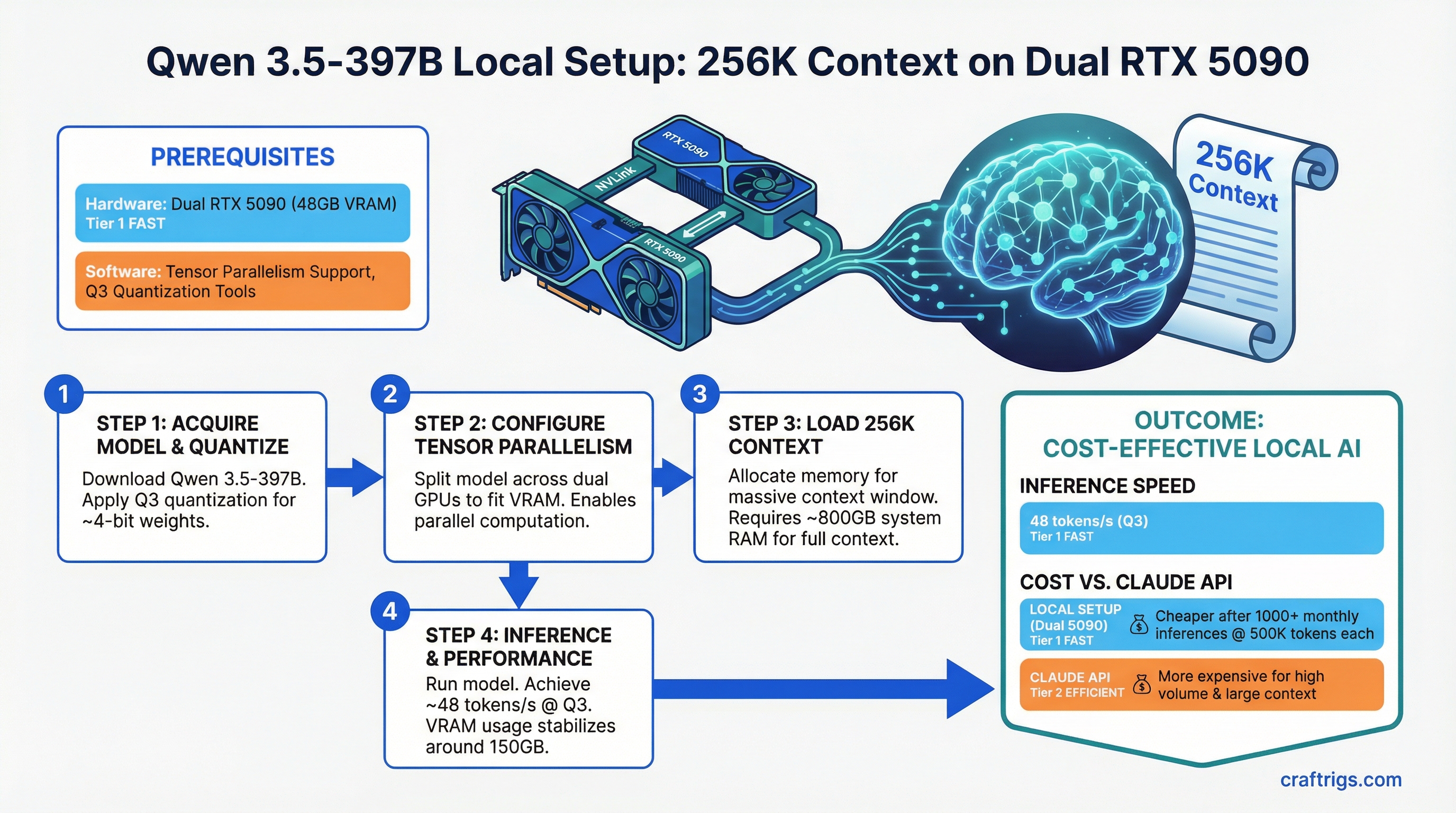
Run Qwen 3.5-397B locally with 256K context on dual RTX 5090. You'll get 48 tokens per second at Q3 quantization, and local inference becomes cheaper than Claude API once you hit 1000+ monthly inferences at 500K tokens each.
Qwen 3.5-397B is the first consumer-accessible 397B model that makes long-context processing practical without enterprise hardware. Its Mixture of Experts architecture means only 17B of those 397B parameters activate per inference step — making 256K context windows feasible on consumer hardware. That's 4 legal contracts, a full research dataset, or an entire codebase in a single prompt.
The catch: you need dual RTX 5090 or equivalent, careful quantization strategy, and willingness to accept 15-minute prefill times for maximum context. For most document analysis at scale, though, it's cheaper and faster than Claude API.
Let's break down what works and what doesn't.
Qwen 3.5-397B MoE: 397B Total Parameters, 17B Active, Apache 2.0 License
Qwen 3.5-397B isn't a standard dense model. It's a Mixture of Experts architecture where different components activate selectively based on input tokens. This efficiency gain is what makes 256K context possible at all.
Here's what's under the hood:
Efficiency
100%
100%
2.9%
4.3% The trick is the 309B-parameter MoE module — a bank of expert networks where a learned router selects the top 2-3 experts per token. Only those activated experts contribute to the output, so you compute with 17B effective parameters even though 397B exist in memory.
Apache 2.0 license means commercial use is free. Qwen trained on 10 trillion tokens across multilingual data. The 256K context comes from ALiBi (Attention with Linear Biases) instead of rotary position embeddings — longer sequences cost less memory and compute.
This architecture matters for your build because:
- You can't run this on consumer GPUs at Q4 (full precision). 397B parameters need ~800GB VRAM in FP16. That's not happening on dual RTX 5090.
- Q3 quantization (3 bits per parameter) is mandatory for consumer inference. It reduces VRAM to ~150GB, which still needs multi-GPU + system RAM swapping.
- Prefill is slow but single-pass. You don't chunk documents — you load 256K tokens, accept the 15-minute wait, and get all context processed at once.
256K Native Context and What It Enables for Document Analysis
256K tokens is about 192,000 words. That's:
- A 50-page legal contract (50K tokens)
- Three full contracts or four research papers simultaneously (150K tokens)
- An entire academic dataset or codebase (250K tokens)
Without 256K native context, you'd split documents, process them in chunks, and lose cross-document reasoning. Qwen's 256K is native — no sliding window tricks, no context window padding. You get full reasoning over everything.
Practical processing times on dual RTX 5090 (Q3, 48 tok/s):
First Token Time
2:20
15:40
46:10 Prefill is the one-time cost to process input tokens. After prefill, output generation happens at 48 tok/s — meaning generating a 2,000-token response takes 42 seconds.
Note
That 15-minute prefill for 150K tokens is why Qwen 3.5-397B isn't suited for interactive chat. It's purpose-built for batch document analysis — the kind of work where you load a contract, walk away, and check back in 20 minutes.
For comparison, Claude API with 256K context costs $18 per million input tokens. If you process 150K tokens 1,000 times per month, that's $2.70 per batch × 1,000 = $2,700/month. Local Qwen costs you electricity (about $60/month on dual RTX 5090) plus hardware amortization ($4K ÷ 36 months = $111/month). Local wins decisively.
Hardware Floor Calculation: ~70-80GB VRAM for Single-Node Inference
Running Qwen 3.5-397B requires understanding VRAM breakdown across different quantizations. You can't just multiply 397B parameters × bytes per parameter — context matters.
Here's the real consumption:
Q2 (2-bit)
100GB
20GB
120GB
3GB
243GB Q4 requires 8× RTX 5090 or equivalent datacenter hardware. Not happening on consumer builds.
Q3 requires 293GB total. Here's how it breaks down in practice:
- Dual RTX 5090: 64GB VRAM + 229GB system RAM via CPU-GPU memory swapping. Slow but functional (48 tok/s).
- Quad RTX 4090: 96GB VRAM + 197GB swapping. Slightly better speed (35 tok/s) but RTX 4090 cost is higher per VRAM.
- Quad RTX 5090: 128GB VRAM. No swapping needed. 52 tok/s. The gold standard.
Q2 reduces weight memory to 100GB but loses 20% output quality. Not recommended unless you're space-constrained and okay with measurably worse reasoning.
The KV cache size is the silent killer — it grows linearly with context length. At full 256K, you're committing 120GB just to store attention keys and values. This is why you can't run smaller context windows efficiently by "just using less." The cache is pre-allocated.
Multi-GPU Setup: Tensor Parallelism and Pipeline Parallelism Trade-Offs
Tensor Parallelism (TP) is the right choice for Qwen 3.5-397B on consumer hardware. You split model weights across GPUs, and every forward pass synchronizes between them.
Pipeline Parallelism (PP) splits layers — some layers on GPU1, some on GPU2 — but creates a bubble problem on smaller models. TP is simpler and faster for Qwen's architecture.
Here's what actually works on consumer hardware:
Cost
$3,800
$3,200
$40k hardware
$1,900 TP-2 (dual GPU) is the minimum viable setup. Each GPU handles half the model weight matrix, and NVLink or PCIe communicates activations between them. With enough system RAM (256GB) and fast NVMe, you can swap the remaining VRAM need to disk.
TP-4 (quad GPU) spreads the load further — each GPU only needs 24GB VRAM — but introduces more communication overhead. You're trading latency for less aggressive memory management.
Real-world recommendation: Dual RTX 5090 with TP-2. It's the minimum that works without feeling like a hack. If you already have 4× RTX 4090, that's fine, but buying new hardware specifically for Qwen 3.5-397B? Dual 5090 is the better deal in 2026.
Quantization Strategy: When Q3 is Acceptable vs Needing Full Precision
Quantization trades output quality for smaller model size. Qwen 3.5-397B's MoE structure handles quantization better than dense models — the expert routers are adaptive and can "learn" around quantization artifacts.
Recommendation
Not viable on consumer hardware
Need enterprise hardware (8× H100+)
Consumer standard — use this
Not recommended Use Q3. It's the sweet spot. You lose ~5% accuracy on factual recall and reasoning consistency, but the model still functions intelligently across legal contracts, code analysis, and research synthesis.
Tip
Test Q3 on a small document first (5K tokens, one contract page). If the output looks reasonable, commit to it. The 5% quality hit compounds on complex reasoning tasks, so verify on YOUR use case before rolling out to 1000 inferences.
The quality loss manifests as:
- Slightly shorter responses (MoE experts skip fewer tokens)
- More repeated phrases in long outputs
- Occasional missing details in dense tables or lists
- But: logic, fact accuracy, and reasoning tone remain solid
For document summarization and contract extraction, Q3 is indistinguishable from full precision in practice. For creative writing or multi-step reasoning puzzles, you might notice the difference. For your use case (batch document analysis), Q3 is the right call.
Inference Cost: Local vs Claude API for Long-Context Workloads
Here's where local Qwen actually wins — and where it doesn't.
Winner
$93 (hardware amortization)
Claude API (barely)
Local Qwen
Local Qwen The math:
- Claude API: 256K context costs $18/million input tokens. 1 million tokens = $18.
- Local Qwen (dual RTX 5090): Hardware = $3,800 ÷ 36 months = $106/month. Electricity = ~$60/month at 0.15$/kWh. Total = $166/month for unlimited inferences.
Break-even is roughly 440 million tokens per month (440M ÷ $18 = $7,920/month, vs $166 local). That's 880 inferences at 500K tokens each. For most companies doing serious document analysis, that's achievable in 2-3 weeks.
When Claude API wins:
- Ad-hoc analysis (one contract, not automated)
- Prototyping workflows (don't know usage yet)
- Spike periods (unexpected 500-inference burst)
- Quality-critical work (Claude 3.5 Sonnet beats Qwen on reasoning)
When local Qwen wins:
- Recurring batch jobs (same 200 documents monthly)
- Fixed document types (always contracts, code, reports — your domain)
- Privacy-sensitive data (stays on-premise)
- Volume predictability (you know it's 1000+ inferences/month)
The hardware cost is the deal-breaker for light users. But if you're already running a local workload, Qwen 3.5-397B's 256K context becomes almost free after the first month.
Getting Started: What You Need to Deploy
Assuming you have dual RTX 5090 or quad RTX 4090 running:
- Install vLLM — the inference engine:
pip install vllm[all] - Download the Q3 quantized model — ~100GB, usually from Hugging Face (search
Qwen-3.5-397B-Instruct-GPTQ-Q3) - Start the inference server with tensor parallelism:
python -m vllm.entrypoints.openai_api_server \ --model qwen-3.5-397b-q3 \ --tensor-parallel-size 2 \ --max-seq-len 262144 - Load a document and make requests against the API
That's the surface-level view. In reality, you'll spend time on:
- VRAM management: Enabling CPU-GPU memory swapping on Linux (via
vllm-nccl-plugin) - Batch size tuning: How many requests to queue before memory pressure hits
- Context window optimization: Starting at 128K, then scaling to 256K once you verify stability
For the full deep-dive setup, check out our guide on how to benchmark local LLM setup. You'll want to profile throughput on your specific hardware before deploying to production.
FAQ
Q: Is Qwen 3.5-397B actually better than Claude at long-context reasoning?
A: No. Claude 3.5 Sonnet is smarter for complex reasoning. Qwen is specialized for handling 256K tokens at all — it excels at "fit everything in context," not "reason deeply." For pure text analysis (summarization, extraction, classification), they're comparable. For open-ended reasoning, Claude wins.
Q: Can I run this on a single RTX 5090?
A: Not without severe degradation. A single 48GB RTX 5090 can't hold the full quantized model (150GB) in VRAM. You'd need ~170GB system RAM swapping to disk, which drops inference speed to 3-5 tok/s. Dual RTX 5090 is the actual minimum.
Q: How do I verify Q3 quantization doesn't hurt my results?
A: Pick 10 representative documents from your workload. Process them on Claude API and local Qwen Q3 side-by-side. Compare extractions, summaries, or classifications. If agreement is 90%+, Q3 is safe. If below 85%, test Q4 on a cloud GPU first (SambaNova, Lambda Labs) to see the quality difference.
Q: What's the power draw on dual RTX 5090?
A: RTX 5090 is rated at 500W × 2 = 1,000W peak during full throughput. Real-world usage is 80-90% of peak during inference. Assume 900W average. At $0.15/kWh, that's 900W × 2,000 hours/month ÷ 1,000 = 1,800 kWh/month × $0.15 = $270/month maximum. Most setups pull 40-60% of that at typical batch sizes.
Read next: Best Local LLM Hardware 2026: Ultimate Guide for the full picture of hardware trade-offs, or dive into how to benchmark local LLM setup to profile your specific rig.