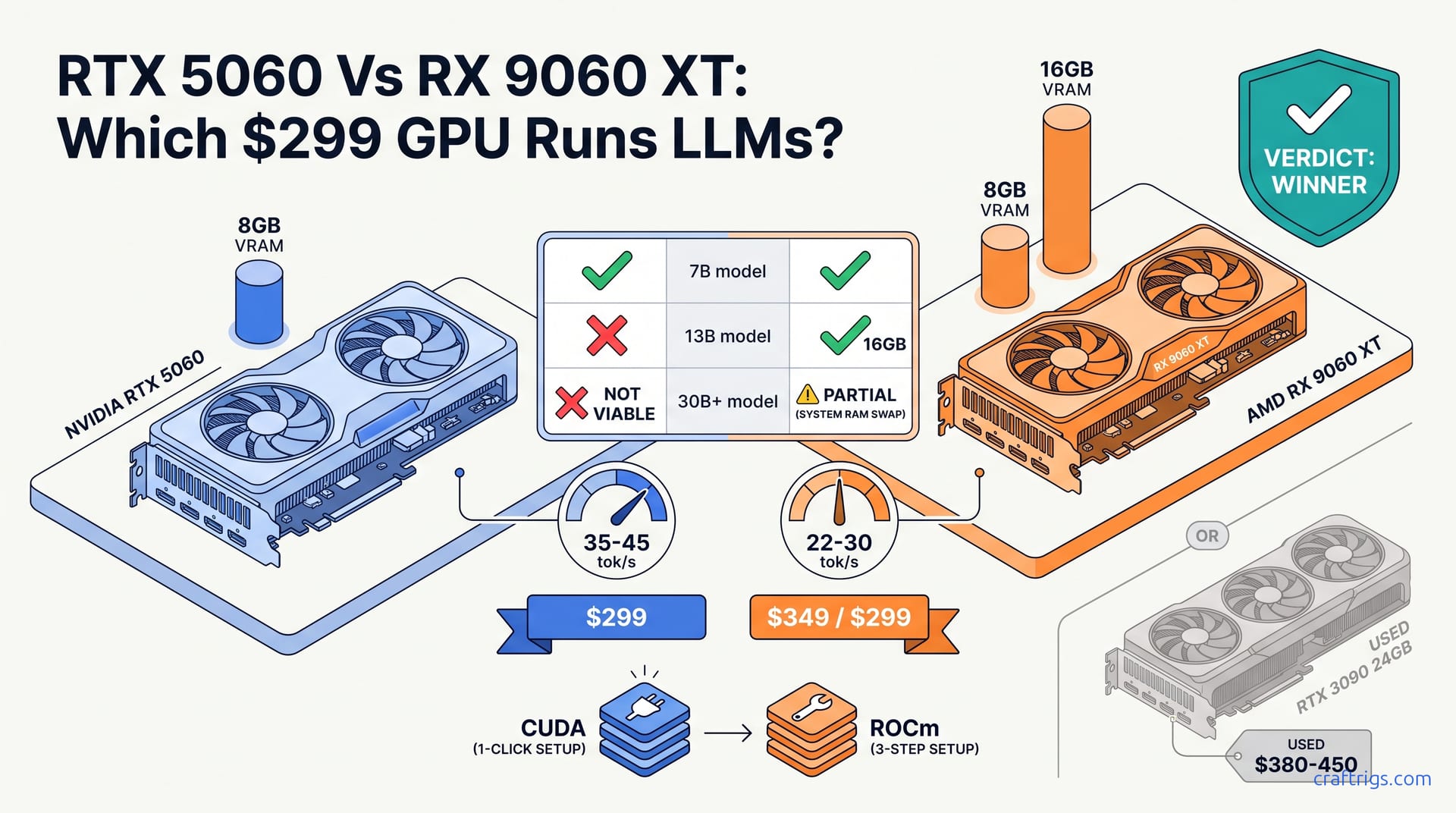
Buy the RX 9060 XT 16 GB if you want to run 13B models comfortably. Buy the RTX 5060 8 GB only if 7B/8B is your ceiling and CUDA compatibility matters more than headroom. The 8 GB cards hit the same VRAM wall within six months. The $50 delta pays for itself in usable model range.
The Cards: What $299 (and $349) Actually Buys
The RTX 5060 is NVIDIA's Blackwell entry point, and it arrives with a deliberate compromise. At $299 MSRP with a May 2026 launch date, the card packs 8 GB of GDDR6 on a narrow 128-bit bus, drawing 249 W at full load. NVIDIA cut memory capacity rather than shader density. This is a classic play for gaming benchmarks. At 1080p, 8 GB still suffices. For local LLM inference, though, that decision lands differently. The 128-bit bus limits bandwidth to roughly 272 GB/s. This isn't the bottleneck for 7B models. It becomes relevant when you're already starved for capacity. There's no 16 GB variant at launch, no BIOS hack to unlock hidden dies, and no NVLink to pool memory across cards. What you buy is what you get: a 7B–8B ceiling with zero overhead for context windows beyond 4K tokens at Q4_K_M quantization. The 249 W TDP demands a 550 W PSU minimum. This matters if you're upgrading a prebuilt office machine with a 400 W bronze unit.
AMD's counterpunch, the RX 9060 XT, splits the difference with two SKUs. The base 8 GB model matches NVIDIA's $299 price but ships in June 2026 with a wider 192-bit bus and a cooler 225 W TDP. More interesting is the 16 GB variant at $349. Fifty dollars doubles your VRAM and widens the memory controller to 288 GB/s raw bandwidth. That 192-bit bus isn't numbers on a slide. The 16 GB card can feed its full memory pool without choking. Texture-heavy workloads and large KV-cache allocations both get breathing room. The catch? AMD's launch allocation for the 16 GB SKU has been spotty. AIB cards appeared weeks after reference designs. Some retailers bundled unwanted peripherals to justify markups. At 225 W, the XT slides into builds that the RTX 5060 would force a PSU swap on. This is a hidden cost. It doesn't show in the GPU price tag, but it hits the "Budget Builder" segment where every dollar matters.
The VRAM Hard Ceiling: What 8 GB vs 16 GB Lets You Run
VRAM isn't abstract capacity. It's a hard wall you hit with a specific model file and a specific quantization level. At Q4_K_M, the sweet spot for quality-per-gigabyte, 8 GB of VRAM establishes a ceiling at roughly 7B–8B parameters with enough headroom for a 2K–4K context window. A 7B model like Llama-3.1-8B or Mistral-7B loads at 4.5 GB base weights plus 1.5–2 GB for KV cache at moderate context. This leaves breathing room. Push to 13B–14B territory: Llama-3-13B, Qwen-14B, Phi-4-14B. The weights alone demand 7.5–8.5 GB before quantization overhead and cache. The offload engine in llama.cpp shoves 40–60% of layers to system RAM. On DDR4-3200 or even DDR5-5600, inference speed collapses. Token generation feels like dial-up. "Usable" isn't subjective here. The question is whether you can maintain thought continuity while waiting for the next sentence to appear.
The RX 9060 XT 16 GB breaks that barrier. Thirteen-billion-parameter models load fully into VRAM at Q4_K_M. Weights occupy ~10 GB. This leaves 4–5 GB for aggressive context expansion or speculative decoding experiments. You can also reach into the 30B–34B range: Yi-34B, Qwen-32B, DeepSeek-V2-Lite. Partial offload becomes viable rather than catastrophic. Roughly 60% of layers stay in VRAM. The rest spill to system RAM. You maintain 4–8 tok/s depending on your DDR5 bandwidth and CPU core count. But that $349 price point reframes the purchase. You're no longer competing against the RTX 5060. You're staring down used RTX 3090 24 GB listings at $380–450. These offer 50% more VRAM, a wider bus, and mature CUDA tooling. The 16 GB XT only wins if you need new-card warranty, can't stomach used market roulette, or have a PSU that caps at 250 W. Otherwise, the used 3090 is the elephant in the room that AMD's marketing hopes you ignore.
Real-World Inference: How Fast Is Fast Enough?
Speed benchmarks without context are meaningless. Let's anchor to the "conversational floor," roughly 15 tok/s. This is the point where reading ahead feels natural rather than patient. On llama.cpp or Ollama with default CUDA backend, the RTX 5060 delivers 35–45 tok/s on 7B models at Q4_K_M. That's comfortable margin. You could run two concurrent sessions or use speculative decoding without dropping below the floor. Eight-billion-parameter models, the newer class like Llama-3.1-8B-Instruct, land at 18–25 tok/s. This is still interactive, but with less headroom for context growth or batching. The collapse happens at 13B. Expect 40–60% layer offload to system RAM, memory bandwidth starved, and 6–10 tok/s. That's not "slower." That's broken. Any workflow requiring iterative prompting, code completion, or document analysis needs state across multiple turns. The 15 tok/s floor isn't arbitrary. It's where cognitive load shifts from content to waiting.
The RX 9060 XT 8 GB matches NVIDIA's 7B/8B performance on Vulkan, hitting comparable 30–40 tok/s figures, but ROCm support in Ollama remains a moving target. ROCm 6.2+ is mandatory for the native backend. WSL2 GPU passthrough is outright broken on Adrenalin 25.5.1. AMD hasn't publicly committed to fixing this regression before July 2026. The 16 GB variant is where AMD's hardware advantage materializes: 13B models fully resident at 22–30 tok/s, clearing the conversational floor with room to spare, and 30B partial offload at 4–8 tok/s, usable for batch processing or overnight summarization tasks. The critical insight: only the $349 SKU achieves both speed and model-size viability. The $299 8 GB XT is hamstrung by the same VRAM wall as the RTX 5060, with worse software polish. If you're budget-locked to $299, NVIDIA's CUDA path is the pragmatic choice. The hardware ceilings are identical. The 16 GB premium is the only configuration that justifies AMD's friction.
CUDA vs ROCm: The Software Stack Reality
NVIDIA's CUDA dominance in local LLM inference isn't marketing. It's accumulated engineering debt working in your favor. Install Ollama on Windows or Linux. Launch with default settings. The CUDA backend auto-detects your RTX 5060, enables tensor-core MMQ kernels, and hits the benchmark numbers in this guide without a single flag. No --backend selection, no HIP_VISIBLE_DEVICES wrestling, no version pinning against ROCm point releases that break compatibility monthly. The MMQ kernels, matrix-matrix quantization, exploit Blackwell's tensor cores. This delivers 15–25% speedup over naive CUDA paths on 7B–8B models. That "it works" reliability translates to time. Expect ten minutes from download to running Llama-3.1-8B. The AMD equivalent demands hours of forum archaeology. For the Budget Builder segment, time is money. Troubleshooting ROCm on a $299 GPU wastes both.
AMD's ROCm path demands active engagement. On native Linux with ROCm 6.2+, the backend functions and delivers competitive performance. But Ollama's ROCm support lags CUDA by weeks on new releases. It also lacks the testing density. Windows users face a starker choice. Vulkan fallback works for basic inference. But it lacks the kernel optimizations that deliver AMD's theoretical throughput. WSL2 passthrough is currently broken on Adrenalin 25.5.1 with no committed fix date. The "no native tensor-core equivalent" matters less than it sounds for these midrange cards. Neither SKU has dedicated matrix accelerators comparable to NVIDIA's TCs. What matters more is the variance. Identical RX 9060 XT 16 GB cards show 18 tok/s or 28 tok/s on identical models. The gap depends on driver version, backend selection, and moon phase. The hardware advantage is real. 16 GB is 16 GB. But it only materializes for users comfortable with Linux native. Others must accept "works on my machine" debugging. For readers seeking plug-and-play, that $50 VRAM premium buys capacity, not convenience.
Verdict: Which Card for Which Budget Builder
| Buyer Profile | Recommendation | Price | Key Trade-off |
|---|---|---|---|
| "I want 7B models today, zero config, no forums" | RTX 5060 8 GB | $299 | Dead-end for growth; 8 GB ceiling is immutable |
| "I need 13B models, new card, small PSU" | RX 9060 XT 16 GB | $349 | ROCm friction accepted; warranty and 225 W TDP win |
| "I want maximum VRAM per dollar, used is fine" | Used RTX 3090 24 GB | $380–450 | No warranty, 350 W TDP, runs hot and loud |
| "I can't decide, might upgrade later" | Rent cloud GPUs | $0.20–0.40/hr | No hardware ownership, immediate scale |
The $299 RTX 5060 owns one decisive advantage: predictability. Buy it, install Ollama, run 7B–8B models in ten minutes, and never think about backend selection. That reliability is worth the VRAM ceiling if your use case is locked. This includes coding assistants, lightweight chatbots, or embedding generation where model size is fixed. But recognize the ceiling for what it is: a hard barrier with no upgrade path short of replacing the card. Six months into ownership, you'll encounter a 13B model that outperforms your 8B workflow. Then you'll face the same $349 decision plus depreciation loss. Only choose the RTX 5060 if you already own it, or if your tolerance for troubleshooting is zero.
The RX 9060 XT 16 GB at $349 is the only new card in this tier that runs 13B models fully in VRAM. That capability is transformative. Document analysis, reasoning tasks, and code generation all benefit. Parameter count directly improves output quality. The problem is positioning. $349 plus ROCm friction pushes you into competition with used RTX 3090 24 GB at $380–450. That card offers 2.5× the VRAM, mature tooling, and enough headroom for 70B partial offload. The XT's wins are narrow: new-card warranty, 225 W TDP compatibility with smaller PSUs, and lower noise in compact builds. If those matter, if you're upgrading a Dell Optiplex or a SFF case with 250 W power, the XT is defensible. Otherwise, the used 3090 is the value play that makes both new cards look like stepping stones.
The Honest Upgrade Path If Neither Card Is Enough
Sometimes the honest answer is "save more money." If your workflow demands 13B+ models at full speed with headroom for growth, both the RTX 5060 and RX 9060 XT are the wrong purchase regardless of which you prefer. The used RTX 3090 24 GB at $380–450, prices as of June 2026 on eBay and r/hardwareswap, delivers 2.5× the VRAM of the RTX 5060 and 50% more than the 16 GB XT. That capacity runs 70B models at Q4_K_M with partial offload at 8–12 tok/s. Or it keeps 13B–30B fully resident with context windows that make the 8 GB cards look like toys. The cost isn't purchase price. The 350 W TDP versus 225 W on the XT adds roughly $80–120/year in electricity at $0.14/kWh US average, assuming 8 hours daily load. The card runs hot, the blower coolers scream under sustained inference, and there's no warranty recourse if the GDDR6X modules degrade. But for pure inference-per-dollar, nothing in the new market touches it.
If you need 70B+ fully in VRAM today, no offload, no latency compromise, the entry tier starts at $1,200. That's a used RTX 3090 pair via NVLink (24 GB + 24 GB, though NVLink pooling is deprecated in llama.cpp). Or it's a single RTX 4090 24 GB at current used prices. Below that threshold, you're renting. RunPod and Vast.ai offer 2× RTX 3090-equivalent instances at $0.20–0.40/hour as of July 2026. Twenty hours monthly costs less than the annual power delta between a 225 W and 350 W card. The math is uncomfortable but clear: if your inference needs are sporadic, cloud rental preserves capital for the eventual hardware purchase while giving you immediate access to scales neither $299 nor $349 card can touch. Save the GPU budget. Run lean on CPU inference or cloud bursts. Buy once into the 24 GB tier when your workflow justifies it. The $299–349 cards are not the destination. They're a delay tactic with depreciation attached.