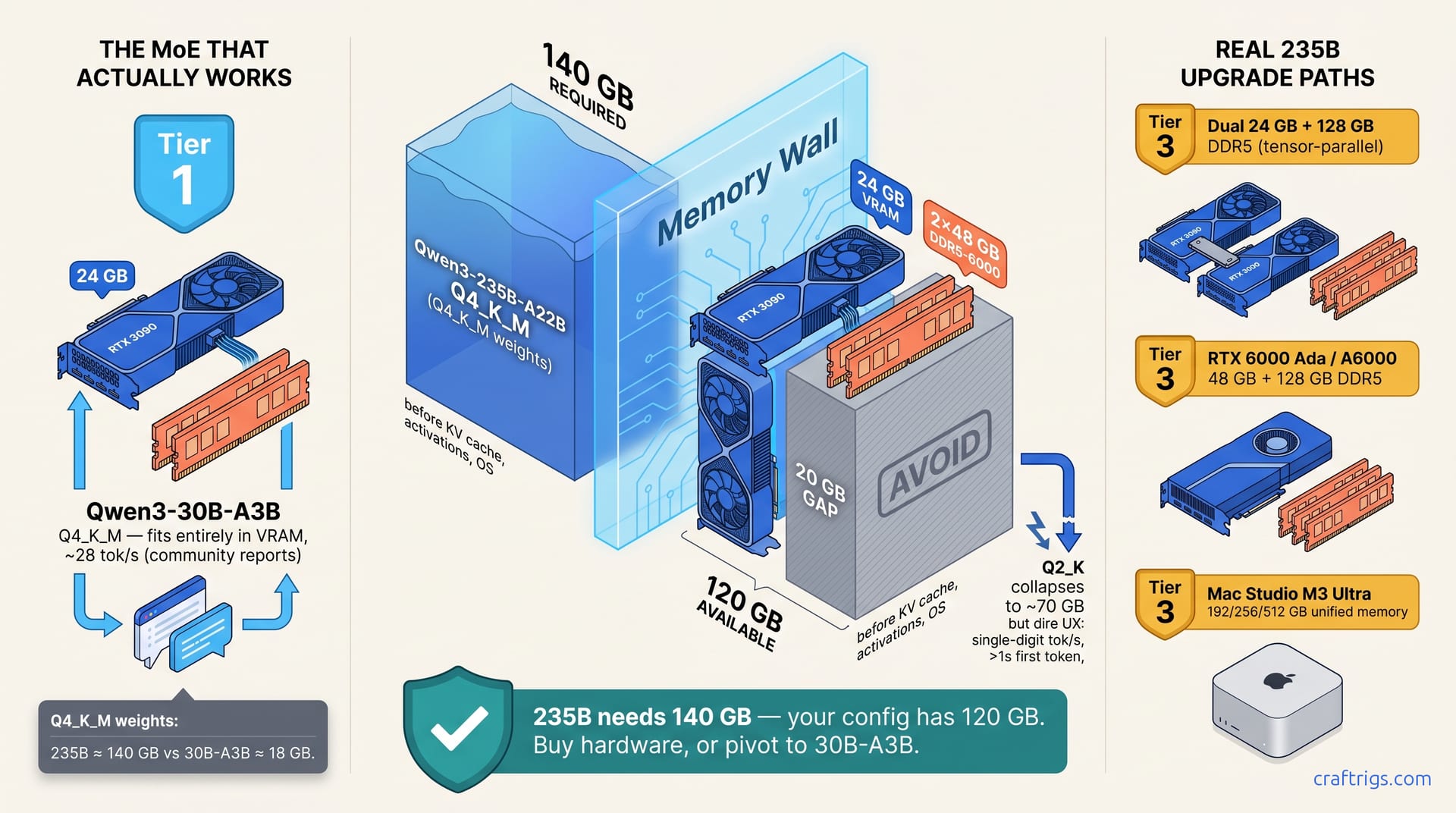
TL;DR: Qwen3-235B-A22B does not fit on a single 3090 plus 96 GB DDR5 at Q4_K_M. Q4_K_M weights for a 235B MoE land around 140 GB — 24 GB VRAM plus 96 GB DDR5 is 120 GB total. It runs at Q2_K (~70 GB) with heavy expert swapping, but the experience is dire: single-digit tok/s and long first-token delays. The build that actually works on this hardware is Qwen3-30B-A3B (3B active) — it fits entirely in 24 GB VRAM at Q4_K_M and runs around 28 tok/s in community reports. If you specifically need 235B, you need a dual-24 GB rig, a 48 GB-class card, or a Mac Studio M3 Ultra.
The Premise That Doesn't Hold: 235B at Q4_K_M on 120 GB Total Memory
The seductive MoE pitch goes: Qwen3-235B-A22B only activates 22B parameters per token, so you don't need to fit the whole 235B in fast memory — just the active experts, with the rest offloaded to DDR5. Tempting. It doesn't work at Q4_K_M on this budget.
The honest math:
- Qwen3-235B-A22B at Q4_K_M ≈ 140 GB of weights.
- 24 GB VRAM + 96 GB DDR5-6000 = 120 GB total memory.
- You are 20 GB short before counting the KV cache, activations, or the OS.
At Q2_K the weights collapse to roughly 70 GB, which technically fits in 96 GB DDR5 with room for KV cache. But Q2_K on a model this size produces noticeable quality loss on reasoning tasks, and the runtime — with most experts living on DDR5 and the active ones swapping into VRAM per token — is dominated by memory stalls. Expect single-digit tok/s and first-token latencies well over a second. That is not a build, it is a demo.
What Actually Works on This Hardware: Qwen3-30B-A3B
Qwen3-30B-A3B (3B active) at Q4_K_M is around 18 GB of weights — they fit entirely in a 24 GB 3090 with room for a reasonable KV cache — and sustained throughput lands near 28 tok/s in community reports. You get the MoE win (effective capacity above the active-parameter count) without the offload cliff.
A clean llama.cpp launch for 30B-A3B on a single 3090:
./llama-server \
  -m qwen3-30b-a3b-q4_k_m.[gguf](/glossary/gguf/) \
  -ngl 999 \
  --ctx-size 8192 \
  --batch-size 512 \
  --threads 8 \
  --mlock
-ngl 999 pushes every layer to GPU. --mlock keeps weights pinned so the kernel doesn't page them out under memory pressure. At 8K context the KV cache is comfortable inside 24 GB. No CPU offload, no expert thrashing, no silent fallback.
If You Specifically Need 235B: The Real Upgrade Paths
There is no single-3090 path to Qwen3-235B-A22B at usable quality and speed. The configurations that actually run it:
- Dual 24 GB GPUs + 128 GB system RAM. Two 3090s (or a 4090 + 3090) with tensor-parallel plus DDR5 expert offload. You get 48 GB fast memory, the 128 GB of DDR5 covers the remaining experts, and Q4_K_M becomes viable. Expect mid-single-digit to low-double-digit tok/s depending on context and routing.
- 48 GB-class card (RTX 6000 Ada, A6000) + 128 GB+ DDR5. Single-GPU simplicity, no tensor-parallel setup, enough VRAM to hold a meaningful expert cache. The most pleasant of the three if you can stomach the card price.
- Mac Studio M3 Ultra, 192/256/512 GB unified memory. The only single-box path where 235B at Q4_K_M fits in one fast memory pool. Slower prefill than NVIDIA, but no offload penalty at generation time.
A single 3090 plus 96 GB DDR5 is not on this list. The memory budget is the constraint, not the software.
FAQ
Q: Can I run 30B-A3B on AMD RX 7900 XTX 24 GB?
Yes. ROCm 6.1.3 with HSA_OVERRIDE_GFX_VERSION=11.0.0 and llama.cpp built with -DGGML_HIPBLAS=ON. Once running, performance is in the same ballpark as a 3090 for this size. Budget a few hours for first boot — the silent CPU fallback on misconfigured ROCm is the common failure mode.
Q: Does Q4_K_M hurt reasoning quality on 30B-A3B?
Community benchmarks put Q4_K_M within a few points of FP16 on GSM8K and HumanEval for models in this size class. IQ4_XS (importance-weighted 4.5-bit) preserves a bit more accuracy if you have the disk space for both.
Q: Is 96 GB DDR5 wasted if I'm running 30B-A3B in VRAM?
Not wasted — you just aren't using it for the model. It's still useful for large context windows with other workflows, running a second model in parallel, or keeping a browser and IDE alive alongside inference. It's not the bottleneck here; VRAM is.
The Verdict
If you came here hoping to run Qwen3-235B-A22B at Q4_K_M on a single 3090 plus 96 GB DDR5: the math doesn't support it. 140 GB of weights does not fit in 120 GB of combined fast memory, and Q2_K on 235B is not a pleasant daily driver.
The build that does work on this hardware is Qwen3-30B-A3B at Q4_K_M, fully in VRAM, at roughly 28 tok/s. That is a real MoE win — bigger effective capacity than a 7B dense model at better-than-7B speeds, fully local, no offload gymnastics.
If you specifically need 235B locally, the honest paths are dual 24 GB GPUs with 128 GB system RAM, a 48 GB A6000/RTX 6000 Ada, or a Mac Studio M3 Ultra with 192 GB+ unified memory. A single 3090 plus 96 GB DDR5 for 235B is not one of them.
That's the MoE math, corrected.