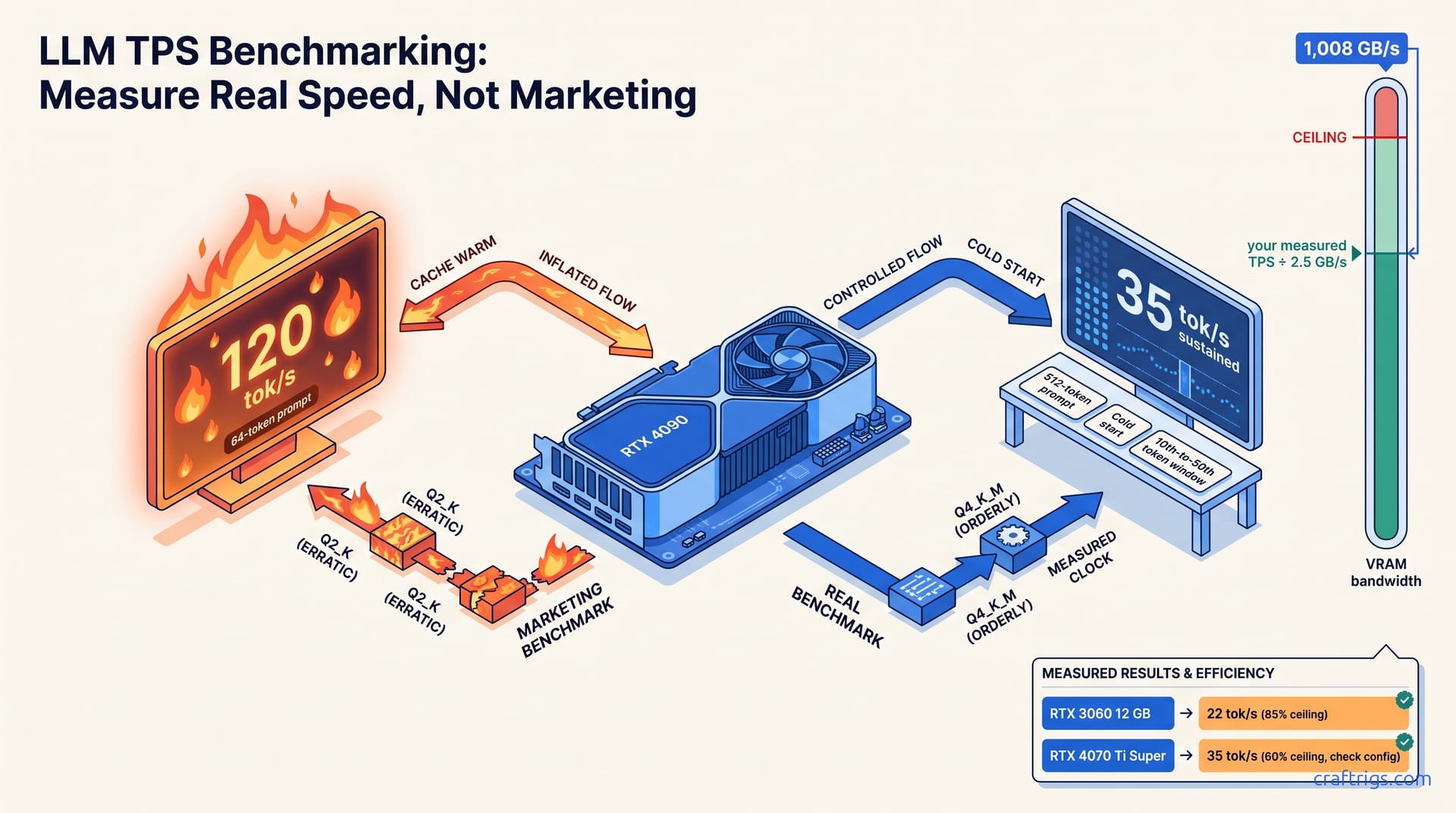
Measure generation speed with tok/s and responsiveness with TTFT — never trust headline numbers that omit quantization, context length, or batch size. Run llama-bench with fixed prompt and generation lengths, test at your actual context window, and compare bandwidth-normalized scores across GPUs. Most "slow" local setups run unquantized models on bandwidth-starved cards or leave batch size at default.
What TPS Actually Measures (and Where It Lies)
TPS — tokens per second — only tells you how fast a model spits out answers after it starts. It says nothing about how long you wait for that first word to appear. That waiting period is TTFT, or time-to-first-token. For anyone using local LLMs for real work, both numbers matter independently. A Llama-3-70B at Q4_K_M generates at 35 tok/s on an RTX 4090. That sounds excellent until you face an 800ms TTFT on a 4K context prompt. The model isn't lazy. It's chewing through your entire prompt in a single prefill pass. That operation is memory-bandwidth-bound in a different way than token generation. These two metrics don't correlate. A setup with blazing TPS feels sluggish if TTFT drags. A card with modest generation speed feels responsive if prefill is optimized. Power users fixate on headline tok/s figures and miss this.
The benchmark theater makes it worse. That YouTube thumbnail promising "4090 hits 120 tok/s!" — it's almost always a warm-cache hero run with a 64-token prompt, batch size 1, and no sustained measurement window. Real chat use involves cold starts, variable prompt lengths, and fluctuating cache states. Reproducible benchmarks demand at least a 512-token prompt. Measure cold-start TTFT separately. Report sustained tok/s after the 10th token to strip out cache-warm distortion. Skip any of these controls and you're not benchmarking. You're generating marketing copy for your own ego. The numbers won't transfer to anyone else's machine. They won't diagnose why your rig feels slow at 2 AM with a fresh context window.
The Benchmark Setup That Produces Trustworthy Numbers
Controlled Variables You Must Fix
Lock your prompt length to 512 tokens minimum, run 3 or more cold-start iterations before recording any numbers, and force batch size to 1 for chat-comparable results. This isn't pedantry. Warm caches inflate TPS by 40–60% on second runs. Your "repeatable" benchmark is measuring how well your GPU remembers the last pass. Cold-start protocol is the difference between a number you can defend on r/LocalLLaMA and a fantasy. Set your context length to your actual use case, not the model maximum. If you chat at 4K, benchmark at 4K. The bandwidth cost scales linearly with sequence length during prefill. Pretending otherwise produces useless ceiling estimates.
The Measurement Sequence
Record TTFT from prompt submission to first token output, then measure sustained tok/s from the 10th generated token to the 50th. This window bypasses cache-warmup jitter and prefill variance that contaminates early tokens. For llama.cpp, the --verbose flag exposes this split, and llama-bench with -p 512 -n 128 automates the protocol. Ollama users face a gap: ollama run --verbose gives total duration and token count, but as of v0.5.x there's no native TTFT split. You'll need a manual stopwatch or a time prefix, accepting 10–15% variance versus llama-bench on identical hardware. The friction matters. If you're serious about comparable numbers, use the tool built for measurement, not the one built for convenience.
How GPU Bandwidth and Quantization Shape Your Ceiling
VRAM bandwidth is the hard ceiling for TPS, and the relationship is brutally linear until quantization changes the game. An RTX 4090 at 1,008 GB/s pushes ~35 tok/s on Llama-3-70B Q4_K_M. An RTX 3090 at 936 GB/s lands near 32 tok/s at identical settings. The ratio holds: more bandwidth, more tok/s. This only breaks when quantization drops model weights small enough for cache effects or compute saturation to emerge. For most real configs, you're bandwidth-bound and pretending otherwise wastes money. The GPU tier tables in our hardware guide map these bandwidth-to-TPS relationships across every current card if you need the full landscape.
Quantization trades quality for speed non-linearly. The inflection point matters more than the extremes. Llama-3-8B at FP16 manages ~85 tok/s on an RTX 4080. Q4_K_M jumps to ~140 tok/s (1.65×) with barely perceptible quality loss. Push to Q2_K and you hit ~180 tok/s (2.1×), but coherent output degrades. You'll notice it in reasoning chains and code generation. For most users, Q4_K_M is the sweet spot. Bandwidth pressure eases before compute saturation kicks in. The quantization deep dive breaks down the exact bit allocations and quality metrics if you're deciding between Q4_K_M, Q3_K_M, and Q8_0 for a specific model family.
Running Your Own Tests: llama-bench and Ollama --verbose
llama-bench: The Reproducible Standard
Install llama.cpp from source or grab a release binary, then run:
llama-bench -m <model.gguf> -p 512 -n 128 -ngl 99The -ngl 99 flag offloads all layers to GPU, while -p 512 -n 128 matches the CraftRigs standard protocol. Output is a single CSV with TTFT, prompt processing time, and sustained tok/s. No manual calculation, no stopwatch guesswork. Expect ~15–25 tok/s on an RTX 3060 12 GB for Llama-3-8B Q4_K_M and ~30–40 tok/s on an RTX 4070 Ti Super. If your numbers fall outside these ranges, you have a configuration problem, not a hardware problem. The llama.cpp setup guide covers build flags, CUDA version matching, and the -ngl behavior in detail if you're troubleshooting offload failures.
Ollama: Quick Checks Without Terminal Wrestling
Run:
ollama run <model> --verboseto see total duration, token count, and derived tok/s after generation completes. For sustained generation rate, divide tokens by (total duration − estimated TTFT), or use ollama ps during inference to catch live VRAM allocation. The limitation is real: Ollama lacks native TTFT split as of v0.5.x. You're estimating or stopwatching. Expect ~10–15% variance versus llama-bench on identical hardware. That's acceptable for quick checks, unacceptable for published comparisons. The Ollama versus native tooling comparison explains why this gap exists and whether it matters for your workflow.
Four Configuration Mistakes That Steal Half Your Speed
| Mistake | Symptom | Fix |
|---|---|---|
| Unquantized FP16 model | ~8 tok/s, OOM risk above 2K context | Switch to Q4_K_M for ~22 tok/s |
| Partial GPU offload (CPU fallback) | ~14 tok/s on a card that should do ~28 tok/s | Force -ngl 99 or num_gpu max layers |
| Ollama conservative auto-split | Hidden CPU layers on 16+ GB cards | Override num_gpu in Modelfile |
| Warm-cache "benchmarking" | 40–60% inflated TPS on repeat runs | Cold-start protocol, 3+ iterations |
Running Llama-3-8B at FP16 on an RTX 3060 12 GB hits ~8 tok/s and risks OOM at context lengths above 2K, while Q4_K_M jumps to ~22 tok/s with identical VRAM headroom. That's 2.5× speed for zero quality loss in most chat use cases — the "default download" trap that catches every beginner who doesn't understand quantization trade-offs. The fix is one flag or one model swap, not a $400 GPU upgrade.
Leaving CPU fallback enabled or forgetting -ngl 99 silently halves throughput. Partial GPU offload forces constant PCIe copy stalls. An RTX 4070 Ti running Llama-3-70B Q4_K_M at 60 layers GPU + 20 layers CPU drops from ~28 tok/s to ~14 tok/s. That's identical to a 3060 at full offload. Ollama's automatic layer splitting often defaults conservatively and must be overridden with num_gpu in Modelfile for cards with 16+ GB. Check your actual offload. The difference between a working config and a broken one is invisible in logs until you measure.
Reading Results: When to Upgrade, When to Reconfigure
Use the bandwidth-to-TPS ratio as your upgrade signal. If your measured tok/s is within 15% of the theoretical ceiling (VRAM bandwidth ÷ 2.5 GB/s per tok/s for Q4_K_M), your GPU is saturated. Only a faster card or lower quantization will help. An RTX 3060 12 GB at 22 tok/s on Llama-3-8B Q4_K_M is already at 85% of its 936 GB/s ceiling, so reconfiguring won't help. You've extracted what the hardware owes you. But an RTX 4070 Ti Super at 35 tok/s on the same model is only at 60% of its 672 GB/s ceiling. That points to a CPU fallback or context-length bottleneck you can fix for free. The hardware tier guide maps these ceilings across every current card if you're comparing upgrade targets.
The reconfigure-before-replace hierarchy is simple: first verify full GPU offload with -ngl 99 or num_gpu set to max layers, then drop quantization one step (FP16 → Q8_0 → Q4_K_M → Q3_K_M), then reduce context length if your use case allows. Only after all three steps still leave you >20% below ceiling bandwidth do you price a GPU upgrade. At current used prices (April 2026), the break-even for a $400 used 3090 over a $250 used 3060 12 GB is roughly 18 months if you generate >50K tokens daily. For casual users, reconfiguration dominates. Measure first. Spend second.