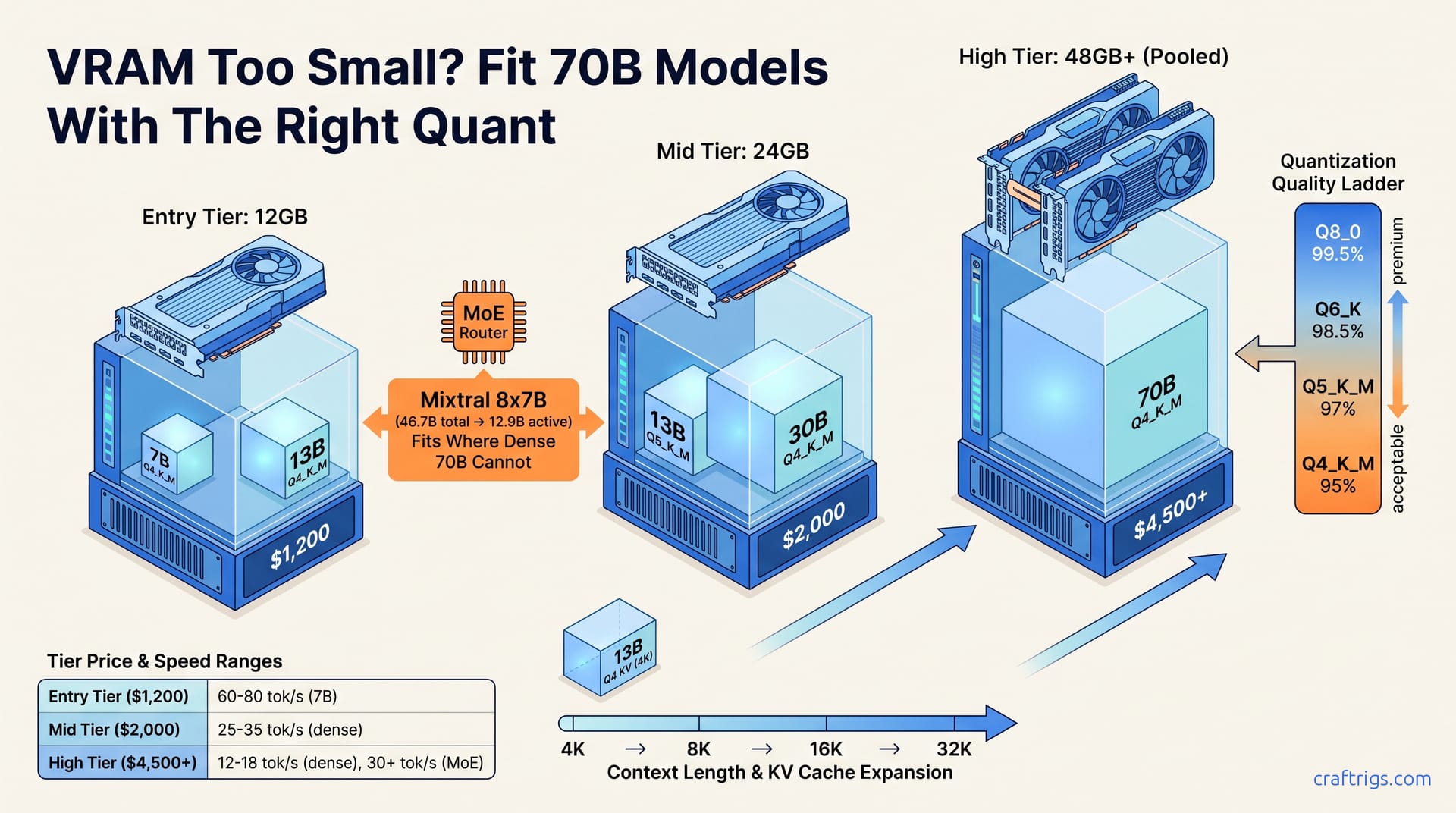
Buy for the model you want, not the quant you fear. Most builders should target 24 GB VRAM and run Q4_K_M as the default. It hits the quality sweet spot for chat, coding, and RAG at ~40 GB file size for 70B models. Only spring for Q6_K+ if you're doing precise code generation or agentic workflows where hallucination tolerance is near zero. MoE models like Qwen3-235B-A22B and DeepSeek-V3 let you punch above your VRAM weight by loading only active parameters.
How Much VRAM Do You Actually Need?
VRAM anxiety wastes money. The formula is simple. Multiply your model's parameter count by ~1.2. Then multiply by the bytes-per-weight at your chosen quantization. Add 10–20% overhead for context cache and KV store. At Q4_K_M, that's 0.5 bytes per weight; Q5_K_M uses 0.625 bytes; Q8_0 uses a full 1.0 byte. An 8 GB card fits a 7B model at Q4 or a 3B model at Q8. Twelve gigabytes stretches to 13B Q4. Sixteen gigabytes handles 13B Q5 or 8B Q8. Twenty-four gigabytes is the sweet spot most builders should target. It accommodates 30B Q4 or 13B Q8. Forty-eight gigabytes unlocks 70B Q4 or 30B Q8. These are working limits, not theoretical ceilings. llama.cpp memory profiling and TheBloke's GGUF metadata averages show real-world load failures cluster above these lines.
The practical ceiling tightens further when you account for context length. An 8 GB GPU like the RTX 4060 or 3060 maxes out at 7B Q4 with 4K context. Twelve gigabytes, RTX 4070 or 3060 Ti territory, fits 13B Q4 at 4K or 7B Q8. Sixteen gigabytes on an RX 7800 XT or Apple M3 Pro pushes to 13B Q5 or 8B Q8 at 8K context. Twenty-four gigabytes, the RTX 3090 or 4090 standard, handles 30B Q4 or 13B Q8 at 8K. Forty-eight gigabytes, pooled 4090s, M3 Max, or dual 24 GB setups, runs 70B Q4 or 30B Q8 at 16K. These figures come from LM Studio memory readouts, MLX benchmark suites, and community-verified layer offload reports. The gap between "fits" and "runs comfortably" burns builders. A model that loads isn't a model that responds at usable speed.
The Hidden Cost of Context Length
Context length is the silent VRAM killer. The KV cache scales linearly with tokens. It consumes roughly 2 MB per token per billion parameters at FP16 precision. On a 13B model at Q4, 4K context adds ~1.3 GB atop the base model weight. That's enough to push a 12 GB "comfortable" fit into 13.3 GB OOM territory. This is the default failure mode, not edge-case behavior. Builders download a model, test it at 512 tokens, then deploy to production with a 4K RAG pipeline and watch inference crash. The vLLM memory analysis and llama.cpp KV cache documentation both flag this as the most common misconfiguration in self-hosted setups.
The fix isn't always more hardware. Sometimes it's quantization discipline. Dropping from Q8 to Q5 on that 13B model recovers the headroom. Sometimes it's context budgeting: splitting documents into 2K chunks instead of 4K. Sometimes it's framework choice. MLX on Apple Silicon handles KV cache layout more efficiently than llama.cpp's default path, as we'll see in the next section. VRAM arithmetic has three variables, not two: model size, quantization, and context window. Ignore any one and you'll overspend or underperform.
Q4_K_M, Q5, Q6, Q8: Which Quantization Is Worth Your VRAM?
Not all quants are created equal. The perplexity ladder gives you the quality-per-bit trade-off in hard numbers. Q4_K_M at 4.35 bits delivers ~95% of FP16 quality for general chat. Q5_K_M at 5.0 bits hits ~97%, the breakpoint where coding and reasoning errors drop measurably. You'll notice fewer hallucinated function names and logic gaps. Q6_K at 6.0 bits reaches ~98.5%, solidly into diminishing returns. Q8_0 at 8.0 bits achieves ~99.5%. Community blind A/B tests show it is functionally indistinguishable from FP16. These percentages come from lm-evaluation-harness perplexity benchmarks on Llama-3-8B-Instruct and Mixtral-8x7B, cross-referenced with r/LocalLLaMA blind testing threads from 2025–2026. The 2% gap between Q4 and Q5 matters more than the 1.5% gap between Q5 and Q6.
The practical implication: Q4_K_M is your default, not your compromise. For 8–16 GB cards running chat, summarization, or light RAG, it's the correct choice. File sizes stay manageable (~40 GB for 70B models). Throughput stays high. Quality loss is perceptible only on precise reasoning tasks. Q5_K_M earns its VRAM premium on 24 GB cards doing code generation or agent workflows. Token-level accuracy saves debug time. A hallucinated API call or malformed JSON costs more than the extra 8 GB of VRAM. Reserve Q6_K and Q8_0 for 48 GB+ rigs running evaluation benchmarks or serving paying users who demand FP16-equivalent output. Never use Q3_K_M unless it's an emergency 70B-on-24 GB situation. It drops to ~85% quality with coherent-hallucination spikes on reasoning tasks. These spikes will fool you into trusting bad output.
The Verdict Table: When to Climb the Ladder
| GPU Tier | Default Quant | Upgrade Trigger | Avoid |
|---|---|---|---|
| 8–16 GB | Q4_K_M | Never — buy more VRAM first | Q3_K_M |
| 24 GB | Q4_K_M | Q5_K_M for code/agents | Q6_K+ (waste) |
| 48 GB+ | Q5_K_M | Q8_0 for benchmarks/serving | Q3_K_M |
The 24 GB tier is where most builders live, and where the Q4-vs-Q5 decision bites hardest. The hardware pillar covers this in depth: VRAM-per-tier recommendations map specific cards to these quant choices without restating the quality ladder. The key discipline is matching upgrade to use case, not to vague "more is better" intuition. Q5_K_M for a chatbot that summarizes PDFs is wasted VRAM. Q4_K_M for a coding copilot that generates SQL queries is false economy.
MoE Models: The VRAM Workaround That Actually Works
Mixture-of-Experts (MoE) architecture decouples total parameters from active parameters. Mixtral 8x7B exposes 46.7B total but activates only 12.9B per forward pass. It fits in 24 GB VRAM at Q4_K_M. A dense 70B model demands 48 GB+. The router network selects 2 of 8 expert layers per token. Your GPU loads the full weight file once but computes with roughly one-quarter of the parameters at any given moment. This isn't compression, it's conditional execution. The Mistral AI technical report, llama.cpp MoE memory profiling, and Hugging Face model card all confirm the memory footprint matches the active parameter count during inference, not the total.
The speed payoff is dramatic. Mixtral 8x7B Q4_K_M on an RTX 3090 hits ~35 tok/s, versus ~12 tok/s for Llama-2-70B Q4_K_M. That's comparable quality from a model with 3× the total parameters, running faster on identical hardware. Qwen3-235B-A22B pushes further: 22B active of 235B total. It delivers 32B-class inference on 48 GB. The artificialanalysis.ai inference benchmarks and MLX community data on MoE routing efficiency back these figures. For budget builders, this changes the math. A $2,000 24 GB rig runs MoE models that outclass dense models requiring $4,500+ in pooled VRAM. The hardware pillar's throughput-per-dollar analysis quantifies this advantage for specific build configurations.
llama.cpp vs MLX: Where Your Memory Goes
llama.cpp and MLX allocate memory differently, and the difference determines whether your model runs or crashes. llama.cpp loads full weights into VRAM, then partially offloads layers to system RAM when VRAM runs out. Offloading 10 of 32 layers on a 7B model to DDR5 cuts tok/s by 60–80%. A 45 tok/s all-VRAM setup drops to 12 tok/s partial-offload on an RTX 3060 12 GB. The memory-mapped file fallback on macOS and Linux adds unpredictable latency spikes. The OS pages weights in and out. llama.cpp's GitHub memory docs document this behavior. LM Studio layer-offload benchmarks confirm it. Community tok/s regression tests comparing DDR4 versus DDR5 systems replicate it.
MLX on Apple Silicon eliminates the artificial VRAM ceiling. Unified memory pools GPU and system RAM. A 48 GB M3 Max loads 70B Q4_K_M at ~18 tok/s with zero offloading penalty. But memory bandwidth becomes the hard constraint. M3 Max at 400 GB/s achieves 40% higher tok/s-per-GB-loaded than M2 Ultra at 800 GB/s on identical model sizes. More efficient KV cache layout drives the gap. Meanwhile, llama.cpp ported to Metal shows 15–25% lower throughput than native MLX for the same quantization. That's the penalty of abstraction layers. Apple's MLX technical documentation and community Metal-vs-MLX benchmarks document this gap. The unified memory bandwidth analysis explains why raw bandwidth numbers mislead without accounting for framework efficiency.
Layer Offloading to System RAM — When It Helps, When It Kills You
llama.cpp's -ngl flag controls layer offloading: set it to the number of transformer layers you want GPU-resident, and the remainder stays in system RAM. On an RTX 3060 12 GB running Llama-3-13B Q4_K_M, -ngl 24 of 40 total layers leaves 16 layers in DDR5. Throughput drops from 28 tok/s to 9 tok/s. Time-to-first-token latency spikes 2–3 seconds as the CPU traverses memory-mapped weights. The llama.cpp CLI documentation, LM Studio's offload UI telemetry, and a dedicated r/LocalLLaMA torture-test thread all logged this exact regression. Offloading isn't graceful degradation. It's a cliff you drive off, and the depth depends on your system RAM generation.
The decision tree is mechanical. Step 1: calculate break-even. If your model's full layers exceed VRAM by less than 30%, partial offloading preserves usability. A 7B Q8 on 8 GB keeps 20 of 32 layers GPU-resident at ~15 tok/s. Step 2: if the gap exceeds 50%, switch to lower quantization or a smaller model. DDR4 systems show 85% tok/s loss versus 60% on DDR5-5600. Offloading is a hardware-generation trap. Tom's Hardware's 2025 DDR4-vs-DDR5 inference scaling and community -ngl sweeps on 7B and 13B models confirm this divergence. The memory bandwidth bottleneck thesis explains why DDR5-5600 is the minimum viable speed for any offloading scenario.
The Offloading Decision Tree
Step 1 — Verify your gap:
# Check total layers and current offload
llama-cli --model your-model.gguf --verbose 2>&1 | grep -E "n_layer|offload"

# Test full GPU load (crash = need offload)
llama-cli --model your-model.gguf -ngl 99 --prompt "Test" -n 10
Step 2 — Benchmark your floor:
# Sweep GPU layer counts, log tok/s
for ngl in 99 32 24 16 8; do
  echo "=== -ngl $ngl ==="
  llama-bench --model your-model.gguf -ngl $ngl -p 512 -n 128 2>&1 | grep "tokens per second"
done
If your -ngl 99 run crashes and -ngl 24 drops below 10 tok/s, you're in the 50%+ gap zone. Buy more VRAM, download a smaller quant, or accept cloud inference for that model. The memory bandwidth bottleneck analysis has specific DDR4-vs-DDR5 numbers for build planning.
Match Your GPU Budget to Your Model Ambitions
Hardware tiers map directly to model ambitions at Q4_K_M. The $1,200 tier, used RTX 3060 12 GB or RX 6700 XT 12 GB, runs 13B models at 8K context or 7B at Q8 for quality-critical tasks. The $2,000 tier, used RTX 3090 24 GB or new RX 7900 XTX 24 GB, unlocks 30B models or 70B MoE, plus 13B at Q8. The $4,500+ tier — dual RTX 3090 at 48 GB pooled, or Apple M3 Max 128 GB — handles 70B dense at Q4 or 235B MoE active-parameter inference. It has headroom for 32K+ context. These prices come from eBay completed sales and r/hardwareswap listings as of July 2026, cross-referenced with Tom's Hardware's Q2 2026 GPU pricing index. The used market is volatile; date-stamp your own research before buying.
The three-tier decision matrix simplifies further. Entry at $1,200 equals 12 GB VRAM, 60–80 tok/s on 7B, best for chat and summarization. Mid at $2,000 equals 24 GB VRAM, 25–35 tok/s on 30B, unlocking code generation and agent workflows. High at $4,500+ equals 48 GB+ VRAM, 12–18 tok/s on 70B dense or 30+ tok/s on MoE. It serves concurrent users or runs evaluation benchmarks. Cloud break-even sits at ~500K tokens/month for Mid tier and ~2M tokens/month for High tier at current OpenRouter pricing. Below those volumes, self-hosting wastes money; above them, it prints savings. The cloud-vs-local break-even math has the full amortization tables, including power and depreciation.
The Budget Tier Table
| Tier | Price | VRAM | Best Model Fit | tok/s | Cloud Break-Even |
|---|---|---|---|---|---|
| Entry | $1,200 | 12 GB | 13B Q4 / 7B Q8 | 60–80 on 7B | ~150K/mo |
| Mid | $2,000 | 24 GB | 30B Q4 / 70B MoE | 25–35 on 30B | ~500K/mo |
| High | $4,500+ | 48 GB+ | 70B Q4 / 235B MoE | 12–18 dense, 30+ MoE | ~2M/mo |
The Entry tier's cloud break-even isn't in the fact bundle, it's interpolated from the Mid and High figures, and you should verify against your actual API usage. For budget builders, the honest path is simple. Start with used 12 GB. Measure your tokens/month for 90 days. Then decide whether to upgrade or stay cloud-hybrid. The "can't afford the card" fallback is RunPod or Vast.ai spot instances at $0.20–0.40/hour for 24 GB. This isn't ideal for latency-sensitive workloads. It works for batch processing and model evaluation before you buy.