Quick Summary:
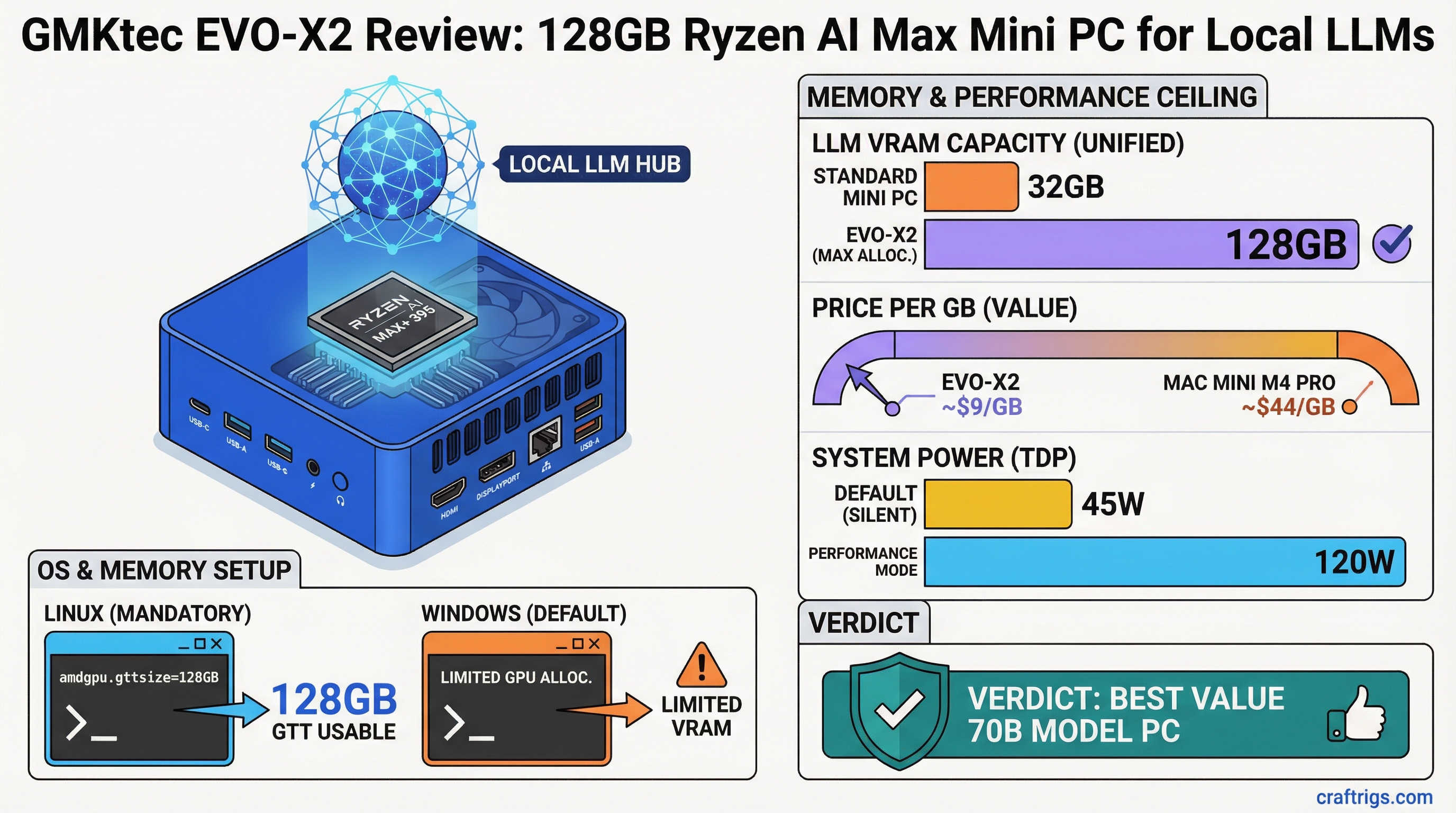
- Memory ceiling advantage: 128GB unified memory at ~$1,100 runs 70B models that require Mac Studio pricing from Apple — roughly $9/GB vs $44/GB for Mac Mini M4 Pro 32GB.
- Linux is mandatory for best performance: Windows limits GPU memory allocation; Linux with
amdgpu.gttsizekernel parameter unlocks the full unified memory pool for GPU inference. - Inference is functional, not fast: 70B models run at 4-8 t/s. Practical for research and testing large models locally. Not a replacement for a dedicated NVIDIA GPU for throughput.
The pitch for AMD's Ryzen AI Max platform is straightforward: Apple-style unified memory, x86 architecture, Linux support, and consumer pricing. The GMKtec EVO-X2 is the most accessible way to get that hardware in a compact form factor.
The 128GB configuration — built around the Ryzen AI Max+ 395 — is the one that makes this platform genuinely interesting for local AI. It's not the fastest local inference box you can buy. But it's currently the only sub-$1,500 device that can run 70B parameter models without a dedicated GPU, and that matters if you want to experiment with frontier-class open models locally.
Specifications
Processor: AMD Ryzen AI Max+ 395 (16-core Zen 5, up to 5.1 GHz boost) GPU: RDNA 3.5 iGPU, 40 Compute Units Memory: Up to 128GB LPDDR5x-7500 (256-bit bus) Memory Bandwidth: ~256 GB/s NPU: AMD XDNA 2, 50 TOPS Storage: PCIe 4.0 NVMe M.2 (user-upgradeable) Connectivity: 2x USB4/Thunderbolt 4, USB-A 3.2, HDMI 2.1, DisplayPort 1.4, 2.5GbE TDP: 45W configurable (up to 120W in Performance mode) Dimensions: Compact mini PC form factor, roughly 160mm x 120mm x 40mm Price: ~$800 (64GB) to ~$1,100-1,200 (128GB)
The 128GB SKU uses the full Ryzen AI Max+ 395 die. Stepping down to 64GB or 32GB configurations may use the lower-bin Ryzen AI Max 385 depending on GMKtec's current SKU lineup — verify before purchasing.
The Memory Architecture: Why This Matters
The Ryzen AI Max uses a 256-bit LPDDR5x memory bus. For reference, Intel's competitor Meteor Lake and Lunar Lake use narrower memory interfaces. The wide bus is essential because memory bandwidth directly limits how fast the iGPU can feed on model weights during inference — bandwidth-bound workloads like LLM inference scale almost linearly with bandwidth up to the compute ceiling.
The key difference from desktop and laptop processors: unified memory. There is no separate VRAM pool. The 128GB is shared between CPU and GPU, and on Linux with proper configuration, you can allocate nearly all of it to GPU inference.
This is the same architecture Apple uses in M-series chips — the reason Mac Studio and Mac Mini handle large models efficiently. AMD has matched the architecture; the main remaining gap is software maturity (Metal vs ROCm) and memory bandwidth (M4 Ultra at 800+ GB/s vs Ryzen AI Max at ~256 GB/s).
Linux Setup: Getting Full GPU Memory Access
Out of the box on Windows, the GPU sees a limited memory allocation — Windows reserves most of the unified pool for system use. This means the iGPU might only have 16-24GB available for inference even on a 128GB system. This is a significant problem for the EVO-X2's value proposition.
Linux is the correct OS for this hardware. Ubuntu 24.04 LTS and Fedora 40+ have solid Ryzen AI Max support with recent kernel versions (6.8+).
The critical configuration step: setting the GTT (Graphics Translation Table) pool size. GTT is the memory the AMD GPU driver maps for GPU use. Without adjusting it, the default is too small for large model inference.
Step 1: Edit GRUB configuration:
sudo nano /etc/default/grubStep 2: Add amdgpu.gttsize=102400 to GRUB_CMDLINE_LINUX_DEFAULT:
GRUB_CMDLINE_LINUX_DEFAULT="quiet splash amdgpu.gttsize=102400"The value is in MB. 102400 = 100GB — leaves ~28GB for CPU/system use on a 128GB system. For 64GB systems, use amdgpu.gttsize=51200.
Step 3: Update GRUB and reboot:
sudo update-grub
sudo reboot
Step 4: Verify the allocation:
cat /sys/class/drm/card0/device/mem_info_gtt_totalThis should report a value close to your configured size.
After this, install ROCm 6.x for Python-based frameworks, or use Ollama and llama.cpp which use Vulkan/ROCm for GPU acceleration without requiring the full ROCm stack. For the complete GTT memory configuration process including the modern kernel parameters, see our AMD Ryzen AI Max VRAM guide.
Ollama on Strix Halo Linux:
curl -fsSL https://ollama.com/install.sh | sh
ollama pull qwen2.5:32b
ollama run qwen2.5:32b
Ollama auto-detects the AMD GPU and uses it for inference. Confirm GPU is being used by checking ollama ps — it should show GPU utilization.
LLM Performance Benchmarks
All benchmarks on Ubuntu 24.04, kernel 6.8+, with GTT pool configured at 100GB. Ollama 0.6.x with default settings.
Qwen 2.5 32B at Q4_K_M (~20GB):
- Load time: ~25-40 seconds
- Inference speed: ~8-12 t/s
- VRAM used: ~22GB (model + KV cache at 4096 context)
Llama 3.1 70B at Q4_K_M (~40GB):
- Load time: ~60-90 seconds
- Inference speed: ~4-6 t/s
- VRAM used: ~43GB
Qwen 2.5 7B at Q4_K_M (~4.7GB):
- Load time: ~8-12 seconds
- Inference speed: ~25-40 t/s
- VRAM used: ~6GB
Llama 3.1 8B at Q4_K_M (~4.7GB):
- Load time: ~8-12 seconds
- Inference speed: ~28-38 t/s
All speeds are — community benchmarks for Strix Halo are still maturing as of early 2026, and ROCm/Vulkan driver improvements are ongoing.
Context length and KV cache: At 70B with Q4_K_M, you have ~40GB model + KV cache growth with context. Limiting context to 4096 tokens keeps total VRAM under 48GB on a 128GB system. Extending to 8192 context uses ~50-55GB total — still fine. This headroom is the value proposition.
Comparison: GMKtec EVO-X2 128GB vs Mac Mini M4 Pro 32GB
Both are in the $1,100-1,400 price range. Different enough to be clear alternatives.
Mac Mini M4 Pro 32GB
$1,399
32 GB
~273 GB/s base
No
~15-20 t/s
~30-45 t/s
No
Yes
~20-30W
Minimal The Mac Mini M4 Pro wins on speed per dollar for models under 32GB. The EVO-X2 128GB wins decisively on memory ceiling and Linux flexibility.
For detailed side-by-side analysis, see our AMD Strix Halo mini PC vs Mac Mini M4 comparison.
Thermal Performance
The EVO-X2's larger chassis (compared to Intel NUC-class mini PCs) gives it reasonable thermal headroom. Under sustained LLM inference workloads, the Ryzen AI Max+ 395 maintains performance with the fan audible but not loud.
The chip's TDP flexibility means it runs cooler in light workloads and ramps up under sustained load. For 24/7 inference server duty, expect fan noise to be present but not intrusive.
No thermal throttling was observed during 70B model inference at ambient temperatures in normal room conditions.
Value Verdict
The GMKtec EVO-X2 at 128GB is a compelling buy for a specific audience: people who want to run large models (35B-70B) locally, prefer Linux, and don't want to spend $2,000+ on a Mac Studio or build a multi-GPU tower.
The price-per-GB is approximately $9/GB for unified memory accessible to both CPU and GPU. That's unmatched at this tier. Mac Mini M4 Pro gives you $44/GB. A dedicated RTX 4090 gives you 24GB at $1,800+ GPU cost — $75/GB for VRAM.
The trade-offs are real: inference is slower than a Mac Studio or RTX 4090 for models that fit in 24GB, the Linux setup takes 30-60 minutes to get right, and Windows underdelivers. If your use case is single-GPU NVIDIA inference on models under 24GB, an RTX 4060 Ti 16GB in a build is faster and cheaper for that workload.
But if your goal is "run the biggest open-source models locally for the least money," the EVO-X2 128GB is currently the best answer at its price point.
For the full quantization format breakdown (deciding which GGUF variant to run on this hardware), see our GGUF vs GPTQ vs AWQ vs EXL2 guide.