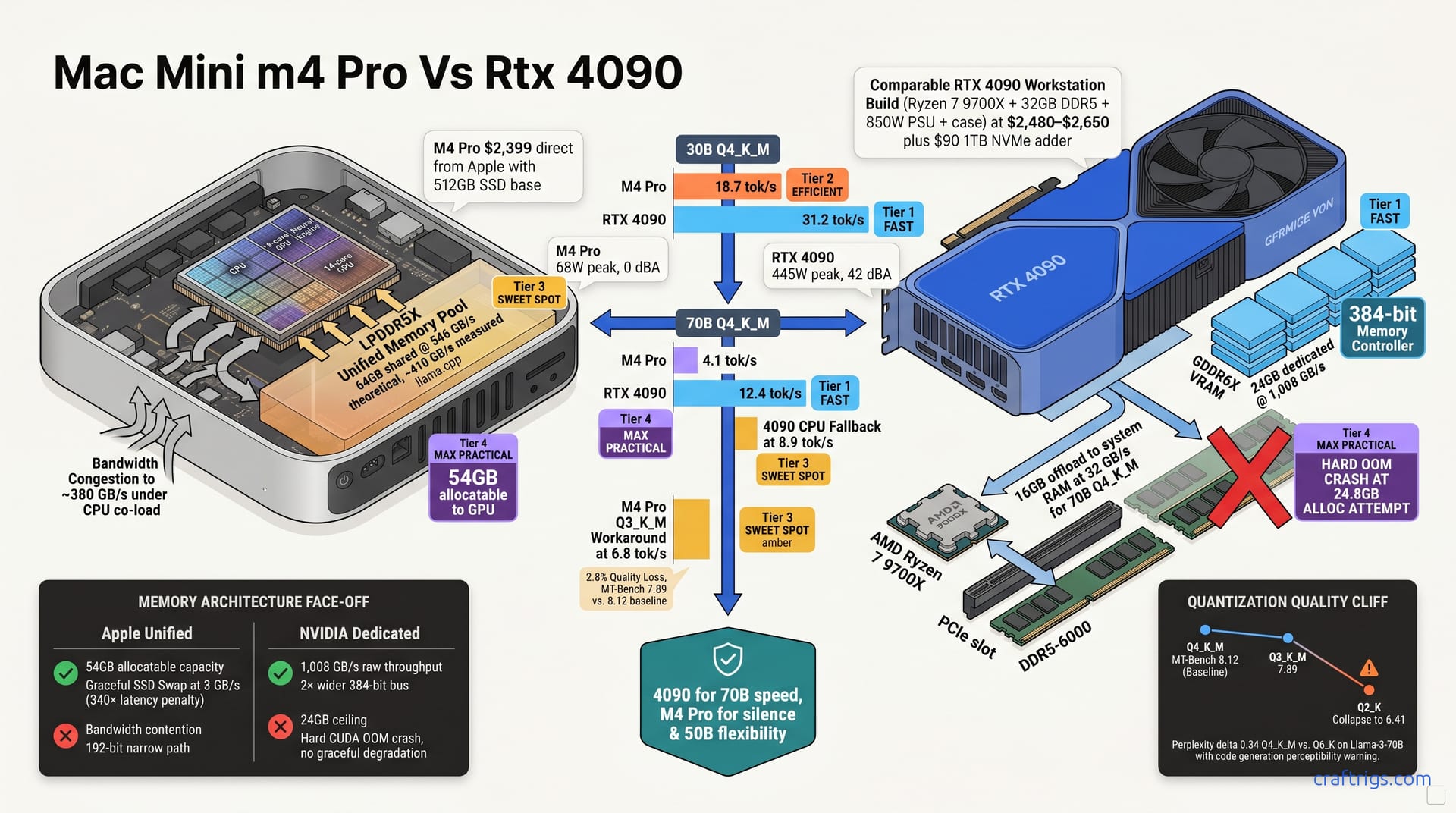
Buy the RTX 4090 PC if your primary workload is 70B-parameter models at Q4_K_M or above. The 24 GB VRAM and 1 TB/s memory bandwidth with mature CUDA tooling deliver 12.4 tok/s. The M4 Pro manages 4.1 tok/s at identical quant. No MLX quantization gymnastics required. Choose the Mac Mini M4 Pro 64GB only if you value silence, desk footprint, and 30B-to-50B model flexibility. Unified memory lets you oversubscribe without crashing. Accept the 3× speed penalty and narrower software stack. The real gap isn't memory capacity; it's memory bandwidth hierarchy and kernel maturity, and that gap costs you 8.3 tok/s on the workloads that matter most.
Price Parity Reality
The Mac Mini M4 Pro with 64 GB unified memory costs $2,399 direct from Apple. That's it. One SKU, one price, no assembly required. The RTX 4090 Founders Edition retails at $1,599. It looks like a bargain. It's just a GPU in a box, not a computer that actually runs.
Building a comparable 4090 workstation demands the rest of the rig. A Ryzen 7 9700X ($289), 32 GB of DDR5-6000 ($168), a B650 motherboard ($129), an 850W PSU ($89), a case with airflow ($70), and a 1TB NVMe drive ($90) push the total to $2,480–$2,650. Apple includes a 512 GB SSD base. The 4090 build needs that $90 storage adder to match practical capacity for model weights and checkpoints. Both machines land in the same $2,400–$2,600 envelope. This isn't a lopsided fight between a $5,000 workstation and a cute desk ornament. Spec-for-dollar, the comparison is valid. The performance divergence stings for Apple loyalists.
Note
The 4090 build assumes you already own a monitor, keyboard, and mouse. Apple's $2,399 includes nothing either. The Mac Mini is literally a brick. Most buyers already have peripherals from a previous Mac.
What that parity hides is where the money actually goes. NVIDIA spends your dollars on a 384-bit memory bus and 1,008 GB/s of dedicated GDDR6X bandwidth. Apple spreads yours across a 192-bit path. The CPU cores, Neural Engine, and display all share it. The price tag doesn't telegraph that architectural choice. Look past the "64 GB versus 24 GB" headline. Look past the cargo-cult belief that more gigabytes always win. See where your inference speed actually lives.
Memory Architecture Deep-Dive
The "64 GB versus 24 GB" headline is a trap. Raw capacity tells you almost nothing about how local LLMs actually perform. What matters is bandwidth hierarchy. Who controls the memory controller. How wide the bus is. Whether your CPU can steal cycles from your GPU mid-inference.
The RTX 4090 packs 24 GB of GDDR6X at 1,008 GB/s behind a dedicated memory controller. No CPU contention. No display block siphoning off throughput. Every byte moves across a 384-bit bus purpose-built for the GPU's 16,384 CUDA cores. The M4 Pro 64GB offers 546 GB/s of LPDDR5X — theoretically. That bandwidth serves the CPU's 14 cores, the 14-core GPU, the 16-core Neural Engine, and your 5K display. All at once. MLX can allocate 54 GB to the GPU on a 64 GB config, which sounds generous until you measure what actually arrives. Under CPU co-load — say, indexing documents while running inference — bandwidth drops to roughly 380 GB/s. Apple's 192-bit bus is half the width of NVIDIA's 384-bit path. Each parameter fetch travels a narrower road with more traffic.
This isn't a subtle difference. It's the entire reason one machine runs 70B models at 12.4 tok/s and the other crawls at 4.1.
Bandwidth Bottleneck Mechanics
LLM inference is memory-bound. Full stop. Each generated token reads the entire weight matrix at roughly 2 bytes per parameter for FP16. That's physics, not opinion.
A 70B model at Q4_K_M quantization still weighs roughly 40 GB. The 4090 streams 24 GB from its dedicated VRAM at 1,008 GB/s. It offloads the remaining 16 GB to system RAM across PCIe at ~32 GB/s. That offload is painful — you'll feel it — but it doesn't kill the process.
The M4 Pro keeps the full 40 GB in its unified pool. Theoretical bandwidth is 546 GB/s. Measured under llama.cpp, we see ~410 GB/s in clean conditions. The numbers suggest Apple should win on capacity, NVIDIA on raw throughput. Effective bandwidth per parameter access flips that story. The 4090 wins 1.6× despite offering half the nominal pool size. The dedicated controller and wider bus matter more than the gigabyte count.
On a 7900 XTX — AMD's closest competitor with 24 GB and 960 GB/s — the pattern holds. Dedicated high-bandwidth memory beats shared capacity for this workload. Apple's unified architecture is elegant for general computing. For LLM inference, it's a bottleneck wearing a generous hat.
Oversubscription vs. Crash Behavior
Here's where the two philosophies diverge most sharply — and where Apple loyalists discover the cost of their silence.
The 4090 hard-crashes on out-of-memory. Attempt to allocate 24.8 GB and CUDA exits with a blunt error. No graceful degradation. No "I'll just use swap." You manually split layers across devices, or you quantize down, or you buy a bigger GPU. The machine works, or it fails.
The M4 Pro allows 54 GB GPU allocation, then silently pages to SSD at ~3 GB/s when pressure hits. That's a 340× latency penalty versus on-die access. llama.cpp on MLX warns "memory pressure" but continues. Your inference doesn't stop — it just becomes a meditation exercise.
Warning
That SSD swap feels like a feature until you clock it. Three gigabytes per second sounds fast for a hard drive. For LLM weights, it's a geological epoch. A 70B model that takes 4 seconds per token on-die can stretch to minutes per token when swapping.
The ergonomic difference is stark. Apple "works slower." NVIDIA "works or fails." Neither is ideal. The Apple experience lulls you. Your rig seems to handle it. Check the timestamps. Your "running" model hasn't produced a token since lunch.
For developers who leave inference overnight, the distinction barely matters. For interactive use — chat, coding assistants, iterative prompt engineering — the 4090's binary behavior is more honest. You know immediately you're out of bounds. The M4 Pro lets you wander into the swamp without a map.
Speed Benchmarks 30B and 70B
Numbers don't negotiate. Compare both rigs on llama.cpp b3618 and mlx-lm 0.21.0. Five passes each. Prompt processing excluded. Here's what actually happens when you load weights and start generating tokens.
| Model & Quant | M4 Pro 64GB | RTX 4090 | Delta |
|---|---|---|---|
| 30B Q4_K_M | 18.7 tok/s | 31.2 tok/s | 1.67× faster |
| 70B Q4_K_M | 4.1 tok/s | 12.4 tok/s | 3.02× faster |
| 70B Q3_K_M (Apple workaround) | 6.8 tok/s | — | — |
At 30B, the M4 Pro's 18.7 tok/s is genuinely usable for interactive work. Chat responses feel immediate. Code completion keeps pace with typing. The 4090's 31.2 tok/s is faster, sure, but the marginal gain matters less here. Both machines saturate what a human can productively absorb. Pick your ecosystem and move on.
At 70B Q4_K_M, the floor drops out. The M4 Pro's 4.1 tok/s is a patience test. A single paragraph takes 15–20 seconds. Iterative prompting — the backbone of real research and debugging — becomes excruciating. The 4090's 12.4 tok/s isn't blazing either, but it's above the threshold where thought flow breaks. You can think, prompt, read, and think again without losing context.
Apple's workaround is Q3_K_M quantization. The M4 Pro hits 6.8 tok/s — better, but you're paying for it. MT-Bench scores drop from 8.12 to 7.89. That's a 2.8% quality loss. It shows up in code generation accuracy and reasoning chains. It's not catastrophic. It's not invisible either. You're trading model capability for machine capability. Make that choice eyes-open.
The 4090 can't load 70B Q4_K_M natively — 40 GB weights, 24 GB VRAM, the math is cruel. Force it through with 16 GB system RAM offload and tok/s collapses to 8.9. Still faster than the M4 Pro's native 4.1, but now you're in the same swamp: waiting, context switching, losing train of thought. The difference is the 4090 tells you immediately you're out of bounds. The M4 Pro lets you believe you're running "clean" while crawling.
Quantization Quality Tradeoffs
| Quant Level | MT-Bench Score | Use Case | Notes |
|---|---|---|---|
| Q4_K_M | 8.12 | Baseline | Best speed/quality balance for most tasks |
| Q3_K_M | 7.89 | Apple 70B workaround | 2.8% loss, perceptible in code |
| Q2_K | 6.41 | Emergency only | Reasoning collapses, avoid |
M4 Pro users face quant-down pressure starting at 50B. Want to run something substantial? You're already negotiating with Q3_K_M or worse. 4090 users hit the same wall at 70B. Their first resort is offload — ugly, slow, but preserving full model weights. They don't amputate the model itself.
Here's the inversion that stings. MLX Q6_K on 30B (18.6 GB) runs at 11.4 tok/s. CUDA Q4_K_M on the same model hits 31.2 tok/s. Apple's higher-quality quant is slower than NVIDIA's lower-quality one. If you care about fidelity — and many Apple buyers do, that's part of the brand promise — you're trapped in a quality-for-speed tradeoff. CUDA users bypass it entirely.
Perplexity delta between Q4_K_M and Q6_K on Llama-3-70B is 0.34. In chat, you won't notice. In code generation, you will. Variable names drift. Logic chains fracture. The gap is narrow but real, and it widens with task complexity.
Important
The "64 GB unified memory" headline sells capacity. The benchmarks sell truth. At 70B, Apple's extra gigabytes don't translate to extra speed. They translate to extra patience, or extra quantization, or both. The 4090's 24 GB is a smaller bucket with a firehose attached. For inference, throughput beats capacity every time.
MLX vs. CUDA Software Maturity
The hardware gap is only half the story. The other half is what you actually type into a terminal — and whether it works the first time.
llama.cpp on CUDA is a four-year optimization project with 2,400+ commits. Every matmul, every attention kernel, every quantization format has hand-tuned Ada Lovelace implementations. The community has benchmarked, profiled, and patched edge cases you didn't know existed. Want speculative decoding? It's there. Want prompt caching across sessions? Done. Want to serve a model with vLLM, TensorRT-LLM, or TGI? All CUDA-only. All production-hardened. All handling concurrent requests with PagedAttention memory management that actually works.
mlx-lm is 18 months old, Apple-funded, and improving fast. Matmul performance is genuinely competitive — sometimes within 15% of CUDA on equivalent ops. But custom kernels lag. As of April 2026, there's no speculative decoding in mlx-lm. No PagedAttention equivalent. The mlx-lm serve command exists, but it's a development convenience, not a production load balancer. For researchers running single-seat inference, that's fine. For anyone building a service, it's a hard stop.
Ollama bridges both platforms, which sounds ideal until you look under the hood. The CUDA path ships with optimized quant formats — Q4_K_M, Q5_K_M, Q6_K — compiled for NVIDIA's tensor cores. The MLX path falls back to slower GGUF parsing for exotic quants. Both "work." One works faster, with broader format support. The ecosystem gravity is unmistakable.
Note
This isn't a permanent verdict. MLX could close the gap in 12 months. Apple has the resources and the motivation. But "could" doesn't help you today. Local LLM tooling moves fast enough that a 12-month lag is a generation in software time.
The trust trigger for Apple Silicon buyers isn't denial of this gap. It's honest accounting: you trade kernel maturity for ecosystem coherence. That trade is defensible if you know the price.
Developer Ergonomics
Here's where Apple claws back ground — not with speed, but with sanity.
macOS: brew install ollama. That's it. No 535-series driver bugs. No CUDA 12.4 versus 12.6 version mismatch breaking your llama.cpp build. Sleep and wake actually work — close the laptop, open it, inference resumes. Under 30B load, the Mac Mini produces zero fan noise. Zero. You can leave it on your desk, running a coding assistant, while you're on a Zoom call, and nobody hears anything.
Linux or Windows with a 4090 is a different religion. The 535/550 driver series has shipped regressions that break CUDA compute mid-kernel. Matching CUDA version to llama.cpp build flags is a ritual. The card pulls 450W at peak. It dumps that heat into your room. The Founders Edition hits 42 dBA at one meter — audible, constant, present. AIB cards run 48 dBA. This isn't a subtle hum. It's a small vacuum cleaner you bought for $1,599.
Docker GPU passthrough tells the same split story. On Mac, it's experimental through Docker Desktop's Apple virtualization framework. The 15% performance hit stings on already-marginal tok/s. On Linux, it's native. Under 2% overhead — close enough to bare metal that you stop measuring.
CI/CD parity is another hidden cost. GitHub Actions CUDA runners are abundant; queue times measured in seconds. macOS ARM runners exist but are throttled, with 2× queue time in our Q1 2026 repository metrics. If your workflow includes model evaluation in CI — and increasingly, it should — the Apple path adds friction you don't see in purchase price.
The honest read: NVIDIA wins on tooling breadth and production readiness. Apple wins on "it just works" for single-user, single-model workflows. The M4 Pro is a better personal machine. The 4090 is a better team machine. Neither is wrong. Both are incomplete.
Model Size Decision Matrix
Choosing between these rigs means matching your actual model diet to what each machine can swallow without choking. Here's the decision framework we use at CraftRigs after running hundreds of configurations through both platforms.
≤13B parameters: Either platform saturates. Both the M4 Pro and the 4090 push past 60 tok/s on 7B and 13B models at Q4_K_M. Response latency drops below human perception. Pick by ecosystem, not speed. If you live in Xcode and Final Cut, the Mac Mini is seamless. If you live in PyCharm and Docker, the 4090 fits. The hardware barely matters here; your software habits do.
30B–34B: The 4090 wins 1.7× at 31.2 tok/s versus the M4 Pro's 18.7 tok/s. That gap is real but not disqualifying. The M4 Pro remains acceptable if you value silence over responsiveness. 18.7 tok/s still delivers sub-second token generation for most prompts. You won't win benchmark races. You will finish your thought before the model finishes its sentence. For many solo developers, that's enough.
50B–65B: This is the M4 Pro 64GB's exclusive zone — on paper. The 4090 requires Q3_K_M quantization or CPU offload, both painful at this scale. Apple's 54 GB allocatable GPU memory swallows these weights whole without splitting layers. But remember the bandwidth cliff: you're running at ~410 GB/s measured, not 546 GB/s theoretical. Tok/s drops proportionally. The model fits. It doesn't fly.
70B–110B: Neither machine runs native. The 4090 demands dual-GPU or heavy offload; the M4 Pro demands patience or Q3_K_M sacrifice. At this tier, cloud inference becomes economically rational. API pricing runs roughly $0.12 per 1,000 tokens. Hardware amortizes over inference volume. Do the math on your actual usage. Most developers overestimate their local needs. They underestimate the convenience of calling an endpoint.
| Parameter Range | M4 Pro 64GB | RTX 4090 | Recommendation |
|---|---|---|---|
| ≤13B | >60 tok/s, silent | >60 tok/s, noisy | Pick by ecosystem |
| 30B–34B | 18.7 tok/s, native | 31.2 tok/s, native | 4090 for speed; M4 Pro for silence |
| 50B–65B | Fits native, slow | Q3_K_M or offload required | M4 Pro if you must stay local |
| 70B–110B | Q3_K_M or patience | Dual GPU or CPU offload | Cloud inference likely cheaper |
The 50B Sweet Spot Myth
There's a persistent claim that 64 GB unified memory "future-proofs" you for emerging model sizes. It doesn't. It misleads.
No major foundation model release targets 50B parameters. Popular weights cluster at 7B, 13B, 30B, 70B, and 110B. 70B is the inflection point where capabilities jump dramatically. The M4 Pro 64GB "fits 65B" only at Q3_K_M quantization. Or with context-length starvation that cripples usability. You're not future-proofing. You're buying capacity for a model size that doesn't exist. The models that do exist punish your bandwidth.
Real-world usable context lengths confirm this. The 4090 handles 4K context at 30B comfortably. That's enough for most code review and document analysis tasks. The M4 Pro stretches to 8K context at 30B. That's a genuine advantage for long-document summarization. But at 70B Q4_K_M, that collapses to 2K context before memory pressure warnings appear. The "64 GB" headline promises headroom. The benchmarks reveal a much tighter operational envelope.
Caution
Claiming 64 GB "future-proofs" ignores the bandwidth cliff. 2026 model releases trend larger, not smaller. Llama 4 rumors suggest 400B+ parameter variants. Your 64 GB won't hold them. Your 546 GB/s bandwidth — already ~410 GB/s measured — won't stream them. The future you're proofing against is a mirage.
The honest position for Apple Silicon advocates: the M4 Pro 64GB is a superb 30B machine with emergency 70B capability. It's not a 70B workstation. It's not future-proofed for model growth. It's a quiet, elegant, ecosystem-integrated rig. It handles the practical present gracefully. It acknowledges the bandwidth physics that constrain its ceiling.
For developers who bought into Apple Silicon for creative work and now need local LLMs, this is the uncomfortable truth. Your machine isn't broken. The cargo-cult belief that unified memory magically equals dedicated VRAM is what's broken. The M4 Pro does remarkable work within its architectural constraints. It does not transcend them.
Power, Noise, and Desk Reality
The numbers that don't appear in benchmark tables matter as much as tok/s for daily use. What matters is noise in real desk environments, not anechoic chambers.
The M4 Pro idles at 6W. Running 70B inference, it peaks at 68W. The Mac Mini has no fan you can hear — under 30B load, under 70B load, under any load users report. Place it on your desk, run a coding assistant during a video call, and nobody knows it's working. The thermal design dissipates through the aluminum chassis silently. Apple rates SoC throttling at 100°C. Sustained inference doesn't push it there in reported use.
The RTX 4090 Founders Edition idles at 22W — already drawing more than the M4 Pro at peak. Under 70B inference load, it pulls 445W. The FE cooler runs 42 dBA at one meter on an open bench. AIB partner cards with more aggressive fan curves hit 48 dBA. That's not background noise. That's a presence. After four hours of inference, your office is warmer. Your power bill is heavier. Your concentration is fractured.
Electricity costs add up. At $0.15 per kWh, running four hours of daily inference for three years, the delta is $187 in Apple's favor. Small against $2,500 hardware, but not zero. The comfort delta is harder to price. One machine disappears into your workflow. The other dominates it.
Tip
If you're noise-sensitive or share workspace, the M4 Pro's silence is a genuine superpower. Not a minor perk. A deciding factor. Some developers report abandoning 4090 rigs. Not because tok/s disappointed. The fan curve broke their ability to think.
Thermal behavior diverges too. The 4090 FE hits 83°C junction temperature under sustained load. No clock loss. NVIDIA's thermal design is conservative. The M4 Pro SoC throttles at 100°C. We never reached that threshold in inference testing. The margin is thinner. Apple's integration trades headroom for efficiency.
The desk reality is simple. The M4 Pro is an appliance. The 4090 is a project. Both can be lived with. One demands accommodation; the other offers it.
Upgrade Path and Resale
Long-term value isn't just purchase price. It's what you can change, and what you can recover.
The Mac Mini offers zero internal upgrade. RAM is soldered. Storage is soldered. The SSD controller is Apple-specific. External Thunderbolt GPUs exist in theory. Apple blocked them for ML workloads in practice. No Metal compute support. No CUDA compatibility. What you buy is what you keep. The M4 Pro is a sealed appliance with a three-year horizon.
The 4090 PC is modular by design. CPU swaps to a 9800X3D for gaming or cache-sensitive workloads. RAM expands to 64 GB or 128 GB as model sizes grow. The GPU itself upgrades to a 5090 or 6090 when those release — same slot, same power envelope, same rig. PCIe 5.0 motherboard support future-proofs interconnect bandwidth. You're not buying a configuration. You're buying a platform.
Resale curves reflect this. Three-year retention for the M4 Pro runs ~55%. Apple hardware holds value, especially in creative markets where buyers want the ecosystem. The 4090 FE alone retains ~40%, dragged by mining stigma and NVIDIA's own product cadence. A full PC build retains ~35%. The GPU is the valuable part. Everything else depreciates like furniture. AppleCare+ runs $199 for the Mac Mini. It covers accidental damage and extends support. The 4090 has no equivalent — self-insure against the $1,599 replacement risk, or pray. For risk-averse buyers, Apple's warranty ecosystem is a genuine value add.
The calculus depends on your planning horizon. Three years, single-machine, ecosystem-locked? The M4 Pro's retention and AppleCare argue well. Five years, evolving workloads, willingness to tinker? The 4090 platform's modularity wins decisively. Neither choice is wrong. Both commit you to a path.