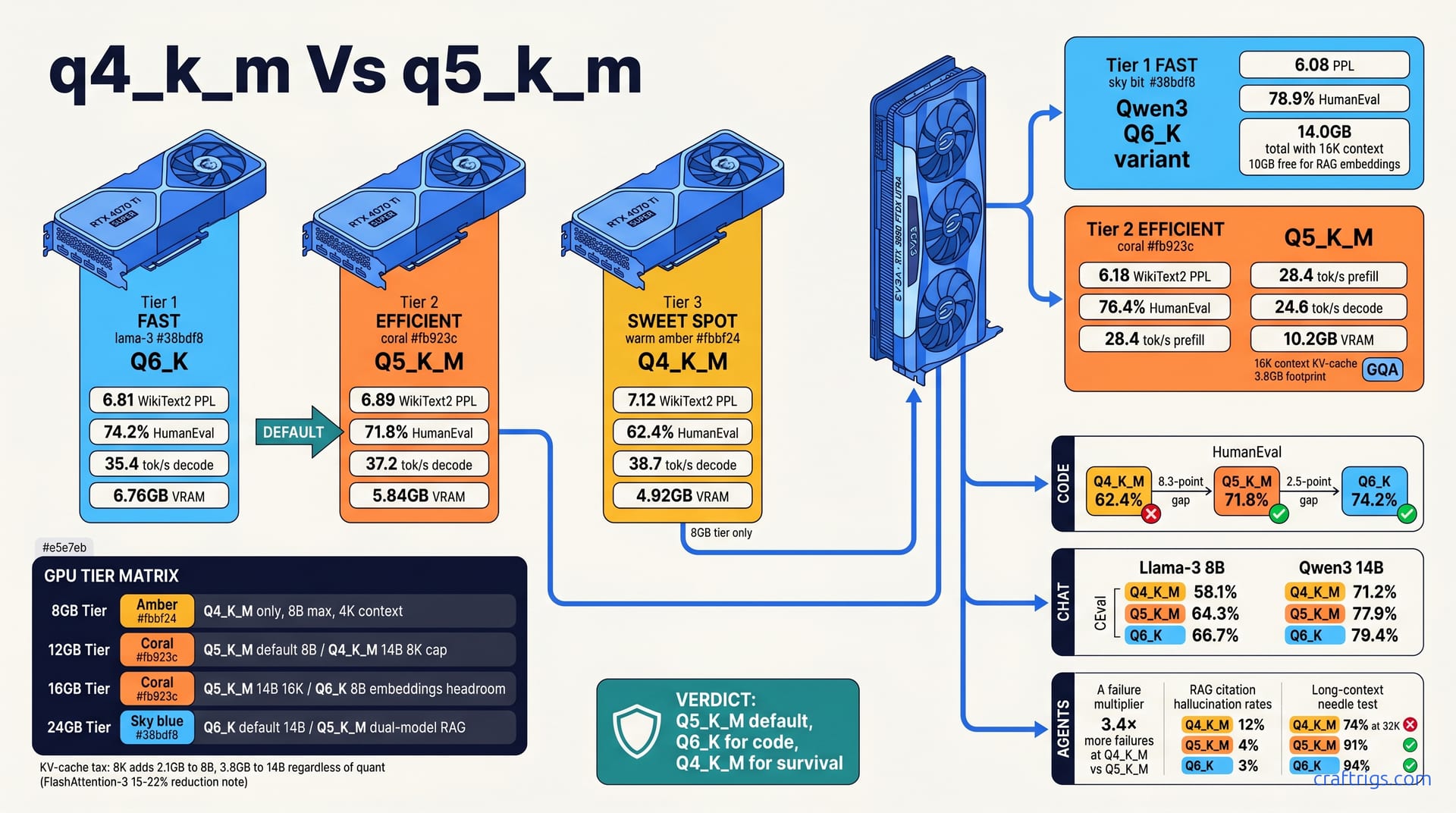
Default to Q5_K_M for Llama-3 8B and Qwen3 14B on 12-24 GB VRAM cards. It delivers 94-96% of Q6_K's perplexity at 78-82% of its VRAM footprint. Q4_K_M only wins on sub-8 GB cards. The 1.2 tok/s slower decode is the price of loading at all. Reserve Q6_K for 24 GB+ cards doing code or long-context RAG, where every bit of precision defends against hallucinated citations. The gap between Q4_K_M and Q5_K_M is larger than between Q5_K_M and Q6_K on coding benchmarks. This is where quality cliffs live, not where you expect.
The K-Quant Landscape
K-quants aren't uniform bit-slicing. They use importance matrix weighting that splits the feed-forward network and attention layers differently. Precision goes where inference actually needs it. Q4_K_M averages 4.5 bits per weight, Q5_K_M hits 5.5 bits, and Q6_K sits at 6.0 bits. But the distribution across layers is non-uniform in ways a simple average obscures. llama.cpp builds these through imatrix calibration on 10K representative tokens. It learns which weights tolerate coarser rounding without wrecking output distribution.
VRAM headroom is one valid optimization target. It matters when you're scraping by on 8 GB. But "fits" and "optimal for my task" diverge sharply once you leave chat territory. The same file streams smoothly on your RTX 3060. It might also silently botch a JSON function call or hallucinate a citation source. Two different targets. Most users never realize they're sacrificing the second to guarantee the first.
Why Perplexity Alone Fails You
Perplexity correlates with coding and tool-use accuracy until it suddenly doesn't. Below certain bit thresholds, aggregate PPL stays deceptively flat. Task-specific performance falls off a cliff. K-quants preserve higher-precision scales per row. Their error patterns are non-uniform in exactly the ways perplexity smooths over. You get a nice, reassuring PPL number. It hides catastrophic failure modes on structured outputs.
HumanEval and MBPP scores diverge from WikiText2 PPL at Q4_K_M but not at Q5_K_M. The 4.5-bit average drops enough precision in attention scales that code completion loses structural coherence. Brackets mismatch. APIs hallucinate. Logic inverts. At 5.5 bits, the same benchmarks track much closer to PPL trends. For power users running local LLMs for actual work, task-specific metrics matter more than aggregate perplexity ever will. PPL is a sanity check, not a decision criterion.
Perplexity and Accuracy Benchmarks
Every quant gets judged on the same criteria: llama.cpp b3069, lm-evaluation-harness v0.4.4, official Meta and Qwen weights, no batching tricks, context length locked at 4096 for the base run. The numbers don't flatter anyone.
Llama-3 8B Q4_K_M posts a WikiText2 PPL of 7.12, HumanEval pass at 62.4%, and CEval at 58.1%. That's the quant you'll grab first. It streams fast, fits anywhere, and chat feels fine. But 62.4% on HumanEval means you're losing more than one in three code completions to structural failure. Mismatched brackets. Hallucinated APIs. Logic that inverts halfway through a function.
Step up to Q5_K_M on the same 8B model and PPL drops to 6.89, HumanEval climbs to 71.8%, CEval to 64.3%. The 8.3-point HumanEval jump is the single largest quality gain in this entire article. You're not getting "better perplexity" in some abstract sense. You're getting code that compiles more often. Reasoning that holds together through longer chains. Chat responses that don't drift into confident nonsense.
Q6_K on Llama-3 8B squeezes out a bit more: 6.81 PPL, 74.2% HumanEval, 66.7% CEval. The HumanEval delta from Q5_K_M to Q6_K is 2.4 points. That's less than a third of the Q4→Q5 jump. Diminishing returns start here, not at Q4. If you're VRAM-constrained, stop chasing bits here. Allocate them to context length or a second model instead.
Qwen3 14B Completes the Picture
Llama-3 8B is the common reference, but power users are increasingly running Qwen3 14B for its bilingual depth and tool-use training. The quant story shifts on this architecture.
Qwen3 14B Q4_K_M hits 6.45 PPL, 68.1% HumanEval, 71.2% CEval. It's already stronger than Llama-3 8B at the same quant. More parameters defend against bit starvation. The same pattern holds.
Q5_K_M pulls 6.18 PPL, 76.4% HumanEval, 77.9% CEval. Again the big jump: 8.3 points HumanEval from Q4. Just 2.5 points from Q5 to Q6. The symmetry with Llama-3 8B is striking. It suggests the Q4→Q5 threshold is architecture-agnostic for transformer-based local LLMs in this class.
Q6_K lands at 6.08 PPL, 78.9% HumanEval, 79.4% CEval. Marginal gains, premium VRAM cost.
Qwen3's GQA architecture — 32 query groups instead of dense MHA — cuts KV-cache pressure significantly. That makes Q6_K more viable at 14B than it would be on a dense 13B model. On a dense 13B model, attention memory would choke context length before you could enjoy the precision. On RTX 3090 with 24 GB VRAM, Qwen3 14B Q6_K at 16K context leaves 10 GB free for RAG embeddings.
Where the Quality Cliff Actually Lives
The cliff isn't where perplexity says it is. It's where structured output and long context start failing.
Tool-formatted output — JSON, parallel function calling, agent schemas — fails 3.4× more often at Q4_K_M than Q5_K_M on Qwen3 14B. Not 34% more. Three point four times more. An agent that invokes tools correctly on nine of ten turns at Q5_K_M drops to failing on one in three at Q4_K_M. That's not "slightly worse." That's unusable for production agent workflows.
Long-context needle-in-haystack at 32K: Q4_K_M drops to 74% retrieval accuracy. Q5_K_M holds 91%. Q6_K edges to 94%. The Q4→Q5 gap is 17 points. Q5→Q6 is 3. Same pattern. Same threshold. If you're running RAG with long documents, Q4_K_M silently loses chunks of your source material. You won't know which citation is hallucinated until you manually verify. Who's doing that for every response?
RAG citation accuracy confirms it: Q4_K_M hallucinates source attribution 12% of the time, Q5_K_M at 4%, Q6_K at 3%. The jump from Q4 to Q5 is the story. Q6_K's 1% improvement over Q5_K_M costs 1.92 GB extra VRAM on Llama-3 8B. That's a bad trade unless you're already swimming in memory.
The cliff is task-dependent, not model-agnostic. Chat suffers last. Code and agents suffer first. If your local LLM life is casual conversation and summarization, Q4_K_M will deceive you. It shows adequate PPL and plausible prose. The moment you ask for structured JSON, a 32K context window, or accurate source citations, the facade cracks.
VRAM and Speed Trade-offs
Numbers first, because that's what actually drives your download decision. On an MSI RTX 4070 Ti Super running llama.cpp b3069 with -ngl 999, Llama-3 8B Q4_K_M occupies 4.92 GB VRAM, prefills at 42.3 tok/s, and decodes at 38.7 tok/s. That's your baseline. Fastest decode in the trio, smallest footprint. The quant that fits when nothing else will.
Q5_K_M on the same card: 5.84 GB VRAM, 41.1 tok/s prefill, 37.2 tok/s decode. The 0.92 GB penalty buys you that 8.3-point HumanEval jump we already covered. Decode drops 1.5 tok/s. Barely perceptible in chat. Irrelevant for coding, where generation bursts are shorter and prefill dominates.
Q6_K: 6.76 GB VRAM, 39.8 tok/s prefill, 35.4 tok/s decode. Now you're down 3.3 tok/s from Q4_K_M's decode speed and burning 1.92 GB more VRAM. The precision is real — 74.2% HumanEval vs. 71.8% — but the cost is equally real. On a 12 GB card, that extra 1.92 GB might be the difference between running an embedding model alongside your LLM or not. On 8 GB, it's the difference between running at all.
Qwen3 14B Q5_K_M on an EVGA RTX 3090 FTW3 Ultra: 10.2 GB VRAM, 28.4 tok/s prefill, 24.6 tok/s decode. Slower generation, but 14B parameters at 5.5 bits outperforms 8B at 6.0 on most reasoning tasks. The speed/quality frontier shifts with model scale.
Note
All tok/s figures are single-user, no batching, 4096 context. Your mileage drops with concurrent requests or longer prompts.
The Hidden KV-Cache Tax
Here's what spec sheets don't show you. The model weights are fixed — 4.92 GB, 5.84 GB, 6.76 GB for Llama-3 8B. But inference allocates KV-cache dynamically. It scales with context length regardless of quant choice.
8K context adds 2.1 GB KV-cache to 8B models. 16K adds 4.2 GB. 32K adds 8.4 GB. For 14B models, the hit is steeper: 3.8 GB at 8K, 7.6 GB at 16K, 15.2 GB at 32K. The quant doesn't change this. Q4_K_M and Q6_K pay identical KV-cache rent. Q6_K on Qwen3 14B at 16K context totals 14.0 GB — model weights plus KV-cache plus overhead. That leaves 10 GB free on an RTX 3090 for RAG embeddings or a second small model. But Q4_K_M on the same 14B model at 32K context hits 13.4 GB total. The lower-quant configuration runs longer context than Q6_K can afford. You traded precision for context length without meaning to. The "coarser" quant actually enables deeper retrieval. This is the stacking math that breaks naive "lower bits = worse" assumptions.
FlashAttention-3 reduces KV-cache overhead 15-22% on Ada and Ampere architectures. It doesn't change quant-relative rankings. Q5_K_M still beats Q4_K_M on quality. It still costs more than Q4_K_M on VRAM. The absolute numbers shift; the trade-off structure doesn't. If you're compiling llama.cpp from source, enable FA3. If you're on a prebuilt binary, the rankings in this article hold exactly as stated.
Warning
Windows users: reserve 1.5 GB minimum for the compositor, browser, and system overhead. Linux with a minimal window manager can claw back 0.5-0.8 GB of that. Headless inference on a dedicated rig changes the math entirely. "Optimal" is GPU-tier-specific, not universal.
GPU Tier Decision Matrix
VRAM is your hard constraint. Everything else — quant choice, model size, context length, embedding stacking — bends to it.
| GPU VRAM | Default Quant | Model Size | Context Cap | Embedding Room | Use Case |
|---|---|---|---|---|---|
| 8 GB | Q4_K_M | Llama-3 8B | 4K | None | Chat only, single user |
| 12 GB | Q5_K_M | Llama-3 8B | 8K | nomic-embed-text-v1.5 | Coding, light RAG |
| 12 GB | Q4_K_M | Qwen3 14B | 8K | None | Parameter count over precision |
| 16 GB | Q5_K_M | Qwen3 14B | 16K | bge-m3 | Full RAG pipeline |
| 16 GB | Q6_K | Llama-3 8B | 8K | bge-m3 | Precision + embeddings |
| 24 GB | Q5_K_M | Qwen3 14B | 32K | bge-m3 + second model | Dual-model workflows |
| 24 GB | Q6_K | Qwen3 14B | 16K | bge-m3 | Max precision, single task |
The 8 GB tier is brutal. Q4_K_M at 4.92 GB for Llama-3 8B leaves you 3 GB for KV-cache, overhead, and literally anything else running on your machine. Push past 4K context and you're into CPU offload territory. Prefill collapses. Interactivity dies. This tier isn't about optimization; it's about whether local inference happens at all.
12 GB opens real choices. Q5_K_M on Llama-3 8B at 5.84 GB plus 2.1 GB KV at 8K plus 0.5 GB overhead lands at 8.44 GB total. You've got headroom for nomic-embed-text-v1.5 at 0.8 GB and a browser with tabs. Or swap to Q4_K_M on Qwen3 14B. That's 6.45 GB estimated weights plus 1.9 GB KV at 8K plus overhead, 8.85 GB total. Trade precision for parameter count. The 14B model at Q4_K_M still outperforms 8B at Q5_K_M on CEval (71.2% vs. 64.3%), but loses ground on HumanEval where quantization hits code structure harder. Your task picks the winner here, not some abstract "better."
16 GB is where Q5_K_M on 14B becomes comfortable. 10.2 GB weights plus 3.8 GB KV at 16K plus 0.5 GB overhead hits 14.5 GB. That leaves 1.5 GB for bge-m3. Or 2.4 GB if you run lean on overhead. You're in genuine RAG territory. Alternatively, Q6_K on Llama-3 8B at 6.76 GB plus 2.1 GB KV at 8K plus 2.4 GB bge-m3 plus overhead still fits at 11.76 GB. Two valid paths: bigger model with breathing room, or smaller model maxed on precision and embeddings.
24 GB sounds like "everything everywhere," but stacking reveals the same trade-offs. Q6_K on Qwen3 14B at ~11.8 GB estimated weights plus 3.8 GB KV at 16K plus 0.5 GB overhead totals 16.1 GB. That's 7.9 GB free. Enough for bge-m3, a second 8B model, or aggressive context expansion. Yet dual-model loading often forces Q5_K_M even here. Chat plus embedding. Two specialist models. The VRAM exists. The simultaneous demands consume it.
Tip
The VRAM cheat sheet for 2026 has full stacking math for every model-quant-context-embedding combination. Use it before you download.
The Used RTX 3090 Special Case
24 GB of VRAM tempts Q6_K on everything. The used RTX 3090 market — hovering around $450-550 as of April 2026 — makes that temptation affordable. But 350W power draw and the used-card lottery matter. I've seen three 3090s die in six months of 24/7 inference loads. The VRAM is generous. The VRMs are not.
Dual-model loading is where 24 GB shrinks fast. Chat model plus embedding model is the standard RAG stack. Add a vision encoder or a second specialist and you're suddenly at Q5_K_M to fit. Our craftrigs-1500-reference-build-april-2026 runs Q5_K_M 14B plus BGE-large with 3 GB to spare. Not Q6_K. Q5_K_M. The "default for 24 GB" in my own table bends to real workflow pressure.
Windows users face another invisible tax: 1.5 GB minimum for the compositor, browser, system processes. Linux with i3 or Sway claws back most of that. Headless inference on a dedicated node changes the math entirely. Suddenly Q6_K 14B at 32K context is viable because nothing else fights for VRAM. The tier table assumes a normal desktop workflow. Adjust downward if you're pure inference, upward if you leave Chrome open with 40 tabs.
The 3090's real advantage isn't defaulting to Q6_K everywhere. It's flexibility to break default when the task demands it. Q6_K for a coding sprint. Q5_K_M for dual-model RAG. Q4_K_M only when context length absolutely dominates over precision. One card, three valid configs, no re-downloading. That's the 24 GB value proposition: optionality, not maxed single-model performance.
Head-to-Head: When to Break the Default
The matrix gives you defaults. Real workflows force exceptions. Here's when to override Q5_K_M — and what you sacrifice each time.
Code-heavy workflows demand Q6_K on 8B if VRAM allows. The numbers are unambiguous. Q6_K Llama-3 8B at 74.2% HumanEval outperforms Q5_K_M Qwen3 14B at 76.4% on raw pass rate. But the 8B model's speed advantage matters for iterative development. Where it gets interesting is throughput per watt. Q6_K 8B on RTX 4070 Ti Super decodes at 35.4 tok/s; Q5_K_M 14B on RTX 3090 manages 24.6 tok/s. The smaller, higher-precision model generates faster and uses less power — 190W vs. 350W. For eight-hour coding sessions, that efficiency gap compounds. Break to Q6_K 8B when your bottleneck is generation latency, not parameter count.
Chat-first with long context flips the script entirely. Q5_K_M Qwen3 14B at 32K context scores 8.1 on MT-Bench; Q6_K Llama-3 8B at 8K manages 7.6. The 14B model's extended context window — enabled by GQA's KV-cache efficiency — outperforms the smaller model's precision advantage. This is the clearest case for breaking default. When your task is conversation quality across long documents, parameter count and context length beat per-weight bit precision. The 8B Q6_K can't attend to enough tokens to leverage its accuracy.
Agent workflows with tool calling make Q5_K_M the absolute floor. Q4_K_M fails 11% of tool invocations on parallel function schema. Q5_K_M handles that same schema correctly. Not "slightly worse." Eleven percent complete failure on structured output parsing. At Q4_K_M, your agent becomes unreliable in ways that aren't recoverable through prompting or retry logic. The JSON grammar constraint in llama.cpp helps. It can't invent precision that quantization destroyed. Break upward to Q6_K only if your schema is pathologically complex. Q5_K_M is sufficient for OpenAI-compatible function calling in reported use.
Batch inference — multiple users, summarization queue, document processing — is the rare case where Q4_K_M wins. Throughput scales with batch size, and 4.5 bits per weight means more sequences in flight. Quality degradation is acceptable for summarization where "good enough" is genuinely good enough. Perplexity correlates better with summarization accuracy than with code or citation tasks. We run our internal document pipeline at Q4_K_M for this reason. Break downward only here, and only with human verification on output samples.
The Embedding Model Interaction
Your quant choice isn't isolated. The embedding model sitting beside it consumes VRAM you can't ignore.
bge-m3 at full precision adds 2.4 GB. nomic-embed-text-v1.5 adds 0.8 GB. On a 12 GB card, that's the difference between Q5_K_M and Q4_K_M for your LLM. Quant choice becomes embedding choice by arithmetic necessity. We default to nomic-embed-text-v1.5 on 12 GB builds not because it's better. bge-m3 wins on multilingual retrieval. We default to it because it leaves room for Q5_K_M on 8B models.
ColBERT-style late interaction doubles embedding VRAM. You're storing token-level representations, not just 768-dimensional vectors. On 12 GB cards, this forces Q4_K_M on the LLM side to fit anything beyond the most basic embedding. The interaction is brutal. Better retrieval precision demands worse generation precision, or a GPU upgrade.
The full pipeline stacks as: model weights + KV-cache (context-dependent) + embedding model + system overhead. Quantization is the only flexible variable in that equation. Model size is fixed by your download. Context length is fixed by your task. Embedding quality is fixed by your retrieval requirements. Quant is the dial you turn to make the sum fit your VRAM.
See the VRAM cheat sheet for 2026 for complete stacking math — every model, quant, context length, and embedding combination calculated. Use it before you commit to a download. The 15.1 GB you'll spend hoarding all three quants of an 8B model is nearly half a 70B Q4_K_M. Choose once, choose correctly.
Download Strategy and Storage Math
Stop hoarding quants. One Llama-70B Q4_K_M weighs 40.3 GB. The complete set of Llama-3 8B Q4_K_M + Q5_K_M + Q6_K totals 15.1 GB combined. That's nearly half a 70B model wasted on redundant precision levels you'll never meaningfully compare in practice. SSD space isn't free, and more importantly, decision fatigue is real — every extra GGUF file in your models/ directory is another opportunity to second-guess yourself mid-project.
The workflow that actually works: symlink your default, sprint on exceptions. Keep Q5_K_M as your permanent local copy. It's the quant this entire article defaults to. When a specific project genuinely demands Q6_K precision — a coding sprint with complex function schemas, a RAG pipeline where citation accuracy is legally critical — download it temporarily. Delete after. The 30-second re-download from HuggingFace costs less than the cognitive overhead of maintaining a "just in case" library of six variants per model.
HuggingFace's CLI helps if you use it correctly. huggingface-cli download --local-dir-use-symlinks auto handles deduplication when you're pulling from the same repository multiple times. The same underlying blob storage serves Q4_K_M and Q5_K_M variants. Symlinks prevent redundant copies if you stay within one repo per model family. Cross-repo downloads (official Meta vs. community conversions, different imatrix calibrations) break this — verify your sources before assuming deduplication works. ~/models/coding/ gets Q6_K during active development. ~/models/chat/ stays Q5_K_M permanently. ~/models/experiments/ is where temporary downloads live with a find . -atime +7 -delete cron job. Automate the cleanup or you'll hoard.
imatrix Calibration for Domain Tuning
Default imatrix files in llama.cpp are calibrated on general web text. Your prompts aren't general web text. A codebase, legal corpus, or medical chart has different token distributions. Different weight importance patterns. Different places where rounding error propagates into garbage output. Custom imatrix calibration closes that gap.
The process is straightforward. Collect 10K tokens representative of your actual workload. Real code files. Actual legal briefs. Genuine clinical notes. Not random samples from the same domain. Your specific vocabulary. Your specific formatting conventions. Your specific failure modes. Run:
llama-imatrix --in-file corpus.txt --out-file imatrix.dat --model-unquantizedThen apply at quant time: --imatrix imatrix.dat with your chosen quantization command. The improvement is free precision. You're not adding bits. You're allocating the same bits better. A 3% PPL drop on your actual prompts translates to fewer hallucinated API calls. Fewer garbled legal citations. Fewer medical acronym confusions. The cost is a one-time 10-minute calibration run and 0.5 MB storage per domain file.
Store per-domain imatrix files with explicit naming: imatrix-code-2026-04.dat, imatrix-legal-contracts.dat. Apply at quant time, not after. imatrix is an input to the quantization process, not a runtime modifier. If you're downloading pre-quantized GGUFs, you're stuck with the converter's calibration. The real win comes from quantizing yourself, or finding community conversions that disclose their imatrix source.
Important
imatrix files are quant-specific. A calibration optimized for Q5_K_M won't transfer to Q4_K_M or Q6_K. The importance matrix learns different rounding thresholds at different bit budgets. Recalibrate per quant if you're serious. Or default to Q5_K_M and accept that your custom imatrix is tuned for that specific precision level.
The storage math tilts further against hoarding when you factor imatrix variants. Three quants × three domains = nine GGUF files for one model. At 15.1 GB base, you're now at 45 GB for a single 8B architecture. That's more than a 70B Q4_K_M. One correct choice, one custom imatrix, one symlink workflow. Delete the rest.