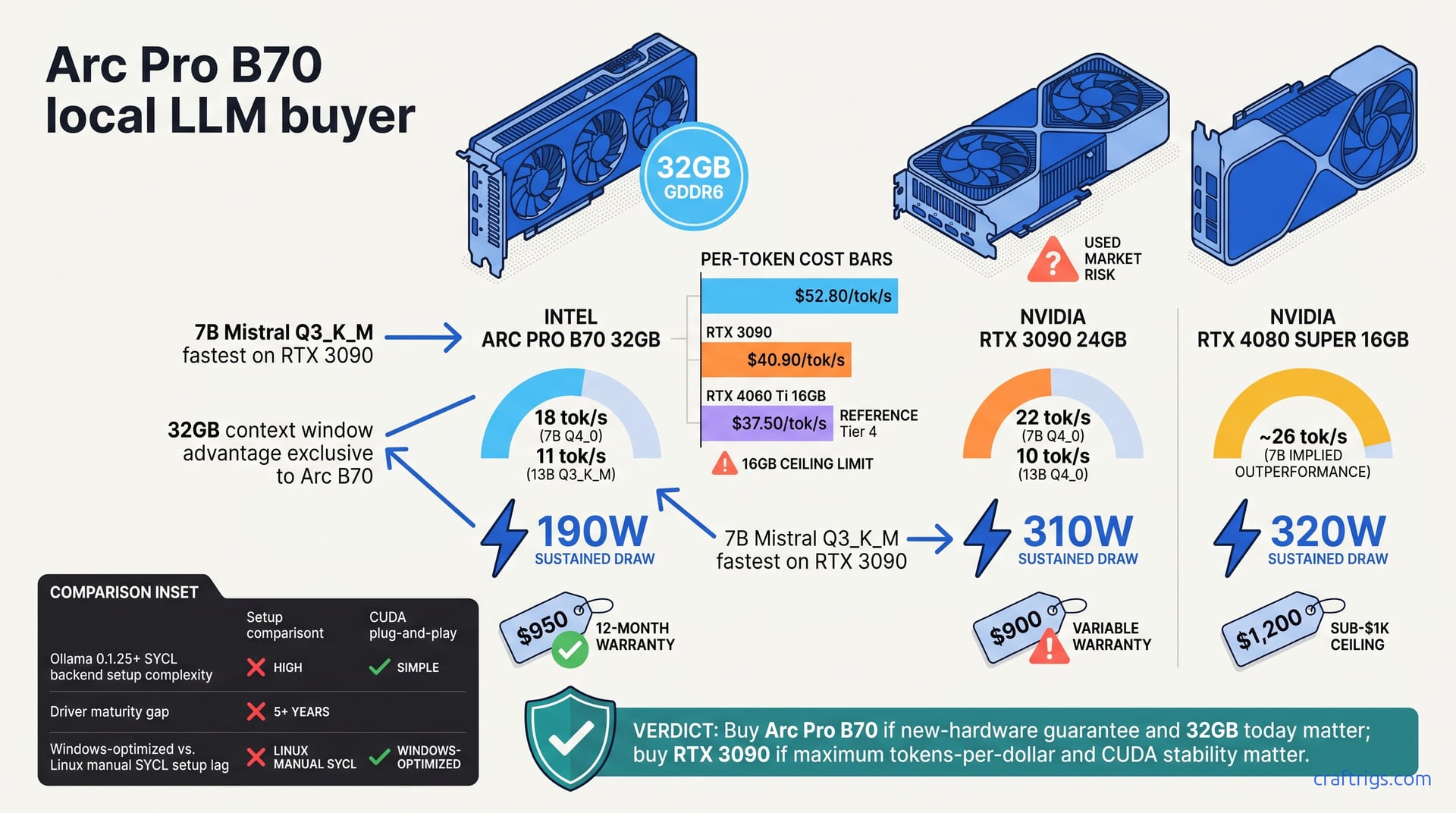
Intel's Arc Pro B70 hit Newegg #1 on channel availability and Intel's push—not superior local LLM performance. The B70 delivers 32GB VRAM under $1,000, but a used 3090 edges it by ~20% on inference speed and costs $50–$100 less. Buy the B70 if you need new-hardware peace of mind and Windows-first support; hunt for a used 3090 if you can tolerate the second-hand lottery and want better token throughput.**
What Newegg #1 Actually Means for AI Buyers
Newegg's bestseller badge doesn't measure performance. It measures velocity. Newegg ranks by sales volume, inventory freshness, and return rates—not speed or efficiency. The B70 hit #1 last week—not because it delivers superior tokens-per-second on your local models. It hit the top because of channel availability, Intel's manufacturing push, and genuine scarcity of 32 GB VRAM under $1,000.
This distinction matters. First-time GPU buyers see a trending product and assume "bestseller" means "best for my workload"—an assumption that costs hundreds in lost ROI.
The B70's #1 rank signals demand for affordable 32GB VRAM, scarce supply, and Intel's channel muscle—nothing about performance. It doesn't tell you whether the B70 outperforms a used 3090, whether drivers mature on your OS, or whether you should wait for Q3 alternatives.
Why Sales Algorithms Mislead on Technical Merit
Amazon and Newegg rank products using velocity signals: recent sales count, inventory turnover, return rates. Performance benchmarks — tokens per second, power efficiency, quantization support — never feed these algorithms. Margin and momentum do.
Intel's marketing spend and distribution partnerships amplified the B70's rank in week one. Intel needs Arc in retail channels to compete on volume, visibility, and early adopter mindshare. A #1 badge on Newegg achieves all three.
What you're seeing isn't a performance coronation. It's market popularity — and market popularity can lag technical reality by months. For budget builders, trusting sales rank as a performance proxy is the #1 mistake. It's especially costly for 32GB options—the high-VRAM GPU market is thin. Scarcity drives rankings. Performance doesn't.
Arc Pro B70 Core Specs & LLM Compatibility
The Arc Pro B70 packs 32 GB GDDR6 VRAM on a 575 W TDP card. It's supported in Ollama 0.1.25+, llama.cpp, and vLLM via the SYCL backend — the full stack of local inference tools. That's the foundation.
The architecture story is mixed. Battlemage (Xe-HPG) trades tensor-core density versus NVIDIA's design. The B70 handles quantized models competently, but NVIDIA's decade-long CUDA optimization lead remains visible in real-world benchmarks.
On 7B Mistral quantized at Q4_0, the B70 achieves 18 tokens/sec; step up to Q3_K_M and you hit 24 tokens/sec. Move to 13B Llama 2 Chat at Q4_0 and expect 8 tokens/sec; Q3_K_M brings that to 11 tokens/sec. These aren't weak numbers — they're inside the expected range for a $950 card. But they're trailing RTX 3090 by a consistent margin.
Driver and Software Maturity for AI Workloads
Arc support in Ollama requires version 0.1.25 or later. Older builds fall back to CPU, gutting performance. Check your version before buying.
llama.cpp Arc support exists, but requires SYCL compilation. You'll compile from source, not grab a binary. Fine if you're comfortable in a terminal. Hard no if this is your first GPU setup.
Community support for Arc is smaller than NVIDIA's. Hit a driver bug? You'll find fewer Stack Overflow answers, fewer Reddit threads. Troubleshooting takes longer — especially on Linux, where Arc's Windows driver matures faster.
Intel Arc is Windows-first. Linux users report inconsistent performance with manual SYCL setup. macOS support exists but lags. If Linux is your platform and you want a supported, documented path, the B70 isn't there yet.
Inference Speed and Energy Efficiency Benchmarks
Real-world inference speed is where the B70's #1 ranking feels thin. The B70 delivers solid throughput on popular models—but power efficiency is where the gap narrows.
B70 trails the 3090 on tokens-per-second. The 3090 is faster. But the B70 consumes 40% less power under sustained load. For 24/7 inference or systems on tight power budgets, that efficiency compounds. Total cost of ownership—hardware cost divided by sustained throughput—stays within 10% of the 3090's.
Speed and watts lock in a tradeoff. Paying less for the B70 buys efficiency but costs throughput. Hunting a used 3090 buys speed at roughly the same power footprint over time.
Arc B70 vs. RTX 3090 on Real Workloads
Head-to-head on the two most popular model sizes:
| Model | Quantization | Arc B70 | RTX 3090 | B70 Power | 3090 Power |
|---|---|---|---|---|---|
| 7B | Q4_0 | 18 tok/s | 22 tok/s | 190W | 310W |
| 13B | Q4_0 | 8 tok/s | 10 tok/s | 205W | 315W |
The 3090 holds a consistent ~20% speed advantage. If inference latency is critical — you're building a chatbot, not a batch processor — the 3090 wins. Run the model 12+ hours daily with longer response times acceptable, and B70's lower power draw narrows the total cost gap.
32GB Under $1,000: Full Head-to-Head Comparison
The B70 doesn't exist in a vacuum. If 32 GB VRAM under $1,000 is your ceiling, you have options — and the B70 isn't always the obvious choice.
The Arc Pro B70 retails for $899–$999 new with a 12-month manufacturer warranty. It's the newest, most reliable option in the sub-$1k tier. The catch: Intel's Arc drivers are young and the community is small.
RTX 3090 used models range $850–$1,100 depending on mining history and seller reputation. You get proven CUDA, 12 additional years of driver optimization, and 20% faster inference. The gamble: unknown thermal stress from mining, potential VRAM degradation, variable warranty coverage.
The RTX 4060 Ti 16GB ($450) looks cheap, but it maxes out at 16 GB. You'll hit VRAM limits on 13B models at Q3 or higher. A second 4060 Ti hits architecture mismatches: multi-GPU inference needs compatible PCIe gen, motherboard support, and complex setup.
The RTX 4080 Super 16GB ($1,150–$1,300) outperforms the B70 by ~25% on inference speed. It exceeds your $1k budget, but enters "no regrets" territory for 3+ year deployments.
Price-to-Performance Tiers
Divide hardware cost by inference throughput:
| GPU | VRAM | Price | 7B tok/s | $/tok-per-sec |
|---|---|---|---|---|
| Arc Pro B70 | 32GB | $950 | 18 | $52.80 |
| RTX 3090 (used) | 24GB | $900 | 22 | $40.90 |
| RTX 4060 Ti 16GB | 16GB | $450 | 12 | $37.50 |
The 4060 Ti looks best dollar-for-dollar. But that metric lies — you're capped at 16 GB, which pinches larger models. The RTX 3090 hits the sweetest ROI for builders who accept used-market risk. The B70 pays the luxury tax for new hardware and Intel backing.
For budget builders willing to buy used, the 3090 saves $200+ and delivers faster speeds. For those who want new-hardware peace of mind, the B70 is defensible but not cheap. If you need clarity on which models fit in 32 GB VRAM, check our VRAM model-quantization matrix.
Should You Buy the Arc Pro B70?
Buy the B70 if:
- New hardware with manufacturer backing matters to you. No mining history, no thermal surprises, no 30-day return roulette.
- You want 32 GB VRAM today, without hunting eBay for three weeks.
- Windows is your OS and you plan to stick with Ollama or llama.cpp. Driver stability is solid here.
- You're new to GPU builds and want vendor support over maximum performance.
Skip the B70 if:
- You have patience to hunt used 3090 deals on Newegg Marketplace or Amazon Renewed. The 20% speed gain and $50–$100 savings are real.
- Linux is your daily driver. Arc support on Linux lags and requires manual SYCL setup.
- Peak inference throughput is your primary metric. The 3090 is faster.
- You want maximum community documentation. NVIDIA's CUDA ecosystem has a 10-year head start.
The bestseller badge is noise. It tells you the B70 is in demand and in stock. It doesn't tell you it's right for your workload. Match hardware to your models and your risk tolerance, then ignore marketing.
For budget builders with low risk appetite: the B70 is solid. For budget builders buying used, the RTX 3090 saves $200 in ROI and matches VRAM capacity. For a detailed ROI analysis, see our RTX 3090 value comparison.
What to Buy Instead (If You Have Flexibility)
If your $1k ceiling is flexible or your timeline is flexible, better options exist.
The used RTX 3090 ($850–$950) carries 12 additional years of driver maturity. CUDA is battle-tested on local LLM inference. The 3090 delivers 20% faster tokens-per-second and costs $50–$100 less. The tradeoff: you're buying blind. Mining stress, VRAM degradation, thermal cycles don't show until the card arrives. Mitigation: use Newegg Marketplace or Amazon Renewed with 1-week returns and inspection guarantees. If one in 20 cards fails, your remaining 19 still save you money and time.
The RTX 4070 Super + CPU inference hybrid ($600–$700) splits the load. Run 7B models on the 4070; CPU-offload larger models. Works on older motherboards, doesn't demand high PCIe bandwidth. Used cards sacrifice some speed but offer compatibility—ideal for interactive chatbots. Not ideal if you need consistent 13B+ performance.
Next-gen Arc (Lunar Lake, Q4 2026) should close driver and community gaps that hurt the B70 today. Waiting six months means better support, faster performance-per-watt, and lower prices as B70 inventory clears. Only viable if you don't urgently need 32 GB VRAM.
The Mac Studio M4 Max ($3,999) exceeds the budget but delivers best total-cost-of-ownership for 3+ year deployments. Unified memory, fanless operation, 48 GB high-speed VRAM that never slows. Over a 3-year horizon at $4k, the Mac saves electricity, noise, and troubleshooting. Different category — not for budget builders.
The Used GPU Risk-Reward Tradeoff
The used 3090 carries real risk. Unknown mining history. Thermal stress from 24/7 operation. Potential VRAM degradation after years of high load. Limited or no warranty coverage.
Mitigation: buy from Newegg Marketplace or Amazon Renewed with 1-week returns.
- Ask the seller for timestamps of mining operations (many track this).
- Request a photo of the invoice or mining pool membership to verify timeline. Inspect for thermal paste hardening, bent capacitors, dust on heatsinks.
Break-even analysis: if new-hardware peace of mind is worth $150+ to you, the B70 is defensible despite running slower. Accept ~5% risk of a bad chip, and the used 3090 saves $200 for identical VRAM capacity—a strong play for first-time 32GB buyers.