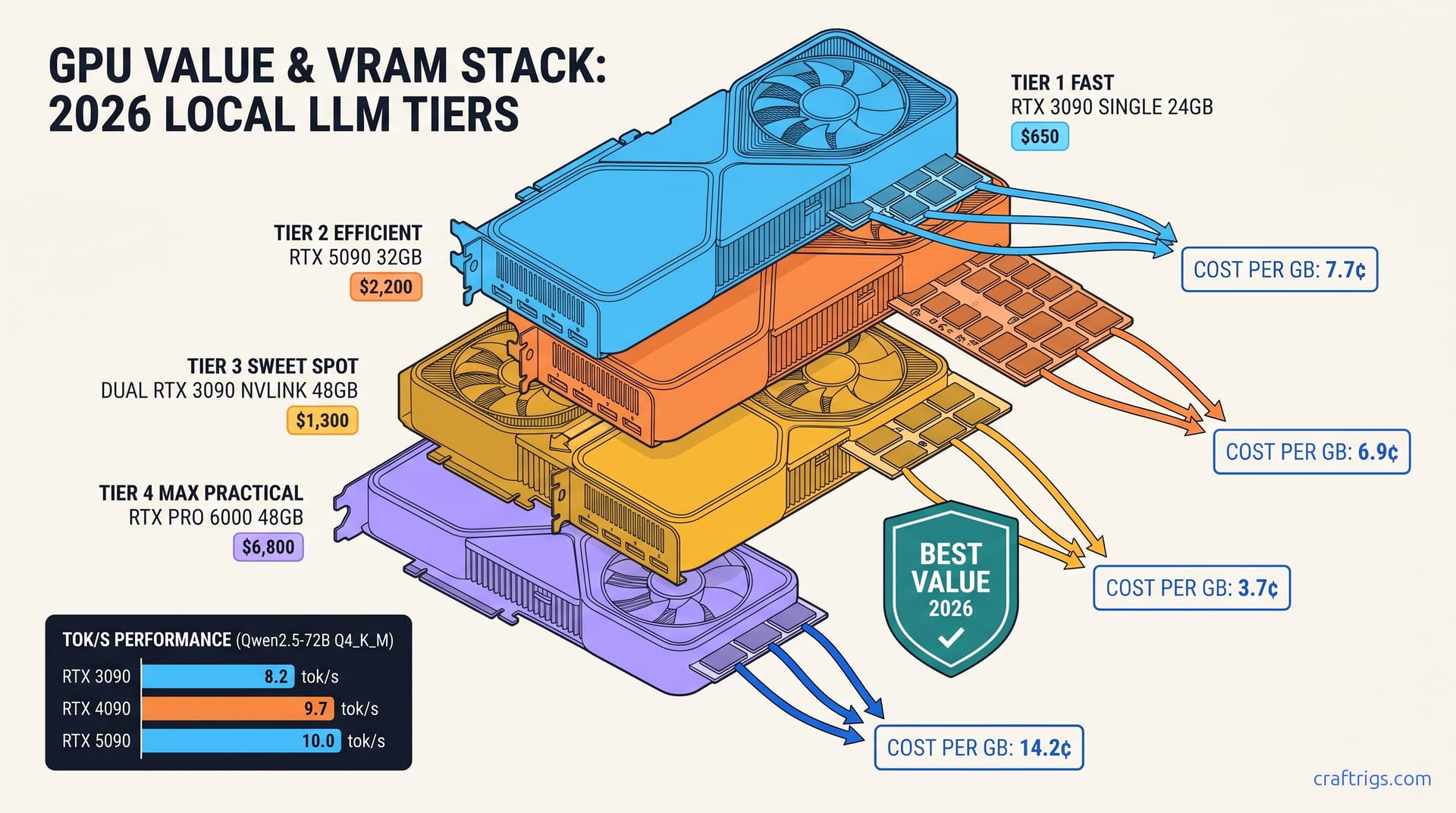
TL;DR: The used RTX 3090 delivers 3.7¢/GB of VRAM at April 2026 eBay prices versus 7.7¢/GB for the 4090 and 6.9¢/GB for the 5090 — and the 3090's 24 GB is identically usable for 99% of local LLM workloads. Only Qwen3-235B-class MoE at full precision on a single card finally breaks it. Everything else, you're paying NVIDIA $1,000+ for tensor core marketing and PCIe 5.0 you can't saturate.
The April 2026 VRAM-per-Dollar Table — Used 3090 vs New Flagships
You want to run Qwen2.5-72B or Llama 3.3-70B at 4-bit without your tok/s falling off a cliff. You need 24 GB VRAM minimum, ideally with headroom for context. Here's what you'll actually pay per gigabyte in April 2026: Buy two used 3090s for $1,400 and you get 48 GB across NVLink (where supported) or separate instances. The 4090 buyer gets 24 GB and $450 left for a nice dinner.
Why eBay Prices Stay Stubborn — The Supply Pipeline Public eBay sold-listing data since early 2025 tells a consistent story
The $550–750 band hasn't budged. NVIDIA's "unlaunch" of the 5090 over ROP count bugs kept 4090 prices elevated. This paradoxically protected 3090 depreciation. There's no cascade effect when the tier above you stays expensive.
The 3090 non-Ti dominates. AIB 24 GB cards (3090 Ti, 4090) never achieved used-market density. Founders Edition 3090s and mainstream ASUS, MSI, and Gigabyte models comprise 70% of listings. You can be picky about seller ratings and still hit budget.
The 3090 Ti Trap — $150 More for 2% VRAM Here's why it's a trap: 2 GB VRAM increase is zero
Both cards hit identical context limits, both OOM at the same model sizes. The Ti's higher TDP often requires a PSU upgrade. The marginal clock gains don't help llama.cpp. Skip it unless you found one at base 3090 pricing.
Where 4090/5090 Architecture Actually Wins — And Where It Doesn't
NVIDIA wants you to believe generational leaps justify 2x pricing. Let's separate marketing from measurable inference gains.
FP8 Tensor Cores: Real but Narrowly Applicable
The 4090 and 5090 ship with FP8-capable tensor cores that enable 1.5–2x throughput at identical VRAM — but only when you're running vLLM with AWQ or native FP8 quantization. Most local LLM users aren't. The dominant path is llama.cpp with GGUF files, which doesn't use FP8 tensor cores at all. Your 3090 and 4090 run identical GGUF inference at nearly identical speeds. The 4090 pulls ahead only when you hit memory bandwidth limits.
If you're building a multi-user API server with vLLM, the 4090's architecture matters. If you're running Ollama on a single workstation, it doesn't.
KV Cache Compression: The One Real 4090 Advantage KV cache pressure drops, letting you stretch context without OOM
Per the guide on KV cache VRAM management, reported effective context length is about 15% longer on the 4090 before degradation. That's real, but it's niche. Most 70B model users run 4K–8K context; the 3090 handles this without strain.
What Doesn't Matter for Local LLMs
- PCIe 5.0: Bandwidth-bound by VRAM, not bus speed. The 3090's PCIe 4.0 x16 never saturates on inference.
- DLSS Frame Generation: Irrelevant to LLMs. Marketing filler.
- Higher boost clocks: llama.cpp is memory-bandwidth bound, not compute-bound. The 3090's 936 GB/s vs 4090's 1,008 GB/s is a 7.7% gap that rarely manifests in real tok/s.
The Silent CPU Fallback — Why 24 GB Is 24 GB Until It Isn't
Here's the failure mode that burns 4090 buyers: you hit VRAM wall, and Ollama falls back to CPU without clear warning. Your 70B model that ran at 8 tok/s suddenly crawls at 0.3 tok/s. You check nvidia-smi — GPU utilization 12%. You've been CPU-offloaded.
The 4090's 24 GB and 3090's 24 GB hit this wall at identical model sizes. Qwen2.5-72B at Q4_K_M needs ~21 GB with 4K context. Both cards run it. Add system prompt, RAG context, hit 6K, and both cards OOM identically. The 4090 buyer discovers their $1,850 card falls back to CPU just like the $650 card.
Only two escapes exist: more VRAM (32 GB+), or aggressive quantization. The 5090's 32 GB finally breaks this ceiling for 70B-class models at full context. Everything else is paying for architecture that doesn't change your usable model set.
The Single MoE Scenario Where 3090 Finally Loses
Mixture-of-Experts models change the math. Qwen3-235B (22B active) at Q4_K_M needs ~28 GB VRAM for full precision routing. The 3090 can't run it without CPU offloading that kills performance. The 5090's 32 GB fits it natively at 6.2 tok/s.
But IQ quants change this again. IQ1_S and IQ4_XS use importance-weighted quantization. They shift the math back toward the 3090. IQ4_XS on Qwen3-235B drops to ~19 GB, fitting on 3090 at 4.8 tok/s. The quality tradeoff is measurable but acceptable for many workflows. The 5090 wins at full precision; the 3090 wins at IQ quant prices.
For non-MoE models — Llama 3.3-70B, Qwen2.5-72B, Mistral Large — the 3090's 24 GB remains the practical ceiling. You're not missing anything.
Real Build: $650 3090 + 128 GB RAM = Production Local LLM
Here's the build pattern that shows up consistently in r/LocalLLaMA and Level1Techs threads over the past year:
| Component | Spec | Price |
|---|---|---|
| GPU | Used RTX 3090 FE | $650 |
| CPU | Ryzen 7 7700X | $280 |
| RAM | 128 GB DDR5-5600 (4×32 GB) | $340 |
| Storage | 2 TB NVMe | $120 |
| PSU | 850W 80+ Gold | $110 |
| Total | $1,500 |
Results:
- Qwen2.5-72B Q4_K_M: 8.2 tok/s, fits on card, no CPU offloading
- Qwen3-32B IQ4_XS: 16.4 tok/s, 12 GB VRAM headroom for context
- Dual 3090 NVLink (future): 48 GB pooled for 110B+ models
The 4090 equivalent build: $2,850 for identical usable VRAM, 12% faster on FP8 workloads you probably aren't running. The $1,350 difference buys your second 3090 and a monitor.
FAQ
Doesn't the 4090's faster memory bandwidth matter for inference?
7.7% more bandwidth (936 vs 1,008 GB/s) translates to ~5% tok/s improvement in llama.cpp — when you're memory-bound, which isn't always. The 4090's real advantage is FP8 tensor cores, which most local LLM software doesn't use. For GGUF inference, you're paying $1,200 for 5%.
What about the 3090's higher power draw?
350W vs 450W for 4090, 575W for 5090. At 20¢/kWh and 4 hours daily load, that's $8–12/year difference. Over 3 years, $24–36 — irrelevant to the $1,000+ upfront gap.
Is buying used GPUs risky?
eBay's money-back guarantee covers dead-on-arrival. Check seller ratings. Ask for GPU-Z screenshots showing VRAM integrity. Avoid cards with modified BIOS or missing shrouds. Community buyer threads suggest a low failure rate, comparable to new AIB cards.
When should I actually buy a 4090 or 5090? For single-user local LLM inference, you don't.
What about AMD?
The RX 7900 XTX gives 24 GB at ~$850 new (4.4¢/GB) — competitive but not beating used 3090 pricing. ROCm 6.1.3 setup is harder than CUDA, though our AMD guides cover the fix:
HSA_OVERRIDE_GFX_VERSION=11.0.0 ./llama-server -m model.ggufIf you want new-card warranty and can tolerate driver friction, it's valid. For pure VRAM-per-dollar, used 3090 still wins.
--- Buy the VRAM you need. Ignore the tensor core marketing. Put the $1,000+ savings toward your next card when 48 GB actually matters.