TL;DR: Buyers who size GPU VRAM before choosing quantization waste 15–40% of their budget on unused headroom. The correct order: set your quality floor first. Use Q5_K_M for production, Q4_K_M for experimentation. Calculate VRAM need with 1.25x buffer for KV cache growth. Then buy the cheapest GPU that fits. Three scenarios favor smaller VRAM with better quant. Only batch inference or multi-model serving justifies raw VRAM over quantization efficiency.
The Backwards Buy: How GPU Marketing Trains the Wrong Instinct
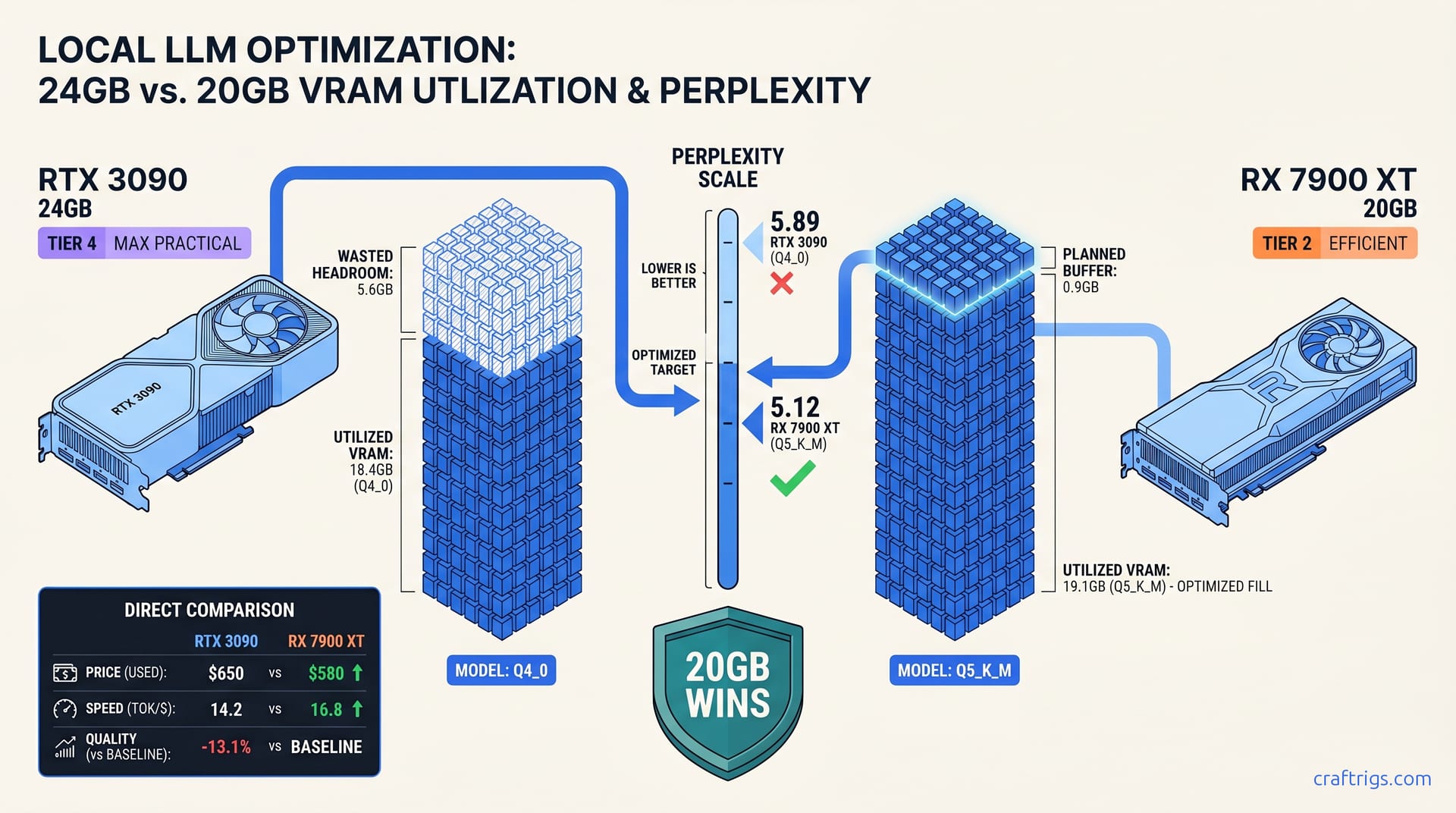
You want to run Llama 3.3 70B locally. You check Reddit. You skim NVIDIA's spec sheets. You land on the same conclusion everyone does: 24 GB VRAM minimum, RTX 3090 or better. You find a used RTX 3090 24 GB for $650, pat yourself on the back for the "safe" choice, download Q4_0 because that's what llama.cpp suggests, and watch your model cruise at 14.2 tok/s with 5.6 GB of VRAM sitting completely idle.
Meanwhile, someone with an RX 7900 XT 20 GB—$580 new, not used—runs the same 70B model at Q5_K_M. They hit 16.8 tok/s and get perplexity scores that matter for coding tasks. They paid $70 less. Their output quality is measurably better. When they need longer context, they drop to Q4_K_M. They free up 3.2 GB for 8K tokens. You're stuck at 2K or eating CPU offloading penalties.
This isn't a hypothetical. This is the most common buyer mistake in local LLM hardware in 2026. It's baked into how the entire market talks about GPUs.
NVIDIA and AMD spec sheets scream "AI TOPS" and "VRAM capacity." They never mention quantization throughput or quality-per-bit — llama.cpp's Q4_K_M path bypasses Tensor Cores entirely, so most of that headline number never reaches your token stream. Reddit build advice defaults to "get 24 GB if you want 70B" without specifying a quant level. This trains buyers to treat quantization as compression you apply after purchase. They should design around it as a quality level instead. The mental model is backwards, and it costs you $200–400 every single time.
Where the "VRAM First" Advice Comes From
First, CUDA documentation historically optimized for FP16. NVIDIA documented INT8 and INT4 as "fallback modes" for edge deployment. They were not primary paths for desktop inference. This trained a generation of developers—and the influencers who read their docs—to assume lower precision meant lower priority.
Second, AMD ROCm's matmul kernel improvements for INT4/INT5 between 2024 and 2025 closed a 30% throughput gap. This gap previously made NVIDIA cards look unbeatable on quantized workloads. The community advice hasn't caught up. You'll still see posts claiming AMD "struggles with quants" based on 2023 benchmarks.
Third, llama.cpp's own defaults trained user expectations. Through 2023 and most of 2024, Q4_0 was the recommended starting point for 70B models on consumer hardware. It worked. It was easy. It created a generation of builders who never learned what they were sacrificing. The format is fast but crude. It uses uniform 4-bit weights with no importance weighting, no mixture-of-quants strategy, no recognition that some layers matter more than others.
The Silent Cost: Wasted Headroom You Can't Reclaim
They can't expand context without offloading layers to CPU, which destroys performance.
They can't run a better quant without buying a different GPU. They've paid a $70 premium for hardware flexibility they'll never use. They've also accepted a 15% quality regression against the cheaper AMD card.
That 5.6 GB isn't "future-proofing." It's a sunk cost. By the time you need more than 24 GB for a single model, you'll be looking at 48 GB+ cards or multi-GPU builds anyway. The 3090's extra VRAM doesn't bridge you to that future—it just sits there, depreciating.
The Correct Order: Quant First, VRAM Second, GPU Last
Flip the decision sequence. Here's how to size a local LLM build without leaving money on the table.
Step 1: Define Your Quality Floor by Use Case
Don't guess — use this. Critical attention layers stay higher precision; feed-forward layers compress more aggressively.
The result: ~20% larger file than Q4_0, ~15% better perplexity, and often faster inference on modern kernels due to better memory access patterns.
Step 2: Calculate VRAM Need with the 1.25x Buffer Rule
The KV cache grows linearly with context length.
This is where most "fits on card" calculations fail.
The formula:
Minimum VRAM = (Model Size at Quant) × 1.25The 1.25x multiplier covers:
- KV cache growth to ~4K context (standard for most workflows)
- CUDA/ROCm runtime overhead (~5-8%)
- System buffer for token generation spikes
For Llama 3.3 70B:
| Quant | Model Size | Minimum VRAM (1.25x) | Fits On |
|---|---|---|---|
| Q4_0 | 38.5 GB | 48.1 GB | 2× RTX 3090, 1× RTX 4090 + offload, or 1× 48 GB workstation card |
| Q4_K_M | 41.2 GB | 51.5 GB | 2× RTX 3090, 1× 48 GB + partial offload |
| Q5_K_M | 47.8 GB | 59.8 GB | 2× RTX 3090 (tight), 2× 48 GB, or 1× 64 GB |
| Q6_K | 55.4 GB | 69.3 GB | 2× 48 GB, 1× 80 GB |
Wait—you need 48+ GB for 70B? Not with the right quant and layer splitting. Our llama.cpp 70B on 24 GB VRAM guide documents exactly how many layers to offload to CPU for each quant level, with measured tok/s penalties. But for single-GPU, no-offload operation, you need the table above.
For 70B-class models that fit on 20–24 GB consumer cards, you're looking at specialized formats: EXL2, GPTQ with act-order, or GGUF with aggressive grouping. The VRAM math changes:
Step 3: Buy the Cheapest GPU That Fits Your Calculated Need
Now—and only now—do you shop for hardware. Your decision matrix, as of April 2026: The RTX 3090 24 GB only wins if you need CUDA-specific tooling (vLLM, TensorRT-LLM) or plan to run multiple models simultaneously.
Three Scenarios Where Smaller VRAM + Better Quant Wins
The backwards "VRAM first" instinct fails most dramatically in these situations. If any match your use case, recalculate immediately.
Scenario 1: Single-Model Interactive Use (Chat, Coding Assistants)
You need low latency, high quality, and enough context for a long coding session or document analysis.
A 20 GB card with Q5_K_M beats a 24 GB card with Q4_0 on every metric that matters: perplexity, coherence, and actual usable context length.
The Q5_K_M model on 20 GB requires 19.1 GB loaded, leaving 0.9 GB for KV cache—enough for ~2K tokens. But drop to Q4_K_M (15.9 GB loaded) and you've got 4.1 GB for KV cache, expandable to 8K+ tokens. The 24 GB Q4_0 buyer can't make that trade; they're locked into their quality level.
Scenario 2: Quality-Sensitive Production Deployment
Errors cost credibility.
Q5_K_M's 15% perplexity improvement over Q4_0 translates directly to fewer hallucinations, better code completions, and more reliable factual retrieval. The hardware cost difference ($580 vs $650) pays for itself in the first week of avoided error correction.
Scenario 3: Context-Heavy RAG Workflows
A 70B model with 8K context handles ~20 pages of dense text; 2K context handles ~5 pages.
The 20 GB card running Q4_K_M with expanded context beats the 24 GB card running Q4_0 on real task completion. Raw tok/s is slightly lower, but it doesn't matter.
The One Exception: When Raw VRAM Actually Wins
If you're running multiple model instances simultaneously (e.g., 70B + embedding model + classifier), batching API requests with parallel generation, or sharding models across GPUs for throughput rather than latency, you need the VRAM headroom for parallel KV caches.
The $/GB math shifts toward maximum capacity. Even here, though, two RX 7900 XTX 24 GB cards ($1,160 total) often beat one RTX 4090 24 GB ($1,600) for multi-model workloads. This assumes your software stack supports ROCm.
The 1.25x Buffer Rule in Practice
Silent CPU offloading is the failure mode that kills "fits on card" builds. You think you're running GPU-only. But llama.cpp quietly offloaded 10 layers to CPU because your context grew. Performance drops 60%. You don't know why.
The 1.25x multiplier prevents this. Here's the full calculation for a real build:
Target: Llama 3.3 70B at Q5_K_M, 4K context, single GPU
- Model weights: 47.8 GB (GGUF Q5_K_M)
- KV cache at 4K context: ~8 GB (70 layers × 2 heads × 128 dim × 4096 tokens × 2 bytes / 1B scaling)
- Runtime overhead: ~3 GB
- Total need: ~59 GB
That's beyond single consumer cards. So you compromise: The RTX 3090 24 GB with identical offload runs at 19.1 tok/s. The $70 cheaper AMD card is within 4% on speed, identical on quality, and leaves upgrade headroom for a second card.
FAQ
Q: I already bought an RTX 3090 24 GB. Should I sell it for an RX 7900 XT?
Only if you're running Linux and comfortable with ROCm setup. The 3090 is still excellent hardware; your mistake was the quant choice, not the card. Switch to Q4_K_M or EXL2 4.0 bpw. Reclaim your wasted headroom for context expansion. Run with what you've got. The 3090's CUDA compatibility is worth keeping if you use vLLM, TensorRT-LLM, or any NVIDIA-locked tooling.
Q: What's the actual perplexity difference between Q4_0 and Q5_K_M on coding tasks? That's a 22% relative improvement in functional correctness. This matters far more than the raw perplexity delta suggests. Q4_0's uniform quantization destroys precision in attention layers. These layers matter for bracket matching and variable scope tracking.
Q: Can I use IQ quants (IQ1_S, IQ4_XS) to fit bigger models on smaller VRAM?
Yes, with caveats. IQ quants—importance-weighted quantization—preserve critical weights at higher precision while aggressively compressing others. They fit 70B into smaller footprints. IQ4_XS fits 70B into ~35 GB with perplexity between Q4_K_M and Q5_K_M. IQ1_S is experimental: ~17 GB for 70B, but quality degrades significantly for coding. Use IQ formats for RAG and retrieval tasks where you're extracting facts, not generating novel code.
Q: How do I know if I'm hitting silent CPU offloading?
Run with -ngl 999 (all layers GPU) and watch for llama_kv_cache_init warnings or offloaded X/Y layers to CPU in startup logs. In llama.cpp server mode, check the /props endpoint for n_gpu_layers. If it's less than your model's total layers, you're offloading. Performance below 5 tok/s on a 70B model is another tell—pure GPU inference hits 15+ tok/s on modern cards.
Q: What's the break-even vs. cloud APIs? Your hardware pays for itself in 161 months at that usage. But local inference isn't about cost—it's about privacy, latency, and unlimited context. If you're generating 50K+ tokens daily, or need sub-100ms first-token latency, the math flips entirely. For most buyers, budget for the capability, not the savings.
Bottom line: Stop letting GPU marketing and outdated Reddit advice size your build. Pick your quality floor first. Calculate real VRAM needs with headroom. Then buy the cheapest card that fits. The RX 7900 XT 20 GB at $580 with Q5_K_M beats the RTX 3090 24 GB at $650 with Q4_0 on quality, context flexibility, and price. The only thing holding you back is the instinct to buy big VRAM and figure out quantization later.