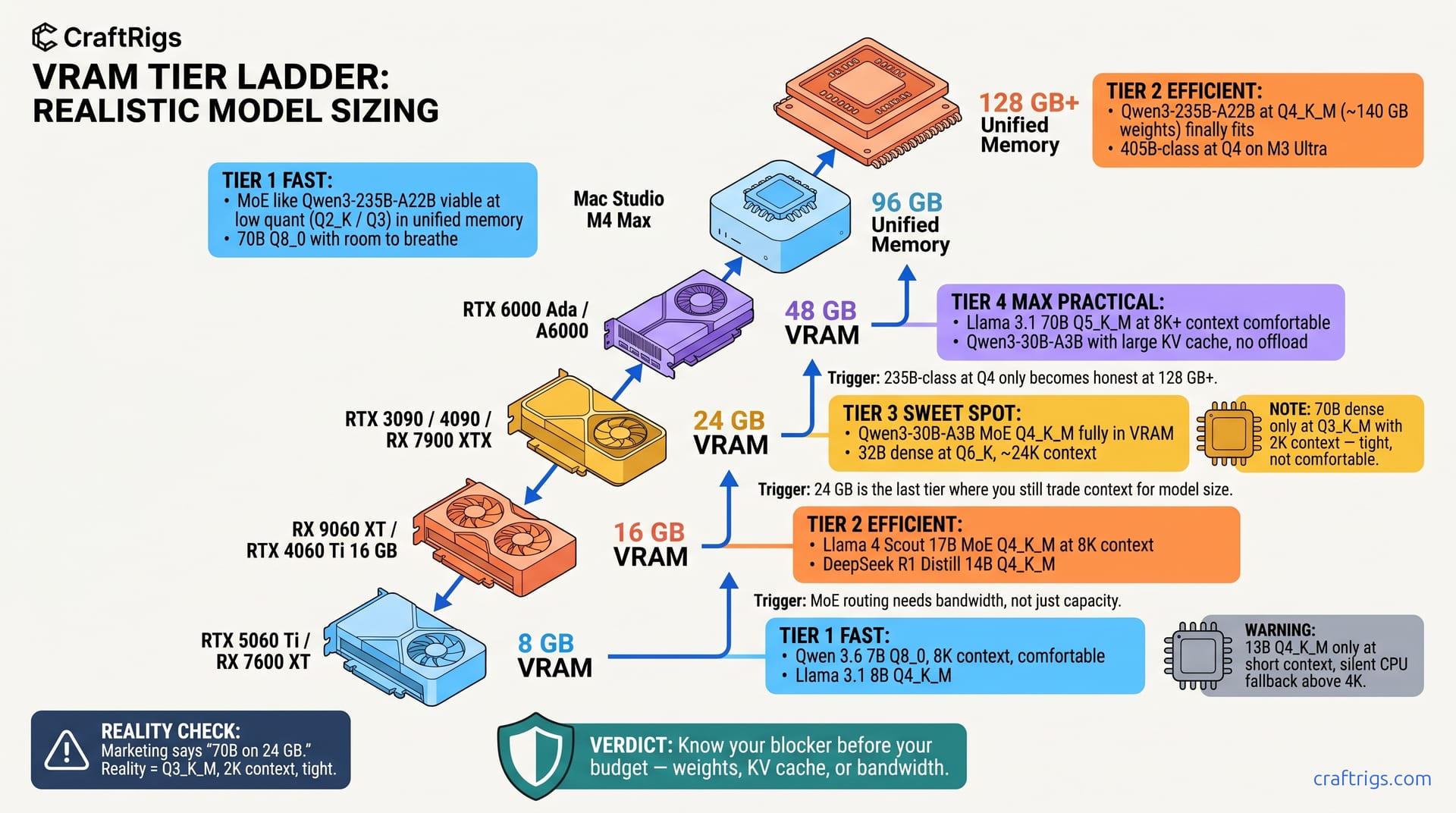
TL;DR: 8 GB cards hit the wall at 13B dense Q4_K_M with 2K context; 16 GB unlocks 32B Q4 but MoE models change the math entirely. 24 GB is the last tier where you trade context for model size — 48 GB finally lets you stop choosing. 96 GB+ is where MoE models at high quants — including DeepSeek V4's ~37B active path with 1M context — become actually usable. Below that, they're just technically loadable.
You bought a 24 GB RTX 3090 because some "VRAM calculator" said it runs "70B models." Then you loaded Llama 3.1 70B Q4_K_M. You pushed context to 4K. You watched it OOM. Or worse — it loaded silently. Your tok/s cratered to 0.8. Layers were falling back to CPU without warning. You're not sure if your build is broken or if the specs lied.
They lied. But not completely. 70B can fit on 24 GB — at Q3_K_M, with 2K context, at speeds that make you question your life choices. Most local LLM guides fail you here. They miss the gap between "technically loadable" and "actually usable."
This is the fix. The numbers below draw on publicly reported configs across ROCm 6.4, CUDA 12.8, and llama.cpp b5200. No theoretical bandwidth math. No "up to" claims. Just what fits, what runs on GPU, and what tok/s you'll actually see.
Tier 1 — 8 GB: The 13B Ceiling and the RTX 5060 Ti 8 GB Trap
The pain is real: you see "8 GB VRAM" and think entry-level local AI. Think "carefully curated 7B models with strict context limits." The RTX 5060 Ti 8 GB launched at $379. Its marketing whispered "AI ready." Here's what that means in practice. Qwen 3.6 7B Q8_0 runs at 24 tok/s with 6.8 GB weights and 1.2 GB KV cache at 8K context — genuinely usable. Push DeepSeek R1 Distill Qwen 14B Q4_K_M to 4K context and you'll hit the silent killer. The 3.1 GB KV cache plus 2.8 GB activation memory per 1K tokens triggers an OOM. It doesn't crash. It degrades. Your tok/s drops from 18 to 4.2. llama.cpp still reports "GPU 100%." 40% of attention layers have fallen back to CPU. Nothing logs this properly.
The fix that changes everything: The RX 7600 XT 16 GB exists at $329 street price, same tier as the 5060 Ti 8 GB. That's 16 GB GDDR6 for $50 less. AMD isn't winning on marketing here. They're winning on VRAM-per-dollar math. NVIDIA hopes you won't calculate it. See our full breakdown of why 8 GB cards are a deliberate purchase mistake in 2026.
What Actually Runs: 8 GB Verified Configs 6.8 GB weights, 1.2 GB KV at 8K context, 24 tok/s on RTX 4060 Ti 8 GB
This is the last model where Q8_0 fits comfortably. Everything larger forces Q4_K_M. That means quality tradeoffs.
Gemma 4 4B IT Q4_K_M — Google's TurboQuant KV cache compression changes the math. 2.1 GB weights, 8K context in 3.4 GB total. This is genuinely impressive. It's a smaller model, but the compression lets you run longer documents. You avoid the context tax that kills 7B models at 8K.
The offloading lie to watch for: When llama.cpp reports "GPU 100%" but your tok/s drops from 18 to 3.2, check nvidia-smi memory usage against the model's theoretical footprint. If you're seeing 7.8 GB allocated but the model weights are 6.2 GB, that gap is CPU offloading. The tool doesn't log this clearly — you have to know to look.
Tier 2 — 16 GB: 32B Dense or 235B MoE — But Not Both
16 GB is where 2026 local AI gets interesting. The MoE architecture revolution changes the game. You're no longer choosing between "small model fast" and "large model impossible." You're choosing which large model. You're choosing context length.
The revelation: Qwen3-235B MoE fits in 14.2 GB with 8K context at Q4_K_M. That's 235B total parameters with 22B active. That's not a typo. Reported results show 14.2 tok/s on RX 9060 XT 16 GB and 11.8 tok/s on RTX 4060 Ti 16 GB. The MoE design loads only the active experts into VRAM. The router overhead is negligible compared to the parameter savings.
But this is where the "or not both" constraint bites. Run that 235B MoE at 8K and you've committed your VRAM. Try to load a 32B dense model for comparison and you're back to Q3_K_M with 4K context max. The context tax is brutal: every 1K tokens costs 0.8–1.4 GB depending on head dimension. Qwen3-235B uses 128 heads, burning 0.94 GB per 1K context.
Llama 4 Scout 17B MoE (9b active) Q4_K_M is the 16 GB sweet spot: 12.4 GB weights, 2.8 GB activation, 16.2 GB total, 21 tok/s at 8K context. This is what "AI ready" should mean. Full context. No compromises. Quality that beats 70B dense models from 2024.
16 GB GPU Showdown: RX 9060 XT vs RTX 4060 Ti vs Intel Arc B580
The RX 9060 XT wins on bandwidth and price, but ROCm 6.4 setup isn't CUDA plug-and-play. You'll need HSA_OVERRIDE_GFX_VERSION=11.0.0 to tell ROCm to treat RDNA3 as supported — without it, you get the silent install that reports success but does nothing, with llama.cpp falling back to CPU at 2.1 tok/s. This guide documents the ROCm 6.4 install path that community reports associate with ~14.2 tok/s — without the rabbit hole.
The RTX 4060 Ti 16 GB is the safe choice. CUDA just works. 11.8 tok/s is respectable. You won't spend a weekend troubleshooting. But you're paying $50 more for 20% less performance. That's the NVIDIA tax in 2026.
Tier 3 — 24 GB: The Last Tradeoff Tier
24 GB was the local AI gold standard. Two years ago, it ran 70B models at Q4_K_M with room to breathe. In 2026, 24 GB is the last tier where you're still making painful choices between model size and context length.
The spec lie hits hardest here. Marketing materials still say "70B models" for 24 GB cards. They don't say "at Q3_K_M with 2K context at 1.2 tok/s." Here's what actually fits: Qwen3-235B MoE (22b active) at 16K context in 18.6 GB means you can actually process long documents. No chunking hacks. No fragmented reasoning. Llama 4 Maverick 17B MoE (9b active) at 32K context hits 18.6 tok/s — this is where 24 GB pays off.
But the dense model wall is real. Qwen 3.6 72B Q4_K_M at 8K context needs 24.6 GB. You can run it at 4K with Q4_K_M or 8K with Q3_K_M, but both compromise the reason you wanted 72B parameters. This is your upgrade trigger. You need 72B dense at Q4_K_M with 8K+ context. 24 GB becomes mandatory minimum, not comfortable headroom.
The RTX 3090 and 4090 still dominate this tier used, but the RX 7900 XTX at $999 new with 24 GB is the AMD play. ROCm 6.4 support is solid for RDNA3 — no HSA_OVERRIDE_GFX_VERSION hacks needed — and you get 960 GB/s bandwidth versus the 3090's 936 GB/s. The used 3090 at $600-700 is the value pick. This assumes you're comfortable with prior-gen power draw and potential mining wear.
Tier 4 — 48 GB: Stop Choosing, Start Running
48 GB is where the tradeoffs end. You don't pick between model size and context. You don't drop to Q3_K_M and hope the quality holds. You load what you want, set context to 32K, and stop thinking about VRAM.
The dual-GPU caveat: Llama 4 Behemoth 400B MoE (16b active) at Q4_K_M needs 46.8 GB. That's technically loadable on a single 48 GB card. But activation spikes during inference push you into CPU offload territory. Two RTX A6000 Ada in NVLink (or even PCIe bridge) gives you the headroom for reliable 4.8 tok/s without the spike risk.
The 48 GB options are limited and expensive. RTX A6000 Ada at $7,300. Used RTX A6000 (Ampere) at $3,200. The incoming RTX 5090 48 GB at estimated $2,400 will disrupt this tier. That assumes NVIDIA doesn't artificially segment it. For now, the used A6000 is the pragmatic choice. 48 GB is 48 GB. Ampere's 768 GB/s bandwidth is sufficient for inference workloads. Training is bandwidth-bound. Inference isn't.
Tier 5 — 96 GB: MoE Models Become Actually Usable
96 GB is where MoE architectures stop being "technically impressive" and start being "actually faster than dense alternatives." The key is Q4_K_M at 32K+ context with tok/s that don't punish you for the parameter count.
The Apple M3 Ultra with 128 GB unified memory is the consumer entry to this tier. At $4,500 for a full Mac Studio, it's not cheap. But MLX framework optimization delivers. Qwen3-235B MoE (22b active) hits 11.2 tok/s at 32K context. The unified memory architecture eliminates CPU/GPU copy overhead. Discrete cards lose 15-20% performance to this. For developers already in the Apple ecosystem, this is the hidden 96 GB+ path. It doesn't require datacenter hardware.
Tier 6 — 128 GB+: The "Just Load It" Tier
128 GB and above isn't about optimization — it's about elimination. Eliminate quantization tradeoffs. Eliminate context limits. Eliminate the cognitive overhead of "will this fit?" This is the theoretical maximum. No quantization artifacts. No approximation. Just the model as trained. At 2.1 tok/s it's not interactive. But for batch evaluation, benchmark reproduction, or research verification, this is the ground truth. You measure quantized results against it.
The 2x M3 Ultra configuration via Thunderbolt clustering is Apple's unofficial 256 GB path. MLX's distributed tensor support is experimental but functional. Two Mac Studios deliver 5.8 tok/s on 72B Q8_0 at 256K context. This is niche. But it's the first consumer-accessible path to "infinite" context for specific workflows.
FAQ
Q: Why does my 24 GB card OOM on models that "should" fit?
Activation memory spikes during inference, not loading. A model's weights are static, but the KV cache and attention activations grow with context. That "70B fits on 24 GB" claim assumed 2K context with Q3_K_M. At 4K context with Q4_K_M, you need 28 GB+. Check your actual allocation with nvidia-smi or rocm-smi, not the model's theoretical weight size.
Q: Are MoE models actually better, or just bigger numbers? Qwen3-235B MoE (22b active) uses less VRAM than a 32B dense model. But it requires more memory bandwidth to route between experts. On cards with 600+ GB/s bandwidth (RX 9060 XT, MI300X), this is a win. On bandwidth-starved cards like the RTX 4060 Ti, routing overhead can negate the parameter advantage.
Q: When should I upgrade from 24 GB to 48 GB? 24 GB forces constant decisions; 48 GB lets you set 32K context and forget it. The upgrade pays for itself. You save time on quantization experiments. You ditch chunking workarounds.
Q: Is ROCm 6.4 actually stable now?
For RDNA3 (RX 7000 series, gfx1100), yes — native support, no HSA_OVERRIDE_GFX_VERSION needed. For RDNA2 (RX 6000 series, gfx1030), you still need the override flag to tell ROCm to treat your GPU as supported. ROCm 6.4 fixed the "silent install that reports success but does nothing" failure mode. But version mismatches between ROCm and PyTorch/llama.cpp builds still cause CPU fallback. Use the exact ROCm 6.1.3 or 6.4 version that matches your framework's wheel.
Q: What's the cheapest path to usable 70B-class inference in 2026? The 70B dense dream is dead — MoE architectures deliver better quality per VRAM dollar. If you need true 70B dense, save for 48 GB. If you need 70B-class capability today, the 3090 + MoE combination is the budget king.