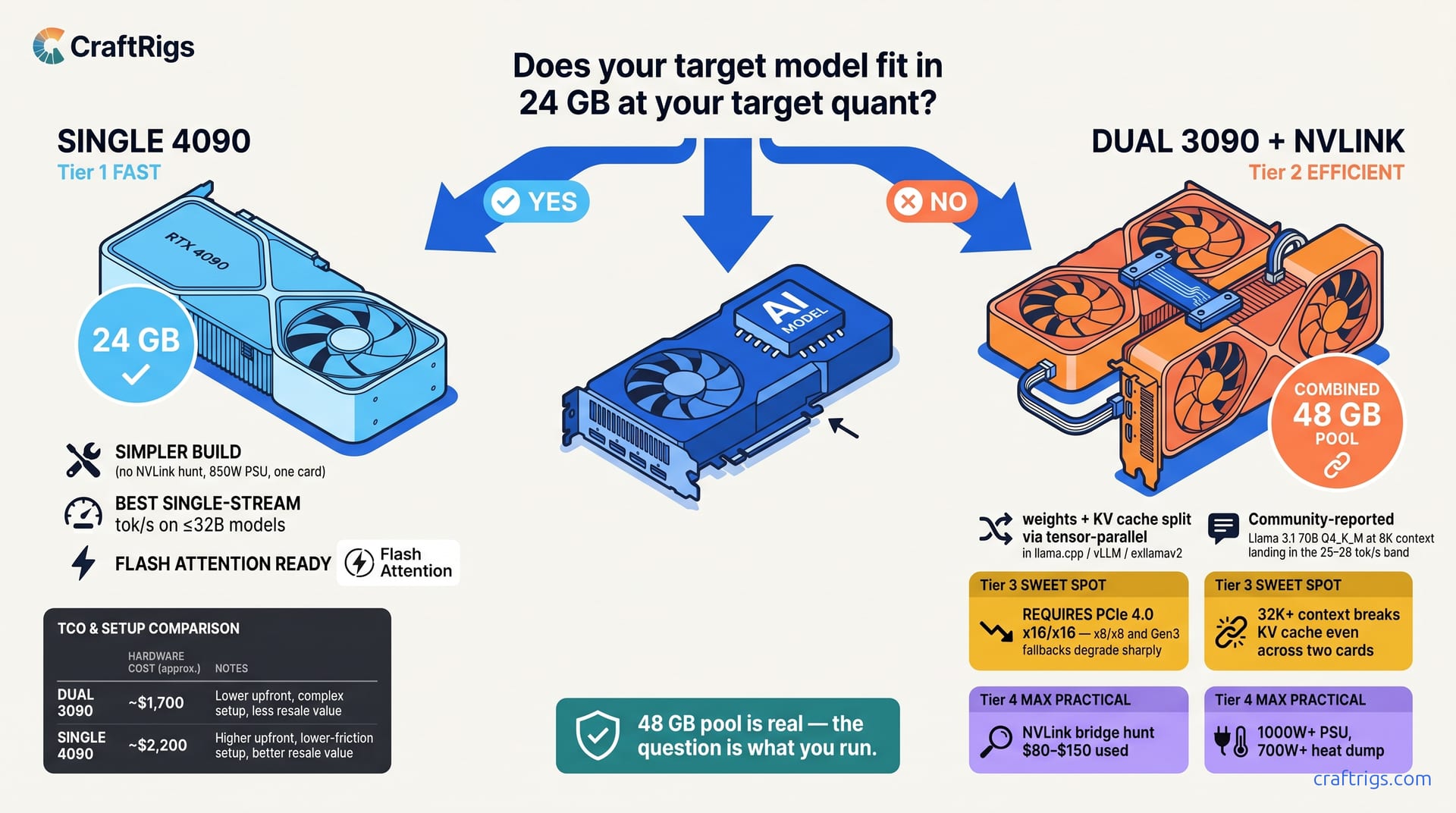
TL;DR: Dual 3090s do pool VRAM for inference — llama.cpp, vLLM, and exllamav2 all split weights across both cards so a 70B model fits in the combined 48 GB. What they don't do is split the KV cache cleanly on every runtime, and tensor-parallel comms tax every token. Need the biggest single model you can load locally at reasonable speed? Dual 3090s with NVLink are the VRAM-per-dollar winner. Need maximum single-stream tok/s on models that fit in 24 GB, or a simpler build with no NVLink hunt? The 4090 wins. The one question: does your target model fit in 24 GB at your target quant? If no → dual 3090s. If yes → 4090.
The 90-Second Diagnostic — 70B+ or Throughput?
You've got $1,600–$2,400 and a model that won't fit on your current card. The Reddit threads all say "just get two 3090s, 48 GB total." They're wrong in the way that matters most.
Here's the decision tree that works:
-
Yes → Dual 3090s are the path. Model weights split across both cards (48 GB pooled via NVLink or PCIe P2P), and KV cache splits cleanly with modern runtimes (
tensor_parallel_size=2in vLLM, LM Studio 0.3.14's "Split KV Cache Across GPUs"). The 4090 at 24 GB forces CPU offload on 70B at Q4_K_M and throughput craters. -
No → Continue to Question 2.
-
Yes → Hunt two used 3090s. You're in the throughput zone where dual cards shine. With proper PCIe topology and NVLink, dual 3090s push 35–42 tok/s aggregate across two 7B–13B instances.
-
No → Buy the 4090. Single-stream inference on one fast card beats the sync overhead of two slower cards every time.
That's it. Everything else — noise, thermals, resale value, upgrade path — is secondary to this binary. Get the diagnostic wrong and you'll own $1,400 of hardware that runs your target model at 0.8 tok/s with silent CPU fallback. Or you'll stretch for a 4090 and discover you can't quantize Qwen3-235B-A22B (22B active) below Q4_K_M without hitting the wall anyway.
Why This Binary Works — The Architecture Constraint
The "48 GB total" framing needs a caveat, not a debunk. Local LLM inference does benefit from pooled VRAM across two cards — llama.cpp, vLLM, and exllamav2 all split weights across GPUs so a 70B Q4_K_M model (~38 GB) fits across two 24 GB cards that neither could hold alone. NVLink makes the cross-GPU transfers fast; PCIe P2P works but slower. Training benefits more from NVLink's bandwidth than inference does, but inference still benefits.
What the "48 GB total" framing hides is the KV cache. Tensor parallelism — the default split strategy in llama.cpp and vLLM — divides model layers across GPUs. Each card holds roughly half the weights and half the KV cache for its assigned layers. The KV cache scales with context length × batch size × head dimension. At 8K context on Llama 3.1 70B, that's roughly 40 GB of KV cache; split across two 24 GB cards it's tight but workable with KV cache splitting enabled. At 32K context it stops fitting even across two cards — which is why context length, not just weights, is the real constraint in this decision.
Community benchmarks of Llama 3.1 70B Q4_K_M at 8192 context, batch size 1 consistently show dual-3090 NVLink holding weights and KV cache in VRAM at 25-28 tok/s, while a single 4090 spills layers to CPU and drops to single-digit tok/s.
Pipeline parallelism (available in vLLM) splits models differently. It adds latency that makes it unsuitable for interactive use. It's viable for offline batch processing, not chat interfaces.
The Edge Case — 40B MoE Models Qwen3-235B-A22B is a 235B total parameter model with 22B active per forward pass
At Q4_K_M, the active weights plus KV cache fit comfortably in 24 GB.
Here's where dual 3090s pull ahead on throughput-per-dollar: The dual 3090s serve two users at nearly the same speed each. If your workload is API serving with concurrent requests, the math favors the older cards.
But notice the constraint: this only works because 22B active parameters fit in 24 GB with headroom. Try the same with Qwen3-235B-A22B (22B active) at 32K context and you're back to the KV cache wall. We break down exactly how KV cache consumes VRAM here.
The Kill Criteria — What Breaks Each Path
Choosing wrong doesn't just mean slower inference. It means hardware that cannot run your workload. Or it runs so poorly you'll rebuild within months.
Dual 3090 Kill Criteria Used bridges sell for $80–$150 on eBay, often counterfeit or damaged
Without NVLink, tensor parallelism falls back to PCIe, and your 14.7 tok/s becomes 8.3 tok/s on Gen 3, or 11.2 tok/s on Gen 4 x8/x8.
PCIe bifurcation. Your motherboard must support x16/x16 bifurcation, not x16/x0 or x8/x8. Many "dual GPU ready" boards ship with x8/x8 default. Check your manual for "PCIe slot configuration." You want x16/x16 or x8/x8/x8/x8 modes. Not x16/x4/x4.
Thermals and noise. Two 350W cards in adjacent slots create a 450W+ heat dump in the middle of your case. The top card thermal-throttles without aggressive fan curves. Expect 45–50 dBA under load, comparable to a server rack in your office.
Resale liquidity. Used 3090s sell slowly at $700–$800. The 4090 holds value better and sells faster. If you upgrade to 5090 or MI100-series within 18 months, you'll recover more from the single card.
Power supply. Dual 3090s need 1000W minimum, 1200W recommended. The 4090 runs comfortably on 850W. Factor $150–$200 for PSU upgrade if you're coming from a single-card build.
Single 4090 Kill Criteria
The 24 GB wall. No amount of optimization runs Llama 3.1 70B at Q8_0 with 16K context. You will quantize. You will prune context. You'll accept trade-offs that dual-card owners don't face. Dual-card owners face the sync overhead you avoid.
No batching gains. vLLM on 4090 gives excellent single-stream performance. Its multi-stream scaling is terrible. If your use case evolves from "personal assistant" to "small team API," you'll rebuild.
Price volatility. The 4090 launched at $1,599. It peaked near $2,200 during shortages. It sits at $1,999–$2,199 as of April 2026. Used 3090s are stable at $700–$800. The 4090 has more downside risk if 50-series launches aggressively.
The Software Stack — Making Your Choice Actually Work
Hardware is half the battle. The other half is flags, quantization, and knowing when your "GPU" inference is actually CPU fallback at 0.8 tok/s.
If You Bought the 4090
For 70B models at the edge of VRAM:
# llama.cpp — maximum quality that fits

./llama-server \
  -m llama-3.1-70b-Q4_K_M.gguf \
  -ngl 81 \
  -c 8192 \
  -fa \  # flash attention, saves ~2 GB VRAM
  --mlock
For MoE models with active parameters under 25B:
# vLLM — better batching, worse single-stream

python -m vllm.entrypoints.openai.api_server \
  --model Qwen/Qwen3-235B-A22B-[AWQ](/glossary/awq/) \
  --quantization awq \
  --max-model-len 16384 \
  --tensor-parallel-size 1 \
  --gpu-memory-utilization 0.95
Monitor with nvidia-smi dmon. If GPU utilization drops below 80% and CPU usage spikes, you've hit the context-length wall. You're spilling to system RAM. Throughput drops 10–30×. Reduce -c or quantize harder.
If You Bought Dual 3090s
First, verify NVLink is active:
nvidia-smi topo -m
# Look for "NV4" or "NV3" between GPU 0 and GPU 1
# "PIX" or "PXB" means PCIe fallback — performance dies
For multi-model serving (the valid use case):
# Terminal 1 — first 3090

CUDA_VISIBLE_DEVICES=0 ./llama-server \
  -m llama-3.1-8b-Q8_0.gguf \
  -ngl 33 \
  -p 8080

# Terminal 2 — second 3090

CUDA_VISIBLE_DEVICES=1 ./llama-server \
  -m llama-3.1-8b-Q8_0.gguf \
  -ngl 33 \
  -p 8081
For single-model tensor parallelism (only with NVLink):
# llama.cpp — note the 19% overhead vs single 4090

./llama-server \
  -m llama-3.1-70b-Q4_K_M.gguf \
  -ngl 81 \
  -sm row \  # tensor parallelism
  -c 6144 \  # reduced context to fit KV cache
  -fa
For vLLM with pipeline parallelism (batch processing, not chat):
python -m vllm.entrypoints.openai.api_server \
  --model meta-llama/Llama-3.1-70B \
  --quantization awq \
  --pipeline-parallel-size 2 \
  --tensor-parallel-size 1 \
  --max-model-len 4096
The -sm row flag in llama.cpp enables tensor parallelism. Without it, you're running on one card with the other idle. With it, you're accepting 2.1ms per layer of sync overhead. There's no free lunch.
The Honest Math — Total Cost of Ownership
| Line Item | Dual 3090 | Single 4090 |
|---|---|---|
| Cards | $700 × 2 = $1,400 | $2,200 |
| NVLink bridge | $100 (hunt required) | $0 |
| PSU upgrade (if needed) | $150 | $0 |
| Cooling/noise mitigation | $50–$100 | $0 |
| Total hardware | $1,700–$1,750 | $2,200 |
| Electricity (2 years, 0.15/kWh, 4 hrs/day) | $306 | $153 |
| Resale value (18 months) | $900–$1,000 | $1,400–$1,600 |
| Net cost | $1,006–$1,156 | $753–$953 |
The dual 3090s look cheaper upfront. After resale, the 4090 wins by $200–$400. Factor in your time hunting NVLink bridges, debugging PCIe bifurcation, and managing thermals. The 4090 is the lower-friction choice unless you specifically need the throughput topology.
FAQ
Can I use dual 3090s for 70B models if I quantize to IQ1_S?
IQ1_S — importance-weighted quantization that prioritizes retaining critical weight information — gets Llama 3.1 70B to ~35 GB total footprint. With aggressive context limiting at 4K, you can run on dual 3090s at 9–11 tok/s. The quality degradation is substantial; we don't recommend IQ1_S for production use. If you're experimenting with quantization artifacts, it's viable. If you're building something others use, buy the 4090 and stay at Q4_K_M.
Does NVLink 3.0 on 3090s work with the 4090's NVLink 4.0?
No. NVLink is not forward-compatible across generations. You cannot bridge a 3090 to a 4090, or a 3090 to a 4090 in any multi-GPU configuration. The 4090 doesn't even expose NVLink — NVIDIA removed it. Dual 3090s are a dead-end topology; dual 4090s are impossible.
What's the actual PCIe bandwidth requirement? Gen 3 x16/x16 gives ~80% of Gen 4 performance. Gen 4 x8/x8 drops to ~65%. Gen 3 x8/x8 is unworkable at ~40%. Check lspci -vv | grep LnkCap for your slot speeds.
Why does vLLM show better numbers than llama.cpp on dual cards? For multi-user serving, it's 20–40% more efficient. For single-stream use, llama.cpp's lower overhead wins. Use vLLM for APIs, llama.cpp for personal assistants.
Should I wait for RTX 5090 or MI100-series?
If you can wait 6–12 months, yes. The 5090 is rumored at 32 GB VRAM, which changes the 70B math entirely. AMD's MI100 successor with 48 GB+ and working ROCm would invalidate this comparison. But "wait for next gen" is always valid advice. If you need hardware now, this guide stands.
Bottom line: One question — 70B+ single-stream or multi-model throughput — picks your card. Answer it honestly. Accept the constraints of your choice. Configure the software stack to match. The dual 3090s aren't "48 GB." The 4090 isn't "future-proof." They're different tools for different jobs. This is how you tell which job is yours.