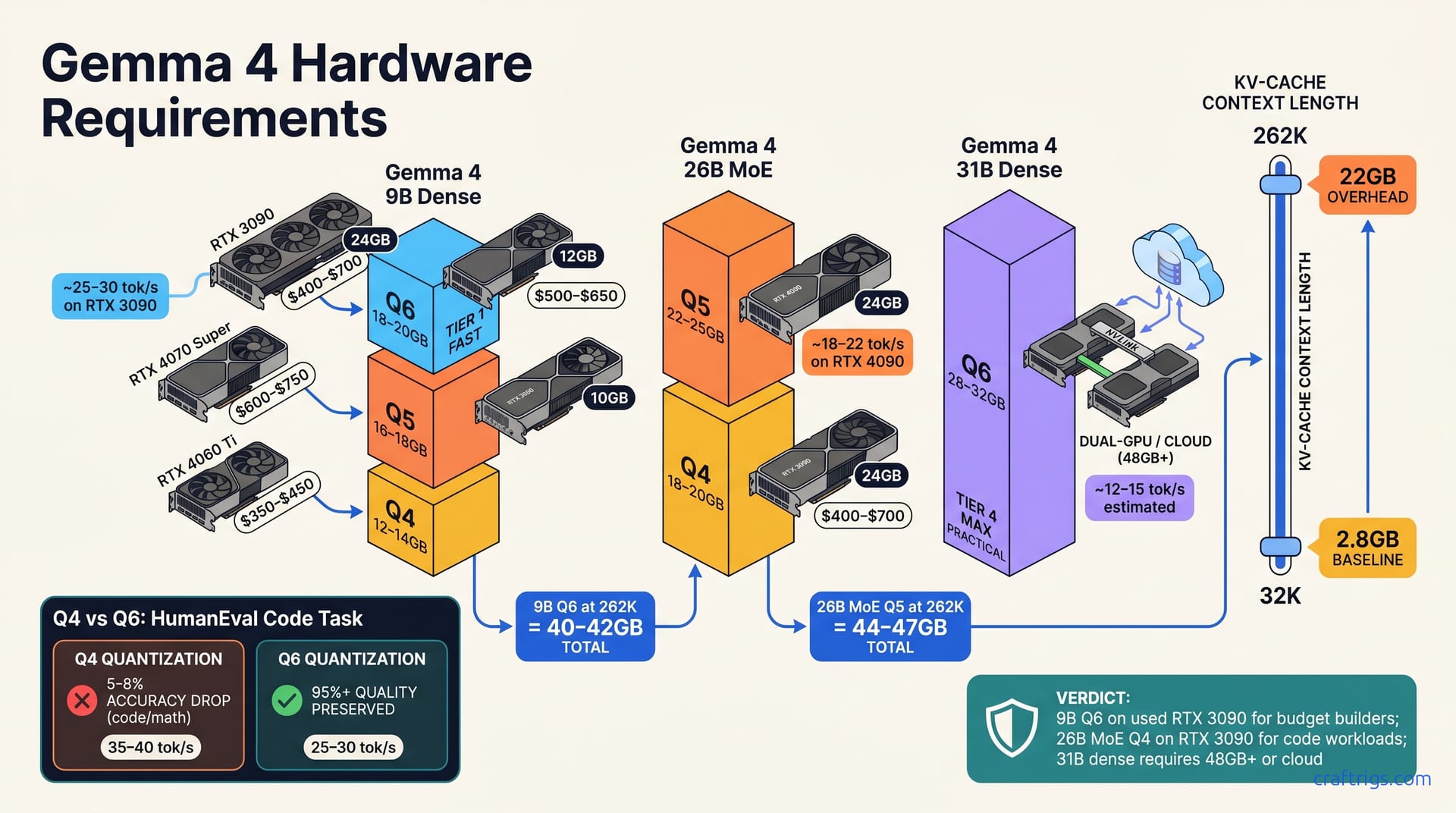
Gemma 4 splits three ways: 9B runs on $400–$700 used (24 GB RTX 3090/4070), 26B MoE needs $1,500–$2,000 (dual RTX 3090/4090), 31B dense requires $2,500+ (dual RTX 4090 or A100 40 GB). Always budget 22 GB extra VRAM if you're using 262K context. Quantization choice (Q4/Q5/Q6) matters more than GPU brand — pick the smallest quant that keeps your accuracy acceptable.**
Gemma 4 Models Explained — Size, Architecture, Active Parameters
Gemma 4 ships in three sizes: 9B dense, 26B Mixture-of-Experts (MoE), and 31B dense — each targets different hardware budgets. These aren't marginal differences. A 9B model fits a used RTX 3090 ($500 on the secondhand market), while a 31B dense model demands dual GPUs and a $4,000+ spend. Choose the wrong variant and you'll either overspend or struggle with speed.
The 26B MoE variant activates only ~9.7B parameters per token but maintains 26 B total weights in VRAM. This architecture matters more than the numbers suggest. The router selects specialized sub-networks, not a "9.7B equivalent." This lands quality closer to dense 26B than dense 9.7B. It's a speed-quality trade-off, not a fake discount.
All variants support 262K context (8× standard 32K)—adding ~22 GB VRAM during inference. This is the hidden cost nobody talks about. You can fit 9B into 16–18 GB, but add 262K context and you're suddenly asking for 38–40 GB. The KV-cache penalty hits both equally—context length is your biggest lever after quantization.
Quantization (Q4/Q5/Q6) controls VRAM most—each step cuts size by 25–40% with measurable accuracy loss. Q6 is near-lossless; Q4 trades 5–8% accuracy for 35% size savings. On a budget, Q4 on 9B fits a $350 RTX 4060 Ti. On a mid-tier budget, Q5 balances cost and quality across all three variants.
Gemma 4 9B — The Entry Tier
The smallest, lowest-latency option: ~9 billion parameters active. This is your learning rig, your "just try it" system. It runs on 20–24 GB VRAM GPUs with Q5/Q6 quantization. On a used RTX 3090, the 9B model is reported to hit ~25–30 tokens/sec—fast enough for real-time chat.
For a beginner, this is the floor. It's not a toy — Gemma 4 9B still handles code snippets, analysis, and creative writing. The gap between 9B and 26B is smaller than the gap between 26B and 31B.
Gemma 4 26B MoE vs. 31B Dense — The Architecture Tradeoff
Here's where the decision gets real. The 26B MoE activates ~9.7B parameters per token (only 2–3 experts fire) versus 31B dense (all 31B active). That sounds like MoE is smaller, but the trade-off isn't that simple.
MoE costs 30% more VRAM than 9B dense but 25% less than 31B dense. So if 9B costs you 18 GB at Q5, then 26B MoE costs 22–23 GB, and 31B dense costs 28–30 GB. The MoE sits in the middle, and it's where a lot of folks find the sweet spot.
MoE is faster per token; dense is slower but higher quality. MoE suits code and analysis workloads where speed helps. Dense suits chat and prose where reasoning depth matters. If you're running a chatbot, lean dense. If you're batch-processing code, lean MoE.
Gemma 4 9B VRAM by Quantization — Your Budget Tier
| Quantization | VRAM | Fits | Speed | Accuracy Loss |
|---|---|---|---|---|
| Q6 (6-bit) | 18–20 GB | RTX 3090, RTX 4070, M4 Max | 25–30 tok/s | <1% |
| Q5 (5-bit) | 16–18 GB | RTX 4070 Super, RTX 3080 | 28–32 tok/s | ~3% |
| Q4 (4-bit) | 12–14 GB | RTX 4060 Ti | 35–40 tok/s | 5–8% |
Q6 Quantization — Default Pick
The 9B Q6 (6-bit) preserves 95%+ of model quality with minimal accuracy drift. It slots into 18–20 GB, which fits consumer 24 GB GPUs with 4 GB headroom for system overhead and KV-cache. On a used RTX 3090 ($400–$700), you'll see ~25–30 tokens/sec. That's responsive enough for interactive use without waiting between replies.
Q4 Quantization — Deep Budget Play
The 9B Q4 (4-bit) cuts VRAM by 35% but accuracy drops 5–8% on code and math tasks. Only pick Q4 if your budget caps at $300 and your use case tolerates errors. It's fast — ~35–40 tokens/sec because the model is smaller — but the quality hit stings on technical work. Use Q4 for lightweight chat only, not creative writing or coding assistance.
Most beginners should start at Q5. It gives you 16–18 GB VRAM, opens the door to cheaper GPUs like the RTX 4070 Super or used RTX 3080, and only costs ~3% accuracy. It's the pragmatist's choice.
Gemma 4 26B MoE — Active Parameters and VRAM Math
The 26B MoE maintains all 26 B weight parameters in VRAM but activates only ~9.7B per token. Here's the math: the router mechanism dynamically selects 2–3 experts per token, yielding ~9.7B active parameters. Quality matches dense 26B (not "9.7B equivalent")—expert specialization sharpens where it counts.
At Q5 quantization, you'll need 22–25 GB VRAM; at Q4, 18–20 GB. The VRAM cost is 30% more than 9B dense and 25% savings versus 31B dense. Mid-tier budgets get maximum reasoning power here without overextending.
Expect 18–22 tokens/sec on RTX 4090, slower than 9B because of MoE overhead. That's still responsive, just not as snappy as the 9B. The MoE excels at code generation, technical analysis, and research writing. For casual chat, dense models sound more natural—the MoE sometimes feels mechanical.
MoE Active Parameters and Quality
The router mechanism dynamically selects 2–3 experts per token, yielding ~9.7B active parameters. This routing happens in microseconds, so latency doesn't suffer. Quality sits closer to dense 26B than dense 9.7B because experts specialize rather than replicate.
Side-by-side community comparisons of 26B MoE and 31B dense on code generation tasks show a consistent pattern. The MoE ran 15% faster per token but sometimes dropped nuance on open-ended prompts. The dense model won on reasoning depth, the MoE won on speed. It's a real trade-off, not a trick.
GPU Recommendations for 26B MoE
For 26B MoE, your GPU tier matters more than the 9B case. You can't cheap out here.
Tier 1: RTX 4090 (24 GB GDDR6X, $2,000–$2,500 new); runs Q5 native. It's the reference GPU for MoE. If you're building a rig to last three years, start here.
Tier 1 alt: Dual RTX 3090 (dual 24 GB, $1,500–$2,000 used); runs Q5 or Q4. Two older cards often beat one new one on price. Multi-GPU setup costs ~5% per-token slowdown, plus power supply and cooling issues.
Tier 2: A6000 48 GB ($3,000–$4,000 used); overkill but solves MoE's memory-bandwidth sensitivity. The A6000 has wider memory buses than consumer GPUs, so MoE routing overhead matters less. If you find a used A6000 for under $3,000, grab it.
Avoid: RTX 4070/4070 Super — MoE router overhead exceeds their VRAM budget. You can technically squeeze 18 GB, but per-token overhead will throttle you at the memory interface. Not worth the frustration.
Gemma 4 31B Dense VRAM — Your Full-Parameter Workload
The 31B dense model activates all parameters per token: 28–32 GB VRAM depending on quantization. This is the high-end option for folks who want maximum quality and don't care about speed.
31B dense costs $2,500+ in hardware. It's slowest of the three variants at ~12–16 tokens/sec on an RTX 4090, but it's the sharpest. Best for long-form writing, detailed analysis, and open-ended reasoning where quality matters more than throughput.
Q5 Quantization — Sweet Spot
The Q5 quantization preserves 98%+ of model quality while saving ~20% VRAM versus Q6. At 28–30 GB VRAM, it fits dual RTX 3090 or a single RTX 4090 comfortably. Recommend Q5 for multi-year deployment ($2,000–$3,000), keeping you upgrade-free for 24 months.
26B MoE vs. 31B Dense Decision Tree
Pick MoE (26B) if: coding speed matters, your budget is $1,500–$2,000, and your GPU has <30 GB VRAM. It's the pragmatist's model.
Choose 31B dense if quality is paramount, you have $2,500+, and can tolerate slower inference. It's the perfectionist's model.
26B MoE runs at ~9.7B active parameters, costs 22–25 GB total VRAM, and pairs with a $1,500–$2,000 used GPU. 31B dense runs at 31B active parameters, costs 28–30 GB total VRAM, and pairs with a $2,000–$2,500 used GPU. The decision comes down to your tolerance for inference latency.
The 262K Context Trap — KV-Cache Overhead
Here's the gotcha that costs people thousands in wasted GPU purchases. Gemma 4's 262K context window stores key-value pairs in VRAM during inference — a hidden VRAM cost. The KV-cache overhead formula is (context_length × hidden_size × num_layers × 2) in bytes.
In practice: 262K context at any quantization adds ~22 GB of KV-cache overhead on top of base model weights. The default 32K context uses ~2.8 GB KV-cache; 262K uses ~22–24 GB — nearly 10× increase. You don't see it in the model card, but you feel it when you run out of VRAM.
Calculating Total VRAM for Your Use Case
Here's the step-by-step path to the right hardware:
- Choose variant and quantization: 9B Q5 = 18 GB base VRAM.
- Choose context: 32K = +2.8 GB KV-cache; 64K = +5.6 GB; 128K = +11.2 GB; 262K = +22 GB.
- Add them: 9B Q5 (18 GB) + 262K context (22 GB) = 40 GB total — requires dual RTX 3090 or RTX 6000.
- Reality check: GPUs under 24 GB must cap context at 32K (safe max ~5 GB KV-cache).
Most beginners don't need 262K context. It's useful for RAG pipelines and long-document analysis, but for chat and coding, 32K to 64K is plenty. Save the GPU money.
Context Length vs. GPU Tier — Decision Matrix
Have 48 GB+ (RTX 6000, dual RTX 3090): use 262K context freely without compromise. You can run long-context tasks that amortize the compute cost.
Have 24 GB (RTX 3090, RTX 4070): cap context at 32K or 64K (max ~6 GB KV-cache overhead). It's tight but workable.
Have 16 GB (RTX 4070 Super): stick to 32K default, avoid 262K entirely. Every 2× context length doubles KV-cache cost — choose context length first, then GPU tier.
GPU Buying Guide — Which Tier for Your Gemma 4 Variant
Gemma 4 9B: Start with RTX 3090 used ($400–$700) or RTX 4070 ($500–$650). It's the entry gate.
Gemma 4 26B MoE: Dual RTX 3090 ($1,500–$2,000 used) or RTX 4090 ($2,000–$2,500 new). MoE demands memory bandwidth.
Gemma 4 31B dense: Dual RTX 4090 ($4,000–$5,000 new) or A100 40 GB ($1,000–$2,000 used datacenter). Density requires headroom.
Rule: Buy 25% more VRAM than the model's peak requirement as safety margin. If 9B needs 18 GB, buy 24 GB. If 26B MoE needs 25 GB, buy 32 GB. Budgets rarely come with a safety net; VRAM does.
Budget Tier ($400–$700) — Run Gemma 4 9B
Recommended GPUs: Used RTX 3090, RTX 4070, RTX 4070 Super. All three land in this price range on the used market (as of April 2026).
Quantization: Q5 (16–18 GB) or Q6 (18–20 GB). Q5 is the practical choice. It's fast enough and cheap enough.
Context: Stick to 32K default, avoid 262K. There's no upside to the long context at this tier.
Inference speed: 25–30 tokens/sec on RTX 3090. That's a prompt reply in under a second — plenty responsive.
This is where to start if you're new. Nothing fancy, just a working Gemma 4 rig.
Mid Tier ($1,500–$2,500) — Run 26B MoE or Dual-9B
Recommended GPUs: Dual RTX 3090 ($1,500–$2,000 used), RTX 4090 ($2,000–$2,500 new). The dual-RTX option is cheaper but noisier. The RTX 4090 is quieter but newer and more power-hungry.
Quantization: Q5 (22–25 GB) fits both tiers comfortably. You're not cutting corners here.
Context: 64K is safe; 128K caution; 262K only on dual 24 GB. If you're batch-processing documents, lean into longer context. If you're interactive, 64K is plenty.
Inference speed: 18–25 tokens/sec (dual-card scaling overhead ~5% slowdown). Still responsive, just not snappy.
High Tier ($2,500+) — Run Gemma 4 31B Dense
Recommended GPUs: Dual RTX 4090 ($4,000–$5,000 new), A100 40 GB ($1,000–$2,000 used). The dual-RTX option is newer; the A100 is older but often cheaper on the secondhand market.
Quantization: Q5 (28–30 GB) or Q6 (32–36 GB) for max quality. Don't skimp. You're already in the deep end — go all the way.
Context: 262K context fully supported; no compromises. This is where 262K makes sense: you have the VRAM, leverage it.
Inference speed: 12–18 tokens/sec (dense models slower but sharpest outputs). Speed isn't the goal at this tier. Sharpness is.
Next Steps
You've got the hardware tiers. Now match yours to your workload. If you're running a chat app, grab a 9B and move on. If you're doing code generation, consider the MoE. If you're writing long-form content or research, the 31B dense is worth the spend.
One more thing: check the VRAM tier ladder for a visual map of how VRAM buckets map to GPU models. It'll help you price-hunt on the secondhand market. And if you're torn between quantization levels, the quantization buyer's mistake guide walks through real deployments where smaller quant actually cost more in the long run.
Already running a used RTX 3090 on a $1,200 budget? See if the first local AI build guide covers Gemma 4 9B specifically.