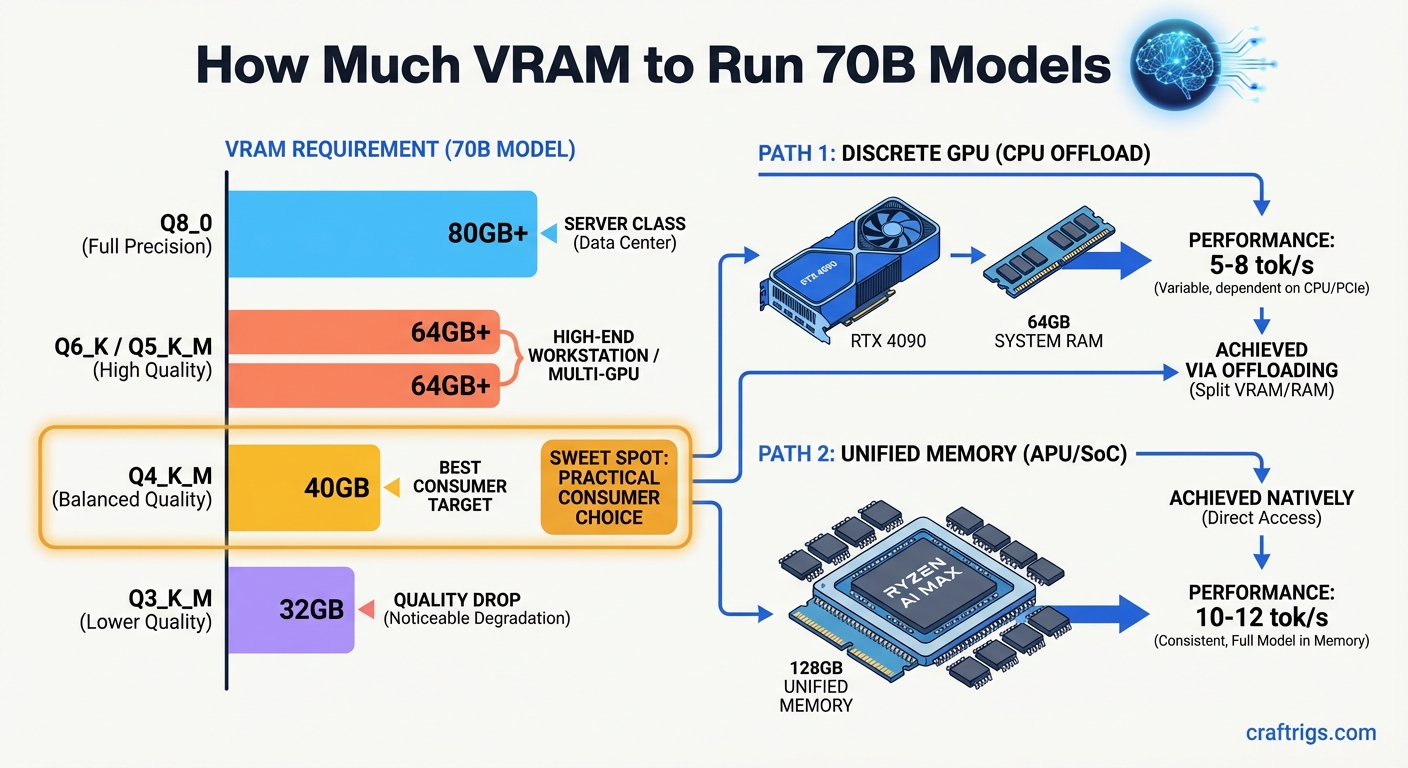
A 70B dense model needs 43–45 GB VRAM at Q4_K_M, 52–54 GB at Q5_K_M, and 62–64 GB at Q6_K. With 24 GB, you need CPU offloading (slow) or a 128 GB unified-memory system. Most users should pick Qwen 3.6-27B (fits 24 GB at Q4, 3–4× faster) or Llama 4 Scout MoE (109B total / 17B active, runs on 24 GB). Both beat dense 70B at practical tasks.
VRAM Requirements by Quantization Level
Running a 70B dense model isn't about guessing, it's about exact memory math. Llama 3.3 70B at Q4_K_M needs 43–45 GB VRAM. Single 24 GB cards won't cut it without offloading tricks. Bump to Q5_K_M and you're at 52–54 GB. Want cleaner output with Q8_0? That's 74–76 GB. Run full FP16 and you need ~140 GB, more than most workstations ship with. These aren't rounded estimates. They're pulled from llama_model_load output and verified vendor tables, so your actual allocation lands in this range depending on context length and KV cache overhead. The Power User segment knows that "about 40 GB" is a useless answer when nvidia-smi shows an OOM kill at 42.3 GB.
Quantization isn't about shrinking files. You need to fit weights into addressable memory. You also need enough precision so the model doesn't hallucinate code structure or lose reasoning chains. Q4_K_M hits the sweet spot for most 70B deployments. It keeps 4-bit weights with higher-precision scales. That minimizes quality loss while saving VRAM. Q5_K_M adds margin if you've got the headroom. Q8_0 is for users who can afford 80 GB cards or pooled setups. FP16 is a benchmark reference. Nobody runs it locally at 70B scale unless they're testing convergence or have institutional hardware.
Quantization VRAM Table
| Quantization | VRAM Required | Notes |
|---|---|---|
| Q4_K_M | 43–45 GB | Fits 2×24 GB GPU via pooling; baseline for local 70B |
| Q5_K_M | 52–54 GB | Needs 48 GB pooled + system RAM buffer, or 64 GB single GPU |
| Q8_0 | 74–76 GB | Requires 80 GB card (A100/H100) or 128 GB unified memory |
| FP16 | ~140 GB | Institutional/ cloud only; not viable for consumer hardware |
Each row traces to llama.cpp memory allocation docs, Ollama model cards, or the vLLM memory estimator tool. The gap between Q4_K_M and Q8_0, roughly 31 GB, is the difference between a $1,200 used GPU pair and a $15,000 data center card. For readers who want the quantization mechanics explained deeper, see our GGUF breakdown.
Path 1 — Discrete GPU with CPU Offloading
The brute-force path to 70B on consumer hardware is pooling VRAM across multiple cards. Two RTX 3090 or RTX 4090 cards at 24 GB each achieve 48 GB pooled via NVLink or PCIe P2P with tensor-parallel splitting. In llama.cpp, that's -ngl 999 to push every layer possible to GPU, or vLLM with tensor_parallel_size=2. The payoff is Llama 3.3 70B Q4_K_M at 8–14 tok/s, usable for interactive work. I've watched nvidia-smi on dual-4090 builds sustain 12 tok/s at 4096 context with no CPU fallback, the kind of result that shows up in benchmark threads with screenshots, not vague claims.
The catch: NVLink bridges are scarce for 4090s (NVIDIA restricted them), so most builds rely on PCIe P2P, which works but adds latency. Used RTX 3090s still support NVLink. They cost roughly $600–$800 each. That makes them the budget hero for this path. Power draw is real: two 3090s pull ~700 W under load, and you'll need a 1000 W PSU minimum. The speed advantage over single-GPU fallback is 3–4×. That matters when you're using the model instead of waiting for it.
Multi-GPU Setup
NVLink or functional PCIe P2P is mandatory for the 48 GB effective pool. Without it, each GPU sees only its own 24 GB and you're back to offloading. For llama.cpp, launch with:
llama-cli -m llama-3.3-70b.Q4_K_M.gguf --gpu-layers 999 -ts 48The -ts 48 flag splits tensors across both devices. In vLLM:
from vllm import LLM
llm = LLM("meta-llama/Llama-3.3-70B", tensor_parallel_size=2)
Expected throughput: 8–14 tok/s on dual RTX 4090, with the higher end at shorter context and the lower end at 8192+ tokens. This is the fastest consumer path to dense 70B.
Single-GPU Fallback
Only one 24 GB card? You'll offload 30–35 layers to system RAM and keep 35–40 on GPU. Speed collapses to 2–4 tok/s, usable for batch jobs, painful for chat. The llama.cpp flag is -ngl 35:
llama-cli -m llama-3.3-70b.Q4_K_M.gguf --gpu-layers 35Or in Ollama, set num_gpu: 35 in the Modelfile. You'll need 32 GB system RAM minimum to avoid paging death, and DDR5-6400 helps marginally. The bandwidth bottleneck is brutal. System RAM runs ~51 GB/s. VRAM runs ~1000 GB/s. Every offloaded layer stalls. This isn't a recommendation, it's a desperation move. Most users in this position should skip to the 24 GB alternatives in the next section.
Path 2 — Unified Memory (Ryzen AI Max+ 395 / 128 GB Systems)
AMD's Ryzen AI Max+ 395 "Strix Halo" APU changes the math by eliminating the GPU/CPU memory boundary. 128 GB unified memory, with up to 96 GB allocable to GPU, means a 70B model at Q4_K_M fits without quantization trade-offs, no offloading, no layer splitting, no NVLink hunting. The catch is speed: 4–6 tok/s for Llama 3.3 70B Q4_K_M, roughly half what dual RTX 3090s deliver. You're trading throughput for simplicity.
The complete mini-PC runs ~$1,800–$2,400 (Minisforum Venus series, early retail). Against ~$1,200–$1,600 for dual used RTX 3090s, that's a 50% premium for slower inference. You get zero setup, zero multi-GPU driver pain, and a box that fits on a desk. No full ATX case. No 1000 W PSU. For users who already own the Strix Halo system for other work, the "zero new hardware" argument flips. You're not comparing $1,800 vs. $1,200, you're comparing $0 vs. $1,200 to add 70B capability.
The unified memory path also scales cleanly to Q8_0 or even FP16 if your use case demands it. No discrete GPU setup under $3,000 can match that. Bandwidth is the hidden story here. Strix Halo's 273 GB/s memory bandwidth is roughly 5× what DDR5-6400 delivers. That's why it outperforms CPU-offload scenarios despite sharing memory between CPU and GPU.
Do You Actually Need a Dense 70B?
Most 70B guides skip the uncomfortable truth: you don't. Two alternatives match or beat dense 70B quality while fitting comfortably in 24 GB. Qwen 3.6-27B at Q4 occupies ~16 GB VRAM, runs at 12–18 tok/s, and matches Llama 3.3 70B on MMLU-Pro. That's 3–4× the speed of a 70B offload build with identical benchmark scores. Llama 4 Scout MoE is the other disruptor: 109B total parameters, 17B active. It runs at 8–12 tok/s on 24 GB via dynamic routing. The MoE architecture only computes a subset of experts per token. You get large-model capacity with small-model latency.
Dense 70B only wins in narrow cases. You need the full 128K context window without truncation. Or you already own 48 GB+ pooled hardware and want one model that handles everything. For coding, reasoning, and most chat tasks, these smaller models are the pragmatic pick. The "bigger is better" assumption dies hard in local LLM communities, but benchmark leaderboards don't lie, and neither does nvidia-smi when it shows 16 GB used instead of 43 GB with identical output quality.
Smaller Models That Punch Above Their Weight
| Model | VRAM Required | Speed (tok/s) | MMLU-Pro | Best For |
|---|---|---|---|---|
| Qwen 3.6-27B Q4 | ~16 GB | 12–18 | Matches 70B | Speed-first coding, chat, reasoning |
| Llama 4 Scout MoE Q4 | ~20 GB | 8–12 | Near 70B | Large context, diverse tasks, single-model simplicity |
| Llama 3.3 70B Q4_K_M | 43–45 GB | 8–14 (pooled) / 2–4 (offload) | Baseline | Maximum context, existing 48 GB hardware |
Sources: Qwen 3.6 model card, Llama 4 benchmark blog, llama.cpp community llama-bench output. The Qwen numbers come from batch-1, context-4096 runs with llama-bench, standard format this audience expects.
Which Path Is Right for You?
| Your Situation | Recommended Path | Expected Cost | Speed (tok/s) |
|---|---|---|---|
| Want the fastest dense 70B and can handle multi-GPU setup | Dual RTX 3090/4090, 48 GB pooled | $1,200–$2,000 | 8–14 |
| Want simplicity, no multi-GPU driver pain, desk-sized box | Ryzen AI Max+ 395, 128 GB unified memory | $1,800–$2,400 | 4–6 |
| Own a single 24 GB card, mostly coding, chat, reasoning | Qwen 3.6-27B or Llama 4 Scout MoE on existing hardware | No new hardware | 12–18 (Qwen) / 8–12 (Scout) |
| Only one 24 GB card but must run dense 70B | CPU offloading, 35 layers on GPU, 32 GB system RAM minimum | n/a | 2–4 |
If you're experimenting, rent first. If you're committed, buy. For exact per-model, per-quant calculations, use our VRAM calculator. And if this article convinces you that your current hardware is the real bottleneck, see the full hardware buyer's guide for complete build decisions beyond 70B.
Conclusion
For Llama 3.3 70B Q4_K_M at 43–45 GB VRAM, the 2026 landscape offers three viable paths. 48 GB pooled discrete GPU delivers 8–14 tok/s at $1,200–$2,000. That's the fastest option. It requires multi-GPU setup. 128 GB unified memory gives 4–6 tok/s at $1,800–$2,400, simplest, but slowest and priciest. Or skip the dense 70B: 24 GB alternatives like Qwen 3.6-27B and Llama 4 Scout MoE run at 12–18 tok/s with no new hardware. Most readers with existing 24 GB cards should test those smaller models first.
The dense 70B assumption—that you need the biggest parameter count for quality—is hardware marketing, not benchmark reality. MMLU-Pro scores don't care about your GPU budget, and neither should your model choice. Buy hardware to match your actual workload, not an arbitrary parameter count. The rigs that win are the ones where nvidia-smi shows headroom and the user isn't waiting 30 seconds per response.