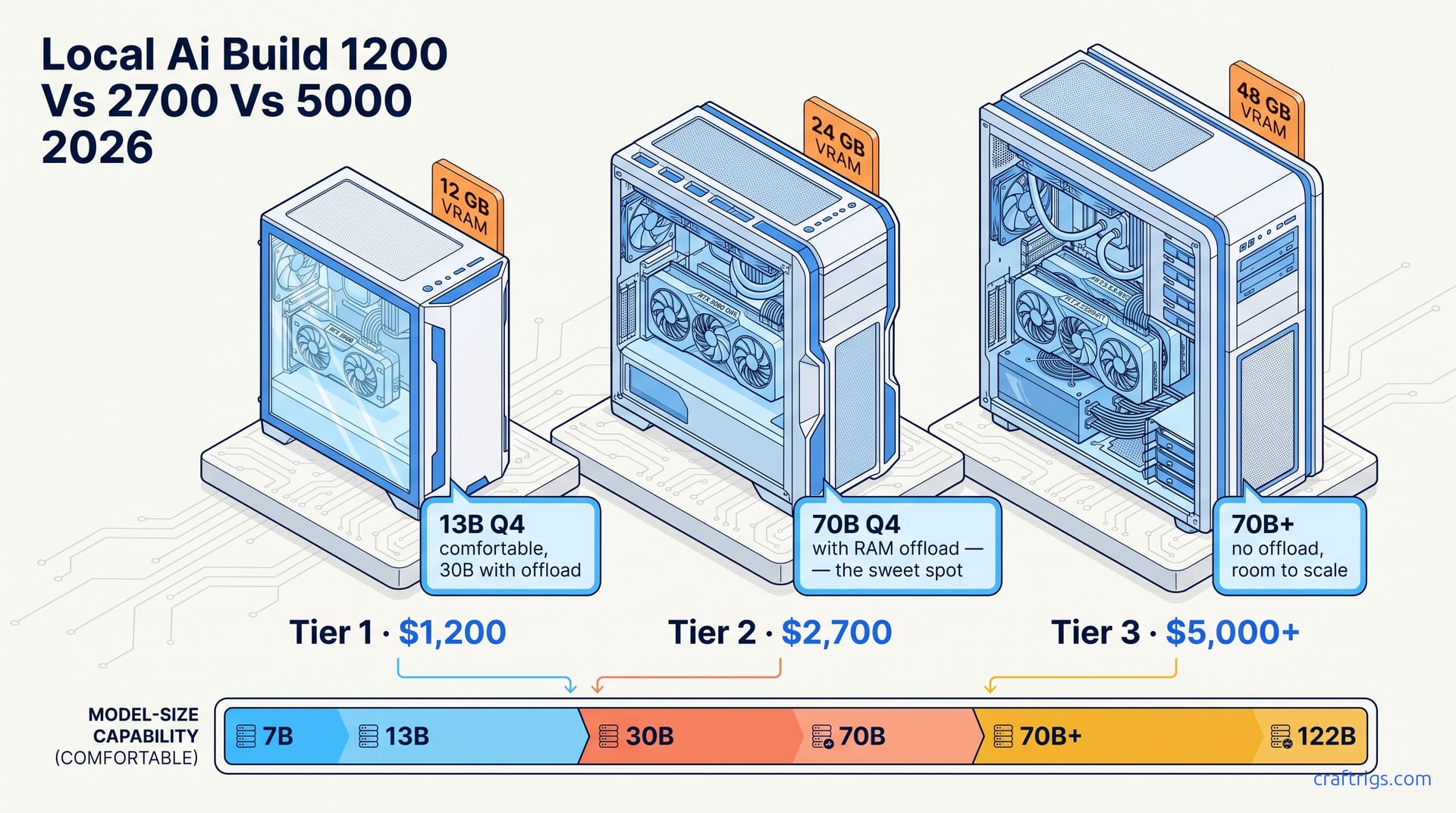
TL;DR — Three honest tiers in 2026: $1,200 buys 12GB VRAM and 14B models. $2,700 buys 16–24GB and gets you into 70B-with-offload territory. $5,000+ buys 48GB+ and ends the offload era entirely. Skip the middle only if you know you need it.
Tier 1: $500–$1,500 — The 12GB Floor
What you get: one RTX 3060 12GB used, or a new RTX 4060 Ti 16GB, on a basic AM5 board with 32GB DDR5. The $1,200 first local AI build and the $500 cheap build bracket this tier.
What runs comfortably:
- 7B and 14B models at Q4_K_M, full-GPU, 30–60 tok/s.
- 27B–32B at Q4 with partial offload — usable but slow (5–10 tok/s).
- 70B? Forget it. CPU offload makes it technically possible and practically miserable.
The wall: 14B is the ceiling for "feels fast." Anything bigger requires offload, which collapses tokens-per-second. If your workflow doesn't need bigger than 14B, this tier is the right answer — don't spend more.
Tier 2: $2,500–$3,500 — The 70B Sweet Spot
This is where most serious local-LLM users land. The $2,700 AI desktop case study is the canonical example — Ryzen 5700X3D, RTX 4070 Super (or a used 3090), 64GB DDR5. The $1,500 reference build is the entry point of this tier.
What runs comfortably:
- 14B and 32B at Q5_K_M or Q6 — full-GPU, 25–50 tok/s.
- 70B at Q4 with smart offload — 8–14 tok/s, totally usable for non-realtime work.
- Two parallel 14B agents at Q4 in vLLM.
The wall: still one GPU. Long context (>32K) eats KV cache fast. 120B+ models are out of reach without a second card. But for 90% of real workflows — coding agent, research, document Q&A — this tier is the right buy.
The leap from Tier 1 to Tier 2 is the biggest jump in capability per dollar in the entire range. Skip it only if you're confident you'll never want a 70B.
Tier 3: $5,000+ — Stop Offloading, Start Scaling
The $5,000 ultimate local LLM server build is the reference here. RTX 5090 + RTX 3090 dual setup, or a single RTX 6000 Ada. 128GB+ system RAM. Threadripper or high-core Ryzen.
What runs comfortably:
- 70B at Q5_K_M fully in VRAM — 25–40 tok/s, no offload.
- 120B models at Q4 with one offloaded layer.
- vLLM-style batched serving for small teams.
- 32K+ context without KV cache panic.
The wall: 240B+ MoE models still need a second box or rented cloud. Power draw is real — budget 700–900W under load, plus the cooling.
Which Tier Is Yours
If you're running 14B coding agents and don't care about 70B: Tier 1. Spend the saved money on a better monitor.
If you want a 70B around occasionally but mostly live in 14B–32B: Tier 2. This is the largest correct answer for the most users.
If you're running 70B+ daily, serving multiple users, or doing batch inference: Tier 3. Anything less and you're working around the rig instead of with it.
Don't buy aspirationally. Buy for the models you actually use this quarter.