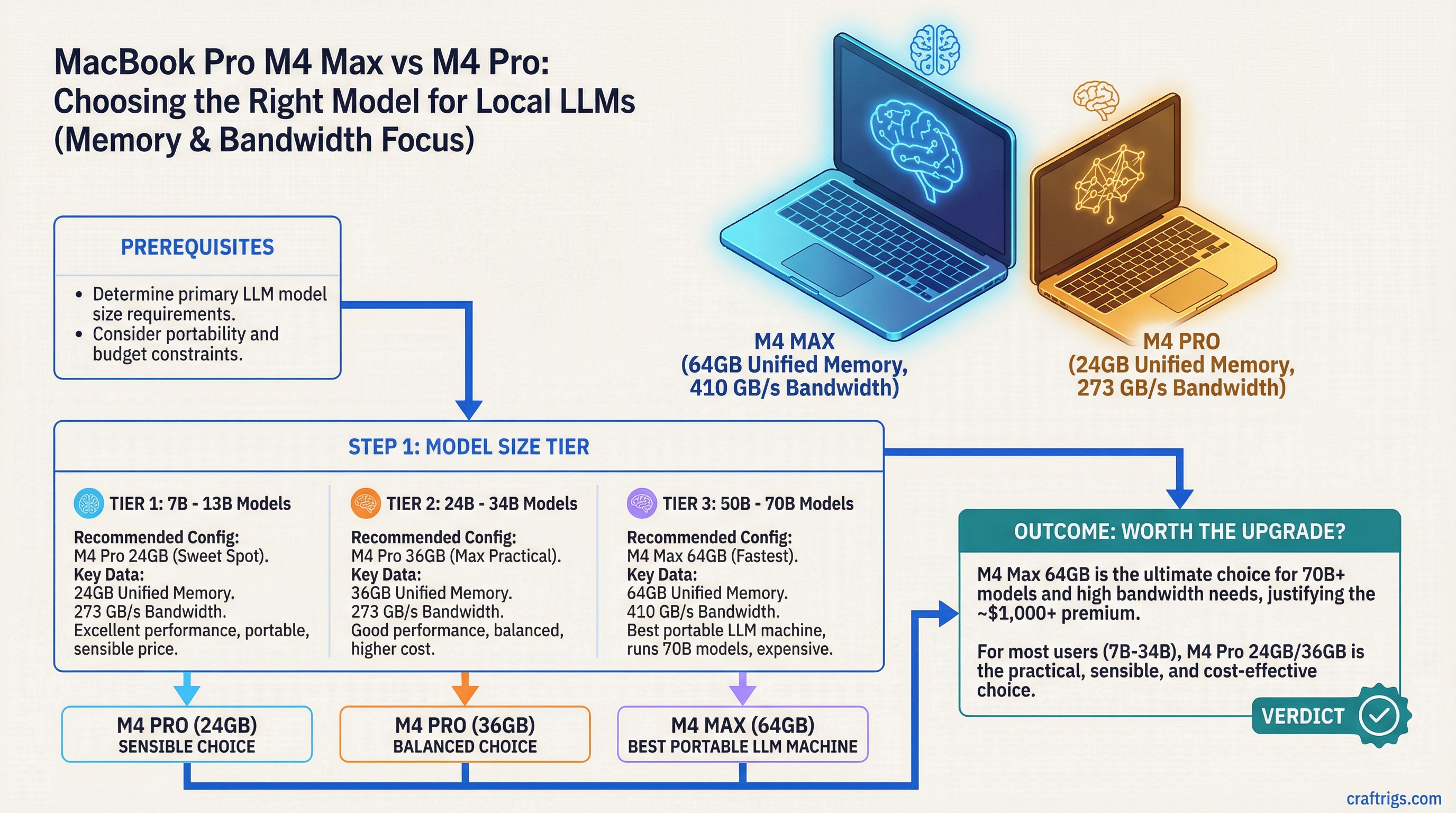
TL;DR: The M4 Max with 64GB unified memory is the best portable LLM machine you can buy. The M4 Pro with 24GB is the sensible choice for most users. The decision comes down to whether you need to run 70B models on the go — and whether that's worth an extra $1,000+.
The MacBook Pro M4 lineup spans three unified memory configurations that matter for local LLMs: 24GB (M4 Pro), 36GB (M4 Max entry), and 64GB (M4 Max top). Each tier opens a different set of capabilities. Here's how to read the differences without the marketing fluff.
The Memory Configs That Matter
Apple sells the MacBook Pro M4 in several configurations. For local LLM purposes, the numbers that matter are:
M4 Pro — 24GB unified memory (~$1,999 base for 14-inch, ~$2,499 for 16-inch):
- 10-core GPU, 273 GB/s memory bandwidth
- Comfortably runs 7B–34B models at quality quantization
- 70B models need heavy Q2/Q3 quantization to fit
- This is the entry point for a genuinely capable LLM laptop
M4 Pro — 48GB unified memory (~$2,999):
- Same CPU and GPU, more memory
- 70B at Q4_K_M fits comfortably
- Solid all-around option for serious users
M4 Max — 36GB unified memory (~$3,499):
- 40-core GPU, 410 GB/s memory bandwidth (major jump)
- More memory than 24GB M4 Pro, much faster GPU
- 70B at Q4 fits, runs faster than M4 Pro 48GB despite slightly less RAM
M4 Max — 48GB unified memory (~$3,999):
- Same 40-core GPU, 410 GB/s bandwidth, more memory
- 70B at Q6 becomes viable
- The memory bandwidth advantage of Max starts pulling clear of Pro variants
M4 Max — 64GB unified memory (~$4,499):
- 40-core GPU, 410 GB/s bandwidth, maximum portable RAM
- 70B at Q6 or Q8 fits with headroom
- The only portable device that approaches desktop-tier 70B inference quality
Memory Bandwidth Is the Hidden Variable
The jump from M4 Pro to M4 Max isn't just memory — it's GPU cores and memory bandwidth.
- M4 Pro: 273 GB/s
- M4 Max: 410 GB/s
That's a 50% bandwidth increase. Since LLM inference is memory-bandwidth bound, the M4 Max is roughly 40–50% faster at token generation than the M4 Pro with equivalent model sizes. This is the real reason to go Max — not just the extra RAM.
For the same 34B Q4 model:
- M4 Pro 24GB: ~30–40 T/s
- M4 Max 36GB: ~45–60 T/s
That gap is noticeable in real use. The Max feels genuinely faster, not just on big models.
Real Performance Numbers
Approximate token generation speeds (T/s) with llama.cpp Metal or MLX:
Llama 3.1 8B Q4_K_M:
- M4 Pro 24GB: ~90–110 T/s
- M4 Max 36GB: ~130–160 T/s
- M4 Max 64GB: ~130–165 T/s (similar, memory size doesn't bottleneck 8B)
Qwen 2.5 32B Q4_K_M:
- M4 Pro 24GB: ~30–40 T/s
- M4 Max 36GB: ~45–60 T/s
- M4 Max 64GB: ~48–62 T/s
Llama 3.1 70B Q4_K_M:
- M4 Pro 24GB: doesn't fit cleanly (needs Q2 ~8–12 T/s)
- M4 Pro 48GB: ~12–18 T/s
- M4 Max 36GB: fits, ~18–25 T/s
- M4 Max 48GB: ~20–28 T/s
- M4 Max 64GB: fits Q6 comfortably, ~15–22 T/s at Q6
The Portability Angle
This is where the MacBook Pro genuinely outclasses any PC alternative. There is no PC laptop that runs 70B models at the quality level of an M4 Max MacBook Pro. PC laptops have dedicated GPUs with 8–16GB of VRAM. An RTX 4090 laptop GPU has 16GB. The 64GB M4 Max has 4x that — in a machine that fits in a backpack.
If you need to run 70B models locally while traveling, at a coffee shop, or anywhere without access to your desktop — the M4 Max MacBook Pro is the only real option. There's nothing else in the laptop category that competes.
Who Should Buy Which
M4 Pro 24GB:
- Your primary use is 7B–34B models
- You work in an Apple ecosystem and want the cleanest portable setup
- Budget is a consideration
- Good choice for developers, writers, and researchers who don't specifically need 70B
M4 Pro 48GB:
- You want 70B capability but don't want to pay for the Max
- Speed is less important than model access
- Reasonable middle ground
M4 Max 36GB or 48GB:
- You use this for serious daily LLM work
- You need 70B models running at quality quantization
- You want meaningfully faster throughput than the Pro
- You're doing document analysis, long-context work, or coding assistance all day
M4 Max 64GB:
- You need 70B at the highest quality you can get on a portable device
- This is your primary compute device and you travel regularly
- You're running vision models alongside LLMs (multimodal workloads eat memory fast)
- You want one device that handles everything without compromise
What You're Giving Up vs a Desktop
Being honest about the tradeoffs:
- A Mac Studio M4 Ultra starts at $9,999+ for the base 96GB config (192GB is a high-spec configure-to-order option at significantly higher cost) and obliterates any MacBook Pro for inference
- A dual RTX 4090 PC is faster for models that fit in 48GB
- The MacBook Pro thermal limits mean sustained inference loads can throttle performance over time — it's not a 24/7 server
The laptop form factor is genuinely worse for sustained heavy inference. But for a personal machine that you also use for normal work, and that you can take anywhere, the M4 Max 64GB is a real tool with no equivalent in the PC laptop world.
The Honest Recommendation
For most people who are serious about local LLMs on a laptop: M4 Pro 48GB. It runs 70B at Q4, handles daily use well, and leaves $500–1,500 in your pocket.
If you specifically need the best portable LLM inference experience available, and budget isn't the constraint: M4 Max 64GB. You'll feel the difference on 34B+ models every day.