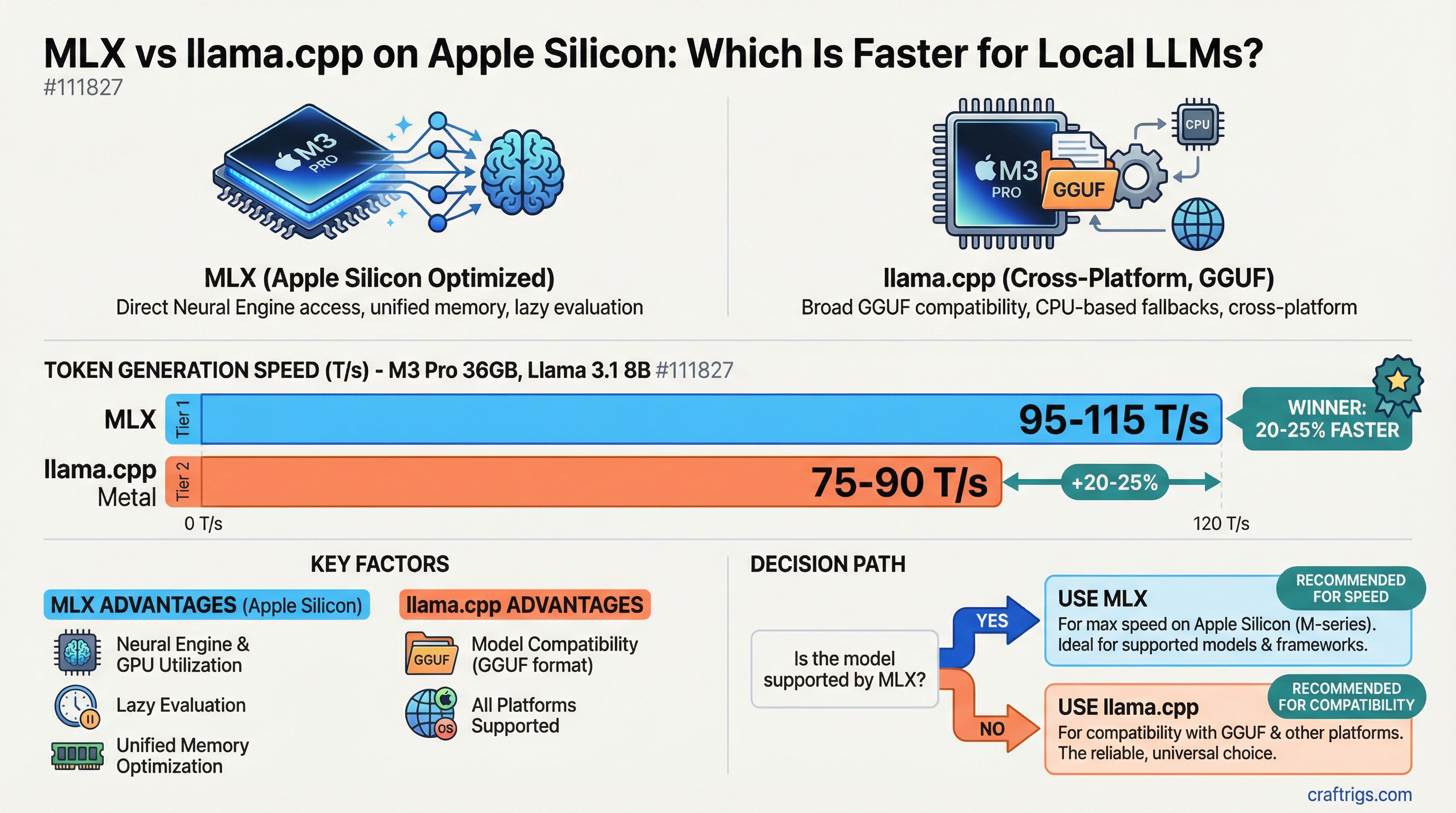
TL;DR: MLX is often faster and more memory-efficient on Apple Silicon, but llama.cpp has better model compatibility. Use MLX if your model is supported. Use llama.cpp for everything else — it's the safer default.
If you're running local LLMs on a Mac, you have two serious inference options: llama.cpp (the industry standard) and MLX (Apple's own framework, purpose-built for their hardware). Both work. But they're not equal, and knowing which to reach for saves you time and gets you better performance.
What llama.cpp Is
llama.cpp is the open-source inference engine written in C++ that started the local LLM movement for consumer hardware. It runs on everything — Windows, Linux, Mac, mobile, Raspberry Pi. On Mac, it uses the Metal API to offload inference to Apple Silicon's GPU cores.
It's the most widely supported inference engine available. If a model exists in GGUF format, llama.cpp can run it. Its community is massive, updates are frequent, and it's the backbone of tools like Ollama and LM Studio.
The Metal backend in llama.cpp was added specifically to support Apple Silicon, and it's good. It's not MLX. But it's good.
What MLX Is
MLX is a machine learning framework Apple released in late 2023, designed specifically for Apple Silicon. It's not a general-purpose inference engine — it's a tensor computation library similar to PyTorch or JAX, but built from the ground up to exploit Apple's unified memory architecture and Neural Engine.
The MLX community has built model-specific inference scripts on top of the framework: mlx-lm is the main package for running language models. Apple's own team ships example scripts for popular models.
Why MLX is different:
- It was designed knowing that CPU, GPU, and Neural Engine share the same memory pool
- Operations are lazy-evaluated and fused where possible, reducing memory copies
- The Neural Engine (a dedicated AI accelerator in every M-series chip) is utilized more effectively than in llama.cpp
- Memory layout is optimized for the specific way Apple's GPU accesses it
Performance Comparison
For the same model on the same hardware, MLX typically beats llama.cpp on Apple Silicon by 10–30% for token generation. The gap varies by model architecture, quantization method, and chip generation.
Rough comparison on an M3 Pro 36GB, Llama 3.1 8B:
- llama.cpp Metal: ~75–90 T/s generation
- MLX: ~95–115 T/s generation
That's approximately a 20–25% gain. Not transformative, but meaningful if you're doing heavy daily usage.
For prompt processing (prefill), the gap is often larger — MLX can be 30–50% faster at processing long input prompts on some models. This matters if you're doing document analysis or long-context workflows.
Memory usage is also typically lower with MLX for equivalent quantization levels, meaning you can fit slightly larger models in the same unified memory pool.
Model Compatibility
This is where llama.cpp wins decisively.
llama.cpp supports:
- Every major model family via GGUF format
- Thousands of quantized models available on Hugging Face out of the box
- Models are downloaded and run immediately with no conversion needed
MLX supports:
- Growing list of major models with community-maintained MLX ports
- Models often need conversion to MLX format first
mlx-lmhandles most popular Llama, Mistral, Qwen, and Gemma variants- Less support for newer or obscure model architectures
- Model availability on Hugging Face is smaller than GGUF ecosystem
In practice, if you want to run a mainstream model (Llama 3, Mistral, Qwen 2.5, Gemma 3, Phi-4), MLX versions are usually available. If you want to run a newer or less popular model immediately on release day, llama.cpp will have it first — sometimes by weeks.
Setup Differences
llama.cpp:
- Simplest path: install Ollama (which uses llama.cpp underneath)
- Or build from source:
cmake -B build -DGGML_METAL=on && cmake --build build - Models in GGUF format from Hugging Face
- Works immediately with standard commands
MLX:
- Install Python 3.11+
pip install mlx-lm- Download model:
mlx_lm.convert --hf-path meta-llama/Llama-3.1-8B-Instruct - Run:
mlx_lm.generate --model mlx-community/Llama-3.1-8B-Instruct-4bit --prompt "Your prompt here" - Slightly more Python-ecosystem friction
MLX requires more setup but isn't complicated. If you're comfortable in a terminal, you'll have it running in 20 minutes.
Quantization Differences
Both frameworks support quantized models, but the formats differ.
- llama.cpp uses GGUF with Q4_K_M, Q6_K, Q8_0, etc.
- MLX uses its own quantization (typically 4-bit and 8-bit MLX format)
You cannot mix formats. If you download a GGUF model, it won't run in MLX natively. You'd need to convert or download a separate MLX version.
The quality of quantization is roughly comparable between the two at the same bit depth. Some users report MLX 4-bit is slightly higher quality than GGUF Q4 on certain model families — but this is model-dependent and hard to generalize.
What Each Chip Generation Means
The gap between MLX and llama.cpp has generally widened with each Apple Silicon generation.
- M1/M2: MLX advantage was modest. llama.cpp Metal was well-optimized.
- M3: MLX started pulling ahead more meaningfully, especially for prompt processing.
- M4: The Neural Engine utilization improvements in M4 benefit MLX more than llama.cpp. The gap on M4 is the largest yet.
If you're on an M4-series chip, MLX's advantage is more significant than on older generations. It's worth setting up.
The Practical Recommendation
- Default choice: Start with Ollama (llama.cpp underneath). Broadest model support, easiest setup, works well.
- Want more speed on supported models: Switch to MLX for daily-use models. Run the conversion once, keep both stacks installed.
- Running a specific model not in MLX format: Use llama.cpp or Ollama, don't fight the ecosystem.
- M4 chip especially: MLX is worth the setup effort. The performance gains on M4 are meaningful enough that it's the better daily driver if your models are available.
There's no reason to pick one forever. Many power users run both — MLX for their main models, llama.cpp for everything else.
See Also
- Mac Mini M4 Pro for Local LLMs: Is It Actually Good?
- MacBook Pro M4 Max vs M4 Pro for Local AI: Is the Max Worth It?
- Mac Studio vs Custom PC for Local LLMs: Real Cost Showdown