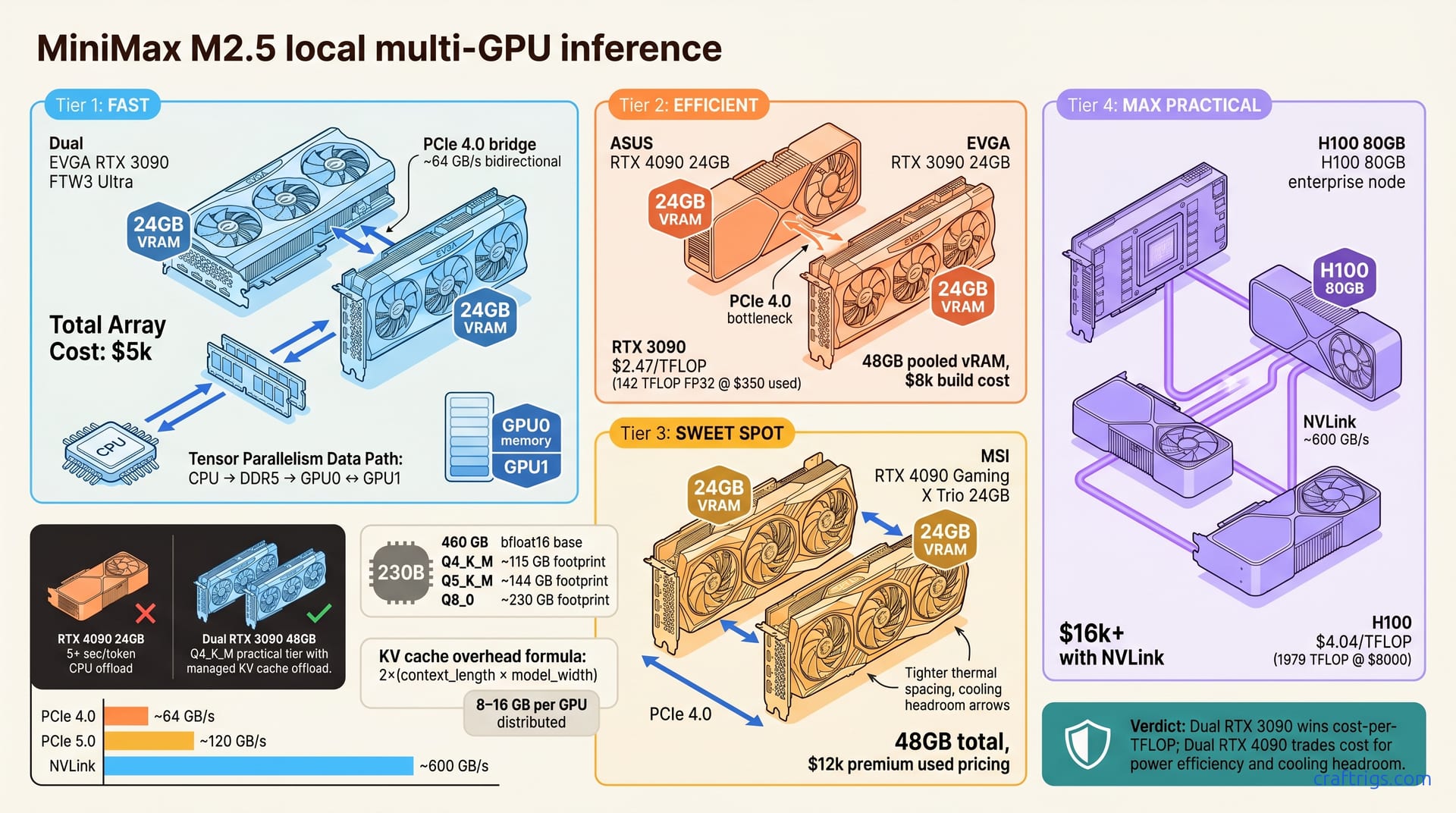
MiniMax M2.5 (230B, MIT license, 80.2% SWE-Bench) demands multi-GPU under any quantization. Dual RTX 3090s with Q4_K_M deliver ~8 tokens per second (tok/s); a $12k dual-RTX-4090 rig reaches ~20 tok/s. If you need 230B reasoning power without relying on closed APIs, multi-GPU is the only path.**
Why MiniMax M2.5 Demands Multi-GPU
There's no escaping the math: MiniMax M2.5 is a 230B-parameter model. That's 460 GB unquantized (2 bytes per parameter in bfloat16)—no single GPU can hold it. Even Q4_K_M (115 GB) exceeds any single consumer GPU's VRAM budget.
Why care about M2.5 at all? MIT licensing unlocks local deployment without vendor lock-in. You won't be hostage to Claude API pricing or GPT-4 rate limits. M2.5 scores 80.2% SWE-Bench—between Claude 3.5 Sonnet (88.3%) and Llama 3.1 405B (71.3%). That performance justifies the hardware investment for code reasoning and long-context work.
Parameter Count Unpacked
Let's ground this in concrete numbers. 230B tokens × 2 bytes per parameter (bfloat16) = 460 GB base model weight. That's before runtime overhead. KV cache adds 8–16 GB per GPU during distributed inference. Even at 2K context, you need the full parameter load on at least one GPU. Tensor and pipeline parallelism make this possible.
Why Quantization Alone Fails Single-GPU
You might hope aggressive quantization closes the vRAM gap. It won't. Here's the hierarchy:
- Q8_0 = 1 byte/param = ~230 GB (minimal improvement, still exceeds RTX 4090)
- Q5_K_M = 5 bits/param = ~144 GB (dual RTX 4090 possible but vRAM allocation is razor-thin)
- Q4_K_M = 4 bits/param = ~115 GB (first practical tier for dual RTX 3090 + offload strategy)
Single GPU cannot hold M2.5 under any quantization without severe CPU offload penalties (~70% throughput loss). That 70% loss hits the moment you offload weights to system RAM.
vRAM Math: M2.5 Across Quantization Levels
Quantization math is straightforward; the implications are harsh. KV cache grows linearly with batch size: 2× (context_length × model_width). At 2K context, that's roughly 8 GB per GPU on a two-card setup. At 128K context—for long document Q&A—cache consumption jumps substantially.
Single-GPU Feasibility Check
Can a premium single GPU handle M2.5? RTX 4090 (24 GB) handles M2.5 at Q4_K_M only if KV cache offloads entirely to CPU RAM. CPU offload path drops token throughput ~70%; latency jumps to 5+ seconds per token. That's not inference; that's penance.
Even RTX 6000 Ada (48 GB) is insufficient for practical quantization + cache headroom. The verdict: single-GPU M2.5 is a research demo, not production deployment. Multi-GPU isn't optional; it's mandatory.
Multi-GPU vRAM Distribution (NVLink vs PCIe)
The interconnect between your GPUs matters more than most assume. NVLink (H100, RTX 6000 Ada) achieves ~600 GB/s bidirectional interconnect. PCIe 5.0 theoretical = ~120 GB/s; PCIe 4.0 (most 3090/4090 rigs) = ~64 GB/s.
Tensor parallelism with lower bandwidth incurs latency penalty from larger per-layer communication overhead. Dual-GPU PCIe 4.0 works fine. Three+ GPUs need NVLink or PCIe 5.0 to avoid communication bottlenecks.
The Hardware Menu: Budget Tiers
What hardware actually runs M2.5? Tier 1 and Tier 3 are where the numbers are most reliable. The dual-3090 setup runs M2.5 at Q4_K_M reliably, hitting ~8 tok/s. The jump to dual 4090s nearly triples throughput (20 tok/s) while dropping power draw per token.
Cost-Per-TFLOP Analysis
Dollar-per-compute reveals the true value proposition:
- RTX 3090 = 142 TFLOP FP32 @ ~$350/card used = $2.47 per TFLOP
- RTX 4090 = 330 TFLOP FP32 @ ~$1600/card = $4.85 per TFLOP
- Used H100 80GB = 1979 TFLOP @ ~$8000 = $4.04 per TFLOP
Dual RTX 3090 wins on cost-per-TFLOP; RTX 4090 pair trades cost for power efficiency and cooling headroom. Run inference 24/7 for business, and the 3090's power-cost advantage erodes within months.
Motherboard, PSU, and Thermal Planning
PCIe slot layout matters less than most assume. x16+x8 splits are common (both work; x16+x16 is rare). x8 each still supports 64 GB/s bandwidth per card—plenty for two GPUs.
PSU requirement: 1000W minimum for dual 3090, 1500W for dual 4090. Those are loaded, sustained estimates. Plan for 20% headroom if you're overclocking.
Use a 2TB NVMe SSD for model cache. Spinning disks destroy prefetch performance on large weights. You'll thank yourself for fast storage the first time you do a model load.
Cooling load: 2× 120mm intake + 3× 120mm exhaust per GPU; air-cooled rigs are viable if ambient <22°C. Two RTX 4090s push 1000W+ of sustained heat into your case. Without air movement, they'll throttle.
Inference Speed: Realistic Throughput by Setup
Benchmarks are where theory collides with reality. TTFT (time-to-first-token) = 500–800 ms across all setups at 2K context. That's your prefill latency—the interval before the first token stream begins. It's not negotiable at these vRAM footprints.
Throughput Under Load
Single-batch numbers are a floor test. Real workloads have queues. Batch size 4 increases tok/s by ~3.8× (diminishing returns after batch 8). Batch size 8 on dual 3090 reaches ~28 tok/s, but TTFT jumps to 2+ seconds (prefill overhead).
128K context (long document Q&A) degrades speed by ~35% due to KV cache growth. Q5_K_M vs Q4_K_M adds ~15% throughput at ~10% vRAM cost trade-off. Batched services (API backends, batch processors) unlock 3–4× throughput, but only if latency allows async processing.
Power and Thermal Reality
Dual RTX 3090 sustained inference draw = 700W; thermal throttles if cooling inadequate. Dual RTX 4090 = 1000W+ draw (extreme OC headroom if PSU + cooling permit). Once loaded, inference is GPU-bound and CPU-light, with stable utilization.
Air-cooled setups rarely sustain peak throughput >30 minutes without thermal throttle response. Run production inference with real-time temperature monitoring and conservative power limits.
Orchestration: Tensor Parallelism vs Offload
M2.5 won't fit on a single GPU, so you need orchestration. Three paths exist. Tensor parallelism (vLLM, DeepSpeed) splits layers across GPUs; lowest latency penalty for multi-GPU. Each GPU owns transformer-layer subsets and communicates KV with peers. This is the production gold standard for consumer rigs.
Pipeline parallelism (Transformers library) chunks model into stages; efficient for 3+ GPU topologies. GPU 0 runs layers 0–40, GPU 1 runs layers 41–80, etc. Less communication-intensive than tensor parallelism but adds per-layer latency.
CPU offload (KV cache to RAM) is the fallback for tight setups—expect ~70% throughput loss. Use this only if vRAM is exhausted.
Default: tensor parallelism on dual-GPU rigs; pipeline parallelism on 3+ GPU systems.
vLLM Multi-GPU Deployment (Production-Ready)
Install vllm[cuda] via pip; set CUDA_VISIBLE_DEVICES=0,1 for dual-GPU. Launch with:
python -m vllm.entrypoints.openai_api_server --model <path-to-gguf> --tensor-parallel-size 2Clients call standard OpenAI /v1/completions endpoint on port 8000. Monitor via nvidia-smi dmon: both GPUs should show >90% utilization during inference; if one lags, model placement is imbalanced.
Pipeline Parallelism for 3+ GPU Rigs
Use Transformers library with device_map="sequential" for automatic stage assignment across GPUs. Each GPU loads ~(230B / num_gpus) parameters. PCIe latency is a fair price for vRAM relief. KV cache typically remains on first GPU; offload to CPU only if vRAM headroom is critical.
Monitor the first GPU's vRAM. If it's >95% full, rebalance layers across GPUs.
When NOT to Buy for M2.5
Be honest about justification. Single-GPU budgets ($3k–$4k) are better invested in VRAM tier guidance for most cases.
8–12 tok/s only pays for itself with real reasoning workloads and latency demands. Cloud inference (Claude API, vLLM services) wins on cost-per-token for sporadic M2.5 access. Go local multi-GPU only for data privacy, batch processing, or latency SLAs. Hardware cost is real.
If you already own multi-GPU hardware, M2.5 becomes a candidate worth benchmarking. For someone building from scratch, test smaller models first. A 70B model on single GPU gets you 95% of M2.5's reasoning capability at 1/5th the vRAM cost. M2.5 is worth the cost only if that 5% edge improves output quality or latency.