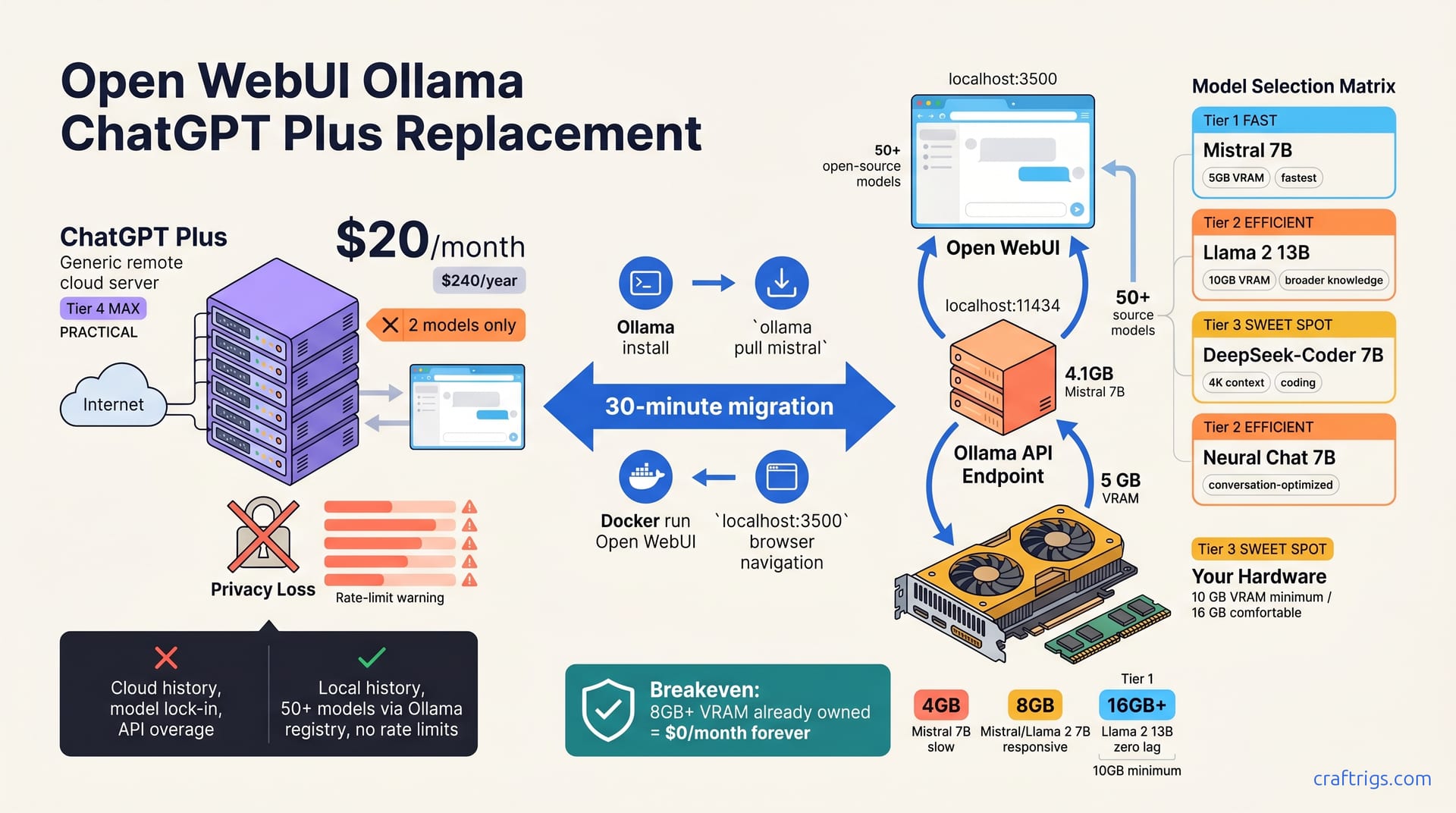
Open WebUI + Ollama replaces ChatGPT Plus for $0/month with complete privacy—your chat history stays on your machine. You choose which model to run and customize system prompts without limits. You lose ChatGPT's frontier capability—GPT-4o reasoning on hard problems—and must manage your own hardware. But for privacy-conscious professionals with a GPU (or willing to use CPU), Ollama is faster and cheaper. Setup takes 30 minutes; switching is immediate.**
Why ChatGPT Plus Isn't Your Only Option
ChatGPT Plus costs $20/month for capabilities that now exist in open-source models like Mistral, Llama, and DeepSeek. Under OpenAI's terms, your chat history becomes their property—they can use conversations to improve their models unless you opt out.
Model lock-in is the real tax. ChatGPT Plus limits you to GPT-4o and 4 mini—you can't switch if a better model ships next month or your needs change. Rate limits on ChatGPT Plus push you toward the API for unrestricted use, and overage charges stack quickly.
The Privacy Case
OpenAI's privacy policy is clear: conversation data can be used to improve models unless you request otherwise. Local chat history stays on your machine—zero cloud sync, no upsell built into the UI.
GDPR and HIPAA compliance become manageable when your code runs locally. You control the audit trail, the data retention, and the backup strategy. Health research, legal briefs, and financial code stay private when Ollama runs locally instead of hitting a cloud API.
The Cost Case
ChatGPT Plus charges $20/month, which equals $240/year before API overages. Open WebUI and Ollama cost $0/month — they run on hardware you already own. An 8 GB VRAM GPU sitting unused becomes your Ollama engine—the cost spreads across every model you run.
ChatGPT Plus limits you to two models (GPT-4o and 4 mini). Ollama supports 50+ open-source models via the registry. You're not just saving subscription fees; you're buying optionality.
| Factor | ChatGPT Plus | Open WebUI + Ollama |
|---|---|---|
| Monthly cost | $20/month | $0/month |
| Yearly cost | $240/year + API overage | $0 (amortized hardware) |
| Model choice | 2 (GPT-4o + 4 mini) | 50+ open-source models |
| Privacy | Cloud-based | Local-only |
| Customization | Limited system prompts | Full per-model customization |
Install Ollama in 2 Minutes
Download Ollama from the official site, pick your OS (Mac, Windows, Linux), and run the installer. It starts automatically and listens on localhost:11434 by default.
Your first model pull — ollama pull mistral — fetches the 4.1 GB Mistral 7B model. Depending on your internet speed, this takes 2–5 minutes. Verify that Ollama is running and see available models with:
curl http://localhost:11434/api/tagsYou'll see JSON output listing every model you've pulled. If Ollama isn't running, the command fails—restart the app and try again.
Pick Your First Model
Mistral 7B is the fastest starting point. It requires 5 GB of VRAM, delivers excellent reasoning for its size, and handles chat workflows without lag. Check the model card on Hugging Face for detailed specs. You'll get responsive answers on a modest GPU.
Llama 2 13B is slower but has broader knowledge coverage. Pick it if you're running 8 GB+ VRAM and don't mind 2–3 second pauses between responses. Neural Chat 7B optimizes for conversation patterns and runs between Mistral and Llama in speed. DeepSeek-Coder 7B is newer and strong for coding tasks, with a 4K token context window that's tight for large codebases but adequate for focused work.
Hardware Reality Check
On 4 GB VRAM, Mistral 7B runs slow (5–10 seconds per response), and Phi 3.5 mini hits acceptable speeds with patience. At 8 GB VRAM, Mistral, Llama 2 7B, and Neural Chat all feel responsive and comfortable. You won't feel like you're waiting.
If you're running 16 GB or more VRAM, Llama 2 13B becomes practical (it requires 10 GB VRAM minimum, with 16 GB comfortable for interactive chat). Any 7B model runs with zero lag at this tier. CPU-only inference generates one token per second—too slow for chat. Skip it unless you're testing before buying hardware.
For detailed VRAM and GPU specs across a wider range of hardware, our VRAM matching guide covers 8 GB through 128 GB tiers.
Install Open WebUI in 5 Minutes
The Docker route is fastest: docker run -d -p 3500:8080 --gpus all ghcr.io/open-webui/open-webui:latest. This pulls the Open WebUI container, maps port 3500, and routes GPU access to your hardware.
If you'd rather skip Docker entirely, download the .exe installer from openwebui.com and run it directly on Windows. Create a local account with an email and password — no cloud sync required, no external account needed.
Open your browser to localhost:3500 and you're in the chat interface. No setup wizards, no integration screens. You're ready to chat.
Connect Open WebUI to Ollama
Go to Settings, then Admin Panel, then Connections. Set "Ollama API endpoint" to http://localhost:11434 (same machine, same default port). Click "Verify." All your Ollama models appear in the model dropdown instantly.
Switch between models mid-conversation with zero overhead. No API key rotation, no config files to edit, no restart required. Export conversation data anytime: Settings → Export creates a YAML backup.
First Chat vs. ChatGPT Plus
On Mistral 7B with 8 GB VRAM, Open WebUI generates 15–30 tokens per second. ChatGPT Plus delivers 50+ tokens per second on GPT-4o. That's noticeable but not a dealbreaker—you're trading speed for complete privacy and zero subscriptions.
Latency on local Ollama is 40–100 milliseconds. Cloud APIs like ChatGPT introduce 200–500 milliseconds of round-trip latency before your model even starts thinking. On a 7900 XTX, local inference felt noticeably tighter for rapid conversations.
Model swapping is instant. History stays in local SQLite, so you can export, backup, or migrate chats without cloud services.
Honest Tradeoffs: What You Gain and Lose
You gain complete privacy — conversations never leave your machine. You gain zero cost, since you're amortizing hardware you already own. You gain model freedom—swap Mistral for Llama instantly without API keys or account changes.
You can hardcode system prompts per model, upload PDFs or codebases offline, and run without rate limits. Want to test fifty variations of a prompt? You can. Want to feed the model your entire codebase and ask for refactoring suggestions? No cloud bill, no privacy violation.
You lose frontier reasoning capability. Mistral 7B is not GPT-4o on novel hard problems. GPT-4o reasons on hard problems better than open-source models do. Multimodal input (voice, images) isn't native to Open WebUI—it's text-only by default, though vision models are available.
When Ollama Wins
Privacy-first workflows like health research, legal document analysis, and sensitive business intelligence are the obvious wins. You're not sending patient data or contract terms to OpenAI's servers.
Repeated complex prompts are another category. Hardcode system instructions once per model and they reload every session. Code and document workflows—refactoring codebases, summarizing research—stay offline.
Offline work is practical. Take your laptop on an airplane with Ollama cached and ready; no internet required. Low-latency local inference powers gaming tools, real-time assistants, and latency-sensitive workflows.
When ChatGPT Plus Wins
Novel creative writing. GPT-4o's prose instinct is two or more tiers ahead of Mistral 7B. For marketing copy or fiction where voice and nuance matter, ChatGPT Plus is the right tool.
Cutting-edge research synthesis. Ollama's models trained on 2023 data; they miss recent breakthroughs. ChatGPT has access to more recent training and better reasoning on emerging topics.
Math competition reasoning. GPT-4o beats Mistral by ten-plus minutes on complex proofs and novel problem-solving. Teams without local GPU hardware are better served by a subscription.
Image understanding requires ChatGPT Plus natively. If your organization forbids local inference, ChatGPT is your only option.
Customize Beyond ChatGPT Plus
Select a model, toggle "System Prompt," and write custom instructions like "You are a Python refactor expert." That instruction sticks for the entire session.
Save prompts in the Open WebUI library so you reload them without retyping. Clone a model via Modelfile and adjust temperature, context window, and stop tokens for your workflow. Mistral 7B's default context window is 32K tokens, versus ChatGPT Plus's default 8K. That's a four-fold advantage for long documents or multi-turn reasoning.
Document Upload Workflow
Use the Open WebUI File menu to upload a PDF, .txt, markdown file, or source code. Ollama embeds the file into your chat context up to your context window limit.
Ask Ollama to "summarize this PDF" or "find security issues." Zero data leaves your machine. The tradeoff: your context window is your bound. Mistral 7B's 32K tokens equal roughly 8,000 words—large whitepapers won't fit. Smaller documents upload and analyze without friction.
For side-by-side comparison of local document handling with AnythingLLM, see our guide on chat with PDFs locally.
Common Customizations
Temperature 0.2 is deterministic, best for code generation, math, and fact recall. Temperature 0.7 (default) balances chat responsiveness with creativity. Temperature 1.0 leans creative—use it for writing, roleplay, and exploration.
Set stop tokens to ["User:", "Assistant:"] to prevent the model from generating runaway responses. Open WebUI caps you at 8 stop tokens per model, which is adequate for most workflows.
Migration Checklist: From ChatGPT Plus to Ollama
Export your ChatGPT Plus history first. Settings → Data & Privacy → Download your data. The export arrives as JSON in 24–48 hours.
Back up Open WebUI: Settings → Export saves all local conversations and presets in a single file. Run Ollama and ChatGPT Plus in parallel for a week before canceling ChatGPT Plus. Time your real workflows on both and see where Ollama lags. Benchmark your workflows — typical Mistral 7B follow-up latency is 2–5 seconds on 8 GB VRAM.
Workflow-Specific Migrations
Daily standup notes are safe to migrate. ChatGPT Plus → Ollama Mistral 7B costs you nothing in capability and saves $240 per year. Research synthesis handles slower speeds, and document uploads offset cloud latency.
Keep ChatGPT Plus for hard math and science, Ollama for idea bouncing. Sensitive data—HIPAA, legal briefs, proprietary algorithms—stays in Ollama for zero exposure and full compliance.
Troubleshooting
Open WebUI won't connect? Check your firewall, verify localhost:11434 is reachable from your browser, and restart Docker. Ollama runs out of memory? Reduce your model size, close background applications, and check ollama list to confirm which model is loaded.
Response lag hitting you? Lower temperature to 0.1 for deterministic output, switch to Mistral 7B if running a larger model, or add VRAM. Docker won't start? Ensure the Docker daemon is running; on Mac, open the Docker Desktop application.