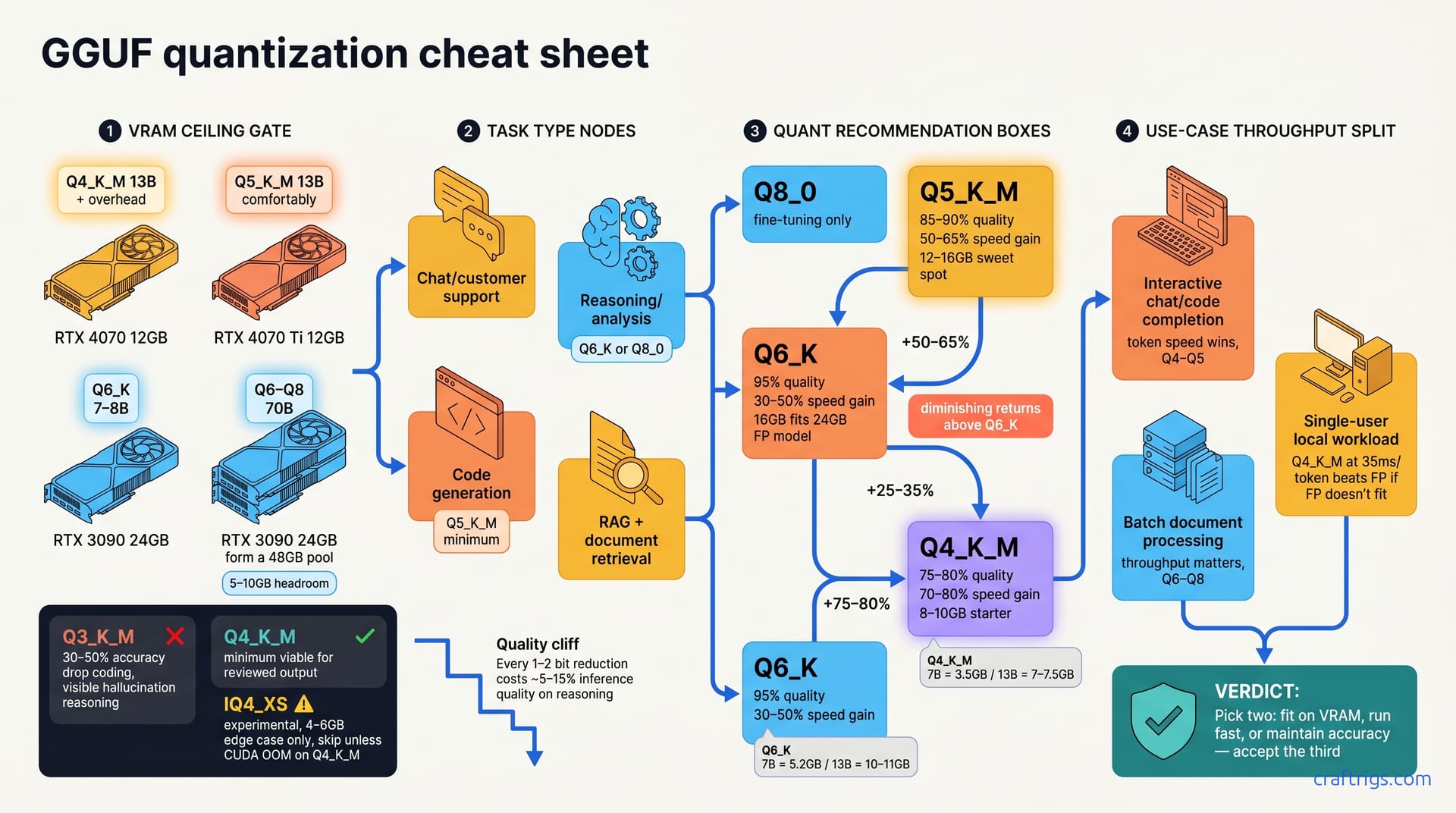
Q5_K_M works for 12–16 GB and mixed tasks; Q4_K_M for 8–10 GB chat; Q6_K for reasoning and code. Skip IQ4_XS and Q8_0—not worth the complexity. Default rule: match your VRAM ceiling first, quality second, speed last.
Why Quantization Matters for Your VRAM Budget
Quantization shrinks model file size 2–4× without retraining, turning 13 GB full-precision into 3.5–6.5 GB quantized. It's the difference between fitting a 13B model on your RTX 4070 or not fitting it at all.
The catch? Lower precision trades quality for speed and file size. The optimal tradeoff depends on your task, not on vendor hype or Reddit arguments. You choose two: fit on VRAM, run fast, or maintain accuracy. Accept the third. Most pick VRAM first (the hard limit), then quality, then accept whatever speed you get.
Every 1–2 bit reduction costs ~5–15% inference quality on reasoning tasks, but less on chat. Coding tasks live in the middle: more sensitive than chitchat, more forgiving than math. This is why one-size-fits-all quantization doesn't exist.
The Quantization Spectrum at a Glance
Here's what each level buys you:
- Q8_0 (8-bit): nearly full precision, largest file, slowest — reserved for fine-tuning only.
- Q6_K: 95% of full quality, 30–50% speed gain, fits 24 GB full-precision models in 16 GB VRAM.
- Q5_K_M: 85–90% quality, 50–65% speed gain, 12–16 GB hardware sweet spot.
- Q4_K_M: 75–80% quality, 70–80% speed gain, 8–10 GB starter tier.
If those numbers feel abstract, remember: Q5 isn't just faster than Q6. Q5 is what you'll actually use most of the time. It's the Goldilocks zone — not too big, not too small, quality still solid.
Why IQ4_XS Matters (Rarely)
IQ4_XS sits between Q4_K_M and Q3_K_M. It's an intermediate quantization for ultra-tight VRAM (4–6 GB edge case only). Choose Q8_0 only when squeezing a 70B into 6 GB: a hobby challenge or a sign your hardware is undersized.
Llama.cpp treats IQ4_XS as experimental; not all quantization tools support it. The complexity tax isn't worth it unless you're hitting CUDA OOM on Q4_K_M. Skip IQ4_XS unless you're hitting CUDA OOM.
File Size vs. Speed: The Core Tradeoff
Let's get concrete. Here's how file sizes map to actual disk space:
- Q4_K_M: 7B = 3.5 GB, 13B = 7–7.5 GB; gains +75–80% speed vs. full precision.
- Q5_K_M: 7B = 4.3 GB, 13B = 8.5–9 GB; gains +50–65% speed vs. full precision.
- Q6_K: 7B = 5.2 GB, 13B = 10–11 GB; gains +25–35% speed vs. full precision.
Speed gain flattens above Q6_K — diminishing returns and wasted VRAM for most budget setups. A 13B Q6_K model at 11 GB leaves you almost nothing for context, KV cache, or swap room.
Throughput vs. Token Speed: Which Matters for Your Use Case
Here's where most people get confused. Two speed metrics matter—and which one counts depends on your task.
Token speed (ms/token) is how fast the model generates one token. Throughput measures tokens per second when running multiple inferences. Interactive chat needs token speed. Batch document processing needs throughput.
For interactive chat or code completion, token speed dominates—lower quants (Q4–Q5) win. Single-user local workload? Even Q4_K_M at 35 ms/token beats full precision at 15 ms/token if full doesn't fit. You can't use what doesn't fit.
Batch document processing leans the other way. If you're indexing a thousand PDFs through an embedding model, throughput matters more. Q6–Q8 shine here.
Benchmark tokens per second (tok/s) on your workload; pick the smallest quant that hits your latency target. Don't optimize for a goal that doesn't match your job.
When VRAM Runs Out: Size Limits by GPU
Let's map realistic hardware to what actually fits:
- RTX 4070 (12 GB): Q4_K_M holds 13B + overhead; Q5_K_M requires careful tuning for 13B.
- RTX 4070 Ti (12 GB): Q5_K_M fits 13B comfortably; Q6_K fits 7–8B models.
- Dual RTX 3090 (48 GB): Q6–Q8 fit 70B; Q5 fits 70B with 5–10 GB headroom.
Always reserve 1–2 GB for context buffer and KV cache inflation. KV cache grows with context length, and "full precision KV cache" is expensive. Your actual usable VRAM is hardware VRAM minus 1–2 GB, not the spec.
Task-Based Quantization: Match Quant to Your Job
This is where the cheat sheet becomes a cheat sheet. Pick your task. Match it to a quantization level. Done.
Chat and customer support: Q4_K_M or Q5_K_M work fine. Users forgive minor hallucination in summarization and chitchat. They notice a typo or bad grammar more than they notice a small accuracy drop.
Code generation: Q5_K_M minimum. Function signatures, syntax, and logic demand accuracy. Code either compiles or it doesn't. Hallucinated Python isn't useful.
Reasoning and analysis: Q6_K or Q8_0. Math, multi-step logic, and constraint satisfaction degrade fast below Q6. If your task is "solve this Sudoku" or "debug my regex," quantization hurts.
RAG and document retrieval: Q4_K_M sufficient. Encoder quality and retrieval ranking matter more than LLM precision. The model's job here is to summarize retrieved chunks, not to reason from first principles.
The Quality Cliff Below Q4_K_M
Here's the hard truth: Q3_K_M and lower suffer 30–50% accuracy drop on coding tasks, visible hallucination in reasoning. You avoid this tier for any task where someone checks output for correctness — VRAM savings aren't worth the rework.
Q4_K_M is the safe minimum. Q5_K_M is the recommended minimum for production-facing work. That gap exists for a reason.
Model age matters too. Llama 2 and older models degrade faster below Q4 than Llama 3 or Mistral. Newer architectures were designed with quantization in mind. Older ones weren't.
Real-World Latency: Task-Specific Benchmarks
Enough theory. Here's what you actually see on real hardware:
- Chat (Llama 3 8B, Q5_K_M, RTX 4070): 35–45 ms/token typical.
- Code (Llama 3 7B, Q5_K_M, RTX 4070): 40–55 ms/token with longer context window penalty.
- Reasoning (Llama 3 13B, Q6_K, RTX 4070 Ti): 80–120 ms/token expected.
Downgrading one quant tier gains ~20–30% speed; upgrading one costs ~25–35% speed. It's not linear because disk I/O, model complexity, and GPU saturation all factor in. But the ballpark is reliable.
The Decision Matrix: Pick Your Quantization Level
Here's the framework. VRAM ceiling is your hard constraint — file size must fit with headroom for context and KV cache. It's immovable. Soft requirements, steep cost: code and reasoning punish aggressive quantization. Speed target comes last — if your job fits VRAM and quality, almost all quants meet latency targets.
Default rule: Q5_K_M for 12–16 GB, Q4_K_M for 8–10 GB, Q6_K for 20+ GB.
Beginner Quick-Pick Table
Stop overthinking. Find your row. Find your column. That's your starting quantization. Test it. Adjust if necessary.
Testing Your Quant Choice
Theory's done. Now test. Load the quantized model in Ollama or llama.cpp and run a 10-prompt burn-in to warm the GPU cache. Measure tokens per second (tok/s) over the next 50–100 tokens — this is your real-world speed. The burn-in matters because the first few prompts cache-miss and lie about performance.
Test a task-specific prompt. If you're doing code, test a code snippet. If you're doing reasoning, ask a multi-step question. Score it by your quality bar. If quality fails, bump one quant tier up; if speed fails, down-tier and re-test.
Log results in a spreadsheet — future model picks will use your baseline. The benchmark that matters is the one you measure yourself, not the one someone posted on Reddit.
Common Mistakes & Hardware Gotchas
These trips happen to everyone. Knowing them saves you time.
Mistake 1: Comparing Q4_K_M across models without normalizing. Llama 3 Q4 ≠ Llama 2 Q4 in quality or speed. Model architecture, training data, and quantization-aware training all matter.
Mistake 2: assuming lower quant always runs faster. Disk I/O overhead can make Q4 slower than Q5 on slow drives. Size isn't the only variable.
Mistake 3: Running KV cache in full precision while the model is quantized. You're quantizing the weights but letting the cache blow up. Defeats quantization gains.
Mistake 4: Mixing quant levels in ensemble (e.g., Q4 encoder + Q6 decoder). It adds complexity for minimal gain.
Model Dependency: Not All Q4_K_M Are Created Equal
Llama 3 quality drops ~10–15% at Q4_K_M; Llama 2 drops ~25–30%; Mistral ~18–22%. These aren't small differences. A Llama 2 model at Q4 is noticeably worse than Llama 3 at Q4.
Always benchmark your exact model + quant combo—never assume other models' results apply. Newer models (2025–2026) are quantization-aware trained; older models degrade much faster. Qwen 2.5 and Llama 3.1 tolerate Q4 better than their 2024 predecessors.
When Disk Speed Kills Your Quantization Plan
You can pick the perfect quantization and then lose to disk speed. Q4_K_M on HDD: 30–60 sec load, 5–10 sec first-token latency (unacceptable for interactive use). Q4_K_M on SATA SSD: model load 8–12 sec, first-token latency 2–3 sec (acceptable for batch). Q4_K_M on NVMe: model load 2–3 sec, first-token latency 0.5–1 sec (standard).
If you're on HDD, bump quant up or add swap. Fewer I/O operations means faster loads. You can't out-algorithm a slow disk.
Tools & Where to Get Quantized Models
You don't need to quantize yourself. Most quantizations already exist.
Hugging Face: Search "[model-name] GGUF" — most quantizations published by community maintainers. You'll find Q4, Q5, Q6, Q8 variants for almost every popular model.
Ollama modelfile: Use FROM to pull any Hugging Face GGUF directly; no manual download needed. Ollama handles the download and setup.
llama.cpp: Quantize your own unquantized GGUF using ./quantize input.gguf output.gguf Q5_K_M. Both Ollama Web UI and llama.cpp GUI display file size and quant level before loading.
Never trust secondary sources claiming "this quant is best"—test on your hardware first. Benchmark yourself. That's the cheat sheet.
Quantizing Your Own Model
If you want custom quantization:
- Download unquantized GGUF from Hugging Face (search "[model] GGUF fp16" or "f32").
- Clone llama.cpp:
git clone https://github.com/ggerganov/llama.cpp && cd llama.cpp - Build:
make(orcmake .. && cmake --build . --config Releaseon Windows). - Run quantize:
./quantize path/to/model.gguf path/to/output.gguf Q5_K_M— replace Q5_K_M with your target. - Run custom-quantized models in Ollama or llama.cpp—no license penalty.
Quantizing a 13B model takes ~5–10 minutes on a CPU. It's not fast, but it's a one-time cost.
Swapping Models Without Reloading
Ollama: quitting and loading a new model takes ~5–15 sec; RAM persists until app closes. With llama.cpp CLI, each run loads fresh; use server mode to keep the model loaded while swapping prompts. Langchain / Python: load once, swap quantized checkpoints in memory using llama-cpp-python.
Swap overhead: you save quantization time but lose ~10–20% inference speed to model-load I/O. Keep this in mind if you're bouncing between models during development.